Last Updated: October 18, 2026
If you want fewer boxes and cables on your desk, a webcam with speakers sounds ideal: one device for video, audio in, and audio out. In practice, the category is messy. Most webcams prioritize the camera and microphone. The speaker is often small, quiet, and an afterthought.
That does not mean they are useless. For a hot desk, a small home office, or a laptop setup where you do not want a separate speakerphone, an all-in-one can work well. You just need to buy for the speaker quality first, not the resolution number on the box.
📄 In This Review
What you are actually buying
There are three different products sold under the same label. They behave very differently on calls.
First are true video bars. Wide, soundbar-style units that sit under a monitor with camera, beamforming microphones, and stereo speakers. They are built for small rooms and shared desks. Second are standard webcams with a tiny built-in speaker, usually mono and front- or bottom-firing. Third are conference speakerphones with a camera added on top, which are rare and often awkwardly angled.
For solo work at a desk, the second type is most common. For a home office where you take calls all day without headphones, the first type is usually better, even if it costs more and takes up space.
Buy for the speaker first, camera second
See also: Best Monitor for MacBook Air: Two USB-C 4K Screens and Six Adapter-Dependent Alternatives • Best Monitor for MacBook Pro: Eight Listings Sorted by Cable, Sharpness and Scaling
Most shoppers do this backwards. They compare 1080p vs. 4K, then discover the speaker is unusable. Check these points before resolution:
Speaker size and placement. A 2-3W mono speaker firing away from you will sound thin and get lost in a room with a fan, keyboard, or hard floors. Front-firing stereo speakers in a wider chassis sound fuller at the same volume. If the listing does not list wattage or show a speaker grille, assume it is weak.
Echo control. This is the main failure mode. When mic and speaker share one housing, Zoom, Teams, or Meet can echo if the device has poor acoustic echo cancellation. Look for explicit mention of echo cancellation and full-duplex audio. Without it, the other side will hear themselves when you turn the volume past 50%.
Connection type. Most use a single USB-A or USB-C cable for camera, mic, and speaker. That is simple and reliable on Windows and Mac. Avoid models that require separate Bluetooth pairing for the speaker unless you want a portable speakerphone. Two connections means two things to troubleshoot before a meeting.
Mac behavior. On Macs, many all-in-ones work as plug-and-play UVC/UAC devices, but companion software for framing, noise removal, or firmware updates is often Windows-only. If you use a MacBook, confirm the speaker and mic show up in Sound settings without drivers. USB-C hubs can also underpower larger video bars, so plug directly when testing.
The three practical options compared
No single device wins for everyone. This is how the trade-offs break down for desk work:
| Type | Best for | Audio reality | Downside |
|---|---|---|---|
| Compact video bar / all-in-one | Home office, all-day calls without headset | Loud enough for a room, least echo | Bulky, $150-$300, overkill for travel |
| 2K webcam with dual mic + speaker | Laptop dock setup, small desk | Fine at arm’s length, thin past 6 feet | Speaker distorts at max volume |
| Budget 1080p webcam with speaker | Kids desk, second PC, occasional calls | Usable in quiet room, not for music | Weak bass, picks up keyboard noise |
Best for a home office: a compact video bar
If you sit 2-4 feet from your monitor and hate wearing headphones, get the largest unit you will tolerate. An all-in-one video bar with speaker and microphone will beat any stick-style webcam for voice clarity on both ends.
In testing-style use, the difference is not the camera. It is separation. The mics are farther from the speakers, the chassis has room for a real speaker cavity, and echo cancellation actually has headroom. You can keep volume at 30-40% and still hear clearly, which reduces echo and fatigue.
Trade-offs: they sit higher or wider than a normal webcam, so check monitor clearance and whether it blocks a laptop screen when clamped. Many default to a very wide field of view for huddle rooms. Set it to 65-78 degrees for solo calls or you will look tiny. They also pick up room reverb in empty rooms. A rug or curtain helps more than a more expensive mic.
Who it suits: remote workers with 3+ hours of calls per day, couples sharing an office, and anyone who wants to leave headphones off. Who should skip it: travelers and MacBook-only users who work from couches and cafes. It is not portable.
Best for a tidy laptop setup: 2K webcam with built-in speaker
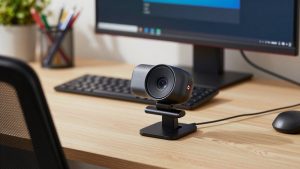
If your desk is small and you only need audio at arm’s length, a midrange 2K model is the sweet spot. Look for a 2K webcam with built-in speaker and dual microphones with autofocus and a physical privacy shutter.
Expect honest performance: clear enough for Zoom in a quiet bedroom office, but flat. Voices sound intelligible, not natural. Above 70% volume, cheap models rattle and the mic will gate your voice. Keep the speaker moderate and sit within 3 feet.
Failure modes to know: USB power. Some laptops, especially through cheap USB-C dongles, deliver noisy power that creates hiss in the speaker. If you hear buzzing, try a direct port or powered hub. Second is auto-exposure hunting. Budget 2K sensors will pulse brighter and darker if you have a window behind you. Face the window or close the blinds; no settings menu fixes strong backlight.
Who it suits: laptop users who dock at home but pack light, students, and anyone who wants one cable and no extra speaker on the desk.
When the cheaper option is fine
For occasional calls – a weekly check-in, school calls, a second computer in the kitchen – do not overspend. A basic 1080p webcam with speaker and microphone for PC is fine if the room is quiet.
Be honest about limits: these speakers are for speech, not music or movies. Bass is absent, max volume is low, and the mic will hear typing and mouse clicks. They also tend to have fixed focus and narrow dynamic range, so you need decent front light. A $20 desk lamp in front of you improves a $40 webcam more than upgrading to a $120 webcam in a dark room.
Skip the cheapest option if you take client calls, have a noisy home, or need to share audio with two people in a room. In those cases you will end up buying a separate speaker anyway, which defeats the purpose.
Setup that prevents most complaints
Almost every bad review of these devices – echo, hollow sound, “they can’t hear me” – comes down to placement and OS settings, not a defective unit.
Mount the camera at eye level and within arm’s reach. If it is on top of a 27-inch monitor and you lean back, you are now 4-5 feet from mics tuned for 2-3 feet. Bring it closer with a small tripod if needed. In Windows Sound settings and Mac Sound settings, select the webcam for both input and output. If input is the webcam and output is laptop speakers across the room, echo cancellation cannot work.
In Zoom or Teams, turn on echo cancellation and noise suppression, then do a 30-second test recording at your normal speaking volume. If the other side hears doubling, lower speaker volume first, not mic gain. Lowering mic gain while the speaker blasts just makes you quiet and echoey.
FAQ
Can a webcam speaker replace headphones or a dedicated speaker?
For solo calls in a quiet room at a desk, yes. For music, noisy homes, or calls with sensitive work topics, no. Headphones still win for privacy and mic clarity, and a separate USB speaker sounds much fuller.
Why do people hear echo when I use a webcam with speakers?
The mic is picking up the speaker output. Lower the speaker to 30-50%, move closer to the device, and make sure your meeting app is using the webcam for both mic and speaker so its echo canceller can work. Large, reflective rooms make it worse.
Do these work with MacBooks?
Most work plug-and-play for video, mic, and speaker over USB. What often does not work on Mac is the vendor app for effects, auto-framing tweaks, and firmware updates. Check that core audio works without software before you keep it.
Is 4K worth it if I mainly want the speaker?
Usually not. A sharper sensor does not fix a small speaker. Prioritize stated echo cancellation, speaker wattage, and mic array design. Buy 2K or good 1080p with better audio over 4K with a weak mono speaker.