Our Short List of 3

- Best for: A home PC with an optical drive, for burning discs, ripping music and keeping password-protected backups on disc.
- Version: Nero Burn Express 4; a newer Nero burning edition is sold under a different name, so do not confuse this listing with a current-year edition
- Devices: 1 PC
- Operating systems: Windows 10, 8, 7 in the title; the listing details also name Windows 11
- Form: one-time purchase with no subscription, according to the Amazon listing details; model number NER912800F065; first available March 1, 2018

- Best for: Moving a Windows system drive to a new SSD or HDD of a different size.
- Version: Echo 7; new in Echo 7 are 4K-sector drive compatibility and enhanced file and folder exclusion for moves to a smaller drive
- Devices: lifetime licence; the listing does not give a multi-PC count, so confirm how many machines the key covers before you buy
- Operating systems: install, activate and run from Windows 11, 10, 8.1, 8 and 7; it can clone drives holding Windows, Linux, macOS or multi-OS partitions
- Form: software download card, with download instructions and an activation key in the package; lifetime licence, not a one-year subscription; activation needs internet access
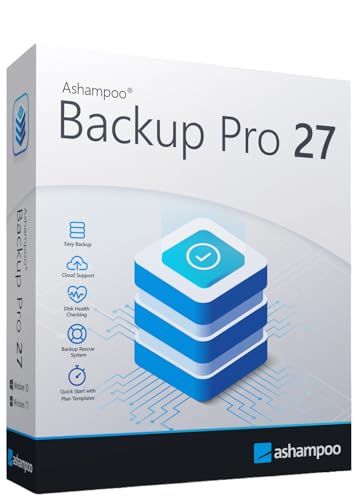
- Best for: A Windows 11 or Windows 10 PC whose owner wants file backups, full drive images and rescue media in one program.
- Version: Backup Pro 27, from Ashampoo
- Devices: the Amazon listing describes a lifetime licence; Ashampoo also sells an annual subscription covering three devices, so the device count depends on the offer on the listing
- Operating systems: Windows 11 and Windows 10, 64-bit; Windows on ARM and Windows Server are not supported, according to Ashampoo system requirements
- Form: PC download; an internet connection is needed for activation and periodic licence verification, with 500 MB of installation space and full administrator rights
All 3 Picks at a Glance
| Product | Specs | Action |
|---|---|---|
| 2. Nero Burn Express 4 | Burn CD DVD Bluray | Copy | Rip | Convert | Backup | Protect | 1 PC | Windows 10 / 8 / 7 |
| Check price on Amazon |
| 3. NTI Echo 7 | Disk Cloning & Migration Software | The Easiest, Safest Way To Upgrade Your Computer’s Drive | Software Download Card | Lifetime License (Not 1-Year Subscription!) |
| Check price on Amazon |
| 5. Backup Pro 27 – Full system backup – restore – rescue – image – recover for Win 11, 10 |
| Check price on Amazon |
Last Updated: November 28, 2026
- Quick Picks
- How to Choose
- 1. Ralix Windows Emergency Boot Disk – For Windows 98, 2000, XP, Vista, 7, 10 PC Repair DVD All in One Tool (Latest Version)
- 2. Nero Burn Express 4 | Burn CD DVD Bluray | Copy | Rip | Convert | Backup | Protect | 1 PC | Windows 10 / 8 / 7
- 3. NTI Echo 7 | Disk Cloning & Migration Software | The Easiest, Safest Way To Upgrade Your Computer’s Drive | Software Download Card | Lifetime License (Not 1-Year Subscription!)
- 4. iolo – System Mechanic Pro, Computer Cleaner for Windows, Blocks Viruses and Spyware, Restores System Speed
- 5. Backup Pro 27 – Full system backup – restore – rescue – image – recover for Win 11, 10
- Which One Fits Your Situation
- Common Mistakes
- Frequently Asked Questions
Choosing backup, recovery and optimization software is a decision about which failure you are preparing for. A full system image helps when a drive stops working, a boot disc helps when Windows will not start, a cloning tool helps when you move to a larger drive, and a cleaner helps when a machine has become slow with junk files and unwanted startup items. None of those jobs is the same, so a tool that handles one well may not help with the others.
This list is for people with an older Windows PC that needs a rescue plan, people moving Windows to a new SSD, people archiving music and photos to disc, and people who want a cleaner that also blocks malware. The five products below were chosen from the names and specifications on their Amazon listings. Each section states the version, the number of devices, the operating systems, and the licence form as the listing describes them, so you can match the offer to your machine before you buy.
📄 In This Review
- Quick Picks
- How to Choose
- 1. Ralix Windows Emergency Boot Disk – For Windows 98, 2000, XP, Vista, 7, 10 PC Repair DVD All in One Tool (Latest Version)
- 2. Nero Burn Express 4 | Burn CD DVD Bluray | Copy | Rip | Convert | Backup | Protect | 1 PC | Windows 10 / 8 / 7
- 3. NTI Echo 7 | Disk Cloning & Migration Software | The Easiest, Safest Way To Upgrade Your Computer's Drive | Software Download Card | Lifetime License (Not 1-Year Subscription!)
- 4. iolo – System Mechanic Pro, Computer Cleaner for Windows, Blocks Viruses and Spyware, Restores System Speed
- 5. Backup Pro 27 – Full system backup – restore – rescue – image – recover for Win 11, 10
- Which One Fits Your Situation
- Common Mistakes
- Frequently Asked Questions
Quick Picks
As an Amazon Associate we earn from qualifying purchases.
| Product | Best for | Key spec from title |
|---|---|---|
| Ralix Windows Emergency Boot Disk | A PC that will not start and needs repair tools from a disc | Boot DVD for Windows 98, 2000, XP, Vista, 7, 10 |
| Nero Burn Express 4 | Burning and archiving files, music and photos to disc | Burn, copy, rip, convert and backup on 1 PC |
| NTI Echo 7 | Moving a whole Windows drive to a new SSD | Disk cloning and migration, download card, lifetime licence |
| iolo System Mechanic Pro | Cleaning a slow Windows PC with added malware blocking | Computer cleaner for Windows, blocks viruses and spyware |
| Backup Pro 27 | A full backup plan with images and rescue media | Full system backup, restore, rescue, image and recover for Win 11, 10 |
How to Choose
See also: Best Tax and Personal Finance Software (Part 3) • Best Office, PDF and Productivity Software (Part 5)
Match the version and the operating system first
A version number tells you more than a brand name, because an older edition may not support the Windows release on your machine. The Ralix disc names Windows 98 through Windows 10 and does not name Windows 11, while Backup Pro 27 names Windows 11 and Windows 10. Nero Burn Express 4 names Windows 10, 8 and 7 in its title, and its listing details also name Windows 11, so read both lines. Check the version on the listing against the Windows release on the PC you plan to use, and look for a note about 64-bit support.
Count the devices and read the licence form
A licence that covers one PC is a different purchase from a licence that covers a household, and a download card is a different purchase from a boxed disc. Nero Burn Express 4 states 1 PC in its title, while the NTI Echo 7 listing describes a lifetime licence and states that it is not a one-year subscription. The iolo listing supplied for this article does not state a device count in its title, so confirm that detail on the listing. Read whether the offer is a download, a key card, a DVD or a subscription, and whether the subscription renews on its own.
Separate cloning, backup, and cleaning
Cloning, backup and cleaning solve different problems, and the words on the listing are the clearest guide to which job a product does. NTI Echo 7 copies a whole drive to a new drive, including Windows and the programs on it, and adjusts partition sizes when the target drive is a different size. Backup Pro 27 creates file backups and full drive images and can make rescue media for a machine that will not start. System Mechanic Pro cleans junk files and repairs system settings, and Nero Burn Express 4 writes files to CD, DVD and Blu-ray. Decide which job comes first, then choose the tool that names it.
Read the renewal, activation, and contents terms
Software offers change between listings, so the terms on the page you buy from are the ones that apply. Ashampoo Backup Pro 27 is sold as a lifetime licence on the Amazon listing and also as an annual subscription on the vendor site, with different device counts for each offer. NTI Echo 7 states a lifetime licence and says activation needs an internet connection. The Ralix disc is a physical DVD, so it needs a working optical drive or an external USB drive, and the NTI download card does not include a drive adapter. Confirm the activation steps, the renewal terms and the box contents before you buy.
1. Ralix Windows Emergency Boot Disk – For Windows 98, 2000, XP, Vista, 7, 10 PC Repair DVD All in One Tool (Latest Version)
This disc fits a household that still runs an older Windows machine and wants a way to reach its files when Windows will not start. It boots the PC from the DVD and opens a menu of repair tools, which suits a machine kept for old programs, old files, or a second computer that nobody wants to rebuild from scratch. The wide list of Windows releases in the title is the point of this product, because most current rescue media no longer names Windows 98 or Windows 2000 at all.
Specs
- Version: listed as Latest Version; no version number is given in the title, so confirm the disc version on the listing
- Devices: no PC count is stated in the listing title; a boot disc is used on one machine at a time
- Operating systems: Windows 98, 2000, XP, Vista, 7, 10; Windows 11 is not named in the title
- Form: physical CD/DVD, plug-and-play boot disc; first available on Amazon October 28, 2019
- Tools named on the listing: hard-drive repair and formatting, file recovery from FAT and NTFS volumes, partition creation, Windows password recovery, registry repair, virus detection and cleaning, CD/DVD copying and burning, ISO image creation, hardware diagnostics, memory testing
- Compatibility: boots on desktop and laptop PCs, including Dell, HP, Samsung, Acer and Sony machines
Best for: An older Windows PC that will not start, where the owner wants repair and file recovery tools on a disc.
Watch out for: The target machine needs a working optical drive or an external USB drive, and the tools on a disc first listed in 2019 may be dated, so check the disc version before you buy.
2. Nero Burn Express 4 | Burn CD DVD Bluray | Copy | Rip | Convert | Backup | Protect | 1 PC | Windows 10 / 8 / 7
- Best for: A home PC with an optical drive, for burning discs, ripping music and keeping password-protected backups on disc.
- Version: Nero Burn Express 4; a newer Nero burning edition is sold under a different name, so do not confuse this listing with a current-year edition
- Devices: 1 PC
- Operating systems: Windows 10, 8, 7 in the title; the listing details also name Windows 11
- Form: one-time purchase with no subscription, according to the Amazon listing details; model number NER912800F065; first available March 1, 2018
A home PC with an optical drive, for burning discs, ripping music and keeping password-protected backups on disc.
Version 4 is an older edition first listed in 2018, and disc burning needs an optical drive, so confirm the edition and the drive.
This program fits a person who still archives files to disc and wants one tool for burning, copying, ripping and protected backups. It writes data, music, video and photos to CD, DVD and Blu-ray, converts audio CDs to MP3, AAC and other formats, and protects backups with a password. The single-PC licence and the simple scope make it a match for a home PC with an optical drive, rather than for a household that needs the same software on several machines.
Watch out for: Version 4 is an older edition first listed in 2018, and disc burning needs an optical drive, so confirm the edition and the drive.
3. NTI Echo 7 | Disk Cloning & Migration Software | The Easiest, Safest Way To Upgrade Your Computer’s Drive | Software Download Card | Lifetime License (Not 1-Year Subscription!)
- Best for: Moving a Windows system drive to a new SSD or HDD of a different size.
- Version: Echo 7; new in Echo 7 are 4K-sector drive compatibility and enhanced file and folder exclusion for moves to a smaller drive
- Devices: lifetime licence; the listing does not give a multi-PC count, so confirm how many machines the key covers before you buy
- Operating systems: install, activate and run from Windows 11, 10, 8.1, 8 and 7; it can clone drives holding Windows, Linux, macOS or multi-OS partitions
- Form: software download card, with download instructions and an activation key in the package; lifetime licence, not a one-year subscription; activation needs internet access
Moving a Windows system drive to a new SSD or HDD of a different size.
This ASIN is software only and does not include a drive adapter, so you need a way to connect both drives at once.
This tool fits a person who is moving Windows to a new drive and wants the new drive to work as a direct replacement. It copies the whole system drive, including Windows, programs and data, and its dynamic resize feature adjusts partitions when the target drive is smaller, the same size, or larger. The download-card form also fits a buyer who does not want a disc, as long as both drives can be connected to the PC during the move.
Watch out for: This ASIN is software only and does not include a drive adapter, so you need a way to connect both drives at once.
4. iolo – System Mechanic Pro, Computer Cleaner for Windows, Blocks Viruses and Spyware, Restores System Speed
This suite fits a Windows PC that has become slow with junk files, broken settings and unwanted startup items, and whose owner also wants malware blocking in the same package. System Mechanic Pro cleans clutter, repairs system settings and runs background maintenance, while its System Shield component adds antivirus protection. That combination suits a single home PC that needs regular upkeep rather than a one-off repair, as long as the buyer confirms which edition and licence the listing actually sells.
Specs
- Version: no version number is named in the Amazon title supplied for this ASIN; iolo sells System Mechanic Pro in numbered editions, so confirm the edition on the listing
- Devices: no PC count is stated in the title supplied; confirm the device count on the listing before you buy
- Operating systems: Windows; iolo’s System Mechanic Professional requirements name Windows 10, 8 and 7, with 270 MB of disk space, 512 MB of RAM and an internet connection for activation
- Form: download; iolo states that no CD is required, and the activation key comes in the order email or in the retail box
- Functions named in the title: computer cleaning, blocking viruses and spyware, and restoring system speed
- Pro features described by iolo: System Shield antivirus, file recovery, and drive wiping
Best for: A slow Windows PC whose owner wants cleaning, repair and malware blocking in one maintenance suite.
Watch out for: This is an older ASIN and the title does not name a version or a device count, so confirm the edition and the licence length.
5. Backup Pro 27 – Full system backup – restore – rescue – image – recover for Win 11, 10
- Best for: A Windows 11 or Windows 10 PC whose owner wants file backups, full drive images and rescue media in one program.
- Version: Backup Pro 27, from Ashampoo
- Devices: the Amazon listing describes a lifetime licence; Ashampoo also sells an annual subscription covering three devices, so the device count depends on the offer on the listing
- Operating systems: Windows 11 and Windows 10, 64-bit; Windows on ARM and Windows Server are not supported, according to Ashampoo system requirements
- Form: PC download; an internet connection is needed for activation and periodic licence verification, with 500 MB of installation space and full administrator rights
A Windows 11 or Windows 10 PC whose owner wants file backups, full drive images and rescue media in one program.
The lifetime licence and the annual subscription are different offers, so confirm which licence form the listing sells, and check your storage against the 8 TB limit.
This Ashampoo program fits a person who wants a complete backup plan for a Windows 11 or Windows 10 PC, rather than a single rescue tool. It backs up individual files and folders, whole drives and partitions, and complete Windows systems, and it can create rescue media for a machine that will not start. The plan-based setup suits a household that wants scheduled backups to a local drive, a network drive or a cloud destination, with selective recovery when only a few files are needed.
Watch out for: The lifetime licence and the annual subscription are different offers, so confirm which licence form the listing sells, and check your storage against the 8 TB limit.
Which One Fits Your Situation
A PC that will not start
The Ralix Windows Emergency Boot Disk is the match here, because it boots the machine from a disc instead of from the drive that has failed. Its menu covers hard-drive repair, file recovery from FAT and NTFS volumes, password recovery and registry repair, which are the jobs that matter when Windows will not load. Confirm that the machine has a working optical drive or an external USB drive.
Moving Windows to a new SSD
NTI Echo 7 is the match here, because it copies the whole system drive and adjusts partitions when the new drive is a different size. The download card and lifetime licence suit a one-off upgrade, and the tool can clone drives holding Windows, Linux, macOS or multi-OS partitions. Remember that this ASIN is software only, so arrange a way to connect both drives first.
Archiving music, photos and files to disc
Nero Burn Express 4 is the match here, because it burns CD, DVD and Blu-ray discs, rips audio CDs to MP3 and AAC, and protects backups with a password. The 1 PC licence suits a single home computer with an optical drive, and Nero Cover Designer covers labels and booklets. Confirm that your machine has a drive that writes the disc type you plan to use.
A slow PC that needs cleaning and malware blocking
iolo System Mechanic Pro is the match here, because it combines junk-file cleaning, system repair and background maintenance with System Shield antivirus in one suite. It suits a home PC that needs regular upkeep rather than a single repair job. Before you buy, confirm the edition, the device count and the licence length on the listing.
Common Mistakes
- Buying a version that does not support the Windows release on the machine it will run on
- Assuming a download card includes a drive adapter, or that a DVD will work on a PC with no optical drive
- Confusing a lifetime licence with an annual subscription, or two offers of the same product with different device counts
- Treating a cleaner as a backup, so there is no image or rescue media when a drive fails
- Setting up a backup plan and never checking that the rescue media and the restore step work
Frequently Asked Questions
Can backup software replace a rescue disc?
A backup program with rescue media can help a machine that will not start, but only if the rescue media was created before the failure. A boot disc such as the Ralix disc is made for that moment, while a cleaner does not create rescue media at all. Keep the rescue media handy and confirm that the machine can boot from it.
Does cloning move Windows and my programs?
Cloning with NTI Echo 7 copies the whole system drive, including Windows, programs and data, to the target drive, and dynamic resize adjusts partitions when the target is a different size. The clone is meant to work as a direct replacement for the old drive. Back up important files first, and confirm that both drives are connected.
Will Nero Burn Express 4 work on Windows 11?
The title names Windows 10, 8 and 7, while the listing details also name Windows 11. Version 4 is an older edition, so confirm the Windows support and the edition on the listing before you buy, and confirm that your machine has an optical drive that writes the disc type you need.
What should I check before buying older-version software?
Check the version number, the Windows releases it supports, the device count, the licence form, and whether renewal is automatic. For the Ralix disc and the iolo listing in this article, the title does not name a version number, so that detail has to be confirmed on the listing itself before you buy.
Related Reviews & Guides



6 Best Laptop Docking Stations With Stand 2026
Best Octoprint Camera 2026