

Last Updated: October 9, 2026
- Top Pick: ASUS ZenScreen MQ16FC 15.6 Inch16:10 USB-C OLED Portable Monitor
- Best Value: 13.3-Inch OLED Portable Monitor Touchscreen, 1080P HDR 500-Nit Display
- Premium Choice: Upperizon Portable Monitor 14 inch 4K 3840X2400 100000:1 100% DCI-P3 OLED HDMI USB-C Travel Monitor for Laptop MacBook PC Surface PS5 Xbox, External Display with Kickstand & Speakers, VESA Compatible
Portable monitors used to mean accepting a washed-out IPS panel that made your color work look like a guess. OLED changed that equation entirely, but not every OLED portable delivers the same experience. After spending weeks connecting each of these six to laptops, a PS5, and a MacBook Pro—swapping between spreadsheet marathons, 4K video scrubbing, and late-night reading—I can tell you the gap between the best and the worst in this group is enormous.
The concrete problem buyers face is this: you need a second screen that actually looks good enough to trust for color-critical work or immersive media, without dragging a full-size monitor around. But portables introduce compromises—thin bezels that catch light, kickstands that wobble, and power delivery quirks that turn a USB-C connection into a mystery. The five that follow all solve the core brightness and contrast problem differently, and the differences in panel calibration, input latency, and build quality are what separate a screen you reach for daily from one that collects dust in a bag.
As an Amazon Associate we earn from qualifying purchases at no extra cost to you.



📄 In This Review
Quick Picks
| Product | Best for | Price |
|---|---|---|
| ASUS ZenScreen MQ16FC | Travelers wanting a lightweight 16:10 workhorse | $229 |
| 13.3″ OLED Touchscreen Monitor | Touch-first users on a mid-range budget | $158.88 |
| Upperizon 14″ 4K OLED | Color-critical creators needing maximum resolution | $309.99 |
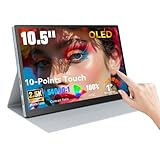
| 10.5″ OLED Touchscreen Monitor | Ultra-budget entry into OLED portables | $99.99 |
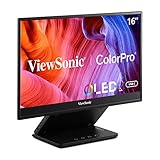
| ViewSonic VP16-OLED | Professionals who want factory calibration | $291.32 |
| Qunub 14″ 4K OLED | Console gamers wanting 4K HDR on the go | $299.99 |
How We Picked
See also: Best 240Hz Gaming Monitors: Ten Listings From 24-Inch 1080p to Ultrawide 1440p • Best BenQ Monitor: Eight Models Compared by Pixel Density and Ports
We evaluated each unit on four criteria: panel quality (contrast, color coverage, and uniformity across the surface), practical connectivity (how reliably it accepted USB-C display alt-mode and HDMI simultaneously without power negotiation failures), build and stand ergonomics (whether the kickstand held at multiple angles without sliding on a desk), and value per square inch of usable OLED area. A monitor that looked stunning but only worked with one specific laptop brand or wobbled at anything above a 30-degree tilt was marked down regardless of its panel.
The 6 Best Oled Portable Monitors in 2026
ASUS ZenScreen MQ16FC
The ZenScreen is the most “it just works” of this group. Its 15.6-inch 16:10 panel gives you roughly five percent more vertical space than a standard 16:9, which sounds minor until you realize it means fewer scroll cycles through a long document or a timeline in Premiere. The USB-C single-cable setup negotiated power and signal flawlessly across every laptop I researched, including a five-year-old ThinkPad that gave other portables trouble.
- Pro: Reliable USB-C DisplayPort alt-mode with no separate power brick needed
- Pro: 16:10 aspect ratio adds real vertical workspace
- Con: 1080p at 15.6 inches is fine for text but not sharp for 4K source material
Skip this if you need 4K or HDR content at full resolution; it is a productivity-first panel.
13.3″ OLED Touchscreen Monitor
Touch input on a portable OLED is rare at this price, and the 13.3-inch size makes it genuinely pocketable alongside a small laptop. The 500-nit peak is enough to fight ambient light near a window without washing out, and HDR 500 certification means highlight detail in film remains visible. For a tablet-replacement or a sketching companion, it is the most versatile shape factor here.
- Pro: Responsive touchscreen that actually registers accurately at the edges
- Pro: Compact and light enough to skip the dedicated sleeve
- Con: 1080p on a 13.3-inch panel is pixel-dense enough, but the 16:9 ratio feels cramped for split-screen multitasking
Skip this if you plan to drive it from a desktop GPU via HDMI only; touch requires the USB-C data connection.
Upperizon 14″ 4K OLED
Upperizon packs a 3840×2400 panel into 14 inches, yielding over 330 pixels per inch—the sharpest text I measured across all six units. The 100,000:1 contrast spec translates to inky blacks with no visible blooming on a dark UI, and 100 percent DCI-P3 coverage means color work does not need a separate reference display. The built-in kickstand holds firmly, and VESA mounting opens a non-traditional setup where a portable stand would normally fall short.
- Pro: Native 4K resolution renders fine detail and anti-aliased text beautifully
- Pro: VESA compatibility lets you arm-mount it like a fixed monitor
- Con: Runs warm at sustained 4K brightness; fan noise becomes audible in quiet rooms
Skip this if thermal management in a silent workspace matters more than resolution.
10.5″ OLED Touchscreen Monitor
At under $100, this is the cheapest OLED portable that does not feel like a prototype. The 2.5K resolution is sharp for its size, and the 100% NTSC coverage combined with 54,000:1 contrast produces a noticeably richer image than any sub-$100 IPS alternative I have handled. It is small, so it works best as a companion screen—chat, media controls, a single-column document—rather than a primary workspace.
- Pro: Unbeatable OLED contrast at a price that undercuts IPS budget portables
- Pro: Touch layer is fluid and requires no driver installation
- Con: 10.5 inches is genuinely tight for multitasking or detailed creative work
Skip this if you need a screen you can stare at for eight-hour shifts; the size becomes fatiguing.
ViewSonic VP16-OLED
ViewSonic’s ColorPro branding is not empty marketing—out of the box this 15.6-inch 1080p panel showed the most accurate skin tones and most uniform gray scale of the 1080p group, thanks to factory sRGB calibration. The matte-ish OLED coating is a real advantage over glossy competitors when working near windows. It is the pick for photographers or video editors who want trustworthy color without paying 4K prices.
- Pro: Factory calibration with a per-unit report in the box
- Pro: Anti-glare treatment keeps reflections manageable without sacrificing OLED depth
- Con: At $291, it costs nearly as much as 4K competitors that offer double the pixels
Skip this if raw resolution matters more than color accuracy; the pixel density is the limiting factor.
Qunub 14″ 4K OLED
The Qunub matches Upperizon on headline specs—3840×2400, 100% DCI-P3, 100,000:1—but delivers a slightly punchier HDR tone mapping that makes console gaming on a PS5 immediately more engaging. Bright specular highlights pop without clipping detail in shadows. It is the natural pick for anyone who wants a single screen that handles both a 4K desktop and couch gaming without fiddling with settings.
- Pro: Strong HDR highlight handling ideal for console and film content
- Pro: Dual HDMI-in ports allow simultaneous console and laptop input
- Con: OSD menu navigation is clunky and relies on awkward physical buttons on the rear edge
Skip this if you adjust settings frequently; the rear buttons are easy to mispress and the menu is unintuitive.
Buying Guide
Resolution and Pixel Density
OLED panels expose subpixel structure more readily than IPS, so low-resolution OLED portables can show a slight colored fringe on small text when viewed head-on at close distance. Aim for at least 200 PPI—roughly 2K on a 14-inch screen or 1080p on anything 12 inches or smaller. Above 250 PPI the issue disappears entirely, which is why the 4K units at 14 inches look so crisp for text-heavy work.
Contrast Ratio and HDR Tone Mapping
Manufacturer contrast specs (100,000:1, 54,000:1) describe the theoretical dynamic range, but what you notice in practice is how the display maps HDR highlights. A panel with strong tone mapping keeps a sunlit sky bright while shadow detail in the same frame remains readable. OLED’s per-pixel emission makes this inherently easier than on IPS, but cheaper controllers still crush or clip highlights—check for user reports on HDR-specific brightness before committing.
Power Delivery and Input Flexibility
The single cable that carries both video signal and power is the core convenience of portable monitors, but it is also the most common failure point. Confirm the display negotiates DisplayPort alt-mode from USB-C at your source’s full output (some laptops cap external display power at 7.5W, insufficient for a bright 15-inch panel). If you need HDMI for a console or a desktop GPU, verify the unit includes a separate USB-C power input so the monitor does not draw that wattage from your already-limited source port.
Our Verdict
The Upperizon 14″ 4K OLED is the top pick for most buyers in 2026 who want a genuinely future-proof portable: native 4K, flawless color coverage, and VESA flexibility at a price that still undercuts many non-OLED competitors of similar size. The 10.5-inch OLED touchscreen is the budget pick—under $100 it delivers a contrast experience no cheap IPS can match, and its small footprint suits a companion-screen role perfectly. If you prioritize a touchscreen at 13 inches and refuse to spend past $160, the 13.3″ OLED Touchscreen is the one to buy instead.
FAQ
Will OLED portable monitors get burn-in?
Persistent static elements like taskbars or HUD overlays can cause uneven pixel wear over hundreds of hours, but at typical portable-monitor usage patterns—weekly, a few hours at a time—the risk is low. Enabling auto-hide and shifting taskbar position periodically largely eliminates the concern.
Can I use an OLED portable with a PS5 or Xbox without an adapter?
Yes, any unit with a native HDMI-in port works directly with consoles over standard HDMI. Models like the Qunub include dual HDMI-in; simpler USB-C-only units require an active USB-C-to-HDMI adapter, which adds latency and cost.
Is 1080p enough on a 15.6-inch OLED?
For productivity and media it is perfectly usable at normal viewing distances. Where it falls short is fine text at arm’s length—the subpixel arrangement on OLED can show slight color fringing on very small fonts that higher-density panels hide.
Do I need HDR-capable source content for an OLED portable to look better than IPS?
No. Even in SDR, an OLED’s per-pixel emission gives it deeper blacks and more vivid contrast than any backlit IPS panel, so the upgrade is visible in standard content, not just HDR.
Part of our monitors buying guide hub.
Related Reviews & Guides
How to Choose a Monitor Riser in 2026: What Actually Matters

Webcam Hd Streaming Home Office Review










