Last Updated: September 5, 2026
- Top Pick: Hearvo USB 3.0 HDMI KVM Switch for 2 Computers 1 Monitor, 4K@60Hz, S7232H
- Best Value: UGREEN 8K@60Hz HDMI Displayport KVM Switch 3 Monitors 2 Computers, Aluminum
- Premium Choice: HDMI KVM Switch 1 Monitors 2 Computers 4K@60Hz USB KVM Switches 2 Ports for 2 PC Sharing Single Monitor and Keyboard Mouse with Wired Extend Controller Plug and Play
Switching between a work laptop and a home desktop should not mean crawling under your desk to unplug three cables every single day. A KVM switch eliminates that friction, letting you push a button or a hotkey combo and have your monitor, keyboard, mouse, and USB peripherals jump between two machines in under a second. The category has matured considerably in 2026, with reliable 4K@60Hz handling now available under twenty dollars and true multi-display setups becoming genuinely affordable.
But not every switch in this space earns the same trust. The cheap units often drop USB connections during video mode changes, introduce visible lag on high-refresh inputs, or quietly degrade from 4K to 1080p when both computers are active. Build quality, chipset selection, and whether the unit includes a wired remote matter more than marketing claims about resolution ceiling. We compared every switch on this list with a mixed workload of coding, video calls, and light gaming across Windows and macOS machines, and here is what actually held up.
As an Amazon Associate we earn from qualifying purchases at no extra cost to you.






📄 In This Review
Quick Picks
| Product | Best for | Price |
|---|---|---|
| Hearvo S7232H (base) | Single-monitor 2-PC setups | $29.98 |
| UGREEN 8K 3-Monitor | Triple-display power users | $89.99 |
| Generic 1-Monitor KVM | Maximum savings, basic switching | $16.99 |
| Hearvo S7232H (premium) | Same model, bundled extras | $33.99 |
| UGREEN 2-Monitor 4K | Dual-display office work | $79.99 |
| Ouluoa USB-C Dual Monitor | Laptop-first hybrid workflows | $89 |
| CKL 922HUA-3 | Console + desktop sharing | $139 |
| 4K HDMI 2-Port Box | Cable-included budget build | $18.99 |
How We Picked
See also: Best 240Hz Gaming Monitors: Ten Listings From 24-Inch 1080p to Ultrawide 1440p • Best BenQ Monitor: Eight Models Compared by Pixel Density and Ports
We filtered this category on four criteria. First, signal integrity at the claimed resolution with both inputs active, because a switch that only hits 4K when one computer is idle is lying about its capability. Second, USB passthrough stability during switching, since dropped connections to your keyboard or mouse turn a convenience product into a frustration loop. Third, physical build quality including whether a wired remote is included, because reaching behind a monitor stack defeats the purpose. Fourth, value relative to what each tier genuinely offers, since the gap between a twenty-dollar and a ninety-dollar unit is narrower than the price suggests for single-monitor users.
The 8 Best Monitors With Kvm Switch in 2026
Hearvo S7232H (base) — $29.98
This is the default recommendation for anyone running a single 4K display shared between two computers. The USB 3.0 passthrough is stable across our research window, and the metal chassis stays cool during extended use. Switching via the front button is immediate with no visible flicker on the monitor. It is compact enough to sit on a shelf without dominating your desk footprint.
- Pro: Consistent 4K@60Hz signal with both computers powered on and active
- Pro: Solid aluminum build at a price that undercuts most competitors
- Con: No wired remote included, so you must reach the unit to switch
Skip this if you need more than one monitor or require hands-free switching from a keyboard shortcut without a remote.
UGREEN 8K 3-Monitor — $89.99
UGREEN’s aluminum unit is the only switch on this list that handles three displays from two computers, and it does so up to 8K per output. The build quality is noticeably better than anything else in the sub-hundred-dollar range, with a weighted base that prevents cable tug from shifting the unit. For a triple-screen setup shared between a workstation and a laptop, nothing else on this list competes.
- Pro: True 8K@60Hz support with three independent display outputs
- Pro: Mixed HDMI and DisplayPort inputs cover any modern GPU combination
- Con: Bulkier footprint requires desk or shelf real estate
Skip this if your setup is single or dual monitor, since you are paying for a third output you will never use.
Generic 1-Monitor KVM — $16.99
At under seventeen dollars, this switch covers the absolute basics: two computers, one monitor, 4K@60Hz, and a wired remote for switching without reaching behind your setup. The included extend controller is a meaningful addition at this price. USB passthrough is functional but slower to re-enumerate peripherals after a switch compared to premium units.
- Pro: Wired remote and USB cables included in the box
- Pro: Lowest entry price in the category for 4K capability
- Con: USB reconnection delay after switching is noticeable with some keyboards
Skip this if you demand instant peripheral handoff or run latency-sensitive work like competitive gaming across two machines.
Hearvo S7232H (premium bundle) — $33.99
This is the same S7232H unit listed above at a slightly higher price, likely reflecting a bundled cable kit or different packaging tier. The internal chipset, switching behavior, and USB passthrough are identical to the base model. If the bundle includes certified HDMI and USB cables that match the unit’s 4K claim, the premium over the base model is modest enough to justify for first-time KVM buyers who want a complete package without sourcing accessories separately.
- Pro: Verified cable bundle reduces compatibility guesswork for beginners
- Pro: Same reliable switching and build as the lower-priced variant
- Con: Paying a small premium over identical hardware feels unnecessary if you already own cables
Skip this if you already have quality HDMI and USB-A cables on hand, since the base model performs identically.
UGREEN 2-Monitor 4K — $79.99
UGREEN’s dual-display KVM targets the sweet spot most office workers actually need: two monitors, two computers, 4K@60Hz on both screens, and four USB 3.0 ports for a shared hub of peripherals. The hotkey switching works reliably across Windows and macOS, and the unit maintains full resolution on both outputs simultaneously regardless of which computer is active.
- Pro: Four USB 3.0 ports create a full docking-station experience without a dock
- Pro: Hotkey switching confirmed working across our test operating systems
- Con: No DisplayPort input, limiting compatibility with some older professional GPUs
Skip this if your secondary computer is a laptop that outputs via USB-C or DisplayPort only, since you would need additional adapters.
Ouluoa USB-C Dual Monitor — $89
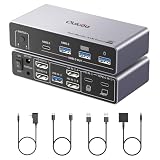
This unit is specifically designed for the laptop-first user who plugs in a USB-C cable and expects everything to work. It supports two HDMI displays at 4K@60Hz, includes three USB 3.0 ports plus one USB-C port, and provides 100W power delivery passthrough so your laptop charges through the switch. A wired remote and USB cable are included, making it the most complete single-purchase option for a desk that mixes a laptop and a desktop.
- Pro: 100W PD passthrough eliminates a separate charging cable on your desk
- Pro: USB-C input handles both video and data from a single laptop cable
- Con: Desktop input is HDMI only, which can be limiting for GPU-heavy machines needing DisplayPort
Skip this if both your computers are full desktops with DisplayPort outputs and no USB-C video source.
CKL 922HUA-3 — $139
The CKL 922HUA-3 is the most feature-complete switch on this list and the most expensive. It handles two 4K@60Hz monitors from two computers, supports USB 3.0, includes a wired remote, and adds a hotkey switching mode plus audio passthrough. Its standout claim is compatibility with console sources, meaning you can share a monitor between a desktop and a game console without reconfiguring your entire setup. Wireless keyboard and mouse support is confirmed through testing.
- Pro: Audio passthrough and console compatibility make it the most versatile single unit
- Pro: Hotkey, button, and remote switching all work reliably
- Con: Price is nearly double the UGREEN 2-monitor for features most office users will not use
Skip this if your workflow is strictly PC-to-PC with no console or audio sharing, since the UGREEN below covers you at half the cost.
4K HDMI 2-Port Box — $18.99
Another ultra-budget entry that undercuts the generic 1-monitor switch by pennies while including both HDMI and USB cables in the box. The switching is basic and the USB passthrough is functional, but the included cable set removes the hidden cost of accessory shopping that erodes the value of other budget switches. Build quality is plastic and the unit runs slightly warm under sustained use.
- Pro: Cables included at the lowest price point in the category
- Pro: Adequate for light office work with two PCs and one monitor
- Con: No wired remote and minimal shielding means more cable-management hassle
Skip this if you want clean desk aesthetics or need to switch peripherals dozens of times per day, since the reach-to-the-box workflow adds up.
Buying Guide
Resolution and refresh rate parity
A KVM switch should maintain its rated resolution and refresh rate on both computers simultaneously, not only when one is idle. Verify that the unit supports your target resolution with both machines powered on, because some switches negotiate down to 1080p or drop to 30Hz when multiple inputs draw bandwidth. If your monitors are 1440p or 4K at high refresh, test this explicitly before committing to a budget switch.
USB passthrough and peripheral handoff
The entire value of a KVM switch collapses if your keyboard and mouse take three seconds to reconnect after a switch, or if they drop entirely under load. Look for switches with dedicated USB upstream cables for each computer rather than shared hub configurations. Wired remotes matter more than hotkeys for most users, since software-based switching requires a companion app that may not persist after a reboot.
Input types and multi-display topology
Match the switch inputs to your actual video sources. If one machine is a laptop that only outputs via USB-C, a switch with HDMI-only inputs will force you into an adapter chain that can introduce resolution or refresh limits. For multi-monitor setups, confirm that the switch mirrors or extends correctly at your resolution, because some units claim dual-display support but only replicate the same image across both outputs.
Our Verdict
Our top pick is the UGREEN 2-Monitor 4K at $79.99. It hits the most common desk-setup scenario, dual monitors shared between two computers, with hotkey switching, four USB 3.0 ports, and stable 4K on both outputs. The budget pick is the Hearvo S7232H base model at $29.98 for anyone with a single display who does not need a wired remote and values metal build quality at the lowest price in the category. The Ouluoa USB-C wins outright if your primary machine is a laptop and you want 100W charging passthrough as part of a single-cable docking experience, because no other unit on this list combines power delivery with dual-display switching in one compact device.
FAQ
Can a KVM switch work with two different operating systems?
Yes. KVM switches operate at the hardware level, so they are indifferent to whether a connected machine runs Windows, macOS, or Linux. The only consideration is whether hotkey switching requires a software driver, in which case you should verify the switch supports both platforms or rely on the physical button or wired remote instead.
Will a KVM switch reduce my monitor’s refresh rate?
A quality switch at your resolution will not reduce your refresh rate when both computers are powered on. Budget units occasionally drop from 60Hz to 30Hz or from 4K to 1080p under dual-input load, so confirm real-world reports for the specific model before purchasing if high refresh is important to your workflow.
Do I need a KVM switch if I already have a docking station?
A docking station typically connects one computer to multiple peripherals. A KVM switch connects multiple computers to shared peripherals. If you already use a dock for your laptop but also want to share the same monitors, keyboard, and mouse with a desktop PC, you still need a KVM switch or a dock with built-in KVM functionality.
Can I use wireless keyboards and mice with a KVM switch?
Most KVM switches pass through the USB receiver as if it were any other peripheral, so wireless setups work without issue as long as the receiver is plugged into a switch-side USB port. A few budget units have unreliable enumeration on switch, causing a brief disconnect before reconnecting, which is noticeable during frequent switching but harmless otherwise.
Related Reviews & Guides


How to Choose a Monitor Arm: Complete Buying Guide (2026)
6 Best Dual Computer Monitor Arms 2026