Last Updated: September 18, 2026
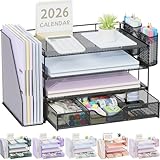
- Top Pick: WALI Desk File Organizer, 4 Tier Desktop Paper Letter Tray Organizer with Drawer and 2 Pen Holders, Office Desk Accessories & Workspace Organizers for Office, Home Supplies(DO005DH-B), 1 Pack, Black
- Best Value: gianotter Metal Mesh Desk Organizers and Accessories with File Holder
- Premium Choice: OPNICE Desk Organizer and Accessories, 2-Tier Computer Monitor Stand Riser with Drawer and 2 Pen Holders, Laptop Stand, Office Desk Accessories for Office Supplies, Black
A desk organizer should make work easier, not become another object you have to manage. Yet shoppers often choose one by appearance alone, then discover that the pen cup is too shallow, the file slots cannot hold folders, or the organizer steals valuable mouse space. Others buy a large multi-tier model for a small desk, overlook the weight limit, or assume that “metal” automatically means sturdy.
The best way to learn how to choose a desk organizer is to start with your habits and available space. Measure first, decide what must stay within reach, and then compare construction, capacity, comfort, and price. The right choice for a student with pens and charging cables will be very different from the right choice for someone sorting invoices and letter-size paperwork.
As an Amazon Associate we earn from qualifying purchases at no extra cost to you.



📄 In This Review
Decide These 3 Things First
- What needs organizing? Count the items you use daily. A compact pen holder may be enough for 10 to 20 writing tools, while a file organizer may need four vertical sections for folders, mail, notebooks, and active projects.
- How much desk space can you give up? Measure the available width, depth, and height, including the space beneath a monitor. Leave at least 3 inches for comfortable mouse movement and avoid blocking a lamp, speaker, or monitor stand.
- How often will you access everything? Open trays suit papers you handle several times a day. Drawers and lidded compartments are better for spare supplies, but they add an extra step and may be less useful if you frequently reach for those items.
Size and Capacity
See also: Best Racing Style Chairs: Ten Listings Compared by Footrest, Weight Rating and Fit • Wall Mounted Cable Organizer for Home Office: Raceways, Racks, Clips
Size is the most decisive factor because even an attractive organizer fails if it does not fit your workflow. For a small workstation, look for a footprint around 8 to 12 inches wide and 4 to 8 inches deep. A rotating pen organizer may occupy less than 6 inches of desk width while providing several compartments.
For paperwork, check the actual tray dimensions rather than relying on the number of tiers. Letter-size paper is 8.5 by 11 inches, so a tray should provide at least 9 inches of usable width and roughly 12 inches of depth. Allow extra room if you keep folders, envelopes, or notebooks in the same section. Four stacked trays can reach 10 to 14 inches high, which may interfere with a monitor or block a window.
Vertical organizers preserve surface area but can become top-heavy. A desktop file holder weighing 1.5 to 3 pounds is generally easier to reposition than a large unit weighing 4 pounds or more. For a monitor riser with storage, verify that the top platform is at least 20 inches wide for a typical monitor and that the listed weight capacity exceeds the monitor’s weight by at least 5 pounds.
Material and Finish
Common materials include powder-coated steel, stainless steel, plastic, bamboo, and engineered wood. Metal mesh is light, ventilated, and resistant to everyday scratches, making it a practical choice for office supplies and letter trays. Plastic is often the least expensive and easiest to clean, though thin walls can flex when compartments are full.
Wood and engineered wood create a warmer appearance and can support heavier items, but they may be more vulnerable to moisture and chipped edges. If you place drinks near the organizer, a sealed finish and wipeable surface matter more than color. For metal, inspect whether the coating covers the edges and corners; exposed cut metal can feel sharp and may eventually rust if repeatedly exposed to moisture.
Material should match the load. Pens, sticky notes, and scissors require little structural strength. File folders, notebooks, and a monitor need thicker panels, reinforced joints, or a broad base. A light plastic cup is perfectly reasonable for writing tools, while a file system is usually better served by steel or rigid, thick-walled plastic.
Construction and Stability
Look closely at how the organizer is assembled. Welded metal joints tend to feel more rigid than loosely fastened mesh panels, while molded plastic is strongest when it has a wide base and few thin connecting tabs. Drawers should slide without scraping, and their stops should prevent the drawer from dropping out when pulled completely open.
Stability depends on more than total weight. A narrow organizer that is 12 inches tall can tip when one side is loaded with folders. Non-slip feet help protect the desk and reduce movement, but they cannot correct an undersized base. If you plan to store heavy notebooks, choose a model at least 8 inches deep or keep the heaviest items in the lowest compartment.
For tiered trays, examine the gap between levels. A 2.5- to 3-inch opening accommodates ordinary paperwork; a 1.5-inch opening may be better for mail but frustrating for thick project folders. If assembly is required, check that screws, washers, and an appropriate screwdriver are included.
Comfort and Performance
An organizer should reduce reaching, visual clutter, and small interruptions. Keep frequently used pens, scissors, and sticky notes within about 12 to 18 inches of your primary seating position. Use rear or lower compartments for items you access once or twice a day.
Rounded edges are more comfortable than sharp stamped metal, especially when the organizer sits beside your keyboard. A rotating pen holder should turn smoothly without wobbling, and five compartments can be more useful than one deep cup because they separate pens, pencils, markers, and small tools. However, do not overfill it: tools that rise more than 2 to 3 inches above the rim are more likely to tip or snag.
Monitor risers and drawer organizers can improve posture by raising a screen, but height must suit your setup. A riser that adds 3 to 5 inches may place the top of the display near eye level for some users, while a taller platform could force you to tilt your head upward. Check the riser’s ventilation openings if you use it with a laptop, and never cover a laptop’s intake or exhaust vents.
Price Tiers
Desk organizers generally fall into three useful price ranges:
- Budget: $8 to $18. Expect plastic pen cups, basic mesh holders, or simple multi-tier trays. The SKYDUE 360 rotating five-slot organizer, listed at $9.98, represents this category. Budget models are best when you need light-duty storage and do not require premium finishes or heavy load capacity.
- Midrange: $18 to $35. This range often adds drawers, multiple file sections, sturdier metal, or a monitor-riser design. The OPNICE two-tier riser with drawer is listed at $19.79, while the gianotter metal mesh organizer with file holder is listed at $17.99. Compare usable capacity rather than simply choosing the model with the most compartments.
- Premium: $35 to $80 or more. Premium organizers may use thicker materials, bamboo or finished wood, modular components, cable management, or stronger monitor platforms. Pay more only when the design solves a specific problem, such as safely supporting a heavy display or consolidating a large paper workflow.
For a basic home office, spending $12 to $25 is often enough. If a model costs substantially more, look for measurable benefits: a higher weight rating, replaceable parts, better drawer hardware, or a configuration that eliminates the need for a second organizer.
Warranty and Return Support
A warranty is less important for a simple plastic cup than for a monitor stand, drawer system, or heavy metal organizer. For higher-cost products, look for at least a 30-day return period and a warranty lasting 12 months or longer. Confirm whether coverage applies to cracked panels, broken drawer tracks, peeling finishes, or only manufacturing defects.
Read the exclusions. Damage caused by exceeding the weight limit, incorrect assembly, or outdoor use may not be covered. Keep the packaging until you have checked every panel and fastener. A straightforward replacement policy is especially valuable for organizers shipped with multiple pieces, because one bent bracket can make the entire unit unusable.
Delivery and Assembly
Small pen holders often arrive ready to use, while tiered trays, risers, and drawer units may require 10 to 30 minutes of assembly. Before buying, check the packaged dimensions and weight if you live in an apartment or need to carry the item upstairs. A 20-inch-wide riser may fit the desk but not a narrow doorway or shelf.
Inspect the parts immediately after delivery. Mesh can bend, plastic corners can crack, and wooden panels can arrive with chipped edges. Do not force misaligned screws; cross-threaded fasteners can weaken the frame. Once assembled, place the unit on a flat surface and test each drawer or tray before loading it.
Spec Checklist
| Spec | Budget | Mid | Premium |
|---|---|---|---|
| Typical price | $8–$18 | $18–$35 | $35–$80+ |
| Footprint | 5–10 in. wide; 4–7 in. deep | 8–14 in. wide; 6–10 in. deep | 10–24 in. wide; 8–14 in. deep |
| Useful capacity | 10–20 tools or small supplies | 20–40 tools, or 2–4 paper sections | 40+ tools, files, drawers, or monitor storage |
| Materials | Plastic or light mesh | Powder-coated metal, rigid plastic, or engineered wood | Thicker steel, solid wood, or reinforced construction |
| Assembly | None to 10 minutes | 10–30 minutes | 10–45 minutes; may include modular parts |
| Warranty target | Return window | 30-day return plus 6–12 months | At least 12 months |
Red Flags
- No stated dimensions, weight capacity, or product weight.
- Photos show papers, pens, or monitors but the description does not confirm that those items fit.
- Sharp exposed edges, rough welds, unstable feet, or a base narrower than the upper storage area.
- Drawers with no stop, thin bottoms, or gaps that allow small supplies to fall through.
- A monitor riser that does not specify a maximum load or ventilation guidance.
- Unusually vague material descriptions such as “high quality metal” without thickness or finish details.
- Assembly instructions that omit hardware, tool requirements, or a clear parts diagram.
FAQ
What is the best desk organizer for a small desk?
Choose a vertical model with a footprint no larger than about 8 by 8 inches, or use a monitor riser that adds storage without taking separate desk space. Prioritize compartments over a wide open tray, and measure the available height before buying.
Is metal or plastic better for a desk organizer?
Metal is usually better for files and heavier supplies because it resists flexing. Plastic is often better for a lightweight pen or craft organizer because it is inexpensive, easy to clean, and available in compact shapes. Construction quality matters more than the material label alone.
How many compartments should a desk organizer have?
Start with three to five compartments for everyday tools. More sections help if you sort by task, but too many small spaces can waste capacity. For paper, choose one section per workflow—such as incoming, active, reference, and outgoing—rather than buying compartments you will leave empty.
Should a desk organizer go beside the monitor or under it?
Place frequently used small tools beside your dominant hand, leaving at least 3 inches of mouse clearance. A monitor-riser organizer belongs under the display when you need to save surface area, but verify its height, weight capacity, and ventilation before placing a monitor or laptop on top.
Related Reviews & Guides
Best Gaming Desk Pads for Full Desk Coverage

Cable Raceway Floor Cover