Last Updated: September 29, 2026
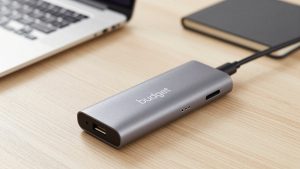
The Anker 555 USB-C hub sits in the practical middle of the dongle market: more capable than a two-port travel adapter, far cheaper and more portable than a powered Thunderbolt dock. It is the kind of accessory that a MacBook or ultrabook owner buys once and forgets about, because it quietly adds back the ports that thin laptops removed. This review covers what the 555 connects, how its passthrough charging works, and where its limits are.
📄 In This Review
What the 555 is for
This is an 8-in-1 bus-powered hub that draws its power from your laptop’s USB-C port and, through passthrough charging, can feed power back while you work. It is designed for people who want one compact adapter that handles a monitor, wired internet, card readers, and a couple of USB devices without carrying a separate power brick for the hub itself.
Port layout
| Port | Count | Spec / use |
|---|---|---|
| HDMI | 1 | 4K30 external display |
| USB-C data | 1 | 5 Gbps peripherals |
| USB-C power (PD in) | 1 | Up to 100W passthrough |
| USB-A | 2 | 5 Gbps, 5V/1.5A each |
| Ethernet (RJ45) | 1 | Gigabit wired |
| SD card | 1 | UHS-I speeds |
| microSD card | 1 | UHS-I speeds |
Charging and power
See also: Best Reclining Chairs: Nine Recliner Listings Compared by Mechanism, Fabric and Space Needs • Best Roku Streaming Deals Reviewed
The passthrough USB-C port accepts up to 100W from your own laptop charger, and the hub reserves a portion for its internal electronics, so the laptop typically sees around 85W after overhead. That is still enough to charge most ultrabooks and MacBooks while they run a monitor and peripherals. Because the hub itself is bus-powered, it will not fast-charge phones on the data ports the way a desktop dock can.
| Spec | Anker 555 (8-in-1) | Basic 5-in-1 travel hub | Powered TB dock |
|---|---|---|---|
| Power source | Bus + PD passthrough | Bus only | Own AC adapter |
| PD passthrough | Up to 100W (~85W net) | 60W or none | 90–100W dedicated |
| Displays | 1 × 4K30 | 1 × 4K30 | 1–2 × 4K60 |
| Ethernet | Gigabit | Often none | 1–2.5 GbE |
| Data speed | 5 Gbps | 5 Gbps | Up to 40 Gbps |
| Price band | $40–70 | $20–35 | $180–300 |
Real-world performance
For a single 4K monitor the HDMI port is capped at 30Hz, which is the most important limitation to understand. At 4K30 the desktop looks fine for documents, browsing, and coding, but the mouse feels less fluid than at 60Hz and it is not ideal for video or fast scrolling. If you drive a 1080p or 1440p monitor instead, the hub can hit 60Hz and the experience is smooth. The Gigabit Ethernet is reliable and a genuine upgrade over congested Wi-Fi for calls and large transfers.
The USB-A ports run at 5 Gbps, fast enough for external SSDs, backup drives, and everyday peripherals, though they share bandwidth, so copying from two fast drives at once will split the throughput. The card readers handle UHS-I speeds, which suits most SD and microSD cards used in cameras, drones, and handheld consoles; if you shoot on faster UHS-II media you will not see its full speed here. For the vast majority of everyday transfers, though, the readers are quick and convenient enough to leave the dedicated card reader in a drawer.
Build and portability
The aluminum shell doubles as a heat spreader—expect it to get warm under load, which is normal for aluminum hubs. The attached cable is short and stiff enough to sit tidily beside a laptop. At roughly the size of a deck of cards, it slips into a bag easily, which is where it beats a desktop dock. Because it carries its own power passthrough, you also avoid the common travel-hub annoyance of watching your battery drain while a monitor and drives sap the laptop; plug your normal charger into the PD port and the hub keeps the laptop topped up while it works.
Who should buy it
The 555 is ideal for ultrabook and MacBook owners who mainly need Ethernet, a single 4K30 or 1440p60 monitor, card readers, and a couple of USB ports, all in a pocketable package with passthrough charging. Buy a powered Thunderbolt dock instead if you need dual monitors, 4K60, or 40 Gbps external SSD speeds; the 555 is not built for that tier.
FAQ
Why is the HDMI limited to 4K30?
The 555 uses a single-lane HDMI path over DisplayPort Alt Mode, which tops out at 4K30. It is a bandwidth trade-off common to compact bus-powered hubs. For 60Hz you can either run a lower resolution like 1440p, or step up to a Thunderbolt dock that dedicates more bandwidth to video.
Does the Anker 555 work with Windows laptops and iPads?
Yes, as long as the host USB-C port supports DisplayPort Alt Mode for video output. Most modern Windows ultrabooks and recent iPad Pro/Air models work fully. On devices without Alt Mode, the data, Ethernet, and card-reader functions still work but the HDMI display output will not.
Bottom line
The Anker 555 USB-C hub is a smart, portable way to give a thin laptop back its ports: Gigabit Ethernet, dual card readers, two USB-A ports, and up to 100W passthrough charging in a deck-of-cards aluminum body. The one thing to accept going in is the 4K30 HDMI cap—fine for productivity, limiting for video. For single-monitor desks and travel, it is one of the best-value hubs you can carry.
Related Reviews & Guides




How to choose a laptop docking station

Best Ergonomic Office Chair for Remote Workers