Last Updated: August 19, 2026
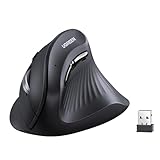
- Top Pick: Attoe Gaming Mouse with 5 D Rocker, Wireless Vertical Mouse with [24000 DPI] [12 Programmable Buttons], Computer Mouse for Gamer/PC/E-Sports/Laptop (Black)
- Best Value: Anker USB Wired Vertical Mouse, Ergonomic Mouse for Computer and Laptops
- Premium Choice: Logitech Lift Vertical Ergonomic Wireless Mouse – Graphite
If you spend more than six hours a day with your hand wrapped around a mouse, your wrist is doing more work than most people realize. Vertical mice keep your forearm in a neutral, handshake-style position instead of the flat pronation a traditional mouse forces, which is why so many developers who deal with wrist fatigue, early carpal tunnel symptoms, or just long debugging sessions eventually switch. The tradeoff is a short adjustment period, usually a few days, before the new grip angle feels natural.
We looked at five vertical mice that make sense for programmers in 2026, weighing sensor accuracy, button count and placement, connection reliability for multi-monitor setups, and how well each one actually holds up during a full workday. Here’s what earned a spot.
As an Amazon Associate we earn from qualifying purchases at no extra cost to you.
![Attoe Gaming Mouse with 5 D Rocker, Wireless Vertical Mouse with [24000 DPI] [12 Programmable Buttons], Computer Mouse for Gamer/PC/E-Sports/Laptop (Black)](https://m.media-amazon.com/images/I/41XVdqDE3aL._SL160_.jpg)





⚡ Save on Your Next PC — Amazon Prime
Prime members get fast free shipping on the systems above, plus early access to Prime Day & Black Friday PC deals. New members get a 30-day free trial.
📄 In This Review
Watch: Top 5 Vertical Mice for Programmer Productivity 2026 — Video Review
How to Choose
See also: Best Air Purifier For Bedroom Allergies • Desk Top Air Purifier
- Grip angle: Look for a 60-90 degree vertical tilt. Steeper angles relieve more pronation but take longer to get used to if you’re switching from a flat mouse.
- DPI range: 800-1600 DPI covers most coding and browsing work; higher ceilings (4000+) only matter if you also game or do detailed design work on the same mouse.
- Programmable buttons: Extra thumb buttons let you bind copy/paste, tab switching, or IDE shortcuts, which cuts down on repetitive keyboard reaches.
- Connection type: Bluetooth saves a USB port and travels well; a 2.4GHz dongle is more reliable for low-latency work; wired is the cheapest and never needs charging.
- Battery life: If you’re going wireless, aim for 3+ months on a charge or replaceable AA batteries so you’re not hunting for a cable mid-sprint.
The Best Picks Reviewed
Logitech Lift Vertical Ergonomic Wireless Mouse
The Lift is the most refined option here, with a 57-degree tilt that’s gentle enough for all-day use without feeling like a big adjustment from a normal mouse. It runs on Logi Bolt or Bluetooth, pairs to multiple devices through Logitech’s Flow-style switching, and the 6 programmable buttons cover most shortcut needs without cluttering the shape. Battery life lands around 24 months on a single AA, which is the kind of number you stop thinking about entirely.
UGREEN Vertical Wireless Mouse
UGREEN’s pick stands out for connection flexibility: Bluetooth 5.0 and a 2.4GHz dongle are both built in, so you can switch between a laptop and desktop without re-pairing. Four DPI settings from 1000 to 4000 give you room to dial in sensitivity per task, and the 5 buttons are laid out sensibly for a thumb that’s still adjusting to the vertical grip.
TECKNET 2.4G Ergonomic Vertical Mouse
TECKNET keeps things simple with a 2.4GHz-only connection, which means lower latency than Bluetooth and a mouse that just works the moment you plug in the dongle. The 4800 DPI ceiling is higher than most programmers need, but scaling it down is a one-click adjustment, and the vertical shape holds a comfortable middle-ground angle that doesn’t demand much of a learning curve.
LOONASA Rechargeable Vertical Mouse
This one covers every connection base at once, Bluetooth 5.0, Bluetooth 3.0, and 2.4G, plus USB-C charging instead of disposable batteries. The silent click mechanism is a real perk in shared offices or on video calls, and 6 buttons give enough room to map a couple of IDE-specific shortcuts.
Anker Wired Vertical Mouse
The Anker is the straightforward, no-fuss choice: plug it in and it works, no pairing, no charging, no dongle to lose. It’s the most affordable mouse on this list and a sensible starting point if you’re vertical-mouse-curious and don’t want to commit to a wireless setup before you know the grip works for you.
Frequently Asked Questions
Do vertical mice actually help with wrist pain?
For many users, yes. Keeping the forearm in a neutral rotation reduces the pronation strain that builds up over hours of flat-mouse use. That said, a vertical mouse isn’t a substitute for taking breaks or seeing a doctor if you have persistent pain.
How long does it take to adjust to a vertical mouse?
Most people need 3 to 7 days before cursor control feels natural again. Precision work like pixel-level design edits takes a bit longer to relearn than general navigation and clicking.
Will a vertical mouse work for gaming too?
Some can, but they’re generally optimized for productivity movements, not fast-flick aiming. If gaming is a priority, look for models with higher polling rates and DPI ceilings, and treat any gains for programming work as a bonus rather than the main selling point.
Bluetooth or 2.4GHz dongle, which is better for programming?
A 2.4GHz dongle typically gives slightly lower latency and more consistent tracking, which matters for fast cursor movement across multiple monitors. Bluetooth saves a USB port and is fine for most coding work, just double-check it doesn’t introduce noticeable lag on your specific setup.
Final Thoughts
For most programmers, the Logitech Lift is the safest recommendation, it’s comfortable out of the box, connects reliably, and doesn’t demand a steep learning curve. If you want maximum connection flexibility across a laptop and desktop, the UGREEN is the better value. And if you just want to test whether a vertical grip works for you before spending much, the Anker wired mouse is the low-risk entry point.
Related Reviews & Guides

8 Best Under-Desk Heater for Winter Work Sessions 2026
How to Integrate a Tablet into Your Desk Setup for Multitasking 2026