Last Updated: September 7, 2026
- Top Pick: The Standing Desk Mat – Topo by Ergodriven | Premium Not-Flat Anti-Fatigue Standing Desk Mat with Calculated Terrain | Ultra-Thick Deluxe Comfort Foam, Durable, PVC-Free | Accessories | Obsidian Black
- Best Value: Standing Desk Mat – Topo Mini by Ergodriven | The Smaller Not-Flat Anti-Fatigue Standing Desk Mat with Calculated Terrain | Ultra-Thick Premium Comfort Foam, Durable, No PFAs or PVC | Obsidian Black
- Premium Choice: Ergohead Anti Fatigue Kitchen Floor Mat Comfort Standing Mat, Portable Office Standing Desk Mat, Multi-Purpose Kitchen Rug, Built-in Handle with Massage Points Comfort Floor Mat (Black, 17" x 22")
Standing at your desk sounds great in theory, but after 20 minutes on a hard floor, most people quietly give up and sit back down. The missing piece is almost always the mat. A well-designed anti-fatigue mat encourages tiny shifts in posture, reduces pressure on your heels and lower back, and makes the difference between a standing session you dread and one you barely notice.
We rounded up six mats for 2026, from terrain-based ergonomic designs to balance boards and industrial-grade options, so you can match the right mat to your flooring, your feet, and your budget.
As an Amazon Associate we earn from qualifying purchases at no extra cost to you.




⚡ Save on Your Next PC — Amazon Prime
Prime members get fast free shipping on the systems above, plus early access to Prime Day & Black Friday PC deals. New members get a 30-day free trial.
📄 In This Review
Watch: Best Sit-Stand Desk Mats for Comfort and Support 2026 — Video Review
How to Choose
See also: Best Air Purifier For Bedroom Allergies • Desk Top Air Purifier
- Thickness: Look for at least 3/4 inch of cushioning if you’re on concrete or tile; thinner mats work fine over carpet or padded subfloors.
- Surface terrain: Flat mats are comfortable but static; mats with varied contours or wobble motion prompt small foot and calf movements that improve circulation over long stands.
- Size and footprint: Measure your standing zone first. A 20″ x 32″ mat suits most single-desk setups, while wider mats help if you pace or shift side to side.
- Material and off-gassing: PVC-free or PFA-free foams are worth the extra cost if you’re sensitive to smells or plan to keep the mat in a small room.
- Edge and bottom design: Beveled edges reduce trip hazards, and a non-slip rubber bottom keeps the mat from sliding on hardwood or tile.
The Best Picks Reviewed
Ergodriven Topo Standing Desk Mat
The Topo isn’t flat by design. Its calculated terrain has raised zones near the heel and ball of the foot that gently encourage you to shift weight throughout the day, which is exactly the kind of micro-movement that keeps legs from stiffening up. The foam is noticeably thicker than most competitors, and the PVC-free construction means less of that new-mat smell. If you stand for four or more hours a day, this is the mat built for that use case.
Ergodriven Topo Mini
Same terrain concept as the full-size Topo, scaled down for smaller desks or shared spaces. It’s a smart pick if your standing footprint is tight, or if you want the ergonomic benefits without committing a large chunk of floor space. The tradeoff is less room to pace, so it suits people who stand mostly in place rather than shifting positions often.
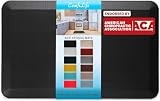
ComfiLife Anti Fatigue Floor Mat
At 3/4 inch thick and 20″ x 32″, the ComfiLife hits a practical middle ground between cushioning and stability. It’s flat rather than contoured, which some people actually prefer for balance, and the stain-resistant surface makes it easy to keep clean if it doubles as a kitchen mat on weekends. Good value for anyone who wants comfort without the higher cost of terrain-based designs.
Ergohead Anti Fatigue Mat
Compact at 17″ x 22″, the Ergohead is built for portability, with a built-in handle that makes it easy to move between a standing desk and the kitchen counter. Raised massage points on the surface add a bit of texture underfoot, which helps if you tend to stand still for long stretches. Best suited to smaller spaces or as a secondary mat rather than an all-day primary station.
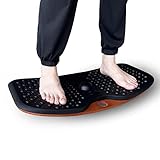
ZEALTOP Balance Board Mat
This is the outlier in the group: a wobble-style rocker board rather than a traditional foam mat. It forces continuous small balance corrections, which engages core and leg muscles more actively than a static mat. It’s a good fit if you already stand comfortably and want to add a light workout element, but it’s not the right choice if you need a stable surface for typing or fine motor tasks.
Frequently Asked Questions
How thick should a standing desk mat be?
Between 1/2 inch and 1 inch is the sweet spot for most people. Thinner mats feel firm and stable but offer less cushioning over time, while very thick mats can feel unstable underfoot, especially in shoes with soft soles.
Do contoured or terrain mats actually help more than flat mats?
Contoured designs like the Topo line are built around the idea that varied foot pressure reduces fatigue better than uniform cushioning. Flat mats are simpler and often more stable, so the right choice depends on whether you want passive comfort or active postural variation.
Can I use a kitchen anti-fatigue mat at my standing desk?
Yes. Mats like the ComfiLife and Ergohead are marketed for both kitchen and office use, and the underlying foam technology is the same. Just check the footprint fits your desk zone and that the bottom grips your flooring type.
Are balance boards a good substitute for a standard mat?
They’re a supplement, not a direct substitute. A board like the ZEALTOP engages stabilizer muscles, which is great for short standing intervals, but it can make precise tasks like typing or mousing harder over a full workday.
Final Thoughts
For most home offices, the Ergodriven Topo is the strongest all-around pick thanks to its terrain design and thick, durable foam. If space is tight, the Topo Mini delivers the same benefits in a smaller footprint. For a budget-friendly option that still holds up daily, the ComfiLife Anti Fatigue Floor Mat is hard to beat.
Related Reviews & Guides
Ultimate Guide to Cable Management for a Clean Desk Setup 2026
Ergonomic Keyboard Tray Installation Guide 2026