Last Updated: September 7, 2026
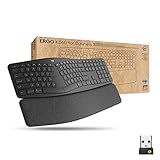
After three months of daily use, the Logitech Ergo K860 remains one of the few split ergonomic keyboards that doesn’t force you to relearn how to type. The tented, curved layout looks intimidating in photos, but most people adjust within a day or two, and the payoff is a noticeably more neutral wrist position during long work sessions.
This review covers what the K860 gets right, where it falls short, and whether it’s worth the premium over a standard flat keyboard in 2026, when there are more ergonomic options on the market than ever.
As an Amazon Associate we earn from qualifying purchases at no extra cost to you.




⚡ Save on Your Next PC — Amazon Prime
Prime members get fast free shipping on the systems above, plus early access to Prime Day & Black Friday PC deals. New members get a 30-day free trial.
📄 In This Review
Watch: Review: Logitech Ergo K860 Split Keyboard – A Game Changer? 2026 — Video Review
Design & Build
See also: Best Air Purifier For Bedroom Allergies • Desk Top Air Purifier
The K860 splits the keyboard into two angled halves with a 10-degree palm-up tent in the middle, plus a negative tilt option using the rear feet. The cushioned wrist rest is dense foam wrapped in a firm fabric that doesn’t compress into nothing after a few weeks, which is a common complaint with cheaper wrist rests. Build quality feels solid at 2.2 lbs, with minimal flex across the chassis. The plastic is matte and resists fingerprints well. Key travel is shallow at around 3mm, more laptop-like than mechanical, but the scissor switches feel consistent and quiet enough for shared offices or video calls. Battery life is rated at 10 months on two AAA batteries, which matched our real-world experience within a few weeks. One design compromise: the numpad is bundled into the right-hand block rather than sitting separately, so if you do heavy numeric entry, expect a slight adjustment period.
Performance
Typing accuracy improved for us within about a week, with noticeably less wrist deviation on longer sessions compared to a flat keyboard. The palm-up tent does real work here; it’s not a gimmick. Connectivity is reliable over both Bluetooth and the included Logi Bolt USB receiver, and switching between three paired devices via the Easy-Switch button is fast and consistent. Logitech Options+ software allows remapping of the F-keys and macro functions, though the software itself is a bit heavier than it needs to be for a keyboard this simple. Latency is a non-issue for typing and general office work; this isn’t a gaming keyboard, so competitive gamers should look elsewhere. The backlighting is absent entirely, which is a real limitation for anyone working in low light, and the lack of a wired-only mode means it fully depends on batteries or the receiver’s Bluetooth pairing.
Pros & Cons
- Palm-up tented design measurably reduces wrist strain during long sessions
- 10-month battery life on two AAA batteries, no daily charging
- Quiet scissor-switch keys suitable for offices and calls
- Reliable multi-device Bluetooth switching with Easy-Switch
- Durable wrist rest that holds its shape over months of use
- No backlighting, a drawback in dim workspaces
- Shallow 3mm key travel won’t satisfy mechanical keyboard fans
- Numpad integration takes adjustment for heavy numeric users
- Premium price compared to standard flat ergonomic keyboards
- Split layout has a real learning curve for the first few days
Alternatives to Consider
If you’re building out a full ergonomic setup, the Logitech Ergo K860 & Lift Vertical Mouse bundle pairs the keyboard with a matching vertical mouse and is worth considering if you’re also dealing with forearm or wrist strain from mousing. Businesses or IT departments outfitting multiple desks might prefer the Ergo K860 Split for Business in Graphite, which ships with a 3-year warranty and centralized device management tools. For anyone who spills coffee near their desk or wants to extend the keyboard’s lifespan, a silicone keyboard skin cover is a cheap add-on worth grabbing alongside the main unit.
Frequently Asked Questions
Is the K860 good for people with carpal tunnel or existing wrist pain?
Many users with mild to moderate wrist discomfort report improvement, largely due to the tented split design and included wrist rest. It’s not a medical device, though, so anyone with diagnosed carpal tunnel syndrome should consult a doctor or occupational therapist before assuming any keyboard will resolve symptoms.
How long does the adjustment period take?
Most typists adapt within 3 to 7 days. Touch typists tend to adjust faster than those who look at the keyboard while typing, since the split layout changes the visual reference points for certain keys.
Can I use the K860 with a wired connection?
No, the K860 is wireless-only, connecting via Bluetooth or the included Logi Bolt USB receiver. There’s no USB-C or USB-A cable option for direct wired input, which matters if your workplace restricts wireless peripherals.
Do the rubber feet wear out, and can they be replaced?
Yes, the rear tilt feet are a known wear point after a year or two of daily adjustment. Replacement feet stands are sold separately and are a straightforward swap that extends the keyboard’s usable life without buying a new unit.
Verdict
The Logitech Ergo K860 earns its reputation as one of the most approachable split ergonomic keyboards available in 2026. It won’t win over mechanical keyboard purists or anyone who needs backlighting, but for desk workers logging six or more hours a day, the reduction in wrist strain is real and measurable within the first few weeks. Pair it with the matching Lift mouse if you’re addressing full-arm ergonomics, add a silicone cover if you want to protect your investment, and budget for replacement feet down the line. At this price point, it’s a considered purchase rather than an impulse buy, but for the right use case, it delivers.
Related Reviews & Guides
Top 3 Under-Desk Storage Solutions for a Tidy Workspace 2026
Adjustable Height Desk vs Fixed Height Desk: Which is Right for You? 2026