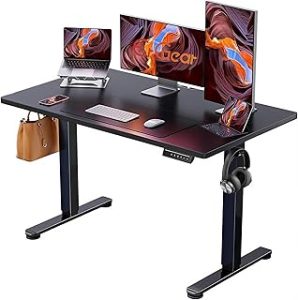
Last Updated: September 7, 2026
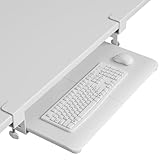
- Top Pick: VIVO Adjustable Computer Keyboard & Mouse Platform Tray Ergonomic Under Table Desk Mount Drawer Underdesk Shelf (MOUNT-KB03B)
- Best Value: BONTEC Under Desk Keyboard Tray, Pull-Out Keyboard & Mouse Platform
- Premium Choice: VIVO Large Keyboard Tray Under Desk Pull Out with Extra Sturdy C Clamp Mount System, 27 (33 Including Clamps) x 11 Inch Slide-Out Platform Computer Drawer for Typing, Black, MOUNT-KB05E
A keyboard tray isn’t just an accessory, it’s often the single change that fixes wrist pain, hunched shoulders, and cramped desk space in one move. By dropping your typing surface 2 to 3 inches below standard desk height (typically 28 to 30 inches), you restore a neutral 90-degree elbow angle that most desks simply weren’t designed to support.
This guide walks through clamp compatibility, tray sizing, and installation steps so you can pick the right mount on the first try instead of returning a tray that doesn’t fit your desk edge or your chair clearance. We’ll reference specific models like the VIVO MOUNT-KB03B and BONTEC pull-out tray to illustrate real-world sizing decisions.
As an Amazon Associate we earn from qualifying purchases at no extra cost to you.





⚡ Save on Your Next PC — Amazon Prime
Prime members get fast free shipping on the systems above, plus early access to Prime Day & Black Friday PC deals. New members get a 30-day free trial.
📄 In This Review
Watch: Ergonomic Keyboard Tray Installation Guide 2026 — Video Review
Measure Before You Buy
See also: Best Air Purifier For Bedroom Allergies • Desk Top Air Purifier
Most installation failures come down to skipping measurements. Before ordering anything, check three numbers: desk thickness, under-desk clearance, and available knee room once the tray arms are installed.
- Desk thickness: most clamp systems fit 0.6 to 3 inches; thick executive desks (2.5 inches+) need a heavy-duty clamp like the one on the VIVO MOUNT-KB05E.
- Clearance below the desk: you need at least 3 to 4 inches of vertical drop for the tray plus your knuckles when typing.
- Knee clearance: verify the mounting arms won’t intrude into your leg space, especially with C-clamp systems that extend backward.
- Desk material: particleboard and laminate desks handle clamps fine, but glass or very thin composite tops may need a no-clamp adhesive alternative.
Choosing the Right Tray Size and Style
Tray dimensions matter more than most buyers expect. A cramped 21-inch tray forces your mouse hand off the platform; a 27-inch tray like the VIVO MOUNT-KB05E gives full-size keyboards and a mouse room to spare, which matters if you use a tenkeyless board plus a larger mouse pad.
- Standard single-level trays (BONTEC, Zontera 25.6×11.8 inch) suit compact keyboards and minimalist setups.
- Trays with wrist rests and storage drawers, like the Klearlook 24.4×10 inch model, add comfort but reduce raw platform depth, so measure your keyboard length first.
- 360-degree rotating mounts, such as the HUANUO tray, are worth the extra cost if you share a desk or switch between sitting positions throughout the day.
- Extra-sturdy C-clamp systems, like the VIVO MOUNT-KB05E, hold up better under heavy mechanical keyboards and daily slide-out use.
Step-by-Step Installation
Installation across most under-desk trays follows the same general sequence, whether you’re mounting a BONTEC tray or a Klearlook platform with a drawer.
- Clear everything from under the desk and locate the front edge center point where you’ll mount the tray.
- Attach the mounting bracket or track to the underside of the desk using the included clamps, hand-tightening first to confirm alignment.
- Slide the tray arm or track assembly into the bracket and test the slide motion before fully tightening bolts.
- Torque down the clamp screws firmly, then pull the tray fully out and push it back in to check for wobble or binding.
- Adjust tilt and height settings (most trays offer 0 to 15 degrees of tilt) to match your natural wrist angle.
Ergonomic Setup After Mounting
Getting the tray installed is half the job. Positioning it correctly determines whether you actually get the wrist and shoulder relief you bought it for.
- Set tray height so your elbows rest at roughly 90 to 110 degrees with shoulders relaxed, not shrugged.
- Keep the mouse platform at the same height as the keyboard to avoid one wrist bending higher than the other.
- Tilt the tray slightly downward (5 to 10 degrees) if you notice wrist extension strain after long sessions.
- Center the tray on your body, not the desk, especially if your monitor is offset to one side.
Weight Limits and Durability
Under-desk trays aren’t all rated equally. Most consumer models support 15 to 25 pounds of combined keyboard and mouse weight, which is plenty for standard peripherals but worth checking if you run a mechanical keyboard, a wrist rest, and a trackball simultaneously.
- Check the clamp material: steel C-clamps (VIVO MOUNT-KB05E) generally outlast plastic-reinforced clamps under repeated slide-out use.
- Ball-bearing slide tracks, common on BONTEC and HUANUO trays, hold up better over years of daily use than basic friction slides.
- If you plan to store items in a drawer compartment, like on the Klearlook tray, subtract that weight from your keyboard and mouse allowance.
Tips
- Test the tray’s slide-out distance before finalizing chair position; some trays extend 20+ inches and need extra legroom.
- Use a torque-appropriate screwdriver, not a drill, when tightening clamps into wood desks to avoid stripping the mounting holes.
- Re-check clamp tightness after the first week of use; wood desks compress slightly and screws can loosen.
- If your desk has a support beam or drawer underneath, measure around it before ordering a wide-clamp system like the MOUNT-KB05E.
Frequently Asked Questions
Will a keyboard tray damage my desk?
Clamp-style trays typically leave small indentation marks on the underside of the desk, not visible from normal use. If you’re renting or using a high-end desk, look for trays with rubber-padded clamps or consider a freestanding riser instead.
Can I install a keyboard tray on a glass desk?
Standard clamp mounts aren’t rated for glass, since clamping pressure can crack the surface. Check for trays explicitly rated for glass or thin composite tops, or choose a freestanding under-desk shelf that doesn’t require clamping.
How much clearance do I need under my desk?
Plan for at least 3 to 4 inches of vertical space between the desk underside and your knees once the tray, arm, and keyboard are all in place. Measure with a book or box of that thickness before ordering if you’re unsure.
Do keyboard trays work with standing desks?
Yes, most clamp-based trays move with the desk as it rises and falls, since they’re mounted directly to the surface. Just confirm the tray’s slide mechanism doesn’t hit the desk frame or motor housing at your lowest sitting height.
Conclusion
The right keyboard tray comes down to matching clearance, desk thickness, and platform size to your actual setup, not just picking the highest-rated option. Measure first, choose a tray with the clamp strength and slide quality your desk demands, and take the extra ten minutes to fine-tune height and tilt after installation. That last step is what turns a mounted tray into real ergonomic relief.
Related Reviews & Guides
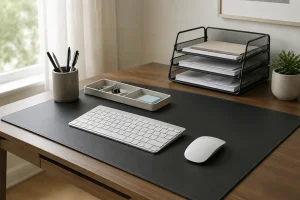

8 Best Desk Mats for Scratch Protection 2026
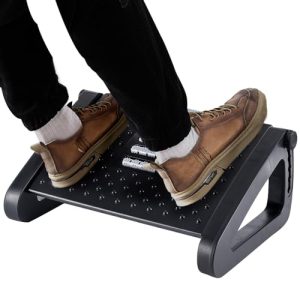
How to Set Up a Productivity-Boosting Desk Layout 2026