Last Updated: September 7, 2026
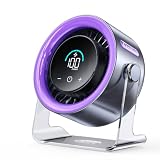
- Top Pick: Coolhill USB Desk Fan for Bedroom: 100 Speeds Digital Display Quiet Portable Fan with Turbo Airflow, 120° Rotating Small Rechargeable Battery Desktop & Wall-Mounted Fans for Bedroom Home Office
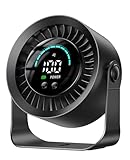
- Best Value: DIGIX Portable Desk Fan, 100 Speeds, 360° Rotation, USB Rechargeable
- Premium Choice: AMACOOL Portable Waist Fan Clip On, 10000mAh Wearable Shirt Fan with Light
If your desk gets stuffy by mid-afternoon, a good desk fan is one of the cheapest upgrades you can make to your workspace. The right one keeps air moving across your hands and face without drowning out calls or blasting papers off your desk, and in 2026 there are far more quiet, USB-rechargeable options than there used to be.
We looked at airflow, noise levels, oscillation range, and how easy each fan is to live with next to a keyboard and monitor. Below are six picks that cover everything from a clip-on wearable fan to a whisper-quiet tower fan, plus a laptop cooling pad if your heat problem is actually coming from underneath your keyboard.
As an Amazon Associate we earn from qualifying purchases at no extra cost to you.





⚡ Save on Your Next PC — Amazon Prime
Prime members get fast free shipping on the systems above, plus early access to Prime Day & Black Friday PC deals. New members get a 30-day free trial.
📄 In This Review
Watch: Best Desk Fan for Staying Cool While Working 2026 — Video Review
How to Choose
See also: Best Air Purifier For Bedroom Allergies • Desk Top Air Purifier
- Noise level: Look for a rated decibel level under 30dB if you take calls at your desk; anything above 40dB competes with normal conversation.
- Speed settings: Fans with 50-100 speed levels let you fine-tune airflow instead of jumping between “too weak” and “too strong.”
- Power source: USB-rechargeable fans with a battery (5,000mAh or more) work at a desk without an outlet or travel with you on a laptop bag.
- Oscillation range: A fan that only blows straight ahead cools one spot; 90° vertical or 120° horizontal oscillation spreads air across a wider desk area.
- Footprint: Measure your desk space before buying a tower fan or dual-fan cooling pad, since both need more clearance than a small clip-on unit.
The Best Picks Reviewed
Coolhill USB Desk Fan for Bedroom
The Coolhill packs 100 speed settings and a digital display into a compact desktop unit, which makes it easy to dial in exactly the airflow you want instead of guessing between low, medium, and high. Its 120° rotation covers a decent swath of desk space, and because it can sit on a desk or mount to a wall, it works in tight home offices where floor and desk space are both limited. The turbo mode gives it a real edge over typical mini fans when you need a quick blast of cool air on a hot afternoon.
DIGIX Portable Desk Fan
DIGIX also offers 100 speeds, but its standout feature is full 360° rotation, which means it can aim air in nearly any direction without repositioning the whole fan. It’s USB rechargeable, so it’s a solid choice for a desk without a nearby outlet or for tossing in a bag before a coworking day. Build quality feels a notch above typical budget desk fans, with a sturdier base that resists tipping at higher speeds.
AMACOOL Portable Waist Fan Clip On
This one breaks from the typical desk fan format entirely. The AMACOOL clips onto a waistband or shirt and runs on a 10,000mAh battery, making it the pick for anyone who moves between a desk, a warehouse floor, or an outdoor job site. It includes a built-in light for early mornings or dim spaces, and the battery capacity means it can run for hours longer than most desktop units before needing a recharge.
Levoit Tower Fan for Bedroom
If noise is your main concern, the Levoit tower fan is rated at just 20dB, quiet enough to run through a video call without anyone noticing. It pushes air at up to 23 feet per second, so despite the near-silent operation, it doesn’t feel weak. The tower form factor takes up more desk or floor space than the compact picks here, but it distributes air more evenly across a room-sized area, which makes it a better fit for a shared home office than a single desk.
Targus 17 Inch Dual Fan Lap Chill Mat
Sometimes the heat problem isn’t the room, it’s the laptop. The Targus AWE55US uses dual USB-A powered fans and a soft neoprene base to pull heat away from a 17-inch laptop and anything smaller, which can meaningfully cut down on fan noise and thermal throttling during long work sessions. It’s not a substitute for a desk fan, but paired with one it addresses the other half of the “why is my desk so hot” equation.
Frequently Asked Questions
How much airflow do I actually need at a desk?
For most desks, a fan with adjustable speeds in the 20-100 range and at least 90° of oscillation is enough to keep air moving without needing an industrial-grade unit. Reserve higher airflow, floor-standing fans for larger rooms.
Are USB-rechargeable fans powerful enough to replace a plug-in fan?
Modern rechargeable fans with 5,000mAh-plus batteries and multiple speed settings can match the output of many plug-in desk fans, especially on turbo or high settings. The main tradeoff is runtime on a single charge at max speed, which is usually a few hours rather than unlimited.
What decibel level counts as “quiet” for a desk fan?
Anything in the 20-25dB range is considered library-quiet and won’t interfere with calls or concentration. The 30-40dB range is still reasonable for background use, while fans above 40dB are noticeable during quiet tasks.
Do I need a laptop cooling pad if I already have a desk fan?
A desk fan cools the air around you, but it doesn’t always reach the vents on the underside of a laptop. If your laptop fan runs loudly or the machine throttles under load, a dedicated cooling pad like the Targus addresses that heat source directly, and works well alongside a regular desk fan.
Final Thoughts
For most home offices, the Coolhill USB Desk Fan hits the best balance of speed control, rotation, and flexible placement. If quiet operation is the priority, the Levoit Tower Fan’s 20dB rating is hard to beat, and anyone who splits time between a desk and moving around should look at the AMACOOL waist fan for cooling that travels with them.
Related Reviews & Guides
Top 3 Budget Monitors for Home Office Use 2026
8 Best Desk Organizers for Minimalist Setups 2026