Last Updated: September 29, 2026
- What Actually Fits on a 40-Inch Wide Desk
- Standing Desk 30 Inches Wide vs 40 Inches: Which to Choose
- Ideal Room Placement for a Small-Space Standing Desk
- What Makes a Compact Frame Stay Stable at Standing Height
- Best Types of 40-Inch Standing Desks by Situation
- Assembly, Moving and Durability Realities
- FAQ
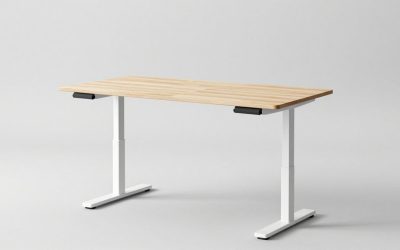
A standing desk 40 inches wide gives you enough surface for a full dual-monitor setup or a large laptop plus second screen in a footprint that fits almost any apartment, bedroom corner, or home office alcove without blocking walkways.
📄 In This Review
- What Actually Fits on a 40-Inch Wide Desk
- Standing Desk 30 Inches Wide vs 40 Inches: Which to Choose
- Ideal Room Placement for a Small-Space Standing Desk
- What Makes a Compact Frame Stay Stable at Standing Height
- Best Types of 40-Inch Standing Desks by Situation
- Assembly, Moving and Durability Realities
- FAQ
What Actually Fits on a 40-Inch Wide Desk
A 40-inch width (typically 40″W x 24″D) provides about 6.6 square feet of usable surface. That is the minimum width where you can work comfortably without feeling cramped if you use an external monitor. Here is how it breaks down in real measurements:
| Setup | Width Needed | Fits on 30-Inch Desk? | Fits on 40-Inch Desk? |
|---|---|---|---|
| Laptop (15″) + mouse + notebook | 28-30 inches | Yes, tight | Yes, with room to spare |
| Single 27″ monitor + keyboard + mouse | 32-34 inches | No, overhangs | Yes, comfortable |
| Dual 24″ monitors on stands | 38-42 inches | No | Yes, edge-to-edge |
| Dual 24″ monitors on single arm | 33-36 inches | Barely, with clamp overhang | Yes, ideal |
| 34″ ultrawide + keyboard | 36-38 inches | No | Yes |
Depth matters as much as width. At 24 inches deep, you can maintain the recommended 20 to 26 inches of viewing distance from your eyes to the screen while leaving 4 to 6 inches for a keyboard tray or wrist rest. If you choose a 40 x 20 inch model to save even more space, you will need a monitor arm to reclaim depth, otherwise your monitor base will push your keyboard too close to the edge.
Weight capacity is rarely an issue at this size. Most compact electric frames are rated for 150 to 250 lbs, while your actual load for a 40-inch top with two monitors, a laptop, and accessories is usually 35 to 60 lbs. The limit to watch is not total weight but weight distribution – a heavy desktop PC tower (25-30 lbs) placed on one side can create wobble if the frame has a single motor and a narrow foot span.
Standing Desk 30 Inches Wide vs 40 Inches: Which to Choose
See also: Best Monitor Under 300: Eight Listings Compared by Refresh Claims, Panel Type and Pixel Load • Best Adjustable Standing Desk Converters for Dual Monitors: Width, Weight and Fit Compared
A standing desk 30 inches wide is a true micro-desk. It works best for laptop-only work, writing, or as a secondary standing station in a kitchen or hallway nook. It will not comfortably hold dual monitors or a large gaming setup, and you will have to stack vertically with a monitor riser or wall shelf to make it functional.
Choose 30 inches wide if:
- Your available wall space is under 36 inches, such as between a closet and a window
- You work primarily on a single laptop or tablet and use an external keyboard occasionally
- You need a mobile or folding standing option you can slide behind a door
Choose 40 inches wide if:
- You use any external monitor 24 inches or larger
- You need room for paperwork, a notebook, or creative tools alongside your computer
- You work 4+ hours per day at the desk and need ergonomic spacing for keyboard and mouse at elbow height
For most people working from home full-time, 40 inches is the smallest width that does not force daily compromises. The 10-inch difference saves only about 1.5 square feet of floor space but doubles your layout options.
Ideal Room Placement for a Small-Space Standing Desk
A 40-inch desk excels because its dimensions work with standard residential clearances. Use these measurements to plan placement without blocking flow:
Clearance rules to follow: Leave at least 36 inches behind the desk chair for someone to walk past while you are seated, and 30 inches minimum if it is against a wall and no traffic passes. At standing height, allow 4 to 6 inches between the desk’s rear edge and the wall for cable management and motor housing. For a 10×12 ft bedroom, a 40-inch desk along the 10-foot wall uses only 33% of that wall, leaving room for a bed, nightstand, and a 24-inch wide filing cabinet or dresser.
Best placements by room type:
- Bedroom corner: Place the desk perpendicular to the window wall. You avoid screen glare and the 40-inch side fits into the dead corner space that is too small for a dresser. Keep the chair side open toward the center of the room.
- Living room alcove or behind a sofa: A 40-inch desk can sit behind a standard 72- to 84-inch sofa as a console-height standing desk. Choose a frame with a height range that goes to at least 46 to 48 inches to match sofa-back height when standing.
- Closet nook conversion: A standard reach-in closet opening is 48 to 72 inches wide. A 40-inch desk slides inside with room for a power strip on the side wall, effectively creating a closed-off office.
Avoid placing a standing desk directly in front of a radiator or baseboard heater, and keep at least 20 inches of side clearance from a doorway swing. Compact desks on casters need an extra 2 inches on each side to roll safely.
What Makes a Compact Frame Stay Stable at Standing Height
Stability at 42 to 47 inches high is the main failure point for narrow, budget frames. Shorter feet and lighter columns amplify wobble. Look for these specs before you buy:
| Feature | What to Look For (40-Inch Top) | Why It Matters |
|---|---|---|
| Frame type | 2-stage or 3-stage dual-motor; T-style or C-style legs | Dual motors lift evenly and reduce lateral sway; 3-stage offers wider height range (about 24″ to 50″) |
| Foot depth | 22 to 26 inches | Deeper feet counter front-to-back rocking when typing at standing height |
| Column overlap | At least 6 inches of overlap at max height | More overlap reduces the lever effect that causes wobble |
| Height range | 28″ to 47″+ | Covers seated height (28-30″) for a standard 18″ chair + standing elbow height for users 5’0″ to 6’2″ |
| Top material gauge | Steel crossbar + 0.75″ to 1″ top | Thinner particleboard tops flex; steel crossbar ties legs together |
Single-motor, single-stage frames are lighter and usually $100 to $200 less, but they tend to shudder when you type at 44 inches and above. If you are over 5’10” or plan to stand for more than two hours daily, a dual-motor frame is worth the premium.
Material and Construction Trade-Offs
At the 40-inch size, top material changes both weight and durability:
- Solid wood (rubberwood, bamboo): Heaviest (35-50 lbs for a 40″ top) but most rigid and repairable. Usually $400–$700 as a complete desk.
- Engineered wood (MDF with laminate): Lightest and most affordable, typically 20-30 lbs. Prone to sagging if overloaded and to chipping at the clamp point for monitor arms. Usually $250–$450 complete.
- Metal or glass top: Extremely durable and thin, but cold to the touch and shows fingerprints. Rare at 40 inches outside of industrial designs.
Best Types of 40-Inch Standing Desks by Situation
Rather than a single best pick, the right desk depends on your constraints:
| Your Situation | Recommended Type | Example Models & Specs to Seek |
|---|---|---|
| Small apartment renter, needs to move often | Lightweight two-leg frame with detachable top | FlexiSpot E2 or E7 Compact (usually $300–$500 range), 40×24 top under 30 lbs, tool-free crossbar |
| Need maximum stability for dual monitors | Dual-motor, 3-stage C-frame with 25″ feet | UPLIFT V2-Commercial or Vari Electric Standing Desk 48″ cut down to 40″ tops, often $500–$750 range |
| Very tight corner, back pain, frequent sit-stand | Compact electric with programmable presets | Autonomous SmartDesk Core or similar with 3 presets, height range 29″–48″, usually $350–$550 range |
| Budget or temporary use | Manual crank or pneumatic lift on steel frame | Manual crank frames paired with a 40″ laminate top, usually $180–$320 range |
If you already own a 40-inch tabletop you like, you can buy a compact frame only (often called a standing desk base). Ensure the base width adjusts down to at least 32 inches to properly support a 40-inch top without overhanging feet.
Assembly, Moving and Durability Realities
Expect one box weighing 55 to 75 lbs for a complete 40-inch electric desk, including top. The frame alone is typically 45 to 60 lbs. Most boxes are 43 to 45 inches long, so they will fit through a standard 28- to 30-inch interior doorway on their side but may not fit inside a small elevator without tilting.
Assembly takes 45 to 90 minutes with two people. The heaviest step is flipping the assembled desk upright. Compact desks have fewer screws than full-size models, but you will still need to attach the control box, motor cables, and feet. Cable management clips should be installed before you flip the desk.
What wears first is not the motor but the touchpoints: the edge banding where your wrists rest, the laminate around the monitor clamp, and the leveling glides on uneven floors. Add felt pads under the feet and a small desktop mat to extend the top’s life. Motors on reputable brands are typically rated for 5,000 to 10,000 cycles (adjustments), which translates to 5 to 10 years of 4x daily sit-stand changes.
For renters, look for frames with adjustable leveling feet rather than fixed casters if your floors are hardwood – it prevents rolling and protects the finish without needing a floor mat.
FAQ
Is a 40-inch wide standing desk big enough for working from home full time?
Yes, for most office work. A 40-inch width handles a 27-inch monitor or two 24-inch monitors on an arm, a full-size keyboard, and a mouse with room for a notebook. If you regularly spread out large paper plans, use three monitors, or need a printer on the desk, you will want 48 to 60 inches.
Can I put a standing desk mat under a 40-inch desk?
Yes. Most anti-fatigue mats are 20 x 32 inches, which fits perfectly within the standing footprint of a 40-inch frame without sticking out into the walkway. Leave at least 4 inches between the mat and the desk feet so the mat does not interfere with height adjustment.
What chair height works with a 40-inch standing desk?
When seated, pair it with a chair whose seat height adjusts from 16 to 21 inches and a desk height of 28 to 30 inches. Your elbows should be at 90 to 100 degrees with wrists floating. At standing height, set the desk at your exact elbow height – typically 38 to 44 inches for someone 5’4″ to 6’0″ – measured from the floor to the underside of your forearm.
Related Reviews & Guides



How to Get Red Cave Key in The Forge

Dead Rails Potions Liquids Guide: Recipes & Effects