

Last Updated: September 16, 2026
- Top Pick: Epson RapidReceipt RR-60 Compact Mobile Document Scanner Receipt
- Best Value: Epson Workforce ES-50 Compact & Lightweight Mobile Document Scanner
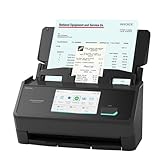
- Premium Choice: Epson RapidReceipt RR-620W Wireless & USB High-Speed AI & Cloud Ready Desktop Color Duplex Receipt & Document Scanner for Mac & PC, up to 45 ppm, 4.3" Color Touchscreen, 100-Page Auto Document Feeder
After comparing receipt scanners in real desk setups, from cluttered home offices to compact travel bags, the difference between a scanner that actually saves you time and one that creates more work is clear. A good receipt scanner does not just produce a readable image. It straightens faded thermal paper, pulls accurate data without manual retyping, and exports cleanly to the accounting or storage system you already use. A bad one jams on thin paper, crops edges, or leaves you sorting files by hand at the end of the month.
What separates the best models is a balance of handling, software, and speed for the way you actually scan. Mobile single-sheet scanners win on portability and zero setup, while desktop feeders win when you have stacks of receipts and documents to power through. Optical character recognition quality, duplex support, and how the included software organizes expenses matter far more than raw resolution specs. We focused on real-world reliability across those factors to rank scanners that fit everything from occasional expense reports to daily small business bookkeeping.
As an Amazon Associate we earn from qualifying purchases at no extra cost to you.



📄 In This Review
Quick Picks
| Product | Best for | Price |
|---|---|---|
| Epson RapidReceipt RR-60 | Best Mobile Receipt Scanner | $179.99 |
| Epson WorkForce ES-50 | Best Value Mobile Scanner | $129.99 |
| Epson RapidReceipt RR-620W | Best Desktop Receipt Manager | $429.99 |
| Brother DS-640 | Best Compact Alternative | $134.98 |
| ScanSnap iX1300 | Best for Simplicity | $279.99 |
| HP HPPS100 | Best for Photos and Receipts | $139.99 |
| ScanSnap iX2500 | Best Performance All-Rounder | $379.99 |
| ScanSnap iX2500 Receipt Edition | Best Premium Workflow Bundle | $419.99 |
How We Picked
See also: Best ViewSonic Monitor: Six Listings Sorted by Job, From a Portable 16-Inch to a Curved 1440p Screen • Best AOC Monitor: Eight Listings Ranked by Price, Refresh Ceiling and Panel Type
We evaluated receipt scanners on the criteria that matter most at a desk: software and data extraction for organizing receipts without manual entry, paper handling for thin and creased thermal receipts as well as standard documents, scan quality and duplex capability, and overall speed and connectivity for mobile versus desktop use. We weighted reliability and ease of export to cloud services and accounting apps higher than advertised speed, and favored models that stay consistent across mixed batches rather than excelling only with pristine pages.
The 8 Best Receipt Scanners in 2026
1. Epson RapidReceipt RR-60
The RR-60 is built for professionals who need a true pocketable receipt scanner without sacrificing organization. It is the most focused mobile option in this roundup for expense tracking, with Epson software that sorts scans into receipts, business cards, and documents automatically. It handles thin thermal receipts and longer invoices more reliably than generic mobile scanners, and the single-sheet path keeps operation simple.
- Excellent receipt management software that reduces manual sorting and data entry
- Compact vertical path design that travels easily and handles mixed lengths well
- Single-sheet feeding is slow for large batches compared to a desktop feeder
Skip it if you regularly scan stacks of receipts at once. This is ideal for frequent travel and one-at-a-time capture, not high-volume batch work.
2. Epson WorkForce ES-50
The WorkForce ES-50 is for buyers who want mobile convenience at the lowest price without giving up dependable image quality. It shares the same compact, lightweight single-sheet design as its more expensive sibling but trades advanced receipt-specific software for a simpler, more general-purpose workflow. For occasional expense reports, filing, or digitizing documents on the go, it delivers clean, straight scans with minimal fuss.
- Very portable form factor that fits in a laptop bag and powers over USB
- Clean output on receipts and documents for the price
- Lacks dedicated receipt parsing features, so you will organize more by hand
Skip it if you need automated receipt categorization and exports. Choose the RR-60 or a desktop model if software-driven bookkeeping is the priority.
3. Epson RapidReceipt RR-620W Wireless & USB High-Speed AI & Cloud Ready Desktop Color Duplex Receipt & Document Scanner
The RR-620W is the desktop powerhouse for anyone who treats receipt scanning as a weekly business task. It combines wireless and USB connectivity, duplex scanning, a 4.3-inch color touchscreen for standalone operation, and a 100-page auto document feeder with speed up to 45 ppm for fast batch jobs. The AI and cloud-ready workflow plus the RapidReceipt software make it especially strong for extracting line items and pushing data directly to services you use.
- High-capacity feeder and duplex scanning dramatically speed up mixed receipt and document batches
- Large touchscreen and robust software simplify one-touch workflows and cloud exports
- Large desktop footprint and premium price are overkill for light, occasional use
Skip it if you only scan a few receipts a month or need something portable. It earns its keep in small business and heavy household management setups.
4. Brother DS-640
The Brother DS-640 is a minimalist mobile scanner for users who value simplicity and low carry weight above all else. It slides easily into a bag, draws power via USB, and handles single sheets with consistent alignment on receipts and standard pages. While its software bundle is more basic than Epson’s receipt-centric suite, it excels as a straightforward capture device to pair with your preferred cloud storage or organization app.
- Ultra-compact and light, ideal for tight desks and travel
- Simple plug-and-scan operation with reliable image quality for everyday needs
- No built-in battery and single-sheet only, so batch scanning takes patience
Skip it if you want hands-off receipt data extraction. It is best when you want a no-frills scanner that just works and stays out of the way.
5. ScanSnap iX1300
The ScanSnap iX1300 hits the sweet spot for home office users who want desktop convenience without complexity. It offers both wireless and USB connectivity and double-sided color scanning, turning piles of receipts and documents into organized digital files quickly. ScanSnap Home software keeps profiles and destinations intuitive, so family members or small teams can scan to the right folder or cloud service without learning a new workflow.
- Easy double-sided scanning streamlines two-sided receipts and forms
- Flexible wireless or USB setup fits permanent desk placement
- Manual feed pace is modest compared to larger desktop feeders
Skip it if you need maximum throughput for large stacks. It is perfect for regular but moderate volume where ease of use matters most.
6. HP HPPS100
The HP Small USB Document and Photo Scanner HPPS100 is for users who split time between receipts and photos or single-sided sheets. This portable sheetfed model focuses on clean capture for smaller jobs and includes HP WorkScan software for quick organization on both PC and Mac. It is an accessible, low effort way to digitize receipts, mementos, and one-sided paperwork without dedicating desk space to a larger feeder.
- Versatile for both documents and photos, useful for household archiving
- Straightforward USB-powered portability and cross-platform software support
- One-sided scanning limits efficiency with double-sided documents
Skip it if you routinely need duplex scanning or high-volume feeding. Choose it for light, mixed media scanning with simple software.
7. ScanSnap iX2500
The ScanSnap iX2500 is the performance all-rounder for demanding desks that want fast, wireless or USB double-sided scanning without a steep learning curve. It handles higher daily volumes more comfortably than compact models and benefits from ScanSnap’s mature software environment for naming, searching, and routing scans. For users who jump between receipts, contracts, and forms, it keeps batches moving while maintaining sharp, accurate images.
- Fast duplex workflow shortens time on mixed documents and receipts
- Proven ScanSnap software makes organizing and finding scans straightforward
- Higher price than entry-level mobile units for similar single receipt tasks
Skip it if you scan only occasionally and want the smallest possible device. It shines when speed and versatility are used often.
8. ScanSnap iX2500 Receipt Edition
The Receipt Edition of the iX2500 builds on the same high-speed wireless or USB duplex hardware but tunes the bundle and workflow for receipt-heavy users. It leans harder into expense-ready features, making it easier to extract, tag, and export receipt data for accounting. If your primary goal is turning a shoebox of receipts into a searchable, exportable ledger with minimal manual correction, this configuration reduces friction from scan to spreadsheet.
- Receipt-optimized workflow improves data capture and accounting exports
- Same reliable high-speed duplex scanning as the standard iX2500
- Premium cost over the base model is hard to justify for general document scanning
Skip it if most of your scanning is general paperwork rather than receipts. For receipt-first bookkeeping, the added optimization pays off.
Buying Guide
Portability vs. Throughput
Start by deciding how you scan. Single-sheet mobile scanners are unbeatable for travel, field work, and tight desks. They force you to feed one receipt at a time but stay compact and often USB powered. Desktop models with auto feeders and duplex support are essential if you batch receipts weekly or handle multipage documents. If you only digitize a handful of receipts after trips, portability wins. If you process stacks, prioritize a feeder and two-sided capture.
Software and Data Extraction
Hardware captures the image, software creates the value. Look for automatic page type detection, receipt-specific data fields, and one-touch export to cloud storage or accounting platforms you already use. Good optical character recognition should handle faded thermal print and slight skew without extra cleanup. Before buying, map your workflow from scan to destination and favor a scanner whose bundled software matches that path, so you are not renaming files by hand later.
Connectivity and Workflow Fit
Connectivity determines where the scanner lives. USB powered mobile units are ideal for laptops and shared spaces, while wireless desktop models fit permanent stations where anyone can send scans to the cloud. Touchscreens and profile buttons reduce taps for recurring jobs, and duplex support prevents flipping pages. Measure your desk footprint, check operating system support, and choose a model whose daily workflow feels invisible rather than intrusive.
Our Verdict
Our top pick for most receipt scanner buyers is the Epson RapidReceipt RR-620W. Its combination of a 100-page feeder, duplex scanning at up to 45 ppm, large touchscreen, and receipt-aware software makes short work of both small and large batches while keeping exports organized. Our budget pick is the Epson WorkForce ES-50, which offers dependable mobile image quality and true portability at $129.99. If your priority is high-speed duplex performance with a refined, receipt-optimized software bundle and you prefer the ScanSnap ecosystem, the ScanSnap iX2500 Receipt Edition is the better premium choice.
FAQ
Do I need a receipt-specific scanner or will any document scanner work?
Any document scanner can capture receipts, but receipt-focused models add software that reads merchant, date, and total fields and sorts expenses automatically. If you only need images, a general scanner is fine. If you want to skip manual entry, choose a receipt-tuned model.
Is duplex scanning important for receipts?
Most thermal receipts are single-sided, so duplex is not essential for them alone. It becomes valuable when you also scan invoices, statements, and double-sided forms in the same workflow, saving time and preventing missed backs.
Are portable scanners accurate enough for bookkeeping?
Yes, modern portable scanners deliver sharp, archive quality images suitable for records and expense reports. Accuracy depends more on software extraction than hardware size, so pair a compact scanner with capable receipt software if you need data exports.
What is the easiest way to organize scans for taxes?
Create consistent profiles that tag by date and vendor and export directly to a dedicated cloud folder or accounting app. Use software that preserves searchable text and lets you export a summary, so your year end review is a quick filter rather than a manual sort.
Related Reviews & Guides

3 Best Mechanical Keyboards for Home Office and Gaming 2026

Blue Light Blocking Glasses Computer










