

Last Updated: October 9, 2026
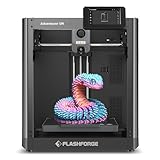
- Top Pick: FLASHFORGE Adventurer 5M 3D Printer with Fully Auto Leveling, Max 600mm/s High Speed Printing, 280°C Direct Extruder with 3S Detachable Nozzle, CoreXY All Metal Structure, Print Size 220x220x220mm
- Best Value: Bambu Lab P1S Combo, P1S 3D Printer and AMS, Multi-Color 3D Printing
- Premium Choice: Bambu Lab P2S Combo, P2S 3D Printer & AMS 2 Pro, Multi-Color 3D Printing
Integrating a high-performance additive manufacturing tool into a desk setup requires balancing workstation space, operating volume, and overall print reliability. Finding the best 3d printer in 2026 comes down to eliminating the daily friction points that interrupt your workflow: manual bed leveling hassles, slow print speeds, and failed print beds that ruin custom desk organizers or functional enclosures. A quality machine should integrate cleanly into your office layout while running quietly enough to operate alongside your primary workstation.
To identify top-tier options across every price point, we conducted a comprehensive review of manufacturer technical specifications, published hardware schematics, price-to-performance metrics, and long-term user feedback. By evaluating key parameters like motion architecture, direct drive vs. Bowden extruders, maximum hotend temperatures, and multi-color automation, this guide cuts through marketing claims to help you select a reliable desktop unit that suits your space and fabrication goals.
As an Amazon Associate we earn from qualifying purchases at no extra cost to you.






Quick Picks
| Product | Best For | Price |
|---|---|---|
| FLASHFORGE Adventurer 5M | Best Budget High-Speed CoreXY | $249 |
| Bambu Lab P1S Combo | Best Overall Multi-Color Setup | $549 |
| Bambu Lab P2S Combo | Best Advanced Multi-Material System | $769 |
| Bambu Lab P1S | Best Enclosed Workhorse | $399 |
| Bambu Lab A1 | Best Entry Bed-Slinger | $299.99 |
| FLASHFORGE AD5X | Best High-Temp Budget Multi-Color | $349 |
| 5M 3D Printer with Touchscreen | Best Ultra-Budget Entry | $79.99 |
| Entina Tina2C | Best Compact Starter for STEM | $199.99 |
How We Picked
See also: Good Height for a Desk: Seated and Standing Numbers by Body Height • Best Desks for Posture: Height, Depth and Sit-Stand Options
Our evaluation process focused on four key criteria critical for modern workspace integration: kinematics and print speed, leveling automation, extruder capabilities, and physical design footprint. We prioritized CoreXY motion systems for their high structural rigidity and speed, automated bed leveling to minimize maintenance, and enclosed build chambers that manage operational noise and thermal stability. Finally, we weighted user feedback regarding long-term component durability and ecosystem software stability to ensure each recommendation provides a smooth operational experience on a home or office desk.
The 8 Best 3D Printer in 2026
FLASHFORGE Adventurer 5M
The FLASHFORGE Adventurer 5M offers high-speed CoreXY printing in a compact, workspace-friendly footprint. Ideal for creators who need quick prototyping capability right on their desk, this machine features a 220x220x220mm build volume and hits top speeds of 600mm/s. Its 280°C direct extruder handles a wide variety of standard and technical filaments, while fully auto leveling removes bed calibration headaches. A 3S detachable nozzle allows swift maintenance without complex disassembly.
- Fast 600mm/s high-speed printing with all-metal CoreXY stability
- User-friendly 3S detachable nozzle system for easy swaps
- Lacks a fully enclosed frame out of the box for high-temp filaments
Skip this model if you need an enclosed build environment or multi-color printing capabilities right out of the box.
Bambu Lab P1S Combo
Designed for enthusiasts and professional creators, the Bambu Lab P1S Combo pairs a fully enclosed core printer with the Automatic Material System (AMS) for seamless multi-color 3D printing. It fits comfortably on a primary desk while keeping draft-sensitive materials isolated and noise suppressed. The included AMS opens up creative possibilities with multi-color models and dedicated support materials, making it a complete turnkey solution for desktop manufacturing.
- Seamless multi-color printing via the integrated AMS unit
- Enclosed cabinet design provides superior temperature control
- Higher initial investment compared to open-bed desktop units
Skip it if you only intend to print single-color functional parts and do not require multi-material support.
Bambu Lab P2S Combo
The Bambu Lab P2S Combo represents a top-tier multi-material desktop solution, bundling the upgraded P2S chassis with the advanced AMS 2 Pro system. Tailored for heavy power users who require reliable multi-color execution and precise material handling, this machine simplifies complex multi-filament workflows. Its enclosed design maintains clean aesthetics and thermal stability, allowing consistent production of detailed multi-color designs without cluttering your workspace.
- Updated AMS 2 Pro offers advanced multi-color management
- Premium enclosed construction for quiet and reliable operation
- Highest price point in this lineup at $769
Skip this option if you are on a strict budget or only need basic entry-level printing features.
Bambu Lab P1S
For users who want an enclosed, reliable workstation workhorse without paying extra for multi-color hardware up front, the standalone Bambu Lab P1S is an ideal fit. It delivers a ready-to-use FDM printing experience in an enclosed body, making it well-suited for draft-sensitive plastics and quiet office settings. The machine offers a clean path for future upgrades, allowing you to add multi-material units later as your workflow demands grow.
- Fully enclosed construction suitable for technical filaments
- Ready-to-use setup with outstanding overall frame rigidity
- Does not include multi-color hardware at initial purchase
Skip it if you know you want to print multi-color models immediately, as purchasing the combo upfront offers better overall value.
Bambu Lab A1
The Bambu Lab A1 brings a ready-to-use, highly accessible FDM experience to beginners, students, and casual hobbyists. Built with an open-frame design that fits easily on an office secondary shelf or study desk, this printer takes the friction out of initial setup. It balances clean industrial design with straightforward software integration, making it an excellent starting point for learning additive manufacturing concepts without managing technical setup hurdles.
- Extremely accessible ready-to-use setup for beginners and kids
- Sleek desktop footprint with user-friendly operation
- Open bed-slinger layout requires open space for bed clearance
Skip this model if you plan to print warp-prone, high-temperature materials that require a fully enclosed environment.
FLASHFORGE AD5X
Engineered for high efficiency and precision, the FLASHFORGE AD5X is a multi-color CoreXY machine featuring a 300°C direct drive extruder. Its 220x220x220mm build volume and 600mm/s print speeds cater to users who need fast turnaround times on detailed, multi-color components. The high-temperature extruder expands material options, while 1-click auto leveling keeps maintenance downtime to a minimum on busy desks.
- 300°C direct drive extruder enables high-temp material capability
- 600mm/s CoreXY speed combined with multi-color printing support
- Open-frame design requires extra attention in ambient room drafts
Skip it if you prefer a pre-enclosed system or an established single-ecosystem software stack.
5M 3D Printer with Touchscreen
The 5M 3D Printer with Touchscreen serves as an ultra-budget gateway into desktop fabrication. At an accessible $79.99 price point, it provides core printing functions managed through an intuitive, integrated touchscreen display. It is best suited for students, hobbyists on tight budgets, or secondary setups where simple operations and basic low-cost prototyping are the main goals.
- Unbeatable $79.99 price point for ultra-low entry barrier
- Simple touchscreen interface simplifies basic print setup commands
- Lacks advanced high-speed kinematics and automated leveling systems
Skip this printer if you require rapid print speeds, high thermal extruders, or multi-material capabilities.
Entina Tina2C
Designed explicitly for young learners, home classrooms, and STEM education, the Entina Tina2C is a fully assembled starter mini 3D printer that gets operational in just 8 minutes. Featuring App and WiFi control, auto leveling, a 3000+ model library, and 20+ creative DIY modules, it fits cleanly on small study desks and offers a safe, highly approachable entry point for educational projects.
- Rapid 8-minute startup time with fully assembled mini chassis
- Rich educational ecosystem with WiFi control and 20+ DIY modules
- Small build scale limits maximum model sizing for larger projects
Skip this machine if you need to print standard full-sized functional tools or large desktop organization trays.
Buying Guide
Kinematics and Motion Speed
The underlying mechanical structure dictates how quickly and accurately a printer operates on your desk. CoreXY architectures keep the heavy stepper motors stationary at the top frame, moving only the lightweight print head along the X and Y axes. This reduces toolhead inertia, allowing stable print speeds up to 600mm/s without causing excessive surface ghosting or desk vibration. Traditional bed-slingers move the entire build plate forward and backward, which requires a deeper physical footprint on your workstation and typically operates at lower speed thresholds to preserve print quality.
Extruder Design and Thermal Limits
Extruder selection impacts the range of engineering filaments you can run. Direct drive extruders sit directly above the hotend, offering precise filament retraction control that reduces stringing and handles flexible material options cleanly. Take note of maximum hotend temperatures: standard extruders reach around 280°C, which handles everyday PLA, PETG, and TPU. Higher-tier direct drive units reaching 300°C allow you to process technical materials like polycarbonate or reinforced composites, provided the ambient bed temperatures remain stable.
Enclosures and Multi-Material Automation
Enclosed printer cabinets serve a dual purpose in a workspace environment: they keep ambient noise suppressed and maintain stable internal air temperatures required to prevent corner warping on materials like ABS. If multi-color models or dissolvable supports are essential to your setup, integrated multi-material units (like the Bambu AMS series or native multi-color systems) manage automatic filament retraction and swapping automatically. Buying these multi-color accessories bundled with the main printer chassis usually saves money compared to purchasing add-on accessories separately later.
Our Verdict
For the vast majority of desk setups, the Bambu Lab P1S Combo ($549) stands out as the best overall choice, combining high print reliability, an enclosed cabinet, and seamless multi-color printing via the AMS. If you want high-speed CoreXY performance on a strict budget, the FLASHFORGE Adventurer 5M ($249) is the clear budget pick, offering 600mm/s speeds and auto leveling at an accessible price point. However, if space is extremely limited or you are equipping an educational desk for young students, the compact Entina Tina2C ($199.99) wins for its rapid 8-minute setup and dedicated STEM learning software.
FAQ
Which 3D printer type is best for a quiet home office desk?
Fully enclosed printers are best for quiet office environments because their solid side panels and top covers block mechanical motor whine and cooling fan noise. Enclosed units like the Bambu Lab P1S keep sound levels contained while preventing ambient room breezes from disturbing print temperature stability.
What is the benefit of a CoreXY structure over a bed-slinger?
A CoreXY structure keeps the print bed stationary on the Y-axis (only moving it vertically on the Z-axis), allowing the toolhead to travel rapidly with less moving mass. This allows higher printing speeds up to 600mm/s while taking up a more compact footprint on your desk compared to bed-slingers that need clearance behind and in front of the frame.
Do I need an enclosed 3D printer for standard PLA printing?
No, standard PLA filament prints exceptionally well on open-bed machines because it does not require high ambient air temperatures to prevent warping. However, an enclosure is still beneficial if you want to keep dust off internal motion components or reduce operating noise near your primary desk area.
Is automatic bed leveling necessary for beginners?
Automatic bed leveling is highly recommended for beginners because it eliminates manual bed adjustment errors, which are the leading cause of first-layer print failures. Systems with full auto leveling calibrate distances automatically, ensuring reliable first-layer adhesion without tedious manual tinkering.
Related Reviews & Guides


Quick Picks: Best Laptop Cooling Pad Fan Stands

Office Desk Filing Cabinet Lockable










