Last Updated: September 12, 2026


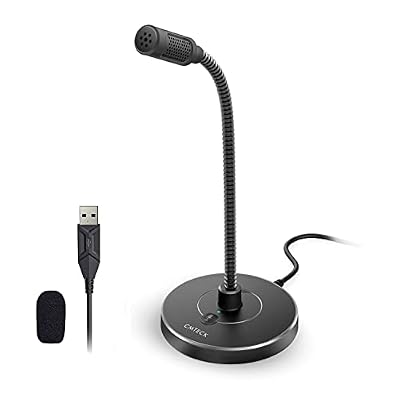

🛒 Best Price Today on Amazon
Prime members get fast, free shipping on everything above, plus member-only deals. New members get a 30-day free trial — cancel anytime.
As an Amazon Associate we earn from qualifying purchases at no extra cost to you.




📄 In This Review
Quick Comparison
| Product | Brand | Price | Rating |
|---|---|---|---|
| Plug & Play USB Computer Microphone | CMOCIIY | $15.99 | 4.6/5 |
| AIRHUG Conference USB Microphone No Speaker | AIRHUG | $19.99 | 4.6/5 |
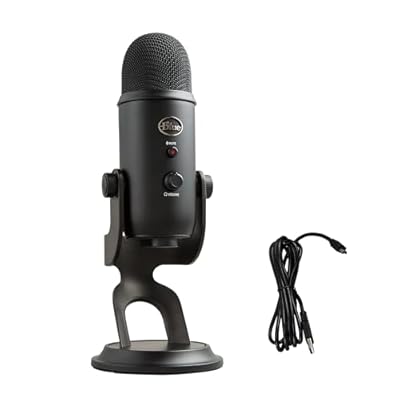
| Logitech Creators Blue Yeti USB Microphone for PC | — | $91.99 | 4.6/5 |
| CMTECK USB Computer Microphone G009 | CMTECK | $16.14 | 4.5/5 |
| Plug & Play USB Computer Microphone | CMOCIIY | $13.99 | 4.5/5 |
Introduction
See also: Standing Desk 50 Inch Height: Who Needs It and Why • Standing Desk Height for 5’10”: Your Target Number and How to Dial It In
A dedicated USB microphone is one of the most impactful upgrades for any home office worker who spends significant time on video calls, records audio content, or participates in remote meetings. The built-in microphones in laptops and webcams pick up significant background noise and sound thin compared to a dedicated condenser microphone positioned close to your voice. A good USB mic makes you sound clearer, more confident, and more professional without requiring any audio engineering knowledge.
What to Look For
- Polar Pattern: Cardioid microphones capture sound from directly in front and reject noise from the sides and rear — ideal for home offices where you want to minimize background noise. Omnidirectional patterns capture all directions, which is better for group conversations.
- Frequency Response: A flat, extended frequency response (typically 20Hz-20kHz) ensures your voice is reproduced accurately without unnatural boosts or cuts. Some mics add a subtle presence boost around 8-10kHz to make voices sound more crisp and clear.
- Stand Type: Desktop stands position the mic directly on your desk. Boom arm mounts bring the mic to mouth level and keep your desk surface clear. For the best audio quality, a boom arm positions the mic 6-12 inches from your mouth.
Top Picks
Blue Yeti USB Microphone
The Blue Yeti is the world's most popular USB microphone, and for good reason. Its multiple polar patterns (cardioid, bidirectional, omnidirectional, stereo) cover any recording scenario. The built-in headphone monitoring with zero-latency lets you hear exactly what you sound like while speaking. The Yeti's rich, professional sound quality has made it the standard choice for podcasters, streamers, and remote workers alike.
HyperX QuadCast S
The HyperX QuadCast S is a feature-rich USB condenser microphone with stunning RGB lighting, four selectable polar patterns, and a built-in anti-vibration shock mount that reduces desk rumble from typing. The tap-to-mute function on top is incredibly convenient for quick muting during calls, and the volume control knob on the body keeps adjustments within reach. Available in a striking red design that looks great on any desk.
Samson Q2U USB/XLR Dynamic Microphone
The Samson Q2U is a dynamic (rather than condenser) microphone that excels at rejecting background noise — making it ideal for home offices in noisier environments. Its dual USB/XLR output means you can use it as a simple plug-and-play USB mic today and upgrade to a proper audio interface later without buying a new mic. The included desktop stand, clip mount, and windscreen make it a complete kit right out of the box.
Final Thoughts
A USB microphone is one of the best investments you can make for your home office audio presence. The Blue Yeti remains the gold standard for versatility and sound quality. If you're in a noisy environment, the Samson Q2U's dynamic capsule is significantly better at rejecting ambient noise. Whatever you choose, your voice will thank you on every call.
What to Look For in a USB Desk Microphone
A USB microphone plugs straight into your computer and dramatically improves how you sound on calls, recordings, and streams compared to a laptop’s built-in mic. The right one balances sound quality with the controls and pickup pattern your space needs. Use these criteria to choose well.
- Pickup pattern: A cardioid pattern captures your voice from the front while rejecting room noise behind it, which is ideal for a home office. Some mics offer multiple patterns for interviews or group recording.
- Sound quality and resolution: Higher sample rates and a clear, natural frequency response make your voice sound full rather than thin or boxy. Listen to sample recordings before buying.
- Onboard controls: A built-in gain knob, mute button, and headphone jack for zero-latency monitoring make the mic far easier to use mid-call than software-only controls.
- Stand vs. boom arm: A desk stand is simple but picks up keyboard thumps; a boom arm isolates the mic from desk vibration and frees up surface space.
- Connection and compatibility: Confirm the mic is plug-and-play with your operating system and uses a connector and cable length that suit your setup.
- Build and isolation: A solid body and included shock mount or pop filter reduce handling noise and plosive pops for cleaner audio.
Tips for Your USB Microphone Setup
Position the mic close to your mouth, roughly a hand’s width away, and speak across it rather than directly into it to reduce plosive pops on hard consonants. A pop filter helps further. The closer and more consistent your distance, the fuller and more professional your voice sounds, with less room echo creeping in.
Set your gain so your normal speaking voice peaks comfortably below the maximum, leaving headroom for louder moments. Gain set too high causes distortion when you laugh or emphasize a word, while gain too low leaves a quiet, noisy recording. A quick test recording while speaking at your natural volume lets you dial this in before an important call.
Mount the mic on a boom arm if you can. A desk stand transmits every keyboard thump and mouse click through the surface into your recording, whereas a boom arm with a shock mount isolates the mic from desk vibration. The arm also clears desk space and lets you position the mic at the ideal angle without it sitting between you and your screen.
Common Mistakes to Avoid
The most common mistake is placing the mic too far away, which makes you sound distant and lets room echo dominate. Speak close to the mic, about a hand’s width, for a full, present voice. Backing off to keep it out of frame trades good audio for a slightly tidier shot, which is rarely worth it.
The second mistake is setting the gain too high and clipping on loud moments. Distorted audio is far more distracting than a slightly quiet recording you can boost later. Leave headroom by setting gain so your normal voice peaks below maximum, and test before relying on it for an important call.
Frequently Asked Questions
Is a USB mic better than my laptop’s built-in mic?
Significantly, yes. A dedicated USB mic captures a fuller, clearer voice and rejects more room noise than a laptop’s tiny built-in mic, making you sound far more professional on calls and recordings.
Do I need a boom arm?
Not strictly, but it helps. A boom arm with a shock mount isolates the mic from desk vibration, reducing keyboard and mouse thumps in your audio, and it frees desk space. A simple stand works if you type lightly.
How close should I be to the microphone?
About a hand’s width away, speaking across rather than straight into it. This distance captures a full voice with minimal room echo, while a pop filter reduces plosive pops on hard consonants.
Will a USB mic work with my computer?
Most USB mics are plug-and-play on common operating systems with no drivers needed. Confirm compatibility with your specific system and that the cable connector matches your ports before buying.
Ready to decide? Our #1 pick for 2026 is the Plug & Play USB Computer Microphone.
Live price & availability on Amazon.
Related Reviews & Guides


Best Printers for Home Use in 2026: Compared and Ranked

Wireless Presenter Remote Clicker Review