Last Updated: October 9, 2026
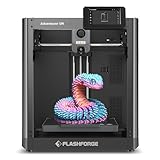
- Top Pick: FLASHFORGE Adventurer 5M 3D Printer with Fully Auto Leveling, Max 600mm/s High Speed Printing, 280°C Direct Extruder with 3S Detachable Nozzle, CoreXY All Metal Structure, Print Size 220x220x220mm
- Best Value: Bambu Lab P1S Combo, P1S 3D Printer and AMS, Multi-Color 3D Printing
- Premium Choice: Bambu Lab P2S Combo, P2S 3D Printer & AMS 2 Pro, Multi-Color 3D Printing
Finding the ideal 3D printer for a modern desk setup requires balancing noise output, physical footprint, print speed, and daily ease of use. Whether you are fabricating custom cable management channels, prototyping custom keyboard cases, or crafting decorative desktop art, a reliable printer must perform without requiring constant mechanical adjustments. The market has shifted dramatically away from difficult-to-assemble kits toward ready-to-use platforms, making it vital to distinguish genuinely dependable machines from those requiring frequent troubleshooting.
To determine what is the best 3d printer for different desktop spaces, we analyzed published manufacturer specifications, official hardware features, current prices, and extensive owner feedback. Our review focuses on the core attributes that affect user experience: kinematic stability, nozzle temperature limits, bed leveling automation, and multi-color extrusion capabilities.
As an Amazon Associate we earn from qualifying purchases at no extra cost to you.






📄 In This Review
Quick Picks
| Product | Best for | Price |
|---|---|---|
| FLASHFORGE Adventurer 5M | Best Budget High-Speed CoreXY | $249 |
| Bambu Lab P1S Combo | Best Enclosed Multi-Color Setup | $549 |
| Bambu Lab P2S Combo | Best Premium Multi-Color System | $769 |
| Bambu Lab P1S | Best Standalone Enclosed Workhorse | $399 |
| Bambu Lab A1 | Best Entry-Level Bed-Slinger | $299.99 |
| FLASHFORGE AD5X | Best High-Temp Multi-Color CoreXY | $349 |
| 5M 3D Printer with Touchscreen | Best Ultra-Low-Cost Entry | $79.99 |
| Entina Tina2C | Best STEM & Kids Mini Printer | $199.99 |
How We Picked
See also: Good Height for a Desk: Seated and Standing Numbers by Body Height • Best Desks for Posture: Height, Depth and Sit-Stand Options
We selected top candidates by evaluating four core parameters: motion mechanics, hotend thermal capacity, calibration automation, and material versatility. CoreXY motion platforms are favored for desktop placement because their rigid structures permit rapid printing with minimal vibrational artifacting. Higher maximum nozzle temperatures expand print options from basic filaments to durable engineering plastics, while automated leveling systems remove tedious manual adjustments. Finally, integrated multi-color feeding modules were weighted heavily for users seeking complex visual outputs without manual filament swaps.
The 8 Best What Is The 3D Printer in 2026
FLASHFORGE Adventurer 5M
This machine is built for budget-conscious makers who want rapid CoreXY performance without breaking the bank. Featuring fully auto leveling, an all metal structure, and a 280°C direct extruder with a 3S detachable nozzle, it delivers steady high-speed output within a 220x220x220mm print size. Pushing up to max 600mm/s high speed printing, it fits neatly on standard desks for fast iterative modeling.
- Rapid max 600mm/s speed inside a rigid CoreXY all metal structure.
- Versatile 280°C direct extruder with a convenient 3S detachable nozzle.
- Lacks an enclosed build chamber out of the box.
Skip this model if your projects demand working with high-temp materials that require an enclosed chamber from day one.
Bambu Lab P1S Combo
Designed for creators wanting a complete, hassle-free multi-color desktop solution, this package includes the enclosed P1S printer and the AMS module. It handles complex multi-color 3D printing jobs automatically while suppressing operating sound and containing temperature drafts. User feedback routinely praises its consistent out-of-box operation and robust construction.
- Seamless multi-color 3D printing via the integrated AMS unit.
- Enclosed design keeps ambient temperatures stable and controls operation noise.
- Higher initial cost than bare-bones single-material setups.
Skip this combo if you exclusively print basic single-color utility parts and want to lower upfront expense.
Bambu Lab P2S Combo
Targeted at advanced prosumers and heavy desktop users who demand top-tier multi-material capabilities. By pairing the upgraded P2S 3D printer with the AMS 2 Pro unit, this system offers efficient multi-color 3D printing with refined filament management. Owner reports highlight exceptional reliability during lengthy, complex print jobs.
- Advanced AMS 2 Pro unit for smooth, reliable multi-color switching.
- Robust enclosed construction ideal for clean studio setups.
- Requires a significant financial investment.
Skip it if you are new to 3D printing and do not need intricate multi-filament setups.
Bambu Lab P1S
Geared toward makers who need a reliable, enclosed FDM printer but prefer to bypass multi-color accessories initially. Delivered as a ready-to-use FDM 3D printer, it provides a controlled printing environment for materials sensitive to air currents. Community consensus notes its excellent print consistency and durable build.
- Fully enclosed housing protects prints and dampens desk vibration.
- Ready-to-use setup minimizes preparation time.
- Does not include the multi-color AMS component.
Skip this standalone unit if you intend to add multi-color capabilities later, as buying the combo saves money overall.
Bambu Lab A1
Ideal for beginners, hobbyists, and younger users looking for an intuitive desktop printing experience. This ready-to-use FDM 3D printer for beginners and kids eliminates complex assembly while delivering impressive print quality. User feedback emphasizes its whisper-quiet operation and smooth setup sequence.
- Extremely user-friendly interface with straightforward automatic calibration.
- Quiet movements make it suitable for shared working spaces.
- Open bed-slinger frame is susceptible to ambient room drafts.
Skip it if your primary focus is printing high-temperature, warp-prone technical filaments.
FLASHFORGE AD5X
Created for power users seeking high thermal capability and multi-color printing at a sensible price. It combines a CoreXY 600mm/s high-speed motion system, 1-click auto leveling, and a high-temperature 300°C direct drive extruder within a 220x220x220mm build volume for high precision and efficiency.
- High 300°C direct drive extruder supports tough engineering materials.
- Fast CoreXY 600mm/s motion with multi-color printing support.
- Open frame layout requires space management for multi-color feeds.
Skip this printer if you require a factory-enclosed build space to control internal temperatures.
5M 3D Printer with Touchscreen
Aimed at extreme budget shoppers and entry-level tinkerers seeking an affordable gateway into 3D printing. Equipped with a touchscreen control interface, this basic machine simplifies basic navigation and model setup directly from the unit’s display screen.
- Unbeatable $79.99 entry price point.
- Intuitive touchscreen simplifies manual menu controls.
- Lacks advanced high-speed motion and multi-material options.
Skip it if you demand rapid production speeds, multi-color output, or high-temperature material compatibility.
Entina Tina2C
Tailored specifically for young learners and STEM home setups. This fully assembled starter mini 3D printer for kids & beginners lets users start in 8 mins. It features App & WiFi control, auto leveling, a 3000+ model library, and 20+ creative DIY modules for home and educational projects.
- Rapid setup allowing users to start in 8 mins via App & WiFi control.
- Includes auto leveling, a 3000+ model library, and 20+ creative DIY modules.
- Small overall mini build area restricts larger functional projects.
Skip this printer if you need to produce larger desktop accessories or structural objects.
Buying Guide
Motion Architecture: CoreXY vs. Bed-Slingers
The motion system dictates how fast and accurately a printer operates on your desk. CoreXY machines move the printhead along both X and Y axes using interconnected belts while the bed moves vertically, resulting in high rigidity and lower physical vibration. Bed-slingers move the print bed back and forth along the Y-axis, which can introduce inertia artifacts on taller prints unless speed is reduced.
Extruder Design and Thermal Tolerances
Direct drive extruders sit directly above the hotend, offering precise filament control for flexible materials like TPU compared to remote Bowden tube setups. Additionally, maximum hotend temperatures determine material options: standard 280°C limits handle PLA, PETG, and TPU, whereas high-temp 300°C extruders permit advanced filaments like nylon or polycarbonate when paired with appropriate thermal control.
Multi-Material and Multi-Color Automation
Multi-color systems rely on automatic material switchers, such as the AMS series, to swap spools mid-print. Integrated multi-color setups allow intricate color patterns and water-soluble support materials without manual intervention. However, multi-color printing increases total print times and filament waste during purge cycles, so evaluate whether your desktop projects genuinely require multi-filament capabilities.
Our Verdict
For most desktop users searching for the optimal balance of features and reliability, the Bambu Lab P1S Combo ($549) stands out as the overall top pick due to its enclosed chamber and integrated multi-color AMS unit. Budget-focused makers wanting speed should choose the FLASHFORGE Adventurer 5M ($249) for its CoreXY structure and high-speed capability. Lastly, if your goal is educational hands-on learning for young students, the Entina Tina2C ($199.99) wins with its quick setup and guided STEM library.
FAQ
Is an enclosed 3D printer necessary for a home desk setup?
An enclosed printer is not mandatory for basic filaments like PLA, but it significantly helps retain heat and control draft airflow. Enclosures also reduce operational sound and isolate odor, making them ideal for desktop placement in shared rooms.
What is the benefit of a CoreXY motion system over a traditional Cartesian printer?
CoreXY systems keep the heavy motors stationary and move only the printhead along the upper frame, reducing mechanical momentum. This allows faster print speeds and smoother surface finishes with fewer vibrations on compact desk spaces.
Can beginners easily set up multi-color printing?
Modern bundled multi-color platforms automatically detect spools and handle filament retraction without manual intervention. While initial setup is straightforward, users should account for additional spool
Related Reviews & Guides

3 Best FlexiSpot Standing Desks for Every Budget in 2026

6 Best Desk Privacy Panels for Home Office 2026