Last Updated: September 27, 2026
“Anker webcam” covers several models, so for a fair comparison this article pits the Logitech Brio 4K against the Anker PowerConf C300, Anker’s closest competitor in features and price, with notes on the cheaper PowerConf C200. Both the Brio and the C300 target professionals on video calls, both offer adjustable fields of view and dual microphones, and both regularly sell for well under their launch prices. The differences come down to resolution, framing intelligence and extras.
📄 In This Review
Specs side by side
| Feature | Logitech Brio 4K | Anker PowerConf C300 | Anker PowerConf C200 |
|---|---|---|---|
| Max resolution | 4K at 30fps | 1080p at 60fps | 2K (1440p) at 30fps |
| 1080p frame rate | 30 or 60fps | 30 or 60fps | 30fps |
| Field of view | 65 / 78 / 90 degrees | 78 / 90 / 115 degrees | 65 / 78 / 95 degrees |
| Auto-framing | No (manual zoom) | Yes, AI framing | No |
| HDR / light correction | RightLight 3 HDR | HDR, low-light correction | Low-light correction |
| Windows Hello IR | Yes | No | No |
| Microphones | Dual omni | Dual, noise cancelling | Dual stereo, AI noise cancelling |
| Connection | USB-C on camera, USB-A cable | USB-C | USB |
| Typical price tier | $130-$200 | $80-$130 | $50-$60 |
Image quality
See also: Best Reclining Chairs: Nine Recliner Listings Compared by Mechanism, Fabric and Space Needs • Best Roku Streaming Deals Reviewed
Sharpness
The Brio’s 4K sensor, downscaled to the 720p or 1080p that meeting apps actually send, produces slightly crisper detail than the C300’s native 1080p. The difference is visible on text, hair and patterned shirts, less so in a small Zoom tile.

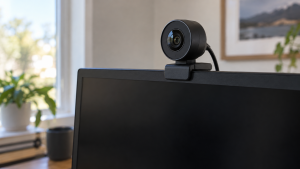
Logitech Brio 4K Webcam, Ultra 4K HD Video Calling (Renewed)
Included for 'Logitech Brio 4K vs Anker webcam' because the listing specifies Ultra 4K HD Video Calling (Renewed), details this guide uses to compare options.
View on Amazon
Logitech MX Brio Ultra HD 4K Webcam with Noise Reducing Microphones, AI-Enhanced Image Quality, Privacy Protector and USB-C Connection - Graphite
Included for 'Logitech Brio 4K vs Anker webcam' because the listing specifies AI-Enhanced Image Quality and Privacy Protector and USB-C Connection, details this guide uses to compare options.
View on AmazonDynamic range
Both handle a bright window reasonably well. The Brio’s HDR has a long track record in backlit offices; the C300’s HDR and low-light correction are competitive in typical home offices.
Motion
Both run 1080p at 60fps, which matters for streaming or demonstrations more than for calls.
Framing and field of view
This is the C300’s advantage. Its AI framing automatically adjusts the shot when you move or when a second person joins, and its 115-degree widest setting fits a small group around a desk. The Brio instead offers manual field-of-view presets and digital zoom through Logitech’s software; it stays where you set it. If you pace while presenting or share your camera with others, the C300’s automation is genuinely useful. If you sit still, the Brio’s fixed framing is less distracting.
Extras and software
- Windows Hello: only the Brio has an IR sensor for face login. On a desktop PC or closed-lid laptop, that is a real daily convenience.
- Software: Logitech uses Logi Tune or G HUB; Anker uses AnkerWork. Both expose field of view, exposure and firmware updates.
- Certification: the C300 is sold as Zoom certified. Logitech business webcams carry various Teams and Zoom certifications depending on SKU.
- Privacy: the Brio ships with a clip-on shade; the C300 includes a snap-on privacy cover.
Who should buy which
Choose the Logitech Brio 4K if
You want the sharpest image, Windows Hello login, or local 4K recording, and you sit in a fixed position for calls.
Choose the Anker PowerConf C300 if
You move while presenting, share the camera with a colleague, or want auto-framing and a wider 115-degree view for less money.
Choose the Anker PowerConf C200 if
You want a clear upgrade over a laptop camera for around $50-$60 and are happy with 30fps and manual field-of-view presets.
Long-term value
Both brands have long sales histories, so street prices fall well below launch pricing. The Brio often sells in the $130-$170 range and the C300 around $80-$110. Over three years of daily calls, the cost difference works out to a few cents per workday, so choose on features rather than price alone. Consider support too: Logitech’s business line has broad IT management tools, while Anker’s AnkerWork app is simpler and aimed at individual users.
FAQ
Is the Brio’s 4K noticeable in meetings?
Modestly. Meeting apps compress video, so the extra sharpness shows most in full-screen views and screen recordings. The larger benefit is the ability to zoom in digitally without losing detail.
Can the Anker C300 be used for streaming?
Yes, its 1080p60 mode works in OBS and similar software. For dedicated streaming, a camera with manual exposure locking and a larger sensor may look better under RGB lighting.
Bottom line
The Logitech Brio 4K wins on sharpness and Windows Hello; the Anker PowerConf C300 wins on auto-framing, a wider view and price. For a stationary professional, the Brio is the better camera. For a presenter who moves or a budget-conscious buyer, the C300 is the smarter buy, and the C200 is the value pick.
Related Reviews & Guides

Ergonomic Chair Size Guide for Petite Users
Best circadian lighting for home office