

Last Updated: September 27, 2026
This review covers the original Insta360 Link, released in 2022, not the Link 2 or Link 2C that followed. The Link was one of the first mainstream webcams to put a motorised gimbal behind a large sensor, pairing 4K video with AI tracking that physically turns the camera to follow you. It was built for teachers, presenters and creators who move, and it introduced desk and whiteboard modes that turn a webcam into a document camera. Here is how it performs and whether it still makes sense.
📄 In This Review
Key specifications
| Feature | Insta360 Link (original) |
|---|---|
| Sensor | 1/2-inch |
| Max resolution | 4K at 30fps |
| HDR | Supported at 1080p and 720p up to 30fps |
| Gimbal | Motorised 3-axis gimbal with AI tracking |
| Zoom | Up to 4x digital |
| Codecs | H.264 and MJPEG |
| Special modes | DeskView, Whiteboard, Overhead, vertical 9:16 by rotating the gimbal |
| Mounting | Built-in clip and 1/4″-20 thread |
| Privacy | Lens tilts down automatically when idle |
| Typical price | Launched at $299; often lower now |
Image quality
See also: Best Reclining Chairs: Nine Recliner Listings Compared by Mechanism, Fabric and Space Needs • Best Roku Streaming Deals Reviewed
The 1/2-inch sensor is large for a webcam, and it shows. In typical home-office light, the Link produces clean, detailed video with natural colour and good dynamic range. In dim rooms, it stays cleaner than most 1080p webcams. 4K at 30fps gives room to zoom in on a presenter or crop for vertical clips, and HDR at 1080p helps with bright windows.

Insta360 Link 2 - PTZ 4K Webcam for PC/Mac, 1/2" Sensor, AI Tracking, HDR, AI Noise-Canceling Mic, Gesture Control for Streaming, Video Calls, Gaming, Works with Zoom, Teams, Twitch & More
Included for 'Insta360 Link review' because the listing specifies PTZ 4K Webcam for PC/Mac and 1/2" Sensor, details this guide uses to compare options.
View on Amazon
Insta360 Link 2 Pro – 4K PTZ Webcam for PC/Mac, 1/1.3” Sensor, Low-Light, AI Tracking, HDR, Directional Noise-Canceling Mics, Supports Stream Deck, Zoom, Teams, Twitch for Streaming or Meetings
Included for 'Insta360 Link review' because the listing specifies 4K PTZ Webcam for PC/Mac and 1/1.3” Sensor, details this guide uses to compare options.
View on Amazon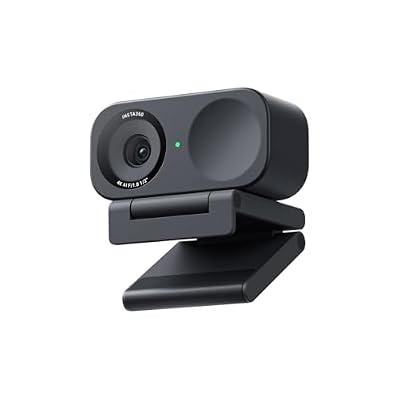
Insta360 Link 2C - 4K Webcam for PC/Mac, 1/2" Sensor, Auto Framing, HDR, AI Noise-Canceling Mic, Gesture Control for Streaming, Video Calls, Gaming, Works with Zoom, Teams, Twitch & More
Included for 'Insta360 Link review' because the listing specifies 4K Webcam for PC/Mac and 1/2" Sensor, details this guide uses to compare options.
View on Amazon
Insta360 Link 2C Pro – 4K Webcam for PC/Mac, 1/1.3” Sensor, Low-Light, Auto Framing, HDR, Directional Noise-Canceling Mics, Supports Stream Deck, Zoom, Teams, Twitch for Streaming or Meetings
Included for 'Insta360 Link review' because the listing specifies 4K Webcam for PC/Mac and 1/1.3” Sensor, details this guide uses to compare options.
View on AmazonAI tracking and the gimbal
How it works
Instead of digitally cropping, the Link physically rotates to keep you centred. That means you keep full image quality when you move to a whiteboard or stand up from a standing desk. Tracking is smooth and does not overreact to small movements.
Gesture control
Hand gestures toggle tracking and zoom without touching the computer, handy for teachers mid-lesson. They can occasionally trigger by accident when you gesture naturally, so some users switch them off.
DeskView and Whiteboard modes
DeskView tilts the camera down to show your desk, correcting the perspective like a document camera, which is useful for sketching, product demos and homework help. Whiteboard mode detects and enhances a whiteboard for legibility. These modes set the Link apart from traditional webcams.
Software
The Insta360 Link Controller app on Windows and macOS manages tracking, modes, exposure, white balance and firmware. Most features also work inside Zoom, Teams and OBS once configured, and the camera remembers settings.
Weaknesses
- HDR is limited to 1080p and below; no HDR at 4K on the original model.
- Gimbal adds bulk and a small motor noise when moving.
- Higher price than fixed webcams with similar image quality.
- Gesture controls can misfire.
- The Link 2 adds 4K HDR and a lower price, which makes the original harder to recommend at full price.
Who it suits
The Link suits teachers, trainers and presenters who move, creators who demo products on a desk, and anyone who needs a document camera and webcam in one. If you sit still on calls, a fixed webcam with a good sensor offers similar image quality for less.
Best uses in practice
Teachers use the Link to move between a desk and a whiteboard without a second camera. Sales and product teams use DeskView to show physical products or documents mid-call, switching back to their face with a gesture or click. Creators use the vertical mode for short-form clips. For ordinary seated calls, most owners switch tracking off and use the Link as a high-quality fixed webcam, re-enabling tracking only for presentations. Mounting it on a tripod behind the desk opens up more room for walking presenters.
FAQ
Should I buy the original Insta360 Link or the Link 2?
If priced similarly, the Link 2 is the better buy, with 4K HDR and a lower launch price, though it moved from a 3-axis to a 2-axis gimbal. The original Link is worthwhile only at a clear discount or if you specifically want its 3-axis gimbal for vertical shots.
Does the Link work with Zoom and Teams?
Yes. It is a standard USB webcam and works in Zoom, Teams, Meet and OBS. Tracking and special modes are configured in Insta360’s app and continue working in those apps.
Bottom line
The original Insta360 Link combines a large 1/2-inch sensor with real gimbal tracking and clever desk modes, making it one of the most versatile webcams for presenters. Buy it discounted, or consider the Link 2 for 4K HDR at a lower price.
Related Reviews & Guides


best ergonomic office chair for petite users
Best monitor arm under 100 dollars










