Last Updated: September 29, 2026
Five hundred dollars will not buy a showroom home office, but it will buy a genuinely comfortable one if you spend it in the right order. The mistake most people make on a tight budget is splitting money evenly across everything, ending up with a wobbly desk, a chair that hurts by lunchtime and a monitor that is merely fine. The better approach is to concentrate spending on the few items that affect your body and your productivity every hour, and go cheap or secondhand on everything else. This plan assumes you already have a laptop or computer.
📄 In This Review
Where the money should go
| Item | Suggested budget | Why this amount |
|---|---|---|
| Chair | $150–$200 (or used premium) | You sit on it 6–9 hours a day |
| Monitor | $100–$150 | Gets the screen to eye level and adds space |
| Desk | $60–$100 | A simple sturdy top is enough |
| Keyboard and mouse | $30–$50 | Needed once the laptop is raised |
| Laptop stand or monitor riser | $15–$30 | Fixes neck posture cheaply |
| Desk lamp | $20–$35 | Reduces eye strain in the evening |
| Power strip and cable basics | $15–$25 | Safety and tidiness |
| Total | About $390–$590 | Trim to fit using the tips below |
The chair: spend the most here
See also: Best Reclining Chairs: Nine Recliner Listings Compared by Mechanism, Fabric and Space Needs • Best Roku Streaming Deals Reviewed
New chairs in the $150–$200 range can offer adjustable seat height, a basic tilt and some lumbar support, but look for adjustable armrests and a seat depth that suits your legs. An even better option is the used market: office furniture liquidators and online marketplaces regularly sell previously leased premium chairs from companies like Steelcase and Herman Miller for $150–$350, depending on the model and condition. A used premium chair frequently outperforms a new budget chair for the same money. Inspect the gas cylinder, test all adjusters and check for cracked armrests before buying.

HUANUO Ergonomic Office Chair with 3D Armrests and Lumbar Support
Included for 'Budget home office setup under 500 dollars' as a relevant option in this category; details come from the product listing.
View on Amazon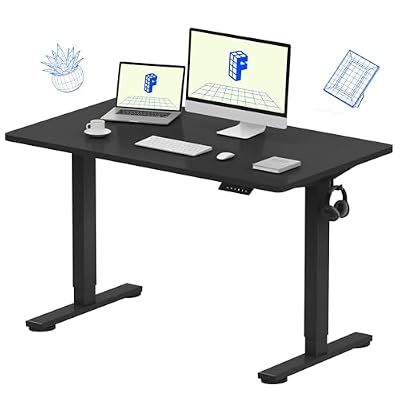
FLEXISPOT EN1 One-Piece Standing Desk, Electric Adjustable with 4 Memory Presets, 176 LBS Capacity, Stable & Quiet, Seamless Desktop for Home Office & Dual Monitors, 48"x24" Black
Included for 'Budget home office setup under 500 dollars' because the listing specifies Electric Adjustable with 4 Memory Presets and 176 LBS Capacity, details this guide uses to compare options.
View on Amazon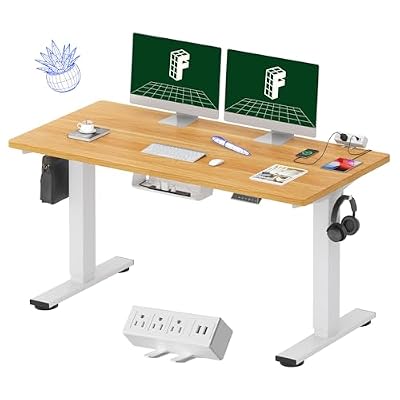
FLEXISPOT EN2 55"x28" Whole-Piece Standing Desk with Power Strip, Maple
Included for 'Budget home office setup under 500 dollars' because the listing specifies Maple, details this guide uses to compare options.
View on Amazon
FLEXISPOT 71 x 63 Reversible L-Shaped Corner Standing Desk, Black
Included for 'Budget home office setup under 500 dollars' because the listing specifies Black, details this guide uses to compare options.
View on AmazonThe monitor: one good screen
A 24-inch 1080p IPS monitor is the budget sweet spot, typically $100–$150 new. If your budget allows $150–$200, a 27-inch 1440p model gives noticeably more workspace. Look for a stand with height adjustment, or a VESA mount so you can add an inexpensive arm later. Using the monitor with your laptop open on a stand beside it creates a practical two-screen setup at no extra cost.
The desk: sturdy beats stylish
A desk at this budget should be at least 100–120 cm wide and 60 cm deep, with no wobble when you type. Simple steel-frame desks with a laminated top do the job. Alternatively, a solid tabletop on two adjustable trestle legs or drawer units is flexible and cheap. Skip a standing desk at this budget; manual crank or cheap electric models near $150 often wobble, and the money is better spent on the chair.
Peripherals and posture fixes
Once your laptop sits on a stand, you need a separate keyboard and mouse. A wireless combo from a mainstream brand for $30–$50 is fine. If you already feel wrist discomfort, spend slightly more on an ergonomic mouse rather than a fancy keyboard. A basic laptop stand raises the laptop screen to near eye level, which alone often relieves neck ache.
Lighting and power
A basic LED desk lamp with adjustable brightness and colour temperature costs $20–$35. Add a surge-protected power strip and a pack of cable ties, and your total finishes under or near $500.
How to trim if you are over budget
Use a sturdy dining or kitchen table instead of buying a desk, saving up to $100. Borrow a lamp from another room. Buy a refurbished monitor from a reputable seller with a warranty. Never cut the chair budget first; it is the item most tied to back and neck comfort.
What to add later
When money frees up, the most valuable upgrades are, in order: a monitor arm, a second monitor, a better webcam or headset if you are on calls often, and eventually a standing desk. Buying in this sequence means every purchase builds on the last rather than replacing it.
FAQ
Is a gaming chair a good budget option?
Usually not. Many budget gaming chairs prioritise looks, with fixed bucket seats and pillow-style lumbar support. A used office chair or a simple mesh task chair is usually more adjustable at the same price.
Should I buy a standing desk converter instead of a monitor?
Only if you already have an external monitor. Screen position affects posture every hour, while standing is an occasional benefit.
Bottom line
For $500, prioritise a good chair (ideally used premium), one decent monitor, a sturdy basic desk, a laptop stand and a keyboard-and-mouse combo. Keep lighting and cables simple and upgrade later in a planned order.
Related Reviews & Guides


Belkin Thunderbolt 4 Dock review

best ergonomic office chair for students