Last Updated: September 29, 2026
Two people, one desk is a common reality in apartments and smaller homes, and it is one of the fastest routes to household friction. One person’s video call collides with the other’s phone call, elbows bump, chargers vanish, and the monitor is always at the wrong height for whoever sits down second. A shared desk can work well, but only if it is planned as two workstations that happen to share a surface rather than one workstation with two users.
📄 In This Review
Measure for two, not one
Each person needs roughly 70–90 cm of desk width to work comfortably with a laptop or a single monitor, plus space for elbows. A shared desk should therefore be at least 150–180 cm wide. Depth of 70–80 cm helps both people keep screens at a comfortable distance. Below 140 cm, sharing side by side becomes cramped enough that one person will usually end up at the kitchen table anyway.
| Desk width | Setup it supports | Verdict |
|---|---|---|
| 120–140 cm | Two laptops, no monitors | Tight; best for part-time sharing |
| 150–170 cm | Two laptops or one monitor each on arms | Workable for daily use |
| 180–200 cm | One monitor each plus lamps and space | Comfortable |
| Two desks in an L or facing | Independent setups | Best if floor space allows |
Layout options
See also: Best Reclining Chairs: Nine Recliner Listings Compared by Mechanism, Fabric and Space Needs • Best Roku Streaming Deals Reviewed
Side by side
The most common layout on a long desk against a wall. It is space-efficient but puts both people in each other’s peripheral vision and makes simultaneous calls harder. Place a slim divider, a plant or the two monitors’ outer edges to create a visual boundary.
Facing each other
Two desks or one deep desk with people on opposite sides. It is sociable and gives each person their own edge, but it means each person appears in the background of the other’s video calls. A low screen or back-to-back monitors fix that.
Back to back or L-shaped
People sit facing different walls. This is the best layout for simultaneous calls because voices project away from each other and neither appears on the other’s camera.
Height: the hidden conflict
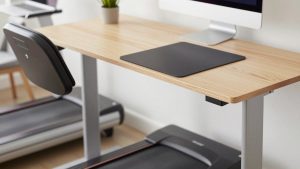
Two people of different heights cannot both have a fixed desk at the right height. The ideal desk height for a 160 cm person and a 185 cm person can differ by around 8–10 cm. Options include a standing desk with one person’s preset height for each shift (only practical if you do not work at the same time), adjustable chairs plus a footrest for the shorter person, or separate monitor arms so each screen can be set independently even if the desk is fixed.
Sound: the real challenge
Simultaneous calls are the biggest problem in shared offices. Both people should use headsets with boom microphones or strong noise suppression; laptop microphones pick up the other person clearly. Soft furnishings, a rug and curtains reduce echo that carries voices across the room. Agree on a simple signal, such as a small light or sign, for “on a call”.
Schedule when possible
Shared calendars help avoid overlapping important calls. If one person has a critical meeting, the other can move to another room for that hour.
Power and cables for two
Give each person their own power strip mounted under their half of the desk, and their own charging cables in their own colour. That ends the “who took my charger” arguments. If you share a monitor, a monitor with two inputs or a KVM switch lets each person connect their own laptop with one cable.
Storage and ownership
Each person needs their own drawer or storage unit. Shared surfaces become everyone’s dumping ground; clear personal zones prevent that. A rolling pedestal drawer under each half of the desk works well and can move if the layout changes.
FAQ
Can two people share one monitor?
Yes, if you work at different times or one person uses it only occasionally. A monitor with two inputs or a USB-C KVM switch lets both laptops connect without swapping cables.
What is the best desk for two people working from home?
A long desk of 180 cm or more, or two separate desks arranged back to back or in an L. Separate desks give each person independent height and layout choices.
Bottom line
A shared desk works when it is really two workstations: at least 150–180 cm wide, arranged to separate sound and cameras, with independent screen heights, headsets for both people and separate power and storage. Plan it deliberately and sharing becomes routine rather than a daily negotiation.
Related Reviews & Guides
best ergonomic office chair for long hours
Secretlab Titan Evo Review