Last Updated: September 27, 2026
Belkin’s Connect Pro Thunderbolt 4 Dock is a 12-port dock designed to make dual-monitor setups simple. Its main advantage over many Thunderbolt docks is two built-in HDMI 2.0 ports, so you can connect two common office monitors without adapters. It also delivers up to 90W of charging, a UHS-II SD card reader and Gigabit Ethernet. This review explains who it suits, where it falls short and how it compares with other Thunderbolt 4 docks.
📄 In This Review
Key specifications
| Feature | Belkin Connect Pro Thunderbolt 4 Dock (per Belkin specs) |
|---|---|
| Connection | Thunderbolt 4 host port, 40Gbps |
| Host charging | Up to 90W |
| Downstream Thunderbolt 4 | 1 port |
| Video outputs | 2 x HDMI 2.0 |
| USB | 1 x USB-C 10Gbps, 2 x USB-A 3.1, 2 x USB-A 2.0 |
| Networking | Gigabit Ethernet |
| Card reader | SD UHS-II |
| Audio | 3.5mm combo jack |
| Display modes | Two 4K at 60Hz or one 8K at 30Hz, host dependent |
| Launch price | About $400; often lower now (check current pricing) |
Design
See also: Best Reclining Chairs: Nine Recliner Listings Compared by Mechanism, Fabric and Space Needs • Best Roku Streaming Deals Reviewed
The Connect Pro is a compact grey block that sits flat on the desk. The front carries the host port, SD reader, USB-C and audio jack; the rear houses the HDMI outputs, downstream Thunderbolt port, Ethernet and USB-A ports. It comes with a short Thunderbolt 4 cable and an external power supply.

Belkin Connect Thunderbolt 4 Docking Station, 5-in-1 USB-C Multiport Core Hub w/ 96W Power Delivery for Mac, Windows, Single 8K or Dual 4K Display, Thunderbolt 4 Cable & Power Supply Included
Included for 'Belkin Thunderbolt 4 Dock review' because the listing specifies Windows and Single 8K or Dual 4K Display, details this guide uses to compare options.
View on Amazon
Belkin Thunderbolt 4 Docking Station Triple Display 96W 14 in 1 USB-C Hub
Included for 'Belkin Thunderbolt 4 Dock review' as a relevant option in this category; details come from the product listing.
View on Amazon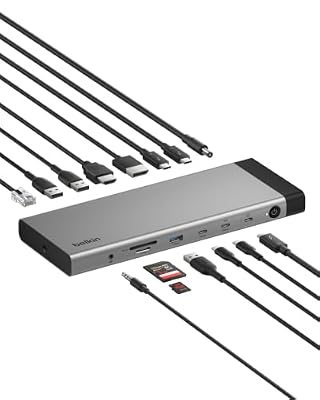
Belkin 140W Thunderbolt™ 5 Dock, 14-in-1 Docking Station, 4K@144Hz Display
Included for 'Belkin Thunderbolt 4 Dock review' because the listing specifies 14-in-1 Docking Station and 4K@144Hz Display, details this guide uses to compare options.
View on AmazonDisplay support
Two HDMI 2.0 outputs support up to two 4K displays at 60Hz on compatible hosts, which covers the most common office setup. Windows Thunderbolt 4 laptops typically handle this well. On Macs, base M1 and M2 chips support only one external display, and the dock does not include DisplayLink. Pro and Max Macs can drive both HDMI screens. If you want high refresh or DisplayPort features such as daisy-chaining, the HDMI-only design is limiting.
Performance
Charging
90W to the laptop suits most ultrabooks and 14-inch laptops. Large performance laptops may charge slowly under load. Reviewers found the front USB-C and USB-A ports provide modest charging for phones and accessories.
Card reader
The UHS-II SD reader is a plus for photographers, with independent tests showing read speeds in the low hundreds of MB/s with fast cards.
Networking
Gigabit Ethernet is fine for most users; NAS-heavy users may prefer 2.5GbE docks.
Strengths and weaknesses
Strengths
Two native HDMI outputs, straightforward dual-monitor setup, UHS-II SD reader, 90W charging and a compact footprint.
Weaknesses
Only one downstream Thunderbolt port limits expansion. Two of the USB-A ports are USB 2.0. No DisplayPort outputs. Gigabit rather than 2.5GbE Ethernet. At full launch price, it was expensive for its feature set; value depends on current pricing.
Who should buy it
The Belkin Connect Pro suits Windows Thunderbolt laptop users and Pro/Max Mac users who want to plug two HDMI monitors in with no adapters, plus a card reader and basic peripherals. Users with many Thunderbolt devices should look at docks with more downstream Thunderbolt ports, such as the StarTech TB4CDOCK or the CalDigit TS4.
Comparison with rivals
| Dock | Native video outputs | Downstream TB ports | Charging | Ethernet |
|---|---|---|---|---|
| Belkin Connect Pro | 2 x HDMI | 1 | 90W | 1GbE |
| CalDigit TS4 | 1 x DP | 3 | 98W | 2.5GbE |
| Dell WD22TB4 | 2 x DP, 1 x HDMI, USB-C | TB4 ports | 90W (130W Dell) | 1GbE |
| StarTech TB4CDOCK | Via TB ports | 3 | 96W | 1GbE |
Setup tips
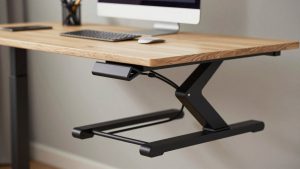
For the cleanest dual-monitor desk, connect both screens via HDMI 2.0 cables rated for 18Gbps so 4K at 60Hz works reliably. Put the dock behind the laptop stand, since the host port and SD reader face the front, and route the rear cables into a tray. The supplied Thunderbolt cable is short at around 0.8m, so on a standing desk the dock should move with the desktop rather than sit on a shelf below. Keyboard and mouse receivers can use the USB 2.0 ports, leaving the faster USB-A and USB-C ports for drives and webcams.
FAQ
Can the Belkin Connect Pro run two monitors on a MacBook Air?
Not on base M1 or M2 MacBook Airs. Check Apple’s specifications for newer models, which may support two displays in certain configurations.
Does it support DisplayPort monitors?
It has no DisplayPort outputs, but you can connect a DisplayPort monitor via the downstream Thunderbolt port with a USB-C to DisplayPort cable.
Bottom line
The Belkin Connect Pro Thunderbolt 4 Dock is a good choice for simple dual-HDMI setups with 90W charging and a UHS-II reader, but its single downstream Thunderbolt port and USB 2.0 ports limit expansion. Buy it at a good price for straightforward office desks, and check Belkin’s current spec sheet first.
Related Reviews & Guides



Podcast studio at home setup guide

Monitor light bar vs desk lamp which is better