Last Updated: September 26, 2026
Video podcasts now make up a large share of podcast listening on YouTube and Spotify, and many hosts record from a desk with a webcam rather than a cinema camera. A podcast asks different things from a webcam than a meeting does: hour-long recordings without overheating or drifting exposure, consistent framing across episodes, clean footage for editing, and a look that matches your co-host’s camera. This guide covers what matters and which webcams suit on-camera podcasting.
📄 In This Review
What podcast video needs from a webcam
Consistency over long sessions
A 60-90 minute recording exposes weaknesses: autofocus hunting when you lean back, white balance drifting as daylight fades, or a camera that heats up and softens. Manual locks for focus, exposure and white balance are more important than headline resolution.
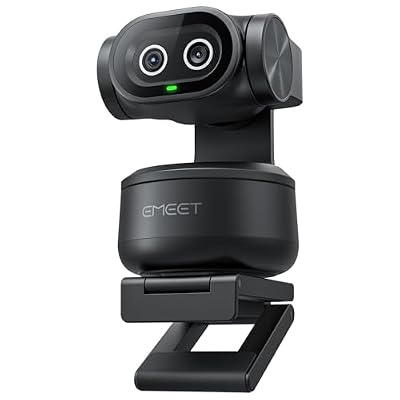
EMEET PIXY Dual-Camera AI-Powered PTZ Camera 4K, AI Tracking
Included for 'Best webcam for podcasting on camera' because the listing specifies AI Tracking, details this guide uses to compare options.
View on AmazonLocal recording quality
Remote recording platforms such as Riverside and SquadCast can record each participant locally at up to 4K and upload afterwards, avoiding call compression. That makes a 4K webcam more useful for podcasts than for ordinary calls, because the full-quality file actually reaches your edit.
Framing room for editing
4K footage lets editors cut between a wide shot and a tighter 1080p crop from one camera, faking a two-camera setup. It also makes vertical clips for Shorts and Reels without dropping below 1080p width.
Audio is separate
No podcaster should rely on a webcam microphone. Plan on a dynamic USB or XLR microphone; the webcam’s job is video only.
Webcams that suit video podcasts
See also: Best Reclining Chairs: Nine Recliner Listings Compared by Mechanism, Fabric and Space Needs • Best Roku Streaming Deals Reviewed
| Webcam | Recording mode | Podcast strength | Typical price tier |
|---|---|---|---|
| Elgato Facecam Pro | 4K60 | Full manual control, 4K for crop edits | $250-$300 |
| Elgato Facecam (original) | 1080p60 uncompressed | Fixed focus never hunts; settings stored on camera | $100-$170 |
| Logitech MX Brio | 4K30, 1080p60 | Good skin tones, easy setup | $170-$200 |
| Insta360 Link / Link 2 | 4K30 | 1/2-inch sensor, tracking can be locked off | $150-$300 |
| Obsbot Tiny 2 | 4K30 | Large sensor, gimbal, voice control | $250-$330 |
Choosing for your format
Solo host at a desk
A 4K webcam lets you get two framings from one camera. The Elgato Facecam Pro or Logitech MX Brio suit this well. Lock focus and exposure once you are seated.
In-person co-hosts
Use one webcam per host, ideally the same model so colours match in the edit. Plug each into its own USB port, and record them in OBS as separate sources, or use a hardware switcher. The original Elgato Facecam is a cost-effective choice for multi-camera setups because its fixed focus and stored settings keep shots consistent.
Remote interviews
Send guests a checklist: face a window, camera at eye level, plain background, wired connection. Your own camera should be better than theirs, but consistency across both sides matters more than one perfect shot.
Setup checklist
- Key light at 45 degrees and slightly above eye level, plus a dim background light for depth.
- Camera at eye level, 60-100cm away, framing head and shoulders with room for the microphone arm.
- Lock focus, exposure and white balance (around 5000-5600K with daylight LEDs).
- Record at 30fps for a conversational look, or 60fps if your channel style is fast-paced.
- Test a full-length recording once to check for overheating or dropped frames.
Heat, power and reliability
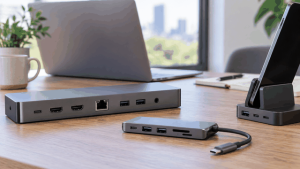
Long recordings stress webcams more than short calls. Give the camera open air rather than tucking it behind a monitor hood, and keep it away from heat sources like lights with hot housings. Connect it directly to the computer or a powered dock rather than a bus-powered hub, which can brown out during long sessions. Record a backup locally even if you use a remote platform, and check that your storage has room: 4K at 30fps in common codecs can use roughly 20-60GB per hour depending on bitrate.
FAQ
Should I use a mirrorless camera instead?
Mirrorless cameras with a fast lens give background blur and better low-light quality, but cost $500-$1,200 with a lens, need dummy batteries for long sessions, and some overheat. A good webcam is the right starting point; upgrade once the show is established.
Is 60fps better for podcasts?
Not necessarily. Most podcast channels publish at 30fps, which looks natural for conversation and keeps file sizes manageable. 60fps suits high-energy formats or gaming-adjacent shows.
Bottom line
For on-camera podcasting, pick a webcam with manual locks and, ideally, 4K for crop-friendly edits: the Elgato Facecam Pro or Logitech MX Brio for solo hosts, matching original Facecams for multi-host desks. Pair it with a dedicated microphone and proper lighting, and record locally for the best final quality.
Related Reviews & Guides
Best Ergonomic Office Chair for Streamers
Best Reclining Chairs: Nine Recliner Listings Compared by Mechanism, Fabric and Space Needs