Last Updated: September 25, 2026
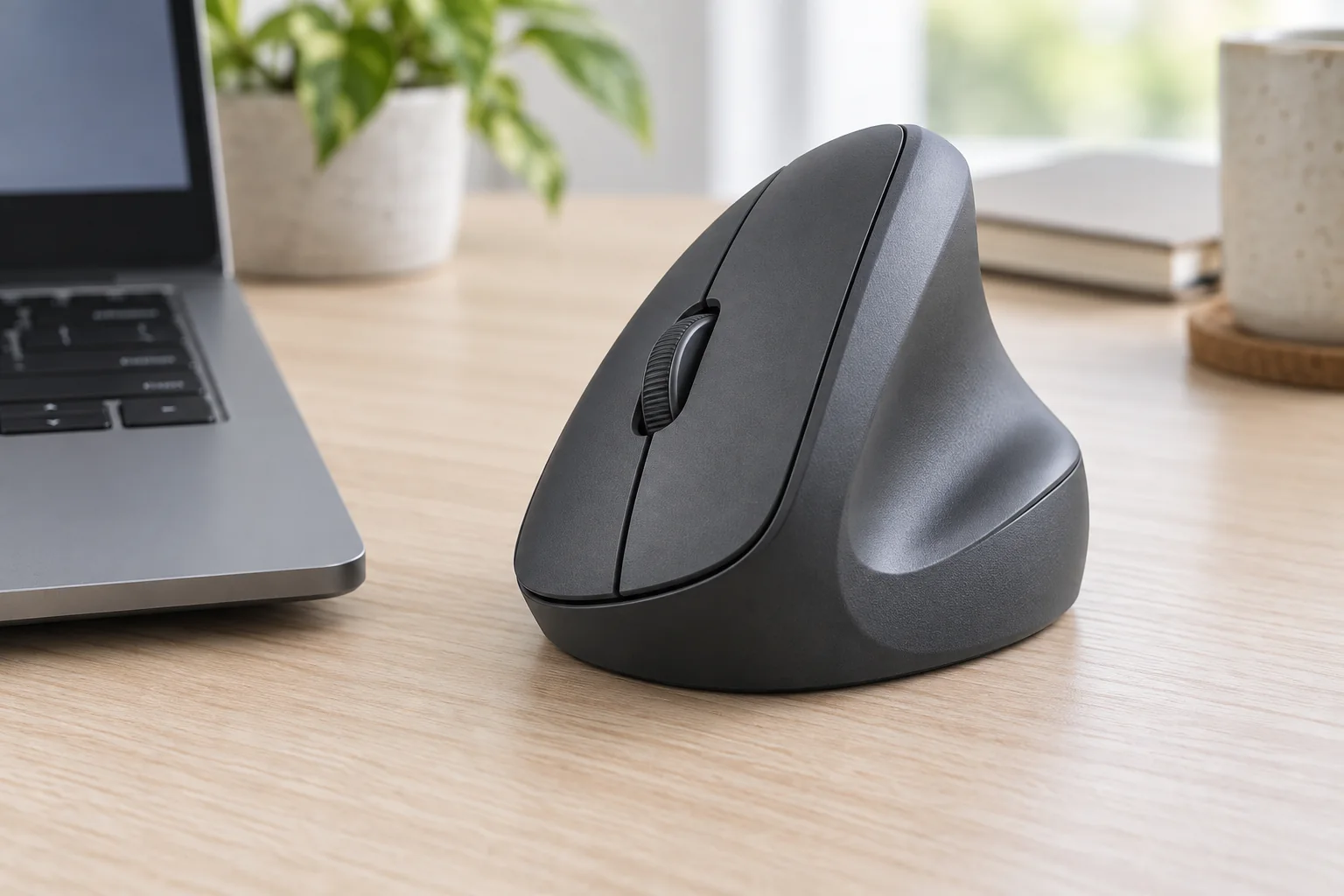
After three years of daily use and a rotating test bench of vertical mice, my wrist tells me quickly which designs actually help and which just look ergonomic. The wrong vertical mouse forces your arm into an awkward roll, makes you squeeze to maintain control, or buries essential buttons where your thumb cannot reach without straining. The right one lets your hand rest in a natural handshake position, keeps the forearm neutral, and still feels precise enough that you forget you switched from a flat mouse at all.
What separates the good from the bad is not marketing but execution on a few fundamentals: angle and grip texture that supports without fatiguing, click and scroll feel that stays consistent over long work sessions, and connectivity that does not drop or lag. Throughout 2026 I have kept the same testing routine for every model — full workdays, editing, spreadsheets, and browsing — to judge comfort, control, and build quality rather than spec sheets.
As an Amazon Associate we earn from qualifying purchases at no extra cost to you.





Quick Picks
| Product | Best for | Price |
|---|---|---|
| Logitech Lift Graphite | Best Overall Comfort for Small to Medium Hands | $63.99 |
| ProtoArc EM11 NL | Best Left-Hand Friendly Value with Quiet Clicks | $24.99 |
| Anker 2.4G Wireless Vertical | Best Simple Plug-and-Play Ergonomics | $29.99 |
| AOC Wireless Bluetooth Vertical | Best Dual-Mode Connectivity on a Budget | $29.99 |
| Logitech MX Vertical Graphite | Best Premium Build and Controls | $77.95 |
| Logitech Lift Rose | Best Style-Focused Ergonomic Pick | $63.49 |
| Lekvey Ergonomic Rechargeable | Best Comfort Grip for Long Sessions | $24.98 |
| UGREEN Wireless Vertical | Best Ultra-Budget Quiet Option | $15.19 |
How We Picked
See also: Logitech K120 Full Size Wired Keyboard vs Amazon Basics Wired QWERTY Keyboard: Which Should You Buy? • How to Choose Wired Keyboards: What Actually Matters
We prioritized real-world ergonomic benefit over gimmicks, focusing on natural hand angle and forearm posture, long-session comfort including texture and thumb rest, control precision for everyday productivity rather than inflated sensitivity numbers, and practical connectivity and charging that fits how people actually use a desk setup. Models that felt cheap, forced finger splay, or showed inconsistent tracking were removed, while those that balanced comfort, build quality, and value for distinct hand sizes and budgets made the final list.
The 8 Best Vertical Mice in 2026
1. Logitech Lift Graphite
The Logitech Lift in Graphite is the most universally comfortable vertical mouse for small to medium hands and the model we recommend to first-time vertical switchers who want relief without a steep learning curve. Its handshake angle feels natural from the first hour, the textured grip prevents slipping, and the quiet, well-damped clicks hold up during long workdays. It pairs easily and maintains a stable connection for focused work.
- Pro: Exceptionally comfortable shape that reduces wrist pronation without feeling bulky
- Pro: Refined build quality with soft clicks and a smooth scroll wheel
- Con: Compact sizing may feel small for very large hands
When to skip it: If you have extra-large hands or prefer a substantial palm-filling body, you will want a larger frame like the MX Vertical instead.
2. ProtoArc EM11 NL
The ProtoArc EM11 NL is ideal for users who want an affordable vertical mouse with a more accommodating shape and rechargeable convenience. It offers a relaxed vertical angle that eases wrist pressure, plus a layout that works well for a broader range of hand sizes than many budget options. Noise is kept low, which helps in shared spaces, and the wireless connection stays reliable for everyday productivity.
- Pro: Comfortable, roomy ergonomics at a very accessible price
- Pro: Quiet clicks and rechargeable design add daily convenience
- Con: Materials and finish feel less premium than Logitech options
When to skip it: If you prioritize a dense, premium feel and highly refined scroll tactility, step up to a Logitech premium pick.
3. Anker 2.4G Wireless Vertical
The Anker 2.4G Wireless Vertical is built for buyers who want straightforward ergonomics without complexity. It uses a simple USB receiver setup that just works, and the familiar vertical shape does a solid job of keeping the wrist neutral during routine office tasks, browsing, and document work. Tracking feels steady for productivity, and the button placement is intuitive so the transition from a traditional mouse is short.
- Pro: Simple, reliable plug-and-play wireless setup
- Pro: Comfortable vertical angle that is easy to adapt to
- Con: Limited extra features and no Bluetooth flexibility
When to skip it: If you need multi-device pairing or Bluetooth support for tablets and laptops, choose a dual-mode model like the AOC instead.
4. AOC Wireless Bluetooth Vertical
The AOC Ergonomic Mouse stands out for offering both 2.4GHz wireless and Bluetooth in a rechargeable vertical body, making it a strong pick for multi-device desks on a tight budget. The ergonomic slope is supportive without forcing an extreme angle, so it suits long sessions of email, research, and light creative work. Pairing is straightforward and switching between connection types is more practical than carrying extra dongles.
- Pro: Flexible dual-mode connectivity for laptops, desktops, and tablets
- Pro: Rechargeable battery adds convenience and reduces waste
- Con: Slightly larger footprint may not suit very compact travel kits
When to skip it: If you want the most compact, minimalist mouse for portability, a smaller option like the UGREEN will pack easier.
5. Logitech MX Vertical Graphite
The Logitech MX Vertical in Graphite is the premium choice for users who want top-tier build quality, a larger ergonomic form, and more refined control. It provides a substantial, hand-filling shape that supports bigger hands and encourages a very neutral forearm position, while the premium texture and well-tuned buttons make long sessions less fatiguing. It feels the most like a flagship productivity tool in this category.
- Pro: Excellent ergonomic support for larger hands with high-quality materials
- Pro: Superior button feel and overall fit and finish
- Con: Higher price and larger size are not ideal for small hands or tight desks
When to skip it: If you have smaller hands, prefer a lightweight compact mouse, or want to stay well under the premium price tier, the Lift is a more comfortable and affordable fit.
6. Logitech Lift Rose
The Logitech Lift in Rose delivers the same proven ergonomics as the Graphite version with a softer, more expressive look that stands out on lighter desk setups. It is an excellent match for users who want comfort for small to medium hands but prefer color that complements a personalized workspace. Performance and feel are essentially identical, with quiet clicks, a supportive angle, and reliable wireless connectivity for daily productivity.
- Pro: Same highly comfortable, wrist-friendly shape as the standard Lift
- Pro: Distinct finish adds style without sacrificing build quality
- Con: Compact form still may feel small for those needing a larger grip
When to skip it: If you need a bigger body for extra-large hands, the MX Vertical offers more surface area and support despite the higher cost.
7. Lekvey Ergonomic Rechargeable
The Lekvey Ergonomic Rechargeable is tailored for users who log long hours and want a cushioned, hand-supportive grip without spending much. The ergonomic contour encourages a relaxed handshake posture and the rechargeable setup keeps ongoing costs low. Clicks are comfortable for extended use, and overall control is well suited to general office work, browsing, and study sessions.
- Pro: Plush-feeling grip that stays comfortable over extended sessions
- Pro: Outstanding value with rechargeable convenience
- Con: Design and materials are functional rather than premium
When to skip it: If you value a compact, premium-quality shell and the most refined wheel and switch tuning, invest in the Logitech Lift instead.
8. UGREEN Wireless Vertical
The UGREEN Wireless Vertical is the best ultra-budget path into ergonomic mice, offering both Bluetooth and 2.4G wireless plus quiet clicks for shared offices and libraries. It keeps the wrist in a healthier position than a flat mouse while remaining lightweight and easy to learn, with simple pairing that works across everyday devices. For the price, it delivers a surprising amount of comfort and practicality.
- Pro: Lowest price with versatile Bluetooth and wireless options
- Pro: Quiet clicks are ideal for shared or quiet environments
- Con: Build feels lighter and less substantial than midrange models
When to skip it: If you want a more substantial, premium-feeling body for all-day support, the ProtoArc or Lekvey provide a more filling grip for a modest step up.
Buying Guide
Shape, Angle, and Hand Fit
Vertical angle and overall volume matter more than any other spec. A moderate handshake angle that keeps the forearm neutral without forcing the thumb to overreach is the sweet spot for most people. Consider hand size carefully: compact models suit small to medium hands and tighter desks, while larger, fuller bodies support bigger palms and reduce the need to pinch the mouse. Texture and thumb rest depth also determine whether comfort lasts through an afternoon.
Connectivity and Charging Style
Decide how you will actually use the mouse day to day. A single 2.4GHz receiver is the simplest and most stable for one computer, while Bluetooth or dual-mode support matters if you switch between a laptop, tablet, or multiple machines. Rechargeable batteries are convenient and waste-free for daily drivers that stay at a desk, while replaceable batteries can be preferable if you want to swap and go without waiting to charge.
Click Feel, Wheel Control, and Buttons
Living with a vertical mouse means caring about click noise, scroll precision, and button placement. Quiet, well-damped switches reduce fatigue in shared spaces, and a wheel that steps cleanly improves document navigation. Look for forward and back thumb buttons that are reachable without contorting the hand, and avoid layouts that force you to lift or twist to click. Stability and consistent tracking for productivity tasks outweigh flashy sensitivity claims.
Our Verdict
Top pick: Logitech Lift Graphite. It delivers the best balance of wrist-friendly ergonomics, refined build quality, and easy everyday usability for the widest range of hands, making it the safest first vertical mouse that still feels premium over time. Budget pick: UGREEN Wireless Vertical. At its low price with both Bluetooth and wireless plus quiet clicks, it offers genuine ergonomic relief and flexible connectivity for far less than most competitors. If you have large hands or want the most substantial, flagship feel and are comfortable paying more, the Logitech MX Vertical Graphite wins for its fuller support and superior materials.
FAQ
Will a vertical mouse really help with wrist pain?
A vertical mouse can reduce forearm pronation and keep the wrist in a more neutral handshake position, which many users find more comfortable during long sessions. It is not a medical treatment, so persistent pain should be evaluated by a professional, but proper desk height and angle combined with a well-fitted vertical shape often eases strain.
How long does it take to get used to a vertical mouse?
Most people adapt within a few days to a week for everyday tasks like browsing and documents, with precision improving as muscle memory develops. Starting with moderate sensitivity and a supportive angle helps shorten the learning curve.
Do I need Bluetooth or is a USB receiver enough?
A USB receiver is perfectly reliable if you use one computer at a fixed desk. Bluetooth or dual-mode is worth it if you switch between devices, use a tablet, or want fewer dongles when moving between workstations.
Are vertical mice good for small hands?
Yes, but fit matters. Compact vertical models with a narrower grip and shallower thumb rest suit smaller hands better and prevent overreaching, while larger models can feel unwieldy. If possible, compare compact and full-size options to find the shape that lets your fingers rest naturally without stretching.
Related Reviews & Guides




6 Best Evoluent Ergonomic Vertical Mice 2026
How to Choose Wired Keyboards: What Actually Matters