Last Updated: September 16, 2026
- 1. Cable Mechanics: Fixed vs. Detachable Type-C
- 2. Form Factor: Selecting the Right Layout for Your Space
- 3. Switch Technology: Membrane vs. Mechanical
- 4. Build Construction and Case Acoustics
- 5. Hot-Swappability: Future-Proofing Your Investment
- 6. When to Spend More (and When to Save)
- Related Guides
- FAQ
- Related Guides
While wireless peripherals continue to flood the market, the wired keyboard remains the undisputed anchor of high-performance desk setups. For professionals, writers, and competitive gamers, the absolute reliability of a physical connection is irreplaceable. Choosing a wired keyboard is no longer just about finding a cheap plug-and-play board; it is about selecting a tool that matches your typing ergonomics, aesthetic standards, and workflow efficiency without the constant anxiety of battery degradation or signal interference.
In 2026, as workspaces become more streamlined and integrated, the market is saturated with complex marketing jargon like “gasket mounts,” “rapid trigger,” and “hall effect switches.” Cutting through this noise is essential to avoid overpaying for features you will never use. This guide focuses on the practical specifications that actually impact your daily typing experience, helping you identify where to invest your budget and where to save it.
As an Amazon Associate we earn from qualifying purchases at no extra cost to you.

📄 In This Review
- 1. Cable Mechanics: Fixed vs. Detachable Type-C
- 2. Form Factor: Selecting the Right Layout for Your Space
- 3. Switch Technology: Membrane vs. Mechanical
- 4. Build Construction and Case Acoustics
- 5. Hot-Swappability: Future-Proofing Your Investment
- 6. When to Spend More (and When to Save)
- Related Guides
- FAQ
- Related Guides
1. Cable Mechanics: Fixed vs. Detachable Type-C
The cable itself is the defining feature of a wired keyboard, yet it is often overlooked. Cheap, entry-level keyboards typically feature fixed USB cables. If the cable frays, gets pinched, or suffers internal damage, the entire keyboard becomes e-waste. For long-term durability, always look for a keyboard with a detachable USB Type-C port on the chassis. This design allows you to easily replace a damaged cable or swap it out for a custom coiled cable to match your desk aesthetic.
2. Form Factor: Selecting the Right Layout for Your Space
See also: Logitech K120 Full Size Wired Keyboard vs Amazon Basics Wired QWERTY Keyboard: Which Should You Buy? • Best Wired Keyboards in 2026: Compared and Ranked
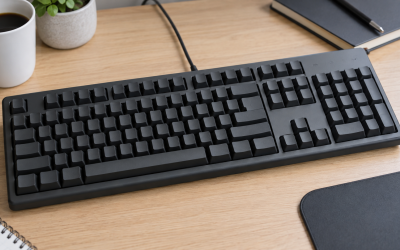
Keyboard size directly dictates your desk ergonomics and mouse movement area. Full-sized keyboards (100%) include a dedicated number pad, which is essential for data entry but forces your mouse arm further outward, potentially causing shoulder strain. Tenkeyless (TKL or 80%) layouts remove the number pad, striking a great balance for general office work. If you want to maximize desk space, 75% or 65% layouts retain the crucial arrow keys while stripping away excess plastic bezel, offering the most ergonomic posture for long typing sessions.
3. Switch Technology: Membrane vs. Mechanical
The switches beneath the keycaps determine how your keyboard feels, sounds, and responds. Membrane keyboards are quiet and inexpensive, but they offer a mushy typing experience and wear out faster. Mechanical switches utilize individual physical springs and leaf springs, offering tactile feedback, longer lifespans, and a much cleaner typing feel. If you work in a quiet office, look for silent tactile or silent linear mechanical switches, which provide the satisfying physical feedback of a mechanical board without the loud acoustic signature that might annoy your colleagues.
4. Build Construction and Case Acoustics
A hollow, lightweight plastic keyboard casing creates an unpleasant, echoing pinging sound with every keystroke. Premium wired keyboards utilize high-density plastics, integrated sound-dampening foam, or heavy CNC-machined aluminum cases. Gasket-mounted designs, where the internal plate is cushioned by rubber or silicone strips, offer a slightly flexible typing deck that absorbs the impact of bottoming out. This reduces finger fatigue during long writing sessions and produces a deeper, more muted acoustic profile.
5. Hot-Swappability: Future-Proofing Your Investment
Unless you are buying a budget-tier board, prioritize a “hot-swappable” PCB (printed circuit board). In standard keyboards, the switches are soldered directly to the electronics; if one switch fails, the board is broken unless you know how to solder. Hot-swappable keyboards allow you to pull switches out and plug new ones in within seconds without any technical expertise. This feature makes troubleshooting incredibly simple and allows you to completely change the typing feel of your keyboard down the road without buying a whole new device.
6. When to Spend More (and When to Save)
You do not need to spend hundreds of dollars to get an excellent typing experience. Avoid premium markups on extreme gaming features like 8000Hz polling rates unless you are a highly competitive e-sports player; standard 1000Hz polling is already virtually instantaneous for 99% of users. Instead, allocate your budget toward high-quality PBT keycaps, which resist the greasy shine that develops on cheap ABS plastic over time, and factory-lubricated switches, which offer a buttery-smooth keypress right out of the box.
Related Guides
If you are ready to transition from understanding the specs to finding the perfect model for your desk setup, check out our comprehensive round-up of the best wired keyboards currently available on the market.
FAQ
Do wired keyboards have less latency than wireless ones?
Yes, wired keyboards inherently offer lower and more consistent latency because the data travels directly through copper wire rather than over crowded radio frequencies. While modern 2.4GHz wireless connections are incredibly fast, wired connections remain completely immune to signal interference from Wi-Fi routers and other desk peripherals.
Can I use a custom coiled cable with any wired keyboard that has a Type-C port?
Generally, yes, but you must ensure the keyboard does not require high power delivery that cheap custom cables cannot support. Keyboards with heavy RGB lighting or built-in USB pass-through hubs require high-quality, thicker gauge wire to function properly over longer cable runs.
What is the difference between ABS and PBT keycaps?
ABS is a cheaper, smoother plastic that quickly wears down, develops a shiny texture, and yellows under sunlight. PBT is a denser, textured polymer that resists wear, maintains its matte finish for years, and produces a deeper, more satisfying sound when typing.
Do I need to install software for a wired keyboard to work?
No, almost all wired keyboards are plug-and-play and will function immediately upon connection to your computer’s USB port. However, some brands offer optional companion software if you want to customize the RGB lighting patterns, remap specific keys, or program complex macros.
Related Reviews & Guides




Mechanical Keyboard Office Quiet Review

Best 60 Percent Mini Keyboard for Your Home Office Desk…