Last Updated: September 26, 2026
A content creator’s desk carries more than a laptop. It holds a camera on an arm, a key light, a microphone boom, a capture card, maybe a second monitor for chat or timeline, and a tangle of USB and power cables that all have to travel with the desktop every time it rises. That changes what “best standing desk” means. Stability on camera, load capacity for clamp-mounted gear and a quiet motor that will not ruin a voiceover matter far more here than for someone typing email. This guide walks through what to look for, which well-known frames fit the job and how to set the desk up so the shot stays steady whether you are sitting or standing.
📄 In This Review
Why creators need a different standing desk
Most standing desk reviews test with a monitor and a keyboard. A creator desk is loaded asymmetrically: a heavy monitor arm on one edge, a boom arm clamped to the back rail, a light stand clamped at a corner. Every clamp adds leverage that turns into wobble at standing height. When you record a talking-head video at 42 to 46 inches of desk height, even a few millimetres of side-to-side sway will show in a camera that is mounted on the desk itself.
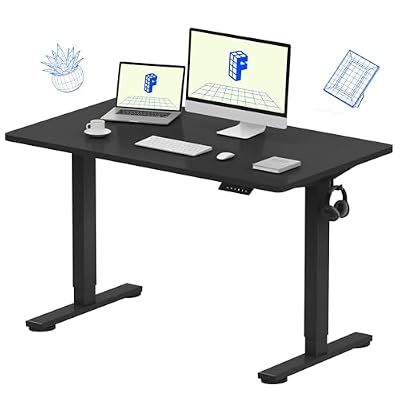
FLEXISPOT EN1 One-Piece Standing Desk, Electric Adjustable with 4 Memory Presets, 176 LBS Capacity, Stable & Quiet, Seamless Desktop for Home Office & Dual Monitors, 48"x24" Black
Included for 'Best standing desk for content creators' because the listing specifies Electric Adjustable with 4 Memory Presets and 176 LBS Capacity, details this guide uses to compare options.
View on Amazon
JOY worker 32" Standing Desk Converter, Height Adjustable Stand Up Riser
Included for 'Best standing desk for content creators' because the listing specifies Height Adjustable Stand Up Riser, details this guide uses to compare options.
View on Amazon
ANTHOSPACE Standing Desk Converter 23.6" x 13.4", Adjustable Height 2.4"–15.7", Sit Stand Converter with Sturdy Steel Frame, Ergonomic Standing Desk Topper & Monitor or Laptop Riser for Home Office
Included for 'Best standing desk for content creators' because the listing specifies Adjustable Height 2.4" and 15.7", details this guide uses to compare options.
View on AmazonThe second difference is noise. A cheap single-motor desk can produce 55 to 60 dB while moving, which is fine in an open office but loud next to a condenser mic. Dual-motor frames from established brands typically sit in the mid-40 dB range. You will not record while the desk moves, but you will move it between takes, and a quieter motor is less likely to vibrate a boom arm out of position.
Key specs to prioritise
See also: Best Reclining Chairs: Nine Recliner Listings Compared by Mechanism, Fabric and Space Needs • Best Roku Streaming Deals Reviewed
Frame stability and crossbar design
Look for three-stage legs (or at least wide two-stage legs) and a solid crossbar or a deep, stiff frame. Frames such as the Uplift V2, the Fully Jarvis and the Vari Electric Standing Desk are widely reported as stable for their class, while budget single-motor frames tend to sway more at full height. Check the manufacturer’s current spec sheet for leg stages and height range before buying.
Load capacity with headroom
Add up your gear honestly. A 32-inch monitor on a gas-spring arm can be 12 to 18 lb, a boom arm with a dynamic mic 4 to 6 lb, a mirrorless camera with a lens and arm 3 to 5 lb, lights and a desktop another 30 to 60 lb. Many creators land around 100 to 150 lb. Choose a frame rated for at least double that, which usually means a dual-motor frame in the 250 to 350 lb class.
Desktop depth for camera distance
A 30-inch-deep top gives room to push a camera back far enough for a less distorted face at a normal focal length. A 24-inch top forces the camera too close or onto a separate stand. For a creator, 30 inches of depth and 60 to 72 inches of width is the practical sweet spot.
Comparison of creator-friendly frame types
| Frame type | Typical load rating | Motor noise | Stability at standing height | Typical price tier |
|---|---|---|---|---|
| Single-motor, two-stage (budget) | 150-180 lb | 50-60 dB | Noticeable sway with arms clamped | $200-$350 |
| Dual-motor, two-stage (mid) | 250-300 lb | 45-50 dB | Good for one camera plus mic | $450-$700 |
| Dual-motor, three-stage (premium) | 300-350 lb | Around 45 dB | Best for full studio loads | $650-$1,100 |
| Four-leg / L-shaped | 350 lb+ | Varies | Very stable, big footprint | $900-$1,600 |
Ranges reflect common list prices for well-known brands; always check the current spec sheet and price.
Setting up the desk for recording
Cable management that moves with you
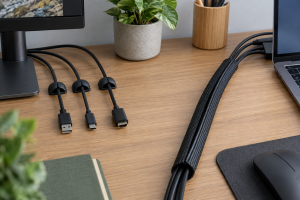
Use a cable tray under the rear edge and a vertebrae-style cable spine down one leg. Leave a service loop of at least 20 inches for every cable that goes to the floor, including the camera power supply and USB capture card. Most “desk will not go up” complaints from creators turn out to be a cable pinned against a wall or shelf.
Mount gear to the right place
Clamp the heaviest arm as close to a leg as possible. A boom arm in the middle of the back edge, far from any leg, acts like a lever. If the frame supports it, mount the camera on a separate floor stand for sit-to-stand work, or on a desk arm and simply re-frame the shot at each height.
Save presets for each workflow
Store one preset for seated editing, one for standing recording and one for standing editing. Creators often find the standing recording height is slightly lower than the standing typing height because you are looking at the camera, not the keyboard.
Budget, space and use-case picks
If you mainly edit and occasionally film with a webcam, a mid-range dual-motor desk around 60 by 30 inches is plenty. If you run a full desk studio with a camera, two lights and a mic, stretch to a three-stage dual-motor frame or an L-shaped desk that separates the “set” side from the editing side. For small bedrooms, a 55 by 28 inch top on a dual-motor frame keeps the footprint tight while leaving room for a boom arm.
FAQ
Will a standing desk shake my camera on video?
At full height, most desks show some sway if you type hard or bump the top. Using a three-stage dual-motor frame, clamping arms near the legs and avoiding typing while the camera rolls keeps it invisible in almost all footage.
Is a bamboo or laminate top better for creators?
Laminate is cheaper and resists scratches from clamps; bamboo looks better on camera and is slightly heavier. Either works, but make sure the top is at least 1 inch thick so clamps grip without crushing it.
Bottom line
For content creators, the best standing desk is a stable dual-motor frame with real load headroom, a 30-inch-deep top and a cable plan that travels with the desk. Spend on the frame first, mount heavy arms close to the legs and save presets for recording and editing heights. Check each brand’s current spec sheet for load, noise and height range before you commit.
Related Reviews & Guides

One cable docking station setup guide

best ergonomic office chair for students