Last Updated: September 7, 2026
Most people buy a power strip the way they buy a phone charger: they look at port count, grab the cheapest option, and never think about it again. That approach works right up until a brick transformer blocks three outlets or a unit fails without any real surge protection. After comparing the best power strips with usb across desk setups ranging from minimalist to battlestation, the differences that actually matter are joule rating, outlet spacing, USB-C support, and cord geometry.
The category has split into two camps. Full power strips combine AC and USB ports in one unit; USB-only hubs go all-in on charging. If you plug in a monitor or lamp, only the first camp helps you. If every device on your desk charges via USB, the second delivers more simultaneous outputs in a smaller footprint. This roundup covers both, ranked for real desk use.
As an Amazon Associate we earn from qualifying purchases at no extra cost to you.




📄 In This Review
Quick Picks
| Product | Best for | Price |
|---|---|---|
| One Beat Surge Protector | Budget surge, small desks | $11.99 |
| Yintar 6Ft Surge Protector | Simple home offices | $12.99 |
| 6FT Flat Plug 8 AC & 6 USB | Device-heavy stations | $15.59 |
| CHCORE Braided Power Strip | Value with USB-C | $9.99 |
| 50W 10-Port USB Station | All-USB households | $18.99 |
| USB Wall Charger 8-Port | Nightstands, travel | $9.99 |
| Chiefway 16-Outlet Strip | Maximum surge protection | $17.09 |
| YISHU Widely Spaced Strip | Transformer-heavy setups | $11.99 |
How We Picked
See also: Best ViewSonic Monitor: Six Listings Sorted by Job, From a Portable 16-Inch to a Curved 1440p Screen • Best AOC Monitor: Eight Listings Ranked by Price, Refresh Ceiling and Panel Type
We scored each unit on four criteria: surge joule rating, outlet-to-USB ratio, cord length and plug geometry, and USB-C availability. Price-to-port count served as a final tiebreaker. A strip that fails on any single criterion frustrates you daily, so we weighted them equally rather than chasing a hero metric.
The 8 Best Power Strips With USB in 2026
One Beat Surge Protector Power Strip
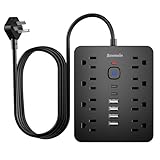
For anyone who needs certified surge protection without paying for extra ports. The 900J rating is the floor we recommend for electronics you care about, and the flat plug tucks behind a desk leg without gaps.
- Pro: Flat plug eliminates the wall gap; the 5-foot cord reaches most outlets from a seated position.
- Pro: Lowest price with a published joule rating in this group.
- Con: No USB-C ports and a limited USB count.
Skip this if your desk already has six or more plugs competing for slots.
Yintar Surge Protector Power Strip
A no-nonsense pick for home offices where three or four devices share one source. The six-foot cord clears cable trays and reaches low-mounted outlets without tension.
- Pro: Three USB-A ports on the face let your phone, earbuds, and watch charge without extra bricks.
- Pro: Undercuts name-brand strips with similar outlet counts while including surge protection.
- Con: No published joule rating, making it hard to confirm real protection versus a passive MOV.
Skip this if you are plugging in a gaming PC or NAS that needs a confirmed surge spec.
6FT Flat Plug Extension Cord with 8 AC and 6 USB
For the person who refuses to daisy-chain. Eight AC sockets plus six USB ports in one flat-plug unit handles a busy desk in a single pass.
- Pro: The 8-to-6 AC-to-USB ratio is the most balanced in this roundup.
- Pro: Flat plug and six-foot cord combine for clean routing behind furniture.
- Con: No joule rating listed, so treat it as an extension cord with built-in charging.
Skip this if storm protection is your priority.
CHCORE Braided Power Strip with USB-C
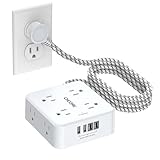
The easiest recommendation for anyone whose gear has moved to USB-C. Eight AC outlets plus four USB ports with two being USB-C, all at under ten dollars. The braided cord resists the tangling that plagues rubber-jacket strips.
- Pro: Two USB-C ports at this price are rare; you can fast-charge a phone without a separate brick.
- Pro: ETL certification confirms independent safety testing.
- Con: The white finish shows desk grime within weeks.
Skip this only if you need a darker finish or a longer cord.
50W 10-Port USB Charging Station
A dedicated charging hub, not a power strip. The 50-watt, 10-amp total is enough to fast-charge multiple phones, a tablet, and earbuds simultaneously without starving any single port.
- Pro: Ten USB ports replace every individual charger brick on your desk.
- Pro: Shared current budget prevents high-draw devices from crashing low-draw charges.
- Con: Zero AC outlets, so you still need a separate strip for anything that plugs directly.
Skip this if you own any non-USB device on your desk.
USB Wall Charger 8-Port
Not a strip but it solves the same problem for USB-only setups. Plug it into a wall socket and eight ports fan out for nightly family charging.
- Pro: Wall-mount design eliminates cord bulk and reclaims desk surface.
- Pro: Eight ports at nine dollars suits shared households.
- Con: No surge protection and no reach flexibility; it works only where the outlet is within arm’s distance.
Skip this if you need surge protection or standard-plug outputs.
Chiefway Surge Protector Power Strip
Built for the most crowded desk imaginable. Sixteen AC outlets and six USB ports backed by 2400J of surge protection, nearly triple the recommended minimum.
- Pro: Highest joule rating in this group; genuine peace of mind during storms.
- Pro: Sixteen outlets mean no daisy-chaining, which is both safer and cleaner.
- Con: Physically large and heavy; demands real floor or desk space.
Skip this if you use fewer than six devices or prefer a low-profile strip.
YISHU Surge Protector with Widely Spaced Outlets
The fix for the most annoying problem in this category: oversized bricks blocking neighbors. Eight widely spaced AC sockets accept bulky adapters side by side.
- Pro: Generous spacing keeps all eight slots usable at once, rare at this price.
- Pro: Six-foot flat plug clears furniture and reaches low outlets without pulling.
- Con: No published joule rating and a build that feels lighter than pricier rivals.
Skip this if your equipment requires confirmed surge protection or USB-C output.
Buying Guide
Joule Rating Is Not Optional
Below 500J a unit offers little beyond passive filtering. Above 900J you get meaningful clamping for sensitive electronics. The Chiefway’s 2400J is the ceiling in this group; the One Beat’s 900J is the floor. If you live in a lightning-prone area or your grid flickers, prioritize the highest number you can afford.
Outlet Spacing and Plug Geometry
A strip with ten outlets that only ever fits five because of transformers is a waste of money. Wide-spacing designs like the YISHU solve this geometrically. Flat plugs on the cord matter equally: they let the strip sit flush against a wall, reducing visible bulk and preventing adjacent-outlet blockage.
USB-C and Shared Output
USB-A ports on power strips typically cap at 2.4A per port, fine for phones but insufficient for laptops. If you want to charge a USB-C device without a dedicated brick, look for strips that include USB-C, like the CHCORE. For households with five or more devices, a dedicated USB hub with a shared wattage budget outperforms a mixed strip on total charging speed.
Our Verdict
The CHCORE Braided Power Strip is our top pick: USB-C support, ETL certification, and the best port-to-price ratio in the group. The Chiefway earns a conditional recommendation if your equipment demands maximum surge protection; 2400J is simply unmatched here. For a pure budget slot where you just need a working strip with confirmed surge today, the One Beat at $11.99 is the floor we would not go below.
FAQ
Do power strips with USB ports actually save money?
Yes, when they replace individual charger bricks. A single wall adapter costs $5 to $15 and occupies one AC outlet. Consolidating five device charges onto one strip frees the AC sockets and eliminates five separate purchases over time.
How many joules of surge protection do I need?
For laptops, monitors, and game consoles, 600 to 900J is adequate in most homes. For high-end workstations, NAS units, or lightning-prone regions, aim for 1500J or higher.
Can a USB-only charging station replace a power strip?
Only if every device on your desk charges via USB. Lamps, monitors, and desktop PCs require a standard AC plug, so you will still need a conventional strip alongside it.
Is a flat plug really worth choosing over a standard one?
In desk setups, yes. A flat plug slides under furniture and against walls without protruding, reducing tripping hazards and keeping cable runs clean. Standard plugs can push a strip three inches from the wall and block adjacent outlets.
Related Reviews & Guides




Blue Light Blocking Glasses Computer

Branch Ergonomic Chair: Top Picks Compared in 2026