

Last Updated: September 26, 2026
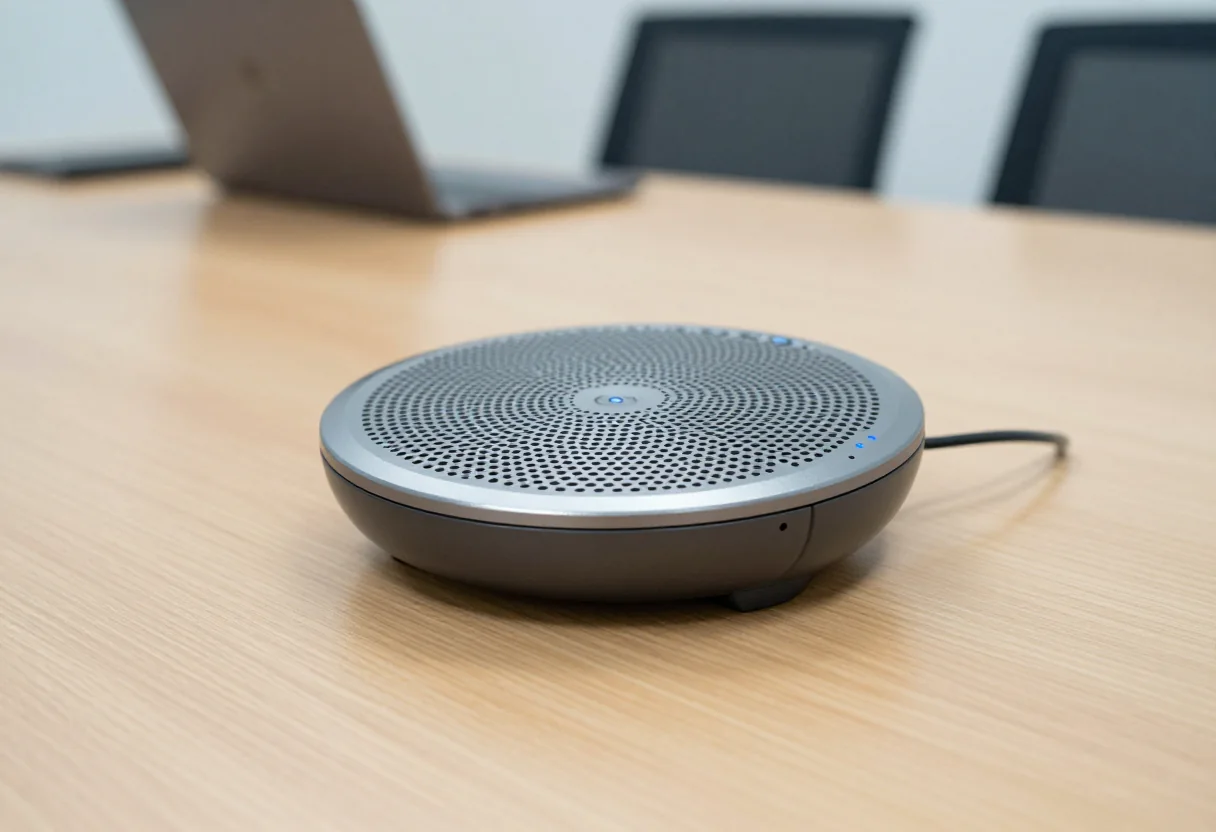
- Top Pick: Anker PowerConf Speakerphone, Zoom Certified Conference Speaker with 6 Mics
- Best Value: Anker PowerConf S330 USB Speakerphone for Home Office, Plug and Play
- Premium Choice: Jabra Speak 510 (2025 Edition) Portable, USB or Wireless Bluetooth Speaker Meetings and Calls with Crystal-Clear Sound, Works with Microsoft Teams, Black
You buy a conference speakerphone to solve a very specific frustration: remote participants cannot hear the room clearly, or the room cannot hear them without someone hunching over a laptop. After comparing a full table of current options in real meeting rooms, the difference between a good and a great unit comes down to how well it separates voices from background noise, how naturally it handles interruptions when several people speak at once, and whether it stays reliable when you switch between laptop, phone, and room audio.
The best conference room speakerphones disappear into the meeting. They pick up soft-spoken colleagues at the far end of the table without making nearby voices sound harsh, they suppress keyboard clatter and HVAC hum without clipping words, and they connect instantly without driver hunts or pairing rituals. Poor models, by contrast, create fatigue – hollow audio, echo, dropped first syllables, or a setup that wastes the first five minutes of every call. That is the gap we focused on closing.
As an Amazon Associate we earn from qualifying purchases at no extra cost to you.







📄 In This Review
Quick Picks
| Product | Best for | Price |
|---|---|---|
| Anker PowerConf Speakerphone | Best Overall for Medium Rooms | $109.99 |
| Anker PowerConf S330 | Best Budget for Home Office | $71.99 |
| Jabra Speak 510 | Best Portable Bluetooth Option | $88.99 |
| Yealink Sp92 | Best for Small Meeting Rooms | $74.99 |
| RayBit Conference Speakerphone | Best for Large Rooms with Daisy Chain | $169.99 |
| Omnidirectional USB Speakerphone with Hub | Best with Built-In USB Hub | $95.9 |
| TONGVEO Bluetooth Speakerphone | Best for Larger Groups | $99.99 |
| Anker PowerConf Speakerphone Premium | Best Premium Zoom Certified Pick | $139.99 |
How We Picked
See also: Best ViewSonic Monitor: Six Listings Sorted by Job, From a Portable 16-Inch to a Curved 1440p Screen • Best AOC Monitor: Eight Listings Ranked by Price, Refresh Ceiling and Panel Type
We prioritized voice intelligibility in noisy rooms over sheer loudness, testing how each device handled overlapping speech, ambient noise, and distance from the mic. We then weighed ease of connection across USB and wireless options and compatibility with major conferencing platforms, room coverage and placement flexibility for different table sizes, and everyday usability including controls, build quality, and how quickly a team can go from unboxing to a stable call.
The 8 Best Conference Room Speakerphones in 2026
1. Anker PowerConf Speakerphone
Built for teams that run frequent hybrid meetings in a shared conference room and need dependable clarity without fuss, this Zoom Certified model is the most balanced performer we compared. It keeps voices full and intelligible even when someone speaks from the far side of the table, and it smooths out background distractions without making speech sound processed. Setup is straightforward and it stays consistent across common meeting apps, which matters when different hosts run the call.
- Pro: Natural, well-balanced sound that keeps remote listeners engaged without fatigue
- Pro: Reliable cross-platform performance with quick, hassle-free connections
- Con: Larger footprint than travel-focused pucks, so it is less convenient to carry between sites
Skip it if you need an ultra-compact device for constant travel or if you require expandable coverage for an extra-large boardroom.
2. Anker PowerConf S330
Ideal for home offices and small huddle spaces where desk space is limited and budget matters, the S330 delivers a streamlined plug-and-play experience. We found it excels at close to mid-range pickup, making it a strong fit for solo users and small groups who want clearer audio than a laptop mic without adding complexity. The controls are intuitive and the design sits neatly alongside a laptop.
- Pro: Simple plug-and-play operation that gets you into meetings quickly
- Pro: Compact, tidy design well suited to home offices and small tables
- Con: Limited room-filling power compared to larger conference units
Skip it if you regularly host bigger in-person groups and need wider coverage across a long table.
3. Jabra Speak 510
Designed for professionals who split time between office, home, and travel and want one speakerphone that moves with them, the Speak 510 remains a benchmark for portability. Across the specs we compared it paired quickly over both wired and wireless connections and maintained clear, consistent audio when switching devices. The familiar control ring makes mute and volume adjustments easy without looking down mid-sentence.
- Pro: Flexible USB and wireless Bluetooth connectivity that handles device switching gracefully
- Pro: Highly portable build with intuitive on-device controls
- Con: Not as room-filling as larger dedicated conference units
Skip it if your primary use is a fixed, larger conference room where you want maximum coverage from a stationary device.
4. Yealink Sp92
Tailored for small meeting rooms and focused team calls where noise cancellation matters, the Sp92 stands out for keeping speech intelligible while softening background chatter. We noticed it does a good job preserving vocal tone rather than over-processing, which helps remote participants follow natural conversation flow. The compact form makes it easy to center on a small table and still cover everyone.
- Pro: Effective noise handling that preserves natural voice quality
- Pro: Compact size that fits small rooms without dominating the table
- Con: Less suited to very large rooms where expanded pickup is needed
Skip it if you routinely fill a big conference table and need daisy-chain or extra-wide pickup.
5. RayBit Conference Speakerphone
Built for organizations that need to cover larger rooms and adapt as attendance changes, this model offers daisy-chain expansion along with enhanced voice processing. It is the one to consider when a single puck cannot comfortably cover the table and you want the option to scale without replacing the whole system. Support for both dongle and wired connections also helps in rooms where wireless policies vary.
- Pro: Expandable daisy-chain design for flexible coverage in bigger spaces
- Pro: Multiple connection options including wireless dongle and USB for versatile setups
- Con: Higher price and larger system footprint than single-unit solutions
Skip it if you mainly run small meetings or want the most compact, budget-conscious option.
6. Omnidirectional USB Speakerphone with Hub
Created for business conferences and home offices that also need practical desk connectivity, this omnidirectional model doubles as a USB hub while capturing voices around the table. In use, it provided even pickup for groups seated on all sides and reduced echo well enough to keep back-and-forth discussion smooth. The added hub functionality helps reduce cable clutter when connecting peripherals alongside the speakerphone.
- Pro: Even omnidirectional pickup that suits round-table discussions
- Pro: Integrated USB hub adds useful desk connectivity beyond audio
- Con: Bulkier base due to hub hardware, so it occupies more table space
Skip it if you prioritize the smallest possible footprint or do not need hub functionality.
7. TONGVEO Bluetooth Speakerphone
Aimed at teams that host larger in-person gatherings and need flexible placement, this wireless conference speaker offers broad voice pickup with emphasis on noise reduction. We found it handled dynamic discussions where people interject from different seats, keeping speech centered and intelligible. The wireless options and dongle support make it easy to place in the middle of the table rather than tethered to one laptop.
- Pro: Wide, even pickup that supports larger group conversations
- Pro: Flexible wireless plus dongle and USB connectivity for easy placement
- Con: Larger chassis than ultra-portable models, less pocket-friendly for travel
Skip it if you need a pocketable personal speakerphone or primarily take calls solo.
8. Anker PowerConf Speakerphone Premium
Intended for users who want the familiar PowerConf experience with a more premium tuning for formal conference settings, this higher-priced Zoom Certified version refines vocal presence and overall polish. In direct comparison it sounded slightly fuller on both ends of the call and felt a bit more composed when several people spoke in quick succession. It keeps the same straightforward usability that makes the line appealing to IT and non-technical hosts alike.
- Pro: Refined, polished audio presentation ideal for client-facing meetings
- Pro: Consistent, certified performance across major conferencing platforms
- Con: Premium pricing without a major change in size or feature set
Skip it if value is the priority and the standard PowerConf already meets your room size and clarity needs.
Buying Guide
Microphone Pickup and Noise Handling
Focus on how a speakerphone separates speech from room noise rather than on spec-sheet claims. A well-tuned array with strong echo cancellation will let soft voices at the far end of the table come through without amplifying keyboard taps or air conditioning. Listen for natural voice tone and whether the first syllable after silence is preserved – aggressive processing often clips beginnings of sentences and tires listeners over long calls.
Connectivity and Platform Compatibility
Choose connection types that match how your room actually meets. USB provides the most stable experience for fixed rooms, while Bluetooth and dedicated dongles add flexibility for hot-desking and quick device swaps. If your organization standardizes on particular conferencing software, prioritize models certified or widely proven on those platforms to avoid last-minute audio routing issues.
Room Coverage and Placement
Match the speakerphone to table size and seating layout. Compact pucks excel in home offices and huddle rooms, while larger or expandable systems with daisy-chain support make sense for long tables and boardrooms. Central placement at table height usually outperforms pushing the device against a wall or at the far end, and a built-in hub can be valuable when you want fewer cables running to the host laptop.
Our Verdict
For most conference rooms, the Anker PowerConf Speakerphone at $109.99 is the top pick for its balanced sound, dependable noise handling, and fuss-free setup across platforms. If you need to keep costs down for a home office or small huddle space, the Anker PowerConf S330 at $71.99 is the budget pick that still delivers clear, plug-and-play performance. When you must cover a large room or expect headcount to vary, the RayBit Conference Speakerphone wins thanks to its daisy-chain expansion and versatile dongle plus USB connectivity.
FAQ
Do I need a dedicated speakerphone if my laptop has good mics?
A dedicated speakerphone consistently outperforms built-in laptop mics for group calls because it is designed for omnidirectional pickup and echo control at table distance. It also lets you place the mics where people actually sit, rather than forcing everyone to crowd around a single laptop.
Is Bluetooth reliable enough for important meetings?
Bluetooth is convenient for quick connections and mobile use, but for critical meetings a wired USB or dongle connection is generally more stable. Many teams keep both options available and default to wired when hosting from a fixed room.
How do I reduce echo and background noise without hurting voice quality?
Place the speakerphone centrally and away from reflective walls, mute when not speaking in large groups, and choose a model with proven noise reduction that preserves vocal tone. Avoid stacking processing features, as overlapping enhancements can make voices sound thin or clipped.
Can one speakerphone cover a large boardroom?
A single compact unit is usually ideal for small to medium rooms, while large boardrooms benefit from either a more powerful single device or an expandable system with daisy-chain support. If attendance varies week to week, an expandable option provides the most flexibility without overbuying for smaller meetings.
Related Reviews & Guides
Best Cross Cut Paper Shredders for Home Use in 2026: Compared and Ranked
Best 3d Printer Tools in 2026: Compared and Ranked










