Last Updated: September 29, 2026
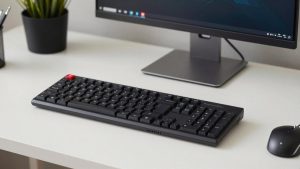
Most discomfort from typing and mousing comes not from the devices themselves but from where they sit. An ergonomic keyboard placed too high still forces your shoulders up; an expensive vertical mouse placed far to the right still stretches your arm. Getting the height and position right is free, takes fifteen minutes, and is the foundation every other ergonomic purchase depends on. This step-by-step guide works for seated and standing desks.
📄 In This Review
The target posture
Aim for a relaxed, neutral posture: shoulders down, upper arms hanging close to your sides, elbows bent at roughly 90-110 degrees, forearms roughly parallel to the floor or sloping slightly down, and wrists straight. Your keyboard and mouse should meet your hands in that position, not the other way round.

UGREEN Ergonomic Wireless Mouse, Bluetooth & 2.4G Wireless, Quiet Clicks
Included for 'How to set up an ergonomic keyboard and mouse height' because the listing specifies Bluetooth & 2.4G Wireless and Quiet Clicks, details this guide uses to compare options.
View on AmazonReference heights
See also: Best Reclining Chairs: Nine Recliner Listings Compared by Mechanism, Fabric and Space Needs • Best Roku Streaming Deals Reviewed
| Your height | Approx. seated keyboard height (floor to home row) | Approx. standing keyboard height |
|---|---|---|
| 5’0″ (152 cm) | 22-23 in (56-58 cm) | 36-37 in (91-94 cm) |
| 5’4″ (163 cm) | 24-25 in (61-64 cm) | 39-40 in (99-102 cm) |
| 5’8″ (173 cm) | 25-26 in (64-66 cm) | 41-42 in (104-107 cm) |
| 6’0″ (183 cm) | 27-28 in (69-71 cm) | 43-44 in (109-112 cm) |
| 6’4″ (193 cm) | 28-29 in (71-74 cm) | 45-46 in (114-117 cm) |
These are starting points, with typical shoes on. Body proportions vary, so always confirm with the elbow check below.
Step-by-step setup
1. Set your chair first
Adjust the seat so your feet rest flat on the floor with thighs roughly parallel to the ground. If your desk is too high to reach this way, raise the chair and add a footrest.
2. Find your elbow height
Sit back, relax your shoulders and let your arms hang. Bend your elbows to about 90 degrees. The underside of your forearm at that point is your target home-row height.
3. Bring the keyboard to that height
On a height-adjustable desk, simply set the desk so the keyboard’s home row is at or slightly below elbow height. On a fixed desk that is too high, a keyboard tray is the best fix; raising the chair with a footrest is the next best.
4. Flatten or tilt negatively
Fold away the rear feet of the keyboard. If your keyboard or tray supports negative tilt (front higher than back), a few degrees helps keep wrists straight.
5. Centre the typing zone
Centre the B and H keys, not the whole keyboard, on your body. On full-size boards this shifts the keyboard left, bringing the mouse closer.
6. Place the mouse right beside the keyboard
The mouse should be at the same height as the keyboard and as close as possible. If your elbow drifts away from your side to reach it, it is too far. A tenkeyless keyboard or a separate number pad solves most reach problems.
7. Check the monitor
Once your hands are set, place the monitor so the top line of text is at or slightly below eye level, about an arm’s length away. Adjusting the monitor last stops you from compromising hand height to fix screen height.
Standing desk specifics
When standing, repeat the elbow check with the shoes you usually wear. Save sitting and standing heights as presets. Many people set the standing height too high, which lifts the shoulders; lower it until your forearms are level or slightly sloping downward.
Quick checklist
- Shoulders relaxed, not raised.
- Elbows at 90-110 degrees, close to your sides.
- Wrists straight, not bent up or sideways.
- Mouse at keyboard height, within easy reach.
- Feet flat on the floor or footrest.
FAQ
Should the keyboard be above or below elbow height?
At elbow height or slightly below. Slightly below, with the forearm sloping gently downward, often keeps wrists straighter, especially with negative tilt. A keyboard above elbow height forces shoulders up and wrists back.
Do I need a keyboard tray?
If your desk is fixed and too high to put the keyboard at elbow height with your feet supported, a keyboard tray is one of the most effective fixes. With a height-adjustable desk, you usually do not need one.
Bottom line
Set your chair, find your elbow height, bring the keyboard’s home row to that level with the keyboard flat or tilted slightly away, and keep the mouse close at the same height. Adjust the monitor last. This fifteen-minute setup delivers more comfort than most ergonomic purchases, and it makes the ones you do buy work properly.
Related Reviews & Guides
Best cheap monitor arm under 40 dollars
Best Ergonomic Office Chair for Co-working Spaces