Last Updated: September 27, 2026
This review covers the original Logitech Brio 4K, the model Logitech has sold as the Brio 4K and Brio Ultra HD Pro, not the newer Brio 100/300/500 series or the MX Brio. Launched in 2017, it was one of the first mainstream 4K webcams and remains a common sight on corporate desks. Years later, it still holds up thanks to strong HDR, flexible framing and Windows Hello face login. Here is how it performs today and who should still buy one.
📄 In This Review
Key specifications
| Feature | Logitech Brio 4K |
|---|---|
| Max resolution | 4K Ultra HD at 30fps |
| 1080p / 720p | 1080p at 30 or 60fps; 720p up to 90fps |
| HDR | RightLight 3 with HDR |
| Field of view | Selectable 65, 78 or 90 degrees diagonal |
| Zoom | Up to 5x digital (4K) |
| Face login | Infrared sensor for Windows Hello |
| Microphones | Dual omnidirectional with noise reduction |
| Connection | USB-C on camera, USB-A cable (USB 3.0 recommended) |
| Mount | Monitor clip with tripod thread; privacy shade included |
| Typical price | $130-$200 depending on retailer and sales |
Image quality
See also: Best Reclining Chairs: Nine Recliner Listings Compared by Mechanism, Fabric and Space Needs • Best Roku Streaming Deals Reviewed
In good light
With daylight or a decent desk light, the Brio produces crisp, well-coloured video. At 1080p, the 4K sensor’s oversampling gives clean edges and readable text on objects you hold up. Skin tones lean natural, and autofocus is quick without hunting much.
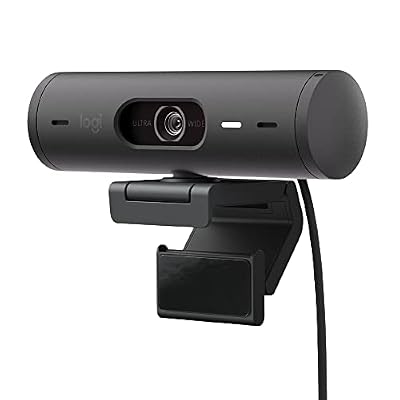
Logitech Brio 501 Full HD Webcam Auto Light Correction Show Mode - Black
Included for 'Logitech Brio review' because the listing specifies Black, details this guide uses to compare options.
View on AmazonIn mixed and backlit light
RightLight 3 with HDR is the Brio’s strength. With a window behind or beside you, it keeps your face visible without blowing out the background as badly as basic 1080p cameras. It is not magic, but it handles a typical home office better than most webcams from its era.
In low light
This is where the Brio shows its age. In dim rooms, noise rises and the image softens. Larger-sensor webcams such as the Razer Kiyo Pro or Insta360 Link look cleaner after dark. A small LED light closes the gap.
Features that still matter
Field-of-view presets
The 65-degree setting frames one person tightly for calls; 90 degrees fits two people or shows a whiteboard. Changing it requires Logitech’s software, such as Logi Tune or G HUB.
Windows Hello
The infrared sensor lets you sign into Windows by looking at the camera, which is handy on desktop PCs and closed-lid laptops without their own IR camera.
Frame rate flexibility
1080p at 60fps makes it viable for casual streaming, and 720p at 90fps is a rare option for smooth motion.
Downsides
- Low-light performance lags newer larger-sensor webcams.
- Only 30fps at 4K, so 4K is mainly for oversampling and cropping.
- The clip is less adjustable than newer designs such as the MX Brio’s.
- Microphones are serviceable but no substitute for a headset in noisy rooms.
How it compares to newer Logitech models
The MX Brio adds a larger-pixel sensor, better low-light performance and a refreshed mount at a similar price. The Brio 500 series offers 1080p with RightLight 4 and a well-designed privacy shutter for less money. The original Brio sits between them: older, but often discounted, and still one of the better HDR performers.
Setup and daily use
Out of the box, the Brio works immediately as a standard webcam. Installing Logi Tune adds the useful controls: field-of-view presets, zoom, exposure, white balance, and firmware updates. Most people settle on 78 degrees with light zoom for solo calls. The clip grips most monitors firmly, and the tripod thread under it lets you move the camera to a stand or arm. Windows Hello setup takes a minute in Windows sign-in settings and then works reliably, even in dim rooms, because it uses infrared rather than visible light. Keep the camera plugged into a USB 3.0 port on the computer or a quality dock; flaky hubs are the most common cause of the Brio dropping to lower resolutions.
FAQ
Does the Logitech Brio work on Mac?
Yes. It is a standard UVC webcam and works with macOS apps including FaceTime, Zoom and Teams. Windows Hello face login is Windows-only, and Logitech’s settings software availability varies by macOS version.
Does the Brio need a USB 3.0 port?
For 4K and 1080p60, yes. On a USB 2.0 port it falls back to lower resolutions or frame rates. Use the included cable and connect to a blue or SS-marked USB 3.0 port or a 5Gbps hub port.
Bottom line
The original Logitech Brio 4K remains a solid choice for professionals who want good HDR, flexible framing and Windows Hello, especially at a discount. If you often work in dim light or want the latest sensor, look at the MX Brio or a larger-sensor alternative instead.