Last Updated: September 29, 2026
The Flexispot E7 Pro sits at the top of Flexispot’s mainstream lineup and has become a default recommendation for people who want a genuinely stable electric standing desk without stepping into boutique pricing. It pairs a dual-motor, three-stage frame with a reinforced C-leg design, and its appeal is straightforward: the rigidity and lift capacity of desks costing far more, at a price most home offices can absorb.
📄 In This Review
Why the E7 Pro stands out
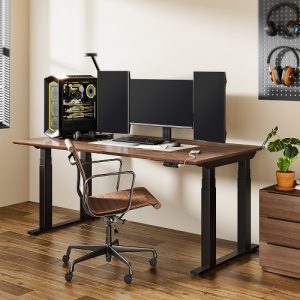
The headline is stability. Three-stage legs give a wider height span and, more importantly, keep the columns thick where sway usually creeps in. The C-shaped feet push the front support outward so your knees clear the base while the desk resists the front-to-back wobble that plagues cheaper frames at full standing height. For anyone who has typed on a tower that shivers with each keystroke, that difference is the whole point.
Who it suits
It fits tall users especially well thanks to a height range that comfortably reaches standing posture for people up to roughly 6’5″. It is also a strong pick for dual-monitor and heavier setups because the frame’s rated capacity leaves generous headroom over a typical load of screens, arms, and peripherals.
Specifications to look for
See also: Best Reclining Chairs: Nine Recliner Listings Compared by Mechanism, Fabric and Space Needs • Best Roku Streaming Deals Reviewed
| Attribute | What to expect |
|---|---|
| Frame type | Dual motor, three-stage legs |
| Height range | Roughly 23″–49″ (frame only) |
| Lift capacity | Around 220–355 lb rated |
| Transit speed | Approx. 1.4″ per second |
| Top width supported | Roughly 48″–80″ |
| Memory presets | Keypad with multiple presets |
| Warranty | Long multi-year frame coverage |
Treat the figures above as evergreen ranges; exact numbers vary by top choice and revision. The pattern that matters is a three-stage dual-motor frame with a lift rating well above what a normal desk load requires.
Build and daily use
Assembly is a one-person job that takes under an hour, and Flexispot’s frames are known for arriving with clear hardware and pre-threaded inserts. Day to day, the anti-collision function reverses the top if it meets resistance, and the memory keypad makes switching between a seated and standing preset a single press. The motors are quiet enough for a shared room and hold their calibration well over months of use.
Choosing a top
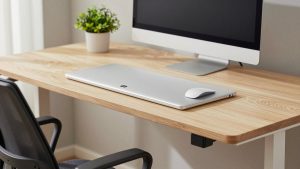
Flexispot sells bamboo and laminate tops in widths from around 48″ to 72″, but the frame also accepts many third-party surfaces. A 30″ depth is the sweet spot for a monitor arm and keyboard; going wider mainly helps dual-screen layouts.
Trade-offs to weigh
The E7 Pro is heavier and pricier than entry frames, and the C-leg geometry, while great for knee clearance, is something to measure against your existing top’s mounting holes. It is not the cheapest way to get a motorized desk—single-motor options exist—but it is one of the better values in the stability-per-dollar sense.
How it compares in the lineup
Against lighter Flexispot frames, the Pro’s advantage is rigidity at full height and a higher weight ceiling. Against premium ergonomic-brand desks, it gives up some finish refinement and controller polish but closes most of the functional gap for a fraction of the outlay.
Cable management and accessories
Because the frame accepts add-ons, it is worth planning your accessories before assembly rather than after. An under-desk cable tray keeps power bricks and hubs off the floor, a clip-on grommet routes cords cleanly through the top, and a headphone hook or under-desk drawer clears the surface for actual work. If you mount a monitor arm, a heavier-gauge top of at least 3/4″ thickness holds the clamp firmly without dimpling. These small additions cost little but transform how finished the desk feels day to day, and they are far easier to install while the frame is still upside down during build.
Longevity and value
The reason frames like this get recommended repeatedly is that they age well. Steel columns, dual motors, and a long warranty mean the desk is likely to outlast several laptops and monitors, so the cost spread over years is modest. When you factor in the health benefit of alternating postures across a long day, a stable frame that you actually use—because it is quiet, quick, and rock-solid—returns far more than a cheaper desk that wobbles enough to discourage standing at all. That behavioral point is easy to overlook but central: the best standing desk is the one you trust enough to raise every day.
FAQ
Is the E7 Pro stable enough for dual monitors and standing work?
Yes. The three-stage legs and C-feet are specifically what reduce sway at standing height, and the rated lift leaves plenty of margin for two monitors, arms, and peripherals. Heavy typers notice far less shake than on two-stage or single-motor frames.
Can I use my own desktop with the frame?
Generally yes—the frame is designed to accept a range of third-party tops within its supported width. Confirm your top’s thickness and predrill mounting holes to match the frame’s bracket pattern before assembly.
Bottom line
The Flexispot E7 Pro earns its reputation as a stability-first standing desk that punches above its price. If you are tall, run multiple monitors, or simply want a frame that stays planted when you type at standing height, it is one of the safest picks in its class—offering the rigidity, lift headroom, and long warranty that make a desk feel like a long-term purchase rather than a temporary fix.