Last Updated: September 26, 2026
A two-monitor desk creates a webcam dilemma: which screen does the camera sit on? Put it on the left monitor and every time you glance at the right screen, where the meeting window often lives, you appear to look away. Put it between the screens and it may sit in a gap with nothing to clip onto. The best webcam for two monitors is less about a specific model and more about mounting flexibility, framing and where you actually look. This guide covers the placement options and the webcam features that make each work.
📄 In This Review
Where to put the camera
| Placement | Eye contact | Mounting method | Best when |
|---|---|---|---|
| On top of primary monitor, centred | Good when looking at primary | Stock clip or VESA bracket | Meetings always on one screen |
| Between two monitors, above the seam | Balanced, slight offset either way | Pole clamp, tripod, bracket | Equal use of both screens |
| Above the monitor you face, in portrait/landscape combos | Good for that screen | Clip or arm clamp | One landscape + one vertical monitor |
| In front of the screen (hanging webcam) | Excellent, lens at eye line | Thin cable hangs over screen | Presenters and sales calls |
The practical rule
See also: Best Reclining Chairs: Nine Recliner Listings Compared by Mechanism, Fabric and Space Needs • Best Roku Streaming Deals Reviewed
Put the camera above the screen where the other person’s face appears. If you always move the meeting window to your left monitor, mount the camera centred on that monitor. Most people who split meetings across screens get better results by committing the call to one screen than by searching for a perfect between-screens position.

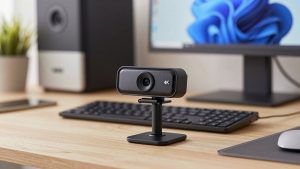
Lenovo Essential FHD Webcam Gen 2, Full HD, 1080p, Dual Microphones, 85 Degree FOV, 30 fps, USB-A Connection, Bulit-in Manual Privacy Shutter, Black
Included for 'Best webcam for two monitors' because the listing specifies Full HD and 1080p, details this guide uses to compare options.
View on AmazonWebcam features that help on dual monitors
A tripod thread
Placing the camera above the seam between monitors usually needs a small tripod, pole clamp or bracket. Webcams with a 1/4″-20 thread, such as the Logitech Brio, Razer Kiyo Pro and Insta360 Link, make that simple. The Anker PowerConf C200’s clip has no tripod thread, which limits it to monitor-top placement.
Moderate field of view
Two monitors spread you across a wider desk, but you still want a head-and-shoulders frame. A camera with selectable 65-78 degree field of view avoids showing the whole room. Very wide 100-degree-plus settings exaggerate the angle when the camera sits off-centre.
Tracking or pan-tilt
If you turn between screens a lot, a tracking webcam such as the Insta360 Link or Obsbot Tiny 2 keeps you centred even when you face the other monitor. Tracking also helps if you use a standing desk and shift position.
Eye contact software
NVIDIA Broadcast’s Eye Contact feature and Windows Studio Effects on supported laptops redirect your gaze toward the camera in software. It works best with small offsets and can look unnatural at large angles, but it helps when the camera must sit on the other screen.
Recommended webcams for dual-monitor desks
- Logitech Brio (4K): tripod thread, selectable 65/78/90 degree field of view, HDR; mounts well above a seam.
- Razer Kiyo Pro: tripod-friendly, good in low light, 80/90/103 degree presets.
- Insta360 Link: gimbal tracking follows you between screens; mounts on a clip or tripod.
- Logitech C920s: budget option with a tripod thread for simple centre mounting.
Mounting ideas for the gap between monitors
A dual-monitor arm with a central pole gives a natural anchor: clamp a mini ball head to the pole just above the monitors. Without a pole, a small desktop tripod behind the seam or a VESA bracket on one monitor extended toward the centre works. Aim for the lens to be level with your eyes and no more than 5-10cm above the top edge of the screens.
FAQ
Should I get a second webcam for my second monitor?
Usually no. Meeting apps send one camera at a time. Two webcams only make sense if you want to switch angles for demonstrations or streaming, which requires OBS or a similar tool.
My monitors are different sizes. Where should the webcam go?
Mount it on the larger, primary monitor where you will place the meeting window, and align its lens with your eye height. Adjust the smaller monitor’s height so your gaze travels less between screens.
Bottom line
On a two-monitor desk, place the webcam above the screen where the call happens, and choose a model with a tripod thread and a moderate field of view so you can mount it exactly there. The Logitech Brio and Razer Kiyo Pro handle this well; the Insta360 Link is the pick if you turn between screens constantly.
Related Reviews & Guides
Best Ergonomic Office Chair for Conference Rooms
best ergonomic office chair for lower back support