

Last Updated: September 29, 2026
A smart desk lamp is one of the highest-impact upgrades for a home office because lighting affects eye comfort, focus, and even sleep more than most people realize. The trouble is that “smart” covers everything from a cheap dimmable clip light to a full-spectrum, app-controlled monitor bar. This buying guide explains the specs that actually matter—color temperature, brightness, color rendering, and controls—so you can match a lamp to how you work.
The four specs that matter
Color temperature (Kelvin)
Color temperature sets the mood and alertness of the light. Warm light around 2700K–3000K is relaxing and good for evenings; neutral 3500K–4500K is the balanced all-day choice; cool 5000K–6500K mimics daylight and helps with focus and detailed tasks. The best smart lamps are tunable across this whole range so you can shift cooler while working and warmer at night to protect your sleep.
Brightness and lux
Brightness is measured in lumens at the bulb, but what matters at your desk is lux—illumination on the surface. General office work wants roughly 300–500 lux; detailed tasks like drawing or electronics work want 500–1000 lux. A good desk lamp delivers this without hot spots or glare into your eyes.
| Spec | What to look for | Why it matters |
|---|---|---|
| Color temperature | 2700K–6500K tunable | Focus by day, wind-down at night |
| Brightness | Adjustable, ~300–1000 lux at desk | Match task detail level |
| CRI (color rendering) | 90+ (Ra) | Accurate colors, less eye strain |
| Flicker | Flicker-free / high-frequency dimming | Reduces headaches and fatigue |
| Controls | App, voice, touch, auto modes | Convenience and scheduling |
| Power | USB-C or mains | Cable tidiness, portability |
| Warranty | 1–3 years typical | LED longevity coverage |
CRI and flicker
Color Rendering Index (CRI) describes how true colors look under the light; aim for 90+ (Ra) if you edit photos, paint, or just want your desk to look natural. Flicker is the invisible culprit behind some eye strain and headaches—quality lamps use high-frequency or flicker-free dimming, which cheap ones skip. Both specs separate a genuinely comfortable lamp from a bright-but-tiring one.
Form factors
See also: Best Reclining Chairs: Nine Recliner Listings Compared by Mechanism, Fabric and Space Needs • Best Roku Streaming Deals Reviewed
| Type | Best for | Trade-off |
|---|---|---|
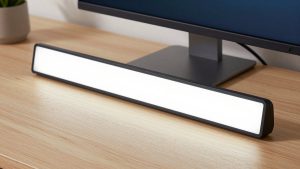
| Monitor light bar | Small desks, no glare on screen | Lights the desk, not the room |
| Articulating arm lamp | Task lighting, drawing, reading | Takes desk clamp space |
| Freestanding base lamp | Simple plug-and-play | Occupies desk footprint |
| Floor/corner smart light | Ambient fill, video calls | Not focused task light |
Monitor light bars clamp to the top of your display, throw light onto the desk without reflecting into your screen, and free up surface space—ideal for small setups. Articulating arm lamps give you precise, positionable task light for detailed work. Many people run both: a bar for glare-free desk fill and an arm lamp for close tasks.
Smart controls worth having
The “smart” part earns its keep through scheduling and automation. Look for app control, voice assistant support (Alexa, Google, Siri/HomeKit), and auto-dimming that reads ambient light and adjusts. Circadian or “natural light” modes shift color temperature through the day—cooler mornings, warmer evenings—which supports better sleep. Presets you can trigger with one tap or a voice command matter more day to day than exotic RGB effects.
What to skip
Flashy RGB is fun but irrelevant to work quality; do not pay a premium for it if you want a task lamp. Be wary of lamps that omit CRI and flicker specs entirely—that silence usually means poor numbers. And cloud-only lamps that stop working if the app server goes down are a real risk; local or hub-based control is more durable. Also weigh the ecosystem: a lamp that speaks the standard you already use—HomeKit, Alexa, Google Home, or Matter—will drop into your routines cleanly, while a proprietary app that only talks to its own bulbs becomes one more login to manage.
FAQ
What color temperature is best for working?
For focused daytime work, cool light around 4500K–6500K promotes alertness and makes detail easier to see. In the evening, shift to warm 2700K–3000K to reduce blue light before bed. This is exactly why a tunable smart lamp is worth it—you get the right temperature for the time of day instead of one fixed setting.
Do smart desk lamps reduce eye strain?
A good one can. The keys are adequate, glare-free brightness at your task (300–1000 lux depending on detail), high CRI for natural color, and flicker-free dimming. A lamp that hits those three reduces the squinting and fatigue that come from working under a single dim overhead bulb or a flickering budget LED.
Bottom line
When shopping for a smart desk lamp, ignore the marketing and check four numbers: a wide tunable color range (2700K–6500K), enough adjustable brightness for your task, CRI of 90 or higher, and flicker-free dimming. Add app and voice control with a circadian mode and you have a lamp that keeps you focused by day and relaxed by night. Match the form factor—monitor bar, arm lamp, or both—to your desk size, and skip paying extra for RGB you will never use.
Related Reviews & Guides

Best monitor arm under 100 dollars
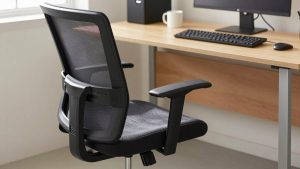
Best Ergonomic Office Chair for Hot Desking










