Last Updated: September 12, 2026
- Top Pick: ScanSnap iX2500 Wireless or USB High-Speed Document Scanner, Black
- Best Value: Epson Workforce ES-400 II High-Speed Color Duplex Desktop Document Scanner
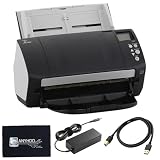
- Premium Choice: Fi-7160 Fujitsu Scanners for Computers – 60 PPM (Mono/Color),600 DPI Document Scanner, with 24V Power Cable & USB 3.0 Cable & Microfiber Cleaning Cloth (Renewed)


🛒 Best Price Today on Amazon
Prime members get fast, free shipping on everything above, plus member-only deals. New members get a 30-day free trial — cancel anytime.
As an Amazon Associate we earn from qualifying purchases at no extra cost to you.





📄 In This Review
Quick Comparison
| Product | Brand | Price | Rating |
|---|---|---|---|
| CZUR Shine Ultra Smart Portable Document Scanner | CZUR | $199 | 4.4/5 |
| Brother DS-640 Compact Mobile Document Scanner | — | $134.99 | 4.3/5 |
| Epson Workforce ES-400 II Color Duplex Desktop Document… | — | $329.99 | 4.5/5 |
Introduction
See also: Good Height for a Desk: Seated and Standing Numbers by Body Height • Best Desks for Posture: Height, Depth and Sit-Stand Options
A dedicated document scanner is one of the most powerful tools for creating a truly paperless home office. Unlike flatbed scanner attachments on all-in-one printers, standalone document scanners use an automatic document feeder to process stacks of pages quickly, with software that automatically straightens, enhances, and OCR-converts scanned text into searchable PDFs. If you deal regularly with paper invoices, contracts, receipts, or reference documents, a document scanner will save hours every month.
What to Look For
- Scanning Speed: Measured in images per minute (ipm); 25–40 ipm is adequate for occasional use; 50+ ipm suits users who scan large batches regularly.
- ADF Capacity: The automatic document feeder tray capacity determines how many pages you can queue in one batch; 20-sheet ADF is minimum viable; 50-sheet or above is significantly more convenient.
- OCR Software: Optical character recognition converts scanned images to searchable, copy-pasteable text; bundled software like ABBYY FineReader or Adobe Acrobat integration adds significant value.
Top Picks
Fujitsu ScanSnap iX1600 Document Scanner
The Fujitsu ScanSnap iX1600 is the most popular dedicated document scanner for home and small office use, scanning at 40 pages per minute with a 50-sheet ADF. The 4.3-inch touchscreen provides quick access to custom scan profiles (receipt, business card, document, photo), and ScanSnap Home software automatically sorts scans by document type into organized cloud or local folders. Both Wi-Fi and USB connectivity are supported.
Epson Workforce ES-500W II Wireless Scanner
Epson's ES-500W II is a wireless duplex document scanner that processes 35 sheets per minute double-sided with a 50-sheet ADF. The scan-to-cloud features integrate directly with Google Drive, Dropbox, OneDrive, and Evernote, and the included ABBYY FineReader OCR software is among the most accurate available. A compact footprint makes it easy to tuck on a desk shelf when not in use.
Canon imageFORMULA R40 Office Document Scanner
Canon's imageFORMULA R40 scans at 40 ipm and includes a 60-sheet ADF — the largest in this category — for processing tall stacks in a single batch. The dedicated drivers for Windows and Mac integrate with existing document management workflows, and the included CaptureOnTouch 4 software provides 11 destination options including network folders and SharePoint. A robust build quality suits high-volume daily use.
Final Thoughts
A dedicated document scanner pays for itself quickly by replacing time spent hunting for paper documents with instant digital search. The Fujitsu ScanSnap iX1600 is the easiest to use and best supported, making it our top recommendation for most home office workers. Choose the Canon R40 if you regularly scan large batches thanks to its superior ADF capacity.
What to Look For in a Home Office Document Scanner
A good document scanner turns stacks of paper into searchable, organized files in minutes. The features that decide how smoothly that goes are the feeder type, scanning speed, and the software that processes your documents. Match these to the volume and kind of paperwork you handle most often.
- Automatic document feeder: An ADF pulls in a stack of pages automatically, which is essential if you scan multi-page documents; flatbed-only scanners suit books and delicate originals instead.
- Duplex scanning: Two-sided scanning in a single pass saves time and handles double-sided forms and letters without manual flipping.
- Speed in pages per minute: Higher throughput matters if you process large batches; for occasional use, a modest speed keeps the price down.
- OCR software: Optical character recognition converts scans into searchable, editable text, which is what makes a paperless system genuinely useful.
- Connectivity: Wi-Fi or USB determines how the scanner fits your desk; wireless models can send directly to cloud folders and multiple computers.
- Resolution and file output: 300 dpi is plenty for text documents, and flexible output to searchable PDF keeps files small and easy to find.
Tips for Your Scanning Setup
Decide on a consistent folder and naming system before you start scanning in bulk. A clear structure, paired with searchable PDFs from OCR, turns your scans into a genuinely paperless archive instead of a digital pile you can never find anything in.
Keep the scanner glass and feeder rollers clean. Dust and streaks show up on every page, and a quick wipe with a soft cloth keeps your scans crisp and prevents misfeeds in the automatic feeder.
Batch similar documents together to take advantage of the feeder and duplex scanning. Running a whole stack in one pass is far faster than scanning page by page, and it builds a habit that keeps paper from accumulating.
Common Mistakes to Avoid
The most common mistake is buying a flatbed-only scanner and then needing to digitize stacks of multi-page documents. Without an automatic feeder, every page becomes a manual chore, so match the scanner type to your actual workload.
Another error is scanning everything as a flat image without OCR. Image-only PDFs cannot be searched, which buries your information just as effectively as a paper file. Always enable text recognition so you can find documents later.
Frequently Asked Questions
What resolution do I need for document scanning?
300 dpi is the standard for text documents, balancing clarity with manageable file sizes. Higher resolutions are only needed for photos or fine detail and create much larger files.
Do I need a scanner with an automatic feeder?
If you regularly scan multi-page documents, yes. An ADF lets you load a stack and walk away, while a flatbed-only scanner is better suited to single pages, books, or fragile originals.
What is OCR and why does it matter?
OCR converts the text in your scans into searchable, selectable characters. It is what transforms a pile of image files into a paperless system where you can actually find documents by typing a keyword.
Can a document scanner send files to the cloud?
Many Wi-Fi scanners can save directly to cloud storage folders or email, which streamlines a paperless workflow. Check the model’s software to confirm which services it supports.
Related Reviews & Guides



Headphone Holder Hanger Under Desk
Best Ergonomic Mouse for Small Hands in 2026: Compared and Ranked