Last Updated: September 27, 2026
The number of motors in a standing desk is one of the few specifications that reliably predicts how it will behave. Single-motor desks put one motor in one leg and drive the other leg through a hexagonal shaft running under the desk. Dual-motor desks put a motor in each leg and synchronise them electronically. The difference shows up in capacity, speed, noise, stability and price. This explainer shows how much each factor matters and which setups genuinely need two motors.
📄 In This Review
How each design works
Single motor with a driveshaft
One motor turns a gearbox in the first leg, and a steel shaft transfers that rotation to the gearbox in the second leg. Both legs rise together mechanically. The shaft is simple and cheap, but the single motor has to lift the whole load, and any twist or play in the shaft can make one side lag slightly under uneven loads.
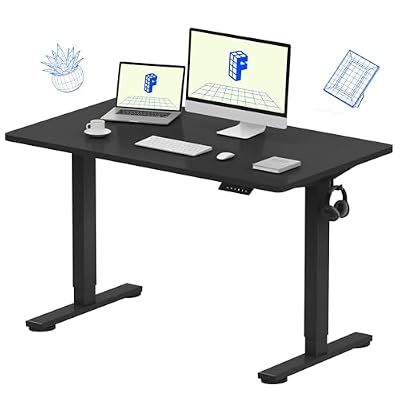
FLEXISPOT EN1 One-Piece Standing Desk, Electric Adjustable with 4 Memory Presets, 176 LBS Capacity, Stable & Quiet, Seamless Desktop for Home Office & Dual Monitors, 48"x24" Black
Included for 'Single Motor Standing Desk vs Dual Motor Standing Desk' because the listing specifies Electric Adjustable with 4 Memory Presets and 176 LBS Capacity, details this guide uses to compare options.
View on Amazon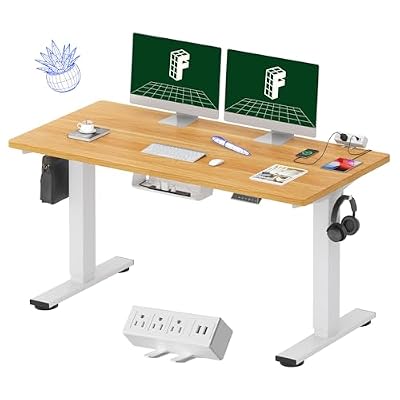
FLEXISPOT EN2 55"x28" Whole-Piece Standing Desk with Power Strip, Maple
Included for 'Single Motor Standing Desk vs Dual Motor Standing Desk' because the listing specifies Maple, details this guide uses to compare options.
View on Amazon
FLEXISPOT 71 x 63 Reversible L-Shaped Corner Standing Desk, Black
Included for 'Single Motor Standing Desk vs Dual Motor Standing Desk' because the listing specifies Black, details this guide uses to compare options.
View on AmazonDual motors with a control box
Each leg has its own motor. A control box monitors both and adjusts power to keep them level, even when the load is heavier on one side, such as a PC tower on the left. The legs can also be heavier and more rigid because there is no shaft to accommodate.
Side-by-side comparison
See also: Best Reclining Chairs: Nine Recliner Listings Compared by Mechanism, Fabric and Space Needs • Best Roku Streaming Deals Reviewed
| Factor | Single motor | Dual motor |
|---|---|---|
| Typical load rating | About 100 to 220 lb | About 250 to 355 lb, higher on heavy-duty frames |
| Lift speed | About 0.8 to 1.1 in per second | About 1.3 to 1.5 in per second |
| Noise during lift | About 45 to 55 dB | About 42 to 50 dB |
| Uneven load handling | Fair | Good, legs synchronised electronically |
| Frame weight | About 40 to 55 lb | About 60 to 90 lb |
| Typical price with top | About $130 to $300 | About $400 to $900 |
What the differences feel like
Speed
Moving 18 inches from sitting to standing takes about 16 to 22 seconds with a single motor and 12 to 14 seconds with dual motors. That sounds trivial, but people change position more often when transitions are quick, and changing position is the whole point.
Noise
Single motors often work harder and whine a little louder, especially near their load limit. Dual motors share the work and usually hum more quietly. On a video call, the difference is noticeable.
Stability
The motors themselves do not hold the desk steady, but dual-motor frames tend to use heavier columns and feet, which reduces sway at standing height. Single-motor frames are usually lighter overall.
Longevity
A motor running near its rated capacity wears faster. Because dual-motor desks have much higher ratings, typical home setups use a small fraction of their capacity, which is good for long-term reliability.
When a single motor is enough
- Laptop plus one monitor, total load under about 60 lb.
- Compact tops of 40 to 55 inches.
- Occasional standing of 30 to 60 minutes a day.
- Tight budgets or secondary desks in guest rooms.
When you should pay for dual motors
- Two or more monitors on arms, or a desktop PC on the surface.
- Tops wider than 60 inches or solid wood tops.
- Asymmetric loads, such as a heavy tower or speaker at one end.
- Daily standing of several hours with frequent transitions.
- Three-stage legs, which almost always come paired with dual motors.
Hidden costs to consider
A single-motor desk that later needs to support a second monitor and a PC may end up overloaded, forcing a replacement. Upgrading from $200 to $450 once is cheaper than buying a $200 desk and then a $450 desk two years later. Conversely, if your setup will stay light, the extra spend buys little you will use.
Also consider the top. Many single-motor desks ship with thinner particle board tops, while dual-motor frames often come with 1 inch tops that handle clamps and weight better.
A quick load estimate
Add roughly 12 lb per 27 inch monitor, 15 lb for a dual monitor arm, 30 lb for a desktop tower, 10 lb for speakers and peripherals, and 35 to 45 lb for a typical laminate top. A dual-monitor desk with a PC lands around 110 to 130 lb, which is near or above many single-motor ratings once you allow headroom. That is the practical dividing line.
FAQ
Do dual-motor standing desks wobble less?
Generally, yes, but mainly because they use heavier columns and frames rather than because of the motors. Column design and top size also play a big role.
Can a single-motor desk handle two monitors?
Two lightweight monitors on stands usually fit within the rating. Heavy monitors on arms plus a PC often exceed comfortable headroom, making dual motors the better choice.
Bottom line
Single-motor standing desks are affordable and adequate for light setups and short standing sessions. Dual-motor desks lift faster, run quieter, handle heavy and uneven loads, and usually come with sturdier frames. If your setup includes more than one monitor or any desktop PC, dual motors are the better long-term investment.
Related Reviews & Guides


Ergonomic Chair Size Guide for Petite Users
Best Ergonomic Office Chair for Night Shift Work