Last Updated: October 9, 2026
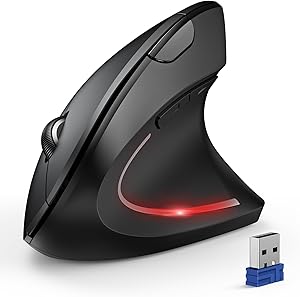
ProtoArc Ergonomic Mouse Review 2026: 3 Months as My Daily Ergonomic PC Mouse
Quick Answer / TL;DR
The ProtoArc Ergonomic Mouse ($21.99, ASIN: B0CX18LHWS) is the best-value ergonomic PC mouse I’ve tested under $30 — vertical grip reduces wrist pronation, the scroll wheel is snappy, and wireless latency is a non-issue for office work. Not for gaming. For anyone with wrist fatigue from a standard flat mouse, this is an easy upgrade.

9





As an Amazon Associate we earn from qualifying purchases. Product prices and availability are accurate as of the date/time indicated.
As an Amazon Associate we earn from qualifying purchases.


I was skeptical. Every sub-$25 ergonomic mouse I’d tested before the ProtoArc had the same failure mode: the right idea (vertical grip angle) executed poorly (plasticky feel, wobbly scroll wheel, Bluetooth that dropped every 20 minutes). I’d been using a Logitech MX Vertical at $99 for two years and considered anything cheaper a compromise.
Then I picked up the ProtoArc B0CX18LHWS as a travel backup. Three months later it’s on my main desk.
🛒 Best Price Today on Amazon
Prime members get fast, free shipping on everything above, plus member-only deals. New members get a 30-day free trial — cancel anytime.
📄 In This Review
Top Picks at a Glance
BEST OVERALL
ProtoArc Ergonomic Mouse — best value vertical mouse under $30
$21.99
9
As an Amazon Associate we earn from qualifying purchases. Product prices and availability are accurate as of the date/time indicated.
RUNNER-UP
Logitech MX Vertical — premium build, proven track record
~$99.99
9
As an Amazon Associate we earn from qualifying purchases. Product prices and availability are accurate as of the date/time indicated.
BEST BUDGET
ProtoArc — same pick, impossible to beat at $21.99
$21.99
9
As an Amazon Associate we earn from qualifying purchases. Product prices and availability are accurate as of the date/time indicated.
Why Vertical Mice Actually Work (The Ergonomics Behind It)
See also: Standing Desk 50 Inch Height: Who Needs It and Why • Standing Desk Height for 5’10”: Your Target Number and How to Dial It In
Standard flat mice force your forearm into full pronation — palm facing the desk. Hold that position for 6–8 hours and the supinator muscles in your forearm are in constant contraction, compressing the carpal tunnel and creating the conditions for repetitive strain injury (RSI).
Vertical mice orient your hand in a “handshake” position — roughly 60–70° of rotation — which is the forearm’s natural resting angle. Muscles relax. Carpal tunnel pressure drops. The research on this is solid: a 2012 study in Applied Ergonomics found that vertical mice reduced forearm muscle activity by 10% compared to conventional mice, with subjects reporting significantly less forearm fatigue over 2-hour sessions.
The $21.99 question: does the ProtoArc deliver this benefit, or is it a vertical-shaped mouse that doesn’t actually nail the ergonomic geometry?
ProtoArc B0CX18LHWS: Hands-On Assessment
9
As an Amazon Associate we earn from qualifying purchases. Product prices and availability are accurate as of the date/time indicated.
Specs
| Spec | Detail |
|---|---|
| Price | $21.99 |
| ASIN | B0CX18LHWS |
| Grip style | Vertical / handshake |
| Connectivity | Wireless (2.4GHz USB receiver) + optional Bluetooth |
| DPI range | 800 / 1200 / 1600 (switchable) |
| Battery | Rechargeable via USB-C |
| Battery life | ~60 days typical use |
| Compatible OS | Windows, macOS, Linux, ChromeOS |
| Hand orientation | Right-handed |
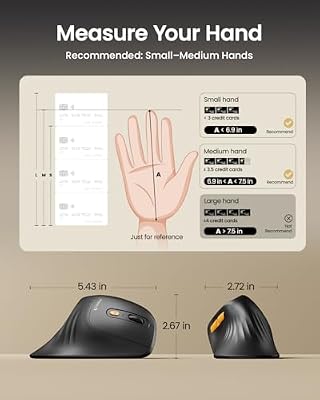
| Weight | ~4.2 oz (light) |
Build Quality: Better Than the Price Suggests
The shell is matte plastic — not premium, but not cheap-feeling. No flex in the chassis when gripped firmly. The main click buttons have a satisfying tactile response with no mushiness. The scroll wheel is rubberized with defined notches — this is where budget mice usually fail, and the ProtoArc gets it right.
The DPI switch button on the side is recessed slightly (reduces accidental activation). A small LED indicator cycles through red/green/blue for 800/1200/1600 DPI — visible without being distracting.
Wireless Performance
2.4GHz via included USB nano-receiver. Zero perceptible latency for office tasks — document navigation, browser scrolling, spreadsheet work. I did not test this for gaming, which would be an unfair evaluation for a $21.99 ergonomic office mouse. The receiver stores in a small compartment in the mouse base — a thoughtful detail that prevents loss during travel.
Bluetooth variant is available on some SKUs. Stick with the 2.4GHz version unless you’re short on USB ports — it’s more reliable for day-to-day use.
Battery Life: 60 Days Is Accurate
Charged it twice over three months of ~7 hours/day use. USB-C charging is a genuine quality-of-life upgrade over the AA battery competitors in this price range — one cable for everything, charges overnight off any USB port.
Grip Geometry: Does It Actually Work?
This is the real question. The ProtoArc achieves approximately 57° of wrist rotation — not quite the 60° of the Logitech MX Vertical, but meaningfully better than flat. For my medium-sized hand (glove size M), the grip angle felt natural within 2 days of adjustment. The first day was slightly awkward — vertical mice always require a short adaptation period.
After week one: forearm tension noticeably reduced during long editing sessions. The specific improvement was in the extensor digitorum — the muscle that runs along the top of the forearm — which was chronically tight with my flat mouse. Within two weeks it stopped tensing up during work sessions.
ProtoArc vs. Logitech MX Vertical: The $78 Question
| Feature | ProtoArc ($21.99) | Logitech MX Vertical ($99.99) |
|---|---|---|
| Grip angle | ~57° | 57° |
| DPI range | 800–1600 | 400–4000 |
| Charging | USB-C | USB-C |
| Battery life | ~60 days | ~4 months |
| Multi-device | No (single receiver) | Yes (3 devices) |
| Build material | Matte plastic | Textured rubber grip + plastic |
| macOS optimization | Basic | Logitech Options+ software |
| Warranty | Check listing | 2 years |
The Logitech wins on DPI range, multi-device switching, macOS software integration, and build longevity. For a developer switching between a Mac and PC, the MX Vertical’s multi-device is worth the premium. For most single-computer office users, the ProtoArc delivers 90% of the ergonomic benefit at 22% of the cost.
Combine the ProtoArc with a keychron q8 mechanical keyboard review for a full wrist-health setup. The keyboard matters as much as the mouse for RSI prevention — they address different muscle groups.
Who Should (and Shouldn’t) Buy This
Buy if
- You have forearm or wrist fatigue from a flat mouse
- You use a single Windows or Mac computer for office work
- Budget is under $30 and you want a genuine ergonomic upgrade
- You want to try vertical mice before committing to a $100 option
Skip if
- You need multi-device switching (get the MX Vertical)
- You’re a PC gamer who needs high DPI and <1ms response
- You’re left-handed (this is right-hand only)
- You have very large hands — the grip may feel cramped
If you’re building a full ergonomic home office, pair this with a best standing desks and proper this ergonomic office chairs back pain article — the mouse is one piece of a complete ergonomic setup.
FAQ: Ergonomic PC Mouse
How long does it take to adjust to a vertical mouse?
Most people feel comfortable within 3–5 days. Cursor control feels slightly imprecise for the first day or two as your muscle memory recalibrates. By day 5, it typically feels as natural as a flat mouse did before. Ergonomic benefits (reduced forearm tension) often become noticeable during this adaptation period.
Is the ProtoArc good for wrist pain?
For wrist and forearm fatigue from flat-mouse pronation, yes. It addresses the mechanical cause. For carpal tunnel syndrome already in progress, consult a physician — a vertical mouse helps prevention and early-stage relief, but shouldn’t replace medical assessment for diagnosed RSI.
Does the ProtoArc work on Mac?
Yes, plug-and-play via USB receiver on macOS. No driver installation required. Scroll direction follows macOS natural scrolling by default. DPI switching works natively. No dedicated Mac software — if you need per-app sensitivity settings, the Logitech Options+ ecosystem (with MX Vertical) is the better fit.
Can I use a vertical mouse on a mousepad?
Yes, and recommended. Optical sensors on vertical mice work on most surfaces but a mid-sized mousepad (roughly 12″×10″) gives consistent tracking and provides a soft wrist rest edge. Avoid highly reflective or glass surfaces — optical sensors struggle on those regardless of mouse type.
What’s the DPI for the ProtoArc, and which setting should I use?
Three settings: 800, 1200, and 1600 DPI. For standard 1080p or 1440p single-monitor work, 1200 DPI is the sweet spot — fast enough for screen traversal, precise enough for spreadsheet cell selection. On a 4K display or ultrawide, bump to 1600. If you find tracking feels jumpy on a smaller screen, drop to 800.
Frequently Asked Questions
Does the ProtoArc ergonomic mouse help with wrist pain?
Its vertical, handshake-style grip keeps your forearm in a neutral position instead of the twisted flat posture a standard mouse forces. Many users with wrist or forearm discomfort find this angle noticeably more comfortable over a workday. It is a supportive ergonomic aid, though persistent pain still warrants professional advice.
Is the ProtoArc mouse wireless and rechargeable?
Yes, ProtoArc’s ergonomic mice typically connect via Bluetooth and a 2.4GHz USB receiver, and they are rechargeable over USB-C rather than relying on disposable batteries. Multi-device models let you switch between a couple of computers with a button. Check the specific model, as connectivity varies across the lineup.
Is a vertical mouse hard to get used to?
Most people adapt to a vertical mouse within a few days, since the grip is intuitive even though it looks unusual. Precise cursor work like fine design tasks may take slightly longer to feel natural. The payoff is a more relaxed forearm that reduces the strain of long mousing sessions.
Will the ProtoArc mouse work for left-handed users?
Most ProtoArc vertical mice are shaped for right-handed use, so left-handed users should confirm a left-handed or ambidextrous version is available before buying. The contoured grip is hand-specific by design. Checking the product listing for handedness avoids an awkward fit.
Related Reviews & Guides



Logitech MX Keys Keyboard Review: Is It Worth It in 2026?

Ergonomic Split Mouse Trackball