Last Updated: November 22, 2026
A workstation changes the UPS question completely. The decision is not whether a battery can keep a light bulb of a PC alive; it is whether the unit can carry a high-draw tower, two monitors, and your storage through a blackout without choking, and whether its output waveform suits the active PFC power supply inside a serious desktop. Undersize the watt rating and the UPS may shut down at the exact moment a render or export is peaking. Pick the wrong waveform and some power supplies behave unpredictably on battery.
This guide is for people who work at a real desktop workstation at home: video editors, CAD and 3D users, developers running local builds, and anyone whose tower draws far more than an office mini PC. The five systems below were chosen from the names and specifications on their Amazon product pages, with priority given to watt capacity, waveform, outlet layout, and the shutdown time a workstation actually needs.
📄 In This Review
Quick Picks
As an Amazon Associate we earn from qualifying purchases.
| Product | Best for | Key spec from title |
|---|---|---|
| CyberPower PR1500LCD Smart App Sinewave | Heavy workstations that need full watt headroom | 1500VA/1500W, sinewave output |
| APC Back-UPS Pro BR1500MS2 | Workstations with active PFC power supplies | 1500VA/900W, sinewave, 10 outlets |
| CyberPower CP1500AVRLCD3 | Dual-monitor desks that need many battery outlets | 1500VA/900W, 12 outlets, color LCD |
| APC Back-UPS Pro BX1500M | Workstations that also need network line protection | 1500VA/900W, 1Gb network dataline protection |
| CyberPower BRG1500AVRLCD2 | Busy desks with data lines to protect | 1500VA/900W, 12 outlets, data line protection |
How to Choose
See also: 7 Best Anti Fatigue Mats (November 2026) • 7 Best Cable Management Trays (November 2026)
Add up your workstation’s real watt draw
Start with watts, not the VA figure in large type. A workstation tower under a rendering or compiling load can pull several hundred watts on its own, and two monitors, powered speakers, and an external drive stack add more on top. List everything you expect the battery side to carry, total the draw as honestly as you can, and then leave headroom above that number. A UPS running near its ceiling has almost no runtime and may overload-trip during a load spike. This is why the 1500W rating of the PR1500LCD matters for heavy rigs, while 900W models suit mid-range towers.
Match the waveform to an active PFC power supply
Most modern workstation power supplies use active power factor correction, and that design pairs most predictably with a true sinewave output when the UPS switches to battery. Simulated sine wave units serve many ordinary desktops well, but a high-end PSU under load is the least forgiving place to test that assumption. If your tower has an active PFC supply, put sinewave models at the top of the shortlist: the PR1500LCD and the BR1500MS2 both state sinewave output in their specifications. Treat waveform as a compatibility decision first and a refinement second, because a shutdown during a waveform handover wastes the whole purchase.
Plan runtime around saving work, not finishing the job
A desktop UPS is a bridge, not a generator. Its job is to give you enough minutes to save the project, let an export finish writing its file, and shut the workstation down in an orderly way. Published runtime figures shrink fast as load rises: the CP1500AVRLCD3 lists 12 minutes at half load but only 3 minutes at full load, and the BRG1500AVRLCD2 shows the same pattern. Read those two numbers as a warning about your own setup. The heavier your tower runs, the fewer minutes you actually get, so buy capacity for the shutdown you need rather than the render you hope to complete.
Count battery outlets for the tower and both monitors
Only the battery-backed outlets keep equipment alive in an outage; the surge-only outlets merely protect. A workstation desk typically needs battery support for the tower and at least one monitor, ideally both, because a dark screen makes a graceful shutdown guesswork. Count your plugs before choosing: the CyberPower models here provide six battery outlets, the BR1500MS2 provides six, and the BX1500M provides five. Reserve surge-only outlets for printers, chargers, and lamps. Also check the physical spacing, since workstation power bricks are wide and can block a neighbouring socket even when the outlet count looks sufficient on paper.
The 5 Best Options
CyberPower PR1500LCD Smart App Sinewave

Wattage is the whole story with this unit. At 1500VA and a full 1500W, it carries more real load than the 900W systems in this roundup, which makes it the natural first look for a workstation with a powerful graphics card, several drives, and two monitors. Its sinewave output suits active PFC power supplies, AVR smooths out voltage swings without draining the battery, and the mini-tower case still fits beside a desk tower. For editors and 3D artists whose machines genuinely pull heavy current, this is the pick that leaves the most headroom.
Specs
- Capacity: 1500VA / 1500W
- Output waveform: sinewave
- AVR: yes
- Outlets: 8
- Form factor: mini-tower
Best for: High-draw workstations that would push a 900W UPS close to its limit.
Watch out for: With only 8 outlets in total, a desk crowded with peripherals may run out of sockets before it runs out of watts.
ASIN: B0083TXNMM
APC Back-UPS Pro BR1500MS2

APC’s BR1500MS2 is the balanced workstation choice. Its sinewave output is the right match for active PFC power supplies, the 900W capacity covers most single-GPU towers plus two monitors, and six battery-backed outlets leave room for an external drive or a small NAS beside the PC. The LCD keeps load and remaining runtime visible at a glance, which helps you decide quickly whether to save and stop or let a short task finish. A replaceable battery (APCRBC163) also extends the unit’s working life, and the two USB charging ports handle a phone without stealing an outlet.
Specs
- Capacity: 1500VA / 900W
- Output waveform: sinewave
- AVR: yes
- Outlets: 10 (6 battery backup + surge, 4 surge-only)
- USB charging: 2 ports (USB-C + USB-A, 15W shared)
- Display: LCD
- Form factor: tower
- Replaceable battery: APCRBC163
Best for: Workstation users who want sinewave output and a battery they can replace years later.
Watch out for: The two USB ports share 15W between them, so fast-charging two devices at once is not realistic.
ASIN: B08GRY1W93
CyberPower CP1500AVRLCD3
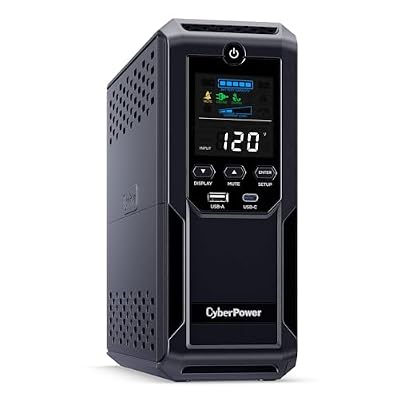
If your workstation desk runs out of outlets before it runs out of power, this CyberPower deserves attention. Twelve outlets, split evenly between battery-backed and surge-only, cover a tower, two monitors, speakers, and charging bricks without a power strip hanging off the UPS. The color LCD reports load clearly, and AVR handles the brownouts that never quite become blackouts. Its published runtime, 12 minutes at half load and 3 minutes at full load, is a useful reality check for planning shutdowns. It uses simulated sine wave output, so check your power supply’s requirements before committing.
Specs
- Capacity: 1500VA / 900W
- Output waveform: simulated sine wave
- Topology: line-interactive with AVR
- Outlets: 12 (6 battery + surge, 6 surge-only)
- USB ports: 2
- Display: color LCD
- Form factor: mini tower
- Runtime: 12 min at half load / 3 min at full load
Best for: Dual-monitor workstations surrounded by peripherals that all need a protected socket.
Watch out for: Simulated sine wave output can be a poor match for some active PFC power supplies; verify your PSU first.
ASIN: B0BCMLLSHL
APC Back-UPS Pro BX1500M

The BX1500M adds a layer many workstation owners forget: protection for the network line feeding the desk. Its 1Gb network dataline protection guards the Ethernet path to your workstation or NAS, while PowerChute software, connected through the data port, can trigger an orderly automatic shutdown when you are away from the desk. Five battery outlets cover the tower, monitors, and one or two extras, and the LCD shows an estimated runtime so you can judge how long you have. For unattended renders and overnight builds, that software shutdown is the feature that earns its place.
Specs
- Capacity: 1500VA / 900W
- AVR: yes
- Outlets: 10 (5 battery backup + surge, 5 surge-only)
- Display: LCD with estimated runtime display
- Software: PowerChute via data port
- Protection: 1Gb network dataline protection
Best for: Workstations left running unattended, where automatic shutdown matters as much as battery minutes.
Watch out for: It has one fewer battery outlet than the other 1500VA models here, so map your plugs before buying.
ASIN: B06VY6FXMM
CyberPower BRG1500AVRLCD2
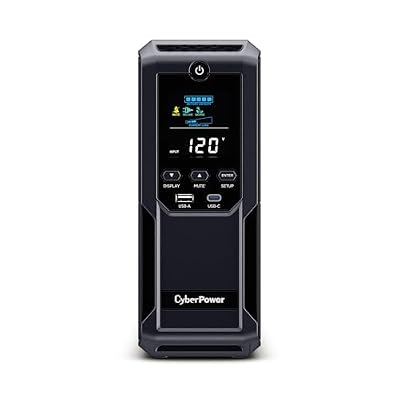
CyberPower’s BRG1500AVRLCD2 mirrors the outlet generosity of its sibling, with twelve outlets and a color LCD, then adds data line protection for the connections running into your desk. That combination suits a workstation corner where the PC, monitors, a dock, and networked storage all converge and every cable is a possible surge path. AVR and line-interactive topology handle everyday voltage drift, and the stated runtime, 12 minutes at half load and 2 minutes at full load, underlines how quickly a loaded workstation drains a battery. It is a practical, protection-focused alternative in this 1500VA group.
Specs
- Capacity: 1500VA / 900W
- Output waveform: simulated sine wave
- Topology: line-interactive with AVR
- Outlets: 12 (6 battery + surge, 6 surge-only)
- USB charge ports: 2
- Display: color LCD
- Protection: data line protection
- Form factor: mini-tower
- Runtime: 12 min at half load / 2 min at full load
Best for: Workstation desks that want maximum outlets plus protection for data lines.
Watch out for: Full-load runtime is listed at just 2 minutes, so a heavily loaded tower gets a very short shutdown window.
ASIN: B0BKHLHM9S
Which One Fits Your Situation
Your workstation pulls serious wattage
Choose the CyberPower PR1500LCD. Its 1500W capacity is double the real-power headroom of the 900W models, and heavy towers with high-end graphics cards are exactly the loads that expose an undersized UPS. Sinewave output also keeps an active PFC power supply on safe ground while you save and shut down.
You run two monitors and a mid-range tower
The APC BR1500MS2 fits this desk neatly. Six battery outlets cover the tower, both screens, and a drive, sinewave output matches an active PFC supply, and the replaceable battery means the unit is not disposable when capacity fades after a few years of service. The LCD’s runtime estimate also helps you judge whether a short export can finish or should wait.
Your desk is short on sockets, not power
Pick one of the twelve-outlet CyberPower models. The CP1500AVRLCD3 is the straightforward choice for a peripheral-heavy workstation, while the BRG1500AVRLCD2 adds data line protection. Either gives you six battery outlets and six surge-only outlets, so printers and chargers stop competing with the equipment that truly needs backup during an outage at your desk.
Your machine renders or builds while you are out
The APC BX1500M is built for that pattern. PowerChute can shut the workstation down automatically through the data port, the LCD estimates the runtime you have, and 1Gb network dataline protection covers the Ethernet feed. An unattended machine needs a plan that works without you standing over it, especially during overnight jobs.
Common Mistakes
- Shopping by the VA number and ignoring the watt rating, which is the limit a workstation load actually hits.
- Plugging a laser printer or space heater into a battery outlet and tripping the UPS during an outage.
- Assuming the runtime on the box applies at full load, when heavy workstations may get only a few minutes.
- Leaving both monitors on surge-only outlets, then trying to shut down a loaded PC with a black screen.
- Skipping the shutdown software, so an unattended workstation still dies hard when the battery runs out.
Safety Notes
Treat a workstation UPS as a high-load device and respect its watt rating: never connect a space heater, a laser printer, or any heating appliance to its battery outlets, because those loads can overload the unit instantly and defeat the protection you bought it for. Keep clear airflow around the case so the battery stays ventilated, and do not bury the unit inside a closed cabinet with the tower’s exhaust. Replace the battery when the unit reports it is due, recycle the old battery through a proper collection point rather than household trash, and never open the sealed case yourself; internal components can hold a dangerous charge even when unplugged.
Frequently Asked Questions
How many watts does a workstation UPS really need?
Add up the tower’s draw under load, both monitors, and any drives you want on battery, then choose a UPS rated above that total with room to spare. A mid-range workstation often fits a 900W unit, while a high-end graphics workstation is safer with the 1500W capacity of the PR1500LCD.
Does my workstation need sinewave output?
If its power supply uses active PFC, sinewave output is the safest match when the UPS runs on battery, and both the PR1500LCD and BR1500MS2 provide it. Simulated sine wave models work for many desktops, but a workstation under load is the wrong place to discover an incompatibility.
How long will a 1500VA UPS run a workstation?
Far less than the headline figures suggest once the tower is working hard. The CyberPower models here list about 12 minutes at half load and only 2 to 3 minutes at full load. Plan on using that time to save your work and shut down cleanly, not to keep producing.
Should monitors go on battery outlets too?
Yes, at least the main monitor, and both if the outlet count allows. You cannot save a project or shut down software you cannot see. Put the tower and primary display on battery outlets first, then add the second screen, and leave printers and chargers on the surge-only side.
Related Reviews & Guides





Best Staple Guns for Upholstery: Power and Precision
Best PC Building Tools for DIY Builds