Last Updated: October 30, 2026
- Top Picks at a Glance
- Quick Comparison Table
- 1. Anker Nano Power Strip with Desk Clamp: Best Overall
- 2. Jgstkcity Desk Clamp Power Strip: Best Value Desk Power
- 3. Anker 67W GaN Charger: Best Travel Charger
- 4. Lenovo Urban Laptop Sleeve, 14 Inch: Best Laptop Protection
- 5. UGREEN Revodok Pro 6-in-1 USB-C Hub: Best Desk-to-Bag Hub
- 6. tomtoc Electronics Organizer Travel Case: Best Travel Organizer
- 7. BESTEK 300W Car Power Inverter: Best Road-Trip Power
- Also Consider
- How We Chose
- Buying Guide: How to Choose Desk and Travel Tech Accessories
- A Worked Example: Sizing a Desk and Bag Kit
- Common Mistakes
- Frequently Asked Questions
- Which One Should You Buy?
- Sources
The best desk and travel tech accessories are the ones that do double duty: charge more devices from one plug, protect a laptop in a bag, and fold away when you leave. If you buy only one, make it the Anker Nano Power Strip with a desk clamp, because it fixes the most common desk problem, too few outlets in the wrong place. For travel, the Anker 67W GaN charger and the Lenovo Urban 14 inch laptop sleeve are the runner-up pair, since one charger and one sleeve cover most trips.
A hybrid work setup means your tech lives in two places: a desk at home and a bag on the move. Most “best accessories” lists ignore that split and give you a pile of cables. This guide sorts seven products into desk gear, travel gear and the items that do both, then adds four alternatives. Every product is a real listing in the shop section of this site. Specs come from the listing or the maker, and anything not published is marked “not listed.” Measurements matter here, so we include edge thickness for desk clamps, wattage for chargers and sleeve sizes, and we explain how to check each against your own desk and laptop.

TOPEAST Quilted Cable Organizer Bag, Soft Tech Pouch & Travel Electronics Case with Elastic Pen Loop, Tangle-Free Cord Organizer for Women, Office Desk, AirPods, Chargers & Accessories, Black
Included for 'Best Desk and Travel Tech Accessories for a Hybrid Work Setup' as a representative home product in this roundup; selection reflects the product set returned for this topic.
View on Amazon
TOPEAST Quilted Cable Organizer Bag, Soft Tech Pouch & Travel Electronics Case with Elastic Pen Loop, Tangle-Free Cord Organizer for Women, Office Desk, AirPods, Chargers & Accessories, Pink
Included for 'Best Desk and Travel Tech Accessories for a Hybrid Work Setup' as a representative home product in this roundup; selection reflects the product set returned for this topic.
View on Amazon
tomtoc Electronics Organizer Travel Case, Cable Organizer for Essentials | Water Resistant Tech Pouch Accessories Travel Bag Carry Storage for Cord, Phone, Cables, Airpods, USB Drive, Daily Items
Included for 'Best Desk and Travel Tech Accessories for a Hybrid Work Setup' as a representative home product in this roundup; selection reflects the product set returned for this topic.
View on Amazon
BAGSMART Electronics Organizer Travel Case for Cords Chargers Phones, Pink | Puffy Padded, Travel Essentials, Cord organizer bag for Cables, Compact Tech Accessories Pouch
Included for 'Best Desk and Travel Tech Accessories for a Hybrid Work Setup' as a representative home product in this roundup; selection reflects the product set returned for this topic.
View on Amazon📄 In This Review
- Top Picks at a Glance
- Quick Comparison Table
- 1. Anker Nano Power Strip with Desk Clamp: Best Overall
- 2. Jgstkcity Desk Clamp Power Strip: Best Value Desk Power
- 3. Anker 67W GaN Charger: Best Travel Charger
- 4. Lenovo Urban Laptop Sleeve, 14 Inch: Best Laptop Protection
- 5. UGREEN Revodok Pro 6-in-1 USB-C Hub: Best Desk-to-Bag Hub
- 6. tomtoc Electronics Organizer Travel Case: Best Travel Organizer
- 7. BESTEK 300W Car Power Inverter: Best Road-Trip Power
- Also Consider
- How We Chose
- Buying Guide: How to Choose Desk and Travel Tech Accessories
- A Worked Example: Sizing a Desk and Bag Kit
- Common Mistakes
- Frequently Asked Questions
- Which One Should You Buy?
- Sources
Top Picks at a Glance
- Best Overall: Anker Nano Power Strip, desk clamp, 70W max, 1500J surge protection, 6 AC outlets and 2 USB-C ports.
- Best Value Desk Power: Jgstkcity Desk Clamp Power Strip, 5 outlets and 6 USB ports, 1200J, 40W total charging.
- Best Travel Charger: Anker 67W GaN USB Charger, 3 ports, compact for laptops and phones.
- Best Laptop Protection: Lenovo Urban Laptop Sleeve, 14 inch, water resistant.
- Best Desk-to-Bag Hub: UGREEN Revodok Pro 6-in-1 USB-C Hub, 4K60 HDMI and 100W power delivery.
- Best Travel Organizer: tomtoc Electronics Organizer Travel Case for cables and small gadgets.
- Best Road-Trip Power: BESTEK 300W Car Power Inverter with dual USB.
Quick Comparison Table
See also: 6 Best Laptop Stands for Ergonomic Desk Setups (October 2026) Top Reviews
| Product | Where it lives | Key specs (as listed) | Watch for | Price tier |
|---|---|---|---|---|
| Anker Nano Power Strip (clamp) | Desk | 70W max; 1500J; 6 AC + 2 USB-C; 5 ft cord; fits 0.6 to 1.8 in edge | Needs a desk edge in range | Premium |
| Jgstkcity Desk Clamp Power Strip | Desk | 1200J; 5 outlets, 6 USB; 40W total; 6 ft cord; fits 1.96 in edge | 40W is shared across ports | Mid-range |
| Anker 67W GaN Charger | Desk and bag | 67W; 3 ports; GaN; compact build | Total shared across ports | Mid-range |
| Lenovo Urban Laptop Sleeve 14 in | Bag | 14 inch; water resistant; charcoal grey | Check your laptop’s exact dimensions | Budget |
| UGREEN Revodok Pro 6-in-1 Hub | Desk and bag | 10Gbps; 4K60 HDMI; 100W PD pass-through | Port mix is fixed | Budget |
| tomtoc Electronics Organizer | Bag | Water-resistant pouch; separate pockets for cords, buds, drives | Size not in title | Budget |
| BESTEK 300W Car Inverter | Car | 12-17V DC to 110V AC; 300W; 4.8A dual USB; aluminum housing | Socket fuse limits real output | Mid-range |
1. Anker Nano Power Strip with Desk Clamp: Best Overall
- Six AC outlets and two USB-C ports, 70W max USB-C output
- 1500J surge protection, per the listing
- 5 ft extension cord
- Clamp fits tabletop edges from about 0.6 to 1.8 inches
- Per-port wattage split and total output: see the maker’s page; not fully listed in the title
Best for: Desks where outlets are on the far wall and cables drape across the floor. Skip if: your desk edge is thicker than 1.8 inches or has a lip, glass top or curved edge that blocks a clamp.
A desk clamp power strip solves two problems at once: it brings power to the desk edge, and it lifts plugs off the floor. Six AC outlets cover a monitor, lamp, dock and a couple of chargers, while the USB-C ports charge a phone or small laptop without bricks. The 1500J rating describes how much surge energy the protection can absorb. Higher numbers mean more protection, though a surge protector’s clamping voltage and the age of its components also matter, and the joule rating wears down as it absorbs surges.
The key measurement is your desk edge. Clamp the strip at the back corner, not the front, and check that the thumbscrew can reach under the desk. A rubber pad stops marks on wood. If you move often, a clamp is easier to take with you than a screw-mounted strip.
Pros: Wide clamp range; 1500J rating; USB-C output; compact design. Cons: Premium tier; total power is shared; short 5 ft cord.
2. Jgstkcity Desk Clamp Power Strip: Best Value Desk Power
- 5 AC outlets and 6 USB ports
- 1200J surge protection
- 40W total charging, per the listing
- 6 ft extension cord
- Fits desk edges up to about 1.96 inches
Best for: Gaming desks, dorms and offices that need many ports at a lower cost. Skip if: you charge a laptop through USB-C; 40W total is shared across all USB ports.
More ports does not always mean more charging power. The 40W figure is a total budget across the USB ports, so charging a phone, a tablet and a pair of earbuds at once is fine, but a laptop that needs 65W will charge slowly or not at all. For laptops, use an AC outlet and the laptop’s own adapter, and use the USB ports for small devices.
The 6 ft cord is useful when the wall outlet is a few feet away. The 1.96 inch clamp range suits thicker desktops, such as butcher-block surfaces. As with any inexpensive power strip, look for safety certifications on the label, such as UL or ETL, and avoid daisy-chaining it into another strip.
Pros: Many ports; lower cost; longer cord; thick-desk clamp range. Cons: Shared 40W; lower surge rating; certifications not stated in the title.
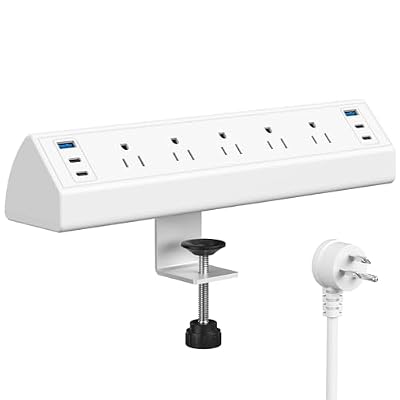
Jgstkcity Desk Clamp Power Strip USB C,Table Surge Protector | 1200J,Total 40W Charging Hub,5 Outlets & 6 USB,6FT Extension Cord,Fits 1.96" Desktop Edge,Office,Gaming,Dorm,White
Included for 'Best Desk and Travel Tech Accessories for a Hybrid Work Setup' as a representative mattress protector in this roundup; selection reflects the product set returned for this topic.
View on Amazon3. Anker 67W GaN Charger: Best Travel Charger
- 67W maximum output with three ports
- GaN (gallium nitride) design for a smaller body
- Marketed for MacBook Pro and Air, iPad Pro, iPhone and Galaxy phones
- Power split across ports: see the maker’s chart
- Plug style: check the listing photos for the prong layout
Best for: Travelers who want one charger for a laptop, phone and tablet. Skip if: your laptop requires 90W or more; check its original adapter rating.
GaN chargers pack more power into a smaller case, which is why one 67W charger can replace a laptop brick and a phone brick. Match the wattage to your laptop: a thin-and-light laptop typically uses 45 to 65W, while a performance laptop uses 100W or more. If your laptop’s adapter is rated for 96W and you use a 67W charger, the laptop may charge slowly under load.
When multiple ports are in use, the charger shares power, so a laptop on one port plus a phone on another may each get less than the maximum. The maker’s chart shows how wattage is split. Pair the charger with a good USB-C cable rated for the wattage, since a thin cable can limit power.
Pros: Compact; three ports; strong brand support; fast phone and laptop charging. Cons: Power sharing; check plug style for your destination; not enough for 100W laptops.
4. Lenovo Urban Laptop Sleeve, 14 Inch: Best Laptop Protection
- Fits 14 inch laptops, notebooks and tablets
- Marketed for MacBook Air and Pro compatibility
- Water resistant outer
- Charcoal grey
- Internal dimensions and padding thickness: not listed
Best for: Commuters who put a laptop inside a backpack or tote and want a layer of protection. Skip if: you need a bag with a handle and accessory pockets; consider a briefcase style.
A sleeve is the cheapest way to add scratch and drip protection to a laptop. Sizing is the main risk. A 14 inch label refers to the screen diagonal, not the case, and laptops with thick bezels or extra depth may not fit. Check your laptop’s width and depth in millimeters, then compare them with the sleeve’s internal dimensions. If the maker does not list them, read the compatible-model list.
A sleeve does not replace padding in a bag. For rough handling, put the sleeve inside a padded laptop compartment. Water resistance helps in light rain, but zips and seams are weak points.
Pros: Low cost; slim; water resistant; works in any bag. Cons: Minimal padding; sizing needs checking; no pockets.

Lenovo Urban Laptop Sleeve 14 Inch for Laptop/ Notebook/Tablet Compatible with MacBook Air/Pro Water Resistant - Charcoal Grey
Included for 'Best Desk and Travel Tech Accessories for a Hybrid Work Setup' because the listing lists an explicit depth/thickness, which is the attribute this article compares.
View on Amazon5. UGREEN Revodok Pro 6-in-1 USB-C Hub: Best Desk-to-Bag Hub
- 10Gbps USB-C data speed, per the listing
- 4K at 60Hz HDMI output
- 100W power delivery pass-through
- Six ports in total, including USB-A and USB-C
- Compatible with MacBook, iPad Pro and many Windows laptops, per the listing
Best for: Laptops with only one or two USB-C ports that need HDMI and USB-A. Skip if: you need Ethernet or an SD card reader; check the exact port mix.
A hub turns one laptop port into several. The numbers to watch are the data speed, the video output and the power pass-through. A 10Gbps port is useful for external SSDs, 4K60 HDMI is useful for a monitor, and 100W pass-through means the hub can pass power to a laptop while using the other ports. The tradeoff is that when a hub passes through 100W, some of that power is used by the hub itself.
Carry the hub in the same pouch as your cables. Some hubs run warm under heavy use, which is worth noting if you use it on a soft surface.
Pros: 4K60 HDMI; 100W pass-through; 10Gbps; low cost. Cons: No Ethernet in this model; warm under load; port mix is fixed.
6. tomtoc Electronics Organizer Travel Case: Best Travel Organizer
- Water-resistant pouch with separate pockets
- Designed for cords, phone, cables, earbuds and USB drives
- Pocket layout and closures: see the listing images; not described in the title
- Exact dimensions: not listed in the title
- Material: not listed
Best for: Frequent travelers and desk workers who keep chargers in a bag. Skip if: you carry bulky items such as a mouse and keyboard; look for a larger organizer.
The simplest travel upgrade is not a gadget; it is a pouch that stops cables from tangling. An organizer keeps chargers together so you do not leave one behind at a hotel. Dedicated pockets or loops, where present, keep cables flat and small items visible. The best way to use one is to keep a travel set that never leaves the pouch: charger, cable, adapter, earbuds, and a spare cable.
Pack the pouch the same way every time. Packing by habit means you notice something missing immediately, which prevents the common mistake of discovering a missing charger on the road.
Pros: Low cost; keeps cables tidy; water-resistant; fits most bags. Cons: Size not listed; limited for large items; stitching quality varies.
7. BESTEK 300W Car Power Inverter: Best Road-Trip Power
- 12 to 17V DC input, 110V AC output
- 300W rating, per the listing
- 4.8A dual USB charging ports
- Aluminum housing
- Plugs into a cigarette-lighter style socket
Best for: Charging a laptop or camera battery on a drive, or powering a small appliance briefly. Skip if: you want to run a hair dryer, kettle or other heating appliance; those draw far more than a vehicle socket can supply.
The 300W rating is a ceiling for the inverter, not for your car. A typical 12V socket is fused at 10 or 15 amps, which limits continuous output to roughly 120 to 180 watts. Check your vehicle manual. For a laptop charger, which usually draws 45 to 100W, this is fine. For anything larger, an inverter wired directly to the battery is the right tool, which should be done by a professional.
Run the engine while using the inverter, because laptops and small appliances can drain the battery quickly. Keep the unit ventilated, not buried under a blanket, and unplug it when you leave the car.
Pros: Compact; dual USB; laptop-friendly; aluminum body for heat. Cons: Socket fuse limit; needs engine running; not for heating appliances.

BESTEK Power Inverter DC 12-17V to AC 110V - 300W Car Plug Adapter Outlet | 4.8A Dual USB Fast Charging Port, Vehicle Charger Cigarette Lighter Adapter for Phone, Laptop on Road Trip - Aluminum Housing
Included for 'Best Desk and Travel Tech Accessories for a Hybrid Work Setup' as a representative home product in this roundup; selection reflects the product set returned for this topic.
View on AmazonAlso Consider
Acozvin Desk Clamp Power Strip, 10 ft
A larger clamp strip with nine AC outlets, eight USB ports and a 10 ft flat plug cord, with 40W total USB charging. It suits crowded desks with many devices.
ProCase 14 Inch Laptop Sleeve
A slim sleeve with soft lining and a front pocket, sized for 14 inch laptops including 14 inch MacBook Pro models. It adds a pocket the Lenovo sleeve lacks.
BESTEK 400W Car Power Inverter
A higher-rated inverter with 30W USB-C power delivery and USB-A. It is a step up for people who want a USB-C port in the car, though the socket fuse limit still applies.
Jakeko Magnetic Portable Monitor Stand
A folding aluminum stand with a 75mm VESA pattern for 13.3 to 18.5 inch portable monitors. It suits a travel second screen.
How We Chose
This guide is research-based. We did not personally use these products. We started from the listings in the shop section of this site and compared them with manufacturer descriptions, including Anker’s charging guidance. We used independent explanations of surge protection, USB power delivery and vehicle socket limits to describe how to use each product safely.
We chose products by where they work: on a desk, in a bag or in a car. We limited each brand to two picks and marked missing details as “not listed.” We did not use star ratings, review counts or sales ranks, and prices are described in tiers only.
Buying Guide: How to Choose Desk and Travel Tech Accessories
1. Measure your desk edge
Desk clamp strips fit a limited range of edge thickness, such as 0.6 to 1.8 inches or up to 1.96 inches. Measure with a ruler at the back corner. Glass, curved or lipped edges often do not work.
2. Add up your charging wattage
Write down what you charge at once: laptop (45 to 100W), phone (15 to 30W), tablet (20 to 30W), earbuds (under 10W). Add the numbers and choose a charger or strip whose total exceeds the sum. Remember that ports share power.
3. Read the surge rating, then the certifications
Joules show how much energy the protection can absorb, and higher is better. Look for UL or ETL listing and keep strips away from heat. Replace a strip after a major surge or after several years of use.
4. Match sleeve size to the laptop
Screen diagonal is a rough guide. Compare your laptop’s width, depth and thickness with the sleeve’s internal size, and leave about 5 to 10 millimeters of margin.
5. Plan for travel rules
Power banks and spare lithium batteries must go in carry-on baggage on flights, and airlines have limits on watt-hour ratings. Check your airline’s rules before you pack. An inverter belongs in the car, not on the plane.
A Worked Example: Sizing a Desk and Bag Kit
Suppose you use a 14 inch ultraportable laptop with a 65W adapter, a phone that charges at 25W, a pair of earbuds and a desk lamp. On the desk, the laptop uses its own adapter in an AC outlet, the lamp takes a second outlet, and the phone and earbuds use USB ports. That is two AC outlets and two USB ports, so even the smaller Jgstkcity strip has room, and its 40W shared USB budget covers a 25W phone plus earbuds with margin. If you add a second phone and a tablet, the 40W total becomes the limit, and the Anker Nano strip with its higher USB-C output is the better fit.
In the bag, the same laptop needs 65W, which the 67W Anker GaN charger covers with only 2W to spare. That is enough to charge the laptop alone, but if you plug in the phone at the same time the charger splits the power, so the laptop may charge more slowly while it is in use. The practical fix is to charge the phone from the laptop’s own USB port or from the hub, or to carry a second small charger for the hotel room.
| Item | Typical draw | Where it plugs in |
|---|---|---|
| 14 inch ultraportable laptop | 45 to 65W | AC outlet or GaN charger |
| Phone fast charging | 15 to 30W | USB-C port |
| Tablet | 20 to 30W | USB-C port |
| Earbuds case | Under 5W | Any USB port |
| External monitor via hub | Powered separately | Hub HDMI plus wall outlet |
The draw figures are typical ranges, not measurements of any specific product, so check your own adapters’ labels. The method still works: list what you charge at once, add it up, and make sure the strip or charger you choose has headroom.
Common Mistakes
- Buying a clamp strip without measuring the desk edge.
- Expecting a shared 40W port budget to charge a laptop.
- Assuming a 300W inverter can deliver 300W from a car socket.
- Choosing a sleeve by the screen diagonal alone.
- Daisy-chaining surge protectors.
Frequently Asked Questions
What are the best desk accessories for a small home office?
A clamp power strip, a USB-C hub and a laptop sleeve cover most needs. The clamp strip frees floor space, the hub adds ports and the sleeve protects the laptop when you move between rooms.
Is a desk clamp power strip safe?
Yes, if it is certified, not overloaded and not plugged into another strip. Check the label for UL or ETL, keep within the rated amps and do not cover it with papers or cloth.
How many watts do I need in a travel charger?
Match the laptop’s adapter rating. A 65W charger suits most thin laptops, while larger laptops may need 100W or more. A 67W charger works for many ultraportables and phones at the same time.
Does a laptop sleeve protect against drops?
Thin sleeves offer light protection against scratches and small bumps but not hard drops. For more protection, use a padded sleeve inside a padded bag.
Can a car power inverter charge a laptop?
Yes, most laptop chargers draw less than the output a car socket can supply. Run the engine, keep the inverter ventilated and avoid heating appliances.
Do I need a USB-C hub if my laptop has USB-C?
If you need HDMI, USB-A or an SD card slot, yes. A hub adds ports without replacing the laptop’s native ports. Check that it supports your display’s resolution and refresh rate.
How do I keep cables organized in a bag?
Use a dedicated pouch with loops and pockets, pack it the same way each trip and keep one travel set separate from your desk set so nothing gets left behind.
Which One Should You Buy?
If you spend most days at a desk, start with the Anker Nano clamp strip, then add the UGREEN hub if your laptop lacks ports. If you travel often, buy the Anker 67W GaN charger and a sleeve that fits your laptop. If you road-trip, the BESTEK inverter is a useful backup, with care about socket limits. The tomtoc organizer ties it together by keeping the small items in one place.
Buy for the problem you have this week, not for a perfect kit. A good desk and travel setup is built from a handful of reliable pieces, each one checked against a real measurement: your desk edge, your laptop’s size and your charger’s wattage.
Sources
- Anker product pages for the Nano Power Strip and 67W GaN charger
- Lenovo accessory information for the Urban Laptop Sleeve
- UGREEN and BESTEK manufacturer product descriptions
- USB Implementers Forum overview of USB Power Delivery
- FAA and airline guidance on lithium batteries in carry-on baggage
Last updated: October 2026