Last Updated: October 13, 2026
- Top 3 Picks
- Quick Comparison
- How We Chose
- 1. VIVO 32 in DESK-V000K – Best for All-Round Laptop and Monitor Setups
- 2. 23.6″ Keyboard Riser Converter (Version A) – Best for a Laptop and Mouse on a Small Desk
- 3. 23.6″ Keyboard Riser Converter (Version B) – Best for Dorm and Rental Desks
- 4. VIVO 28 in DESK-V028S – Best for a Compact Two-Tier Setup
- 5. VIVO 29 in Single Top DESK-V000U – Best for Light Single-Monitor Use
- 6. VIVO 42 in DESK-V042KB – Best for Dual Monitors and Wide Layouts
- 7. VIVO 32 in Standing Desk Riser (DESK-V000S) – Best for a Straightforward 32-Inch Riser
- 8. 23.6″ Keyboard Riser Converter (Version C) – Best for Light Tasks Like Email and Reading
- 9. VIVO 36 in DESK-V000V – Best for a Deep Surface with Laptop Plus Monitor
- 10. JYLH JOYSEEKER 32″ Standing Desk Converter – Best for a Quick Sit-to-Stand with Keyboard Tray
- How to Choose an Adjustable Height Desk Converter
- Types of Desk Converters Explained
- Setting Up for Better Posture
- Common Mistakes to Avoid
- Care and Maintenance
- Frequently Asked Questions
- Our Recommendation by Situation
The best adjustable height desk converter for most people in this group is the VIVO 32 inch K Series, model DESK-V000K. It is a two-tier unit with a full-width keyboard tray, a 32-inch work surface, a manufacturer rating of 33 pounds on the desktop and a lift range that is generous enough for most average and tall users. It fits a laptop plus an external monitor or a single large monitor, and it lifts with a squeeze-and-glide spring mechanism rather than a motor, so there is nothing to plug in. If your desk is small or your budget is tight, the VIVO 29 inch single-top model or one of the compact 23.6 inch keyboard risers is the lighter way to start. If you run two monitors or an ultrawide, the VIVO 42 inch or the deeper 36 inch model gives you the surface you need. Ten converters follow, with real dimensions and weight ratings so you can check fit before you buy.
📄 In This Review
- Top 3 Picks
- Quick Comparison
- How We Chose
- 1. VIVO 32 in DESK-V000K – Best for All-Round Laptop and Monitor Setups
- 2. 23.6" Keyboard Riser Converter (Version A) – Best for a Laptop and Mouse on a Small Desk
- 3. 23.6" Keyboard Riser Converter (Version B) – Best for Dorm and Rental Desks
- 4. VIVO 28 in DESK-V028S – Best for a Compact Two-Tier Setup
- 5. VIVO 29 in Single Top DESK-V000U – Best for Light Single-Monitor Use
- 6. VIVO 42 in DESK-V042KB – Best for Dual Monitors and Wide Layouts
- 7. VIVO 32 in Standing Desk Riser (DESK-V000S) – Best for a Straightforward 32-Inch Riser
- 8. 23.6" Keyboard Riser Converter (Version C) – Best for Light Tasks Like Email and Reading
- 9. VIVO 36 in DESK-V000V – Best for a Deep Surface with Laptop Plus Monitor
- 10. JYLH JOYSEEKER 32" Standing Desk Converter – Best for a Quick Sit-to-Stand with Keyboard Tray
- How to Choose an Adjustable Height Desk Converter
- Types of Desk Converters Explained
- Setting Up for Better Posture
- Common Mistakes to Avoid
- Care and Maintenance
- Frequently Asked Questions
- Our Recommendation by Situation
Quick answer: For most people in 2026, the best adjustable height desk converter is the VIVO 32" DESK-V000K — our #1 rated choice. See the full ranked comparison, alternatives and buying advice below.
Top 3 Picks
Best overall: VIVO 32 in Standing Desk Converter, DESK-V000K. A 32-inch by roughly 15.7-inch top, a wide keyboard tray that rises with the surface, and a 33-pound desktop rating make it the most balanced choice for a laptop with a monitor or a single large screen. VIVO lists a lift range of about 4.5 to 20 inches, which suits a wide range of heights.

VIVO Black 32 in Standing Desk Converter, DESK-V000K
Included for 'Best Adjustable Height Desk Converter in 2026' because the listing specifies DESK-V000K, details this guide uses to compare options.
View on Amazon
Height Adjustable Standing Desk Converter Keyboard Riser 23.6 Inch Black
Included for 'Best Adjustable Height Desk Converter in 2026' as a relevant option in this category; details come from the product listing.
View on Amazon
Adjustable Height Standing Desk Converter Keyboard Riser 23.6 Inch Black
Included for 'Best Adjustable Height Desk Converter in 2026' as a relevant option in this category; details come from the product listing.
View on Amazon
VIVO Black 28 in Standing Desk Converter, DESK-V028S
Included for 'Best Adjustable Height Desk Converter in 2026' because the listing specifies DESK-V028S, details this guide uses to compare options.
View on Amazon
VIVO Black 29 in Single Top Standing Desk Converter, DESK-V000U
Included for 'Best Adjustable Height Desk Converter in 2026' because the listing specifies DESK-V000U, details this guide uses to compare options.
View on Amazon
VIVO Black 42 in Standing Desk Converter, DESK-V042KB
Included for 'Best Adjustable Height Desk Converter in 2026' because the listing specifies DESK-V042KB, details this guide uses to compare options.
View on Amazon
VIVO 32 in Standing Desk Riser, Height Adjustable Workstation
Included for 'Best Adjustable Height Desk Converter in 2026' because the listing specifies Height Adjustable Workstation, details this guide uses to compare options.
View on Amazon
Height Adjustable Standing Desk Black Converter Keyboard Riser 23.6 Inch
Included for 'Best Adjustable Height Desk Converter in 2026' as a relevant option in this category; details come from the product listing.
View on Amazon
VIVO Black 36 in Standing Desk Converter, DESK-V000V
Included for 'Best Adjustable Height Desk Converter in 2026' because the listing specifies DESK-V000V, details this guide uses to compare options.
View on Amazon
JYLH JOYSEEKER 32" Standing Desk Converter, Quick Sit to Stand Desk Riser
Included for 'Best Adjustable Height Desk Converter in 2026' because the listing specifies Quick Sit to Stand Desk Riser, details this guide uses to compare options.
View on AmazonBest budget-minded pick: VIVO 29 in Single Top Standing Desk Converter, DESK-V000U. A single-surface design arrives pre-assembled, takes up little desk space and has a straightforward manual lift. Its 22-pound rating keeps it in the laptop-and-one-monitor class, which is exactly what many home offices need.
Best for wide setups: VIVO 42 in Standing Desk Converter, DESK-V042KB. A 42-inch top and a 42-inch keyboard tray handle two monitors side by side or a wide laptop-and-monitor layout, with a 33-pound desktop rating and the same 4.5 to 20-inch lift range as the 32-inch K Series.
Quick Comparison
| Product | Best for | Key specs (per listing and manufacturer data) |
|---|---|---|
| VIVO 32″ DESK-V000K | All-round laptop and monitor setups | Two-tier, 32″ top, keyboard tray, 33 lb desktop rating, spring lift |
| 23.6″ Keyboard Riser Converter (version A) | Laptop and mouse on a small desk | Compact 23.6″ single surface, black, scissor-style lift |
| 23.6″ Keyboard Riser Converter (version B) | Dorm and rental desks | 23.6″ riser, black, adjustable height |
| VIVO 28″ DESK-V028S | Compact two-tier setup | Two-tier, 27.6″ top, keyboard tray, 28.6 lb desktop rating |
| VIVO 29″ Single Top DESK-V000U | Light single-monitor use | Single tier, 29″ top, pre-assembled, 22 lb rating |
| VIVO 42″ DESK-V042KB | Dual monitors and wide layouts | Two-tier, 42″ top and tray, 33 lb desktop rating |
| VIVO 32″ Standing Desk Riser (DESK-V000S) | Straightforward 32″ riser | 32″ class, alloy steel, minimal assembly |
| 23.6″ Keyboard Riser Converter (version C) | Light tasks such as email and reading | 23.6″ riser, black, adjustable height |
| VIVO 36″ DESK-V000V | Deep surface for laptop plus monitor | Two-tier, 36″ x 22″ top, wide keyboard deck, 33 lb rating |
| JYLH JOYSEEKER 32″ | Quick sit-to-stand with keyboard tray | 32″ riser, keyboard tray, gas-spring lift, 33 lb rating on most listings |
How We Chose
This guide is based on research, not on using the products. We began with the ten listings, then compared manufacturer specifications, dimensions and weight ratings for each model, and used well-established ergonomics guidance to judge the range of heights and surfaces. The criteria were the size and depth of the work surface, the weight the platform is rated to carry, the available lift range, whether a keyboard tray is included, assembly effort, desk footprint and how well each design suits a laptop, a single monitor or two monitors. We also noted where listings disagree about a figure, because retailers sometimes quote a different measurement for the same model. We make no claim to have used any unit; where a detail is uncertain, we say so and recommend confirming it on the product page.
1. VIVO 32 in DESK-V000K – Best for All-Round Laptop and Monitor Setups
As an Amazon Associate we earn from qualifying purchases at no extra cost to you.

The V000K is the reference point for this guide. It is a two-tier converter: the upper platform holds a monitor or laptop, and a lower keyboard tray sits at an ergonomic offset and rises in step with the top. VIVO lists a 31.5-inch by 15.7-inch work surface and a keyboard tray that is about 31.3 inches wide and narrows in the center for arm clearance. The lift uses a pneumatic spring, so you squeeze a handle and guide the unit up or down without a crank or motor.
Who it suits: remote workers and students with a desk at least 16 inches deep who want a laptop and one external monitor, or a single large monitor, at standing height. Because it is wide and fairly deep, it also leaves room for a notebook or a phone stand on the upper tier.
Key specs
- Top surface about 31.5 x 15.7 inches, keyboard tray about 31.3 x 11.8 inches
- Desktop rating of 33 pounds and a keyboard tray rating of about 4 pounds, per VIVO
- Listed adjustment range of roughly 4.5 to 20 inches
- Pneumatic spring lift with a lock; the keyboard tray is removable with the included hex tool
- Steel frame with a particleboard top; unit weight is in the mid-30-pound range
Strengths
The balance of surface area, lift range and a dedicated tray is the main appeal. The tray lets you keep the keyboard lower than the monitor, which is closer to a healthy typing posture than a single-surface riser, and the wide top gives space for a laptop stand and a mouse pad. VIVO also sells monitor-mount variants of this series, so you can add an arm later if you decide to.
Pros and Cons
Pros
- Two-tier design with a rising keyboard tray
- 33-pound desktop rating covers a laptop plus a monitor
- Generous lift range for tall and average users
- No power, no cranking, easy height changes
Cons
- Heavy to move, so it tends to stay in one place
- Needs a desk about 16 inches deep
- Keyboard tray rating of 4 pounds suits a keyboard and mouse only, not a heavy laptop
- Listings quote different height figures, so confirm what is measured
Setup scenario: Imagine a 30-inch-deep desk, a 14-inch laptop on a small stand on the upper tier and a keyboard and mouse on the tray. Once the unit is raised, the laptop screen sits near eye level while your hands rest at elbow height. Keep cables slack behind the unit so they do not tug on ports during a lift, and check that the base sits fully on the desk before you load it.
Versus the nearest alternative: The VIVO 36 inch V000V has a deeper 22-inch top and a bigger footprint, which is better for a laptop plus monitor on a deep desk. The V000K is the more space-efficient pick, and it is the better value if your desk is under about 24 inches deep.
2. 23.6″ Keyboard Riser Converter (Version A) – Best for a Laptop and Mouse on a Small Desk
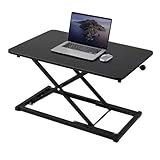
This listing is a compact single-surface riser with a 23.6-inch width, finished in black and described as height adjustable. Products in this class are essentially a platform on a scissor-style lift: you place a laptop, a keyboard and a mouse on the top and raise it with a handle or lever. The listing name is generic and nearly identical to two others in this guide, so the practical differences, such as the mechanism, load rating and finish quality, are best confirmed on the product page.
Who it suits: laptop users with small or narrow desks, apartment renters, dorm residents and anyone who needs a standing option that stores under a bed or in a closet. It is not meant for a large monitor or a heavy workstation.
Key specs from the listing
- 23.6-inch wide platform, black finish
- Adjustable height from a low seated position to a standing position
- Compact enough for a small desk
- Load rating, exact height range and desktop depth are not stated in the listing name
Strengths
The footprint is its main advantage. A 23.6-inch riser leaves room for a second item on the desk and moves easily between rooms. For a single laptop, a keyboard and a mouse it provides a clean sit-stand switch without tools. The simple lift is less likely to confuse a household with several users.
Pros and Cons
Pros
- Small footprint and light enough to move
- Good fit for laptop-only work
- Easy to store when not in use
- Simple raise and lower action
Cons
- Single surface means the keyboard and screen sit at the same height, which is not ideal for ergonomics
- Limited load capacity compared with the VIVO two-tier models
- Generic listing makes it harder to verify specs
- Not suited for a large monitor
Setup scenario: Picture a narrow desk that is 40 inches wide with a lamp and a notebook already taking up space. A 23.6-inch platform leaves room for both, and you can slide the riser aside when you want the desk surface free for writing. Because the weight rating is unstated in the listing name, keep the load to a single laptop and peripherals until you have confirmed the capacity.
Versus the nearest alternative: The other 23.6-inch listings in this guide are almost identical on paper. Choose between them on the details you can verify: the stated load rating, return policy and seller. If you want a rated capacity and a known manufacturer, the VIVO 29 inch single-top is the more documented option.
Ergonomic note: On a single-surface riser, raise the laptop on a small stand and use an external keyboard so the screen sits closer to eye level while your hands stay at a comfortable height. This one extra accessory turns a basic riser into a better setup.
3. 23.6″ Keyboard Riser Converter (Version B) – Best for Dorm and Rental Desks

The second 23.6-inch listing carries a slightly different title but the same size, color and general concept: an adjustable height riser for a keyboard and laptop. Its closeness to the first listing means one thing for shoppers: the decision should rest on seller reliability, return terms and the stated weight capacity, not on the headline specs.
Who it suits: students, renters and travelers who need a small, tool-free setup that does not damage furniture. Because it is compact, it can sit on a kitchen table or a console and be moved away at the end of the day.
Key specs from the listing
- 23.6-inch wide platform in black
- Adjustable height design for sitting and standing
- Keyboard riser concept; best for a laptop, keyboard and mouse
- Confirm capacity, lift mechanism and desk depth requirements on the product page
Strengths
Portability is the main strength. A unit of this size typically weighs far less than a 32-inch two-tier model, so you can carry it with one hand. A smaller surface also forces a tidy desk, which many people find beneficial. If you only need standing time for calls and quick tasks, a basic riser may be all you need.
Pros and Cons
Pros
- Easy to carry and store
- Low desk footprint
- Good for temporary or shared spaces
- Suits a laptop-first workflow
Cons
- Small surface leaves little space for papers or a second device
- Not appropriate for heavy monitors
- Specifications are thin in the listing name
- Single-tier posture compromise for long sessions
Setup scenario: In a shared room, a riser like this can live in a closet and come out for a few hours a day. Put a rubber mat or a non-slip pad under it on glossy surfaces, check that all four feet touch the desk, and raise it slowly with both hands the first few times to learn how the lock behaves. Ask yourself whether a person of different height will use it, and set the lift range accordingly.
Versus the nearest alternative: It is nearly interchangeable with version A and version C. Compare the product pages and pick the one that lists a capacity, a clear description of the lift and a good return policy. Against the VIVO 28 inch two-tier, it is far more portable but less ergonomic.
Practical tip: Before ordering, measure the depth of your desk and the space behind it. Even small risers need a few inches at the rear so the platform can extend as it rises, and a cable pulled taut as the platform moves can damage a port.
4. VIVO 28 in DESK-V028S – Best for a Compact Two-Tier Setup

The V028S shrinks the two-tier concept into a 28-inch format. VIVO and retailers list a 27.6-inch by 15.8-inch top, a keyboard tray about 20.3 inches wide, a base around 24 by 16 inches and a pneumatic spring lift. The adjustment range is listed at about 4.9 to 17.2 inches, and the desktop is rated at about 28.6 pounds with a roughly 5-pound tray rating. Figures differ slightly between retailers, so treat them as close approximations and confirm them on the page.
Who it suits: people who want a keyboard tray but do not have room for a 32-inch unit, such as users with a compact home office, a corner desk or an apartment with a small work nook.
Key specs
| Spec | Approximate value |
|---|---|
| Top surface | 27.6 x 15.8 inches |
| Keyboard tray | 20.3 x 11.8 inches |
| Lift range | 4.9 to 17.2 inches |
| Desktop rating | About 28.6 pounds |
| Tray rating | About 5 pounds |
| Lift | Pneumatic spring with simple locking |
Strengths
This model keeps the two-tier posture benefits of the K Series while fitting on narrower desks. A 20-inch tray is enough for a standard keyboard and mouse, though not for a full-size keyboard with a number pad plus a large mouse pad. The surface can carry a laptop and a 24-inch monitor if the combined weight stays within the rating.
Pros and Cons
Pros
- Two-tier ergonomics in a smaller footprint
- Manual spring lift with no electricity
- Well-documented dimensions
- Reasonable capacity for a laptop and a modest monitor
Cons
- Narrower tray limits keyboard choices
- Lower lift maximum may not suit very tall users
- Capacity is lower than the 32-inch and larger models
- Needs assembly according to the listing
Setup scenario: On a 48-inch-wide desk, a 28-inch two-tier unit leaves about 20 inches for a lamp, a mug and a notebook. Put a 24-inch monitor on the upper tier, keep the laptop closed or on a stand beside it, and rest the keyboard on the tray. The reduced width keeps your mouse arm close to your body, which many people find more comfortable than reaching across a wide tray.
Versus the nearest alternative: The V000K offers a wider tray and a higher lift range at a modest increase in footprint. The 29-inch single-top V000U is simpler and lighter but lacks a separate keyboard tray. Choose the V028S if you want a tray and your desk is under about 30 inches wide.
5. VIVO 29 in Single Top DESK-V000U – Best for Light Single-Monitor Use

The V000U is a single-surface riser with a roughly 29.3 by 17.8 inch top, a steel frame, non-skid rubber padding and a pre-assembled build. Listings give a lift range of around 1.8 to 16.5 inches and a total capacity of about 22 pounds. Because the surface is a single level, you set the keyboard and monitor on the same platform, which is simple and affordable but a compromise for ergonomics.
Who it suits: people who work on a laptop with an external keyboard, or with a single lightweight monitor, and who want a straightforward solution that arrives ready to use. The low minimum height means the platform sits only a couple of inches above the desk in the seated position, so it does not feel like a bulky object.
Key specs
- Top surface about 29.3 x 17.8 inches
- Single-tier design, manual lift
- Adjustment range about 1.8 to 16.5 inches, depending on the retailer
- Total rating about 22 pounds, which includes everything on the platform
- Alloy steel and engineered wood, pre-assembled
Strengths
Pre-assembly is a real advantage, and so is the deeper 17.8-inch top compared with the 15.7-inch surfaces of the K Series. The extra depth makes room for a laptop and a separate keyboard. The low closed height keeps the monitor from towering over the desk when you sit.
Pros and Cons
Pros
- Arrives assembled
- Deeper top for laptop and keyboard layouts
- Low seated profile
- Simple, durable design
Cons
- 22-pound total rating is the lowest of the VIVO models here
- No separate keyboard tray, so posture is less ideal for heavy typing
- A large monitor can quickly exceed the rating
- Retailers quote slightly different heights
Setup scenario: Suppose you have a 14-inch laptop on a stand, a wireless keyboard and a mouse. The total weight is under 6 pounds, far inside the 22-pound rating, so the platform leaves plenty of margin. For a second monitor on the same platform, add the weights first. Because the surface is a single level, consider an external keyboard so you can raise the laptop screen without raising your hands too high.
Versus the nearest alternative: The V028S gives you a tray and a higher capacity in a similar width. The compact 23.6-inch risers are lighter and more portable but less documented. Pick the V000U when you want a known brand, a simple structure and a laptop-first routine.
Weight check: A typical 24-inch monitor is roughly 8 to 12 pounds and a 14-inch laptop is roughly 3 to 4 pounds, so 22 pounds covers a monitor, a laptop and a few accessories. A 27-inch monitor with a heavy stand can use most of the allowance on its own.
6. VIVO 42 in DESK-V042KB – Best for Dual Monitors and Wide Layouts

The V042KB scales the K Series to 42 inches. The top is listed at 42 by 15.7 inches, the keyboard tray at about 42 by 11.8 inches with a center cutout, and the lift range at 4.5 to 20 inches. It uses a manual pneumatic lift that you adjust by squeezing a handle, a steel base with a laminated engineered-wood top, and a three-year limited warranty according to retailer listings. The desktop rating is 33 pounds and the tray is rated at about 4.4 pounds.
Who it suits: users with two monitors, an ultrawide, or a laptop plus a large monitor who need a wide surface to place everything within reach. It is also a good match for a standing workstation that includes a notebook, a tablet or a small speaker next to the screens.
Key specs
- Top about 42 x 15.7 inches, tray about 42 x 11.8 inches
- 33-pound desktop rating, about 4.4 pounds on the tray
- Lift range about 4.5 to 20 inches
- Manual pneumatic lift with removable keyboard tray
Strengths
The width is the point. Two 24-inch monitors need about 42 inches side by side, and the V042KB provides that without hanging over the edge. The wide tray lets you place a full-size keyboard, a mouse and a wrist rest with room to spare.
Pros and Cons
Pros
- Fits two monitors or an ultrawide
- Wide keyboard tray with space for accessories
- High lift range for tall users
- Same trusted K Series mechanism as the 32-inch model
Cons
- Large and heavy, so it is a permanent fixture
- 33 pounds spread across 42 inches is limiting for two heavy monitors
- Needs a wide and strong desk
- Top depth of about 15.7 inches can feel shallow for large monitors
Setup scenario: With two 24-inch monitors weighing roughly 9 pounds each, you load about 18 pounds on the top, leaving room for a laptop or a speaker. Measure the width of your monitor bases and the center-to-center spacing before you buy, because 42 inches of surface only helps if the monitors sit comfortably side by side. Check your desk can carry the combined weight of the unit and its load.
Versus the nearest alternative: The 36-inch V000V offers a deeper top but less width. The 32-inch V000K is more compact and often enough for a laptop plus one monitor. If you plan to use monitor arms with clamps, consider the weight rating carefully and read the manufacturer’s mounting notes.
7. VIVO 32 in Standing Desk Riser (DESK-V000S) – Best for a Straightforward 32-Inch Riser

This VIVO riser is a 32-inch class height adjustable workstation with minimal assembly and an alloy steel frame. It belongs to the same family of simple sit-stand platforms as the V000K, though retailer data for this specific model is less consistent. A similar dark walnut variant has been listed at roughly 15.75 by 31.9 inches with a weight in the mid-20-pound range, which suggests a similar footprint to the other 32-inch VIVO models. Confirm the lift range, desktop rating and whether a keyboard tray is included on the product page.
Who it suits: shoppers who like the 32-inch size and want a VIVO product but do not need every feature of the K Series. It is a useful middle ground for a laptop with an external monitor or a large single display.
Key specs from the listing
- 32-inch class width, black finish
- Alloy steel construction
- Minimal assembly
- Details such as the exact rating and range should be confirmed on the product page
Strengths
The 32-inch width provides ample space for a monitor on one side and a laptop on the other. Being from a brand that publishes manuals, warranties and replacement parts for its range is a practical advantage over anonymous listings. A pre-built or near-ready structure reduces the risk of assembly errors.
Pros and Cons
Pros
- 32-inch workspace in a recognizable brand
- Minimal assembly
- Alloy steel frame
- Good size for a laptop and a monitor
Cons
- Less published detail than the K Series
- May not include the same keyboard tray configuration
- Heavier than a compact riser
- Confirm capacity and lift range before purchase
Setup scenario: If you are comparing this model with the K Series, write down the figures that matter to you: top depth, whether a tray is included, the maximum height and the rating. Then compare them line by line on the product pages. That simple step settles most questions and avoids a return, especially when retailers show slightly different numbers for similar VIVO models.
Versus the nearest alternative: The V000K is the better documented 32-inch option and the one to choose if a dedicated keyboard tray matters. The JYLH JOYSEEKER 32-inch model is a competing design with a keyboard tray, and the V000S is the logical pick if you prefer the VIVO name and a simpler layout.
8. 23.6″ Keyboard Riser Converter (Version C) – Best for Light Tasks Like Email and Reading

The third 23.6-inch riser is described as a height adjustable standing desk converter in black, suitable for a keyboard and a laptop. As with the other two, the listing name is generic and similar to its siblings. The best way to treat these three is as a single product class and pick the version with the clearest documentation, the most reassuring return policy and a stated load rating.
Who it suits: anyone who spends only part of the day standing and wants to keep the footprint minimal. It is a convenient option for answering email, reading documents, joining calls or doing a short stint of laptop work on a kitchen counter.
Key specs from the listing
- 23.6-inch wide platform, black
- Adjustable height for standing and sitting
- Designed for a keyboard riser role
- Rating and range to be confirmed on the product page
Strengths
Short sessions are where a compact riser makes the most sense. Standing for 20 to 30 minutes at a time between seated blocks is a common routine, and a lightweight riser makes switching easy. A narrow unit is also less intimidating to a first-time user than a large two-tier workstation.
Pros and Cons
Pros
- Minimal footprint
- Lightweight and portable
- Good for intermittent standing
- Low barrier to trying a sit-stand routine
Cons
- Cramped for two devices plus accessories
- Posture is limited by a single surface
- Thin specifications in the listing
- Not intended for heavy loads
Setup scenario: Consider a kitchen counter where you stand for short work bursts. A riser that sets up in under a minute is likelier to get used than a large unit that takes space all day. Use a stool nearby so you can switch back and forth, wipe the platform clean after each session, and store the unit upright against a wall when it is not in use.
Versus the nearest alternative: The A and B listings are the closest matches. If you prefer a larger surface, the VIVO 29 inch single-top has about six more inches of width and a documented rating. If you need a separate keyboard tray, step up to the V028S.
Standing routine: Many ergonomics guides suggest alternating between sitting and standing rather than standing all day. A person with a medical condition, pregnancy or joint concerns should ask a clinician for personal guidance before changing their routine.
9. VIVO 36 in DESK-V000V – Best for a Deep Surface with Laptop Plus Monitor

The V000V is a two-tier converter with a deeper top than the K Series. Retail data lists a 36-inch by 22-inch top, a lower keyboard deck about 25 inches wide, dual pneumatic springs for lift assistance and a 33-pound capacity. The top sits about 6.5 inches above the desk when lowered and rises to about 17 inches. A newer V2 variant exists with somewhat different dimensions, so confirm which version the listing shows.
Who it suits: users who like a deeper platform so a monitor can sit farther back, giving a comfortable viewing distance, with room in front for a laptop. It also suits people who prefer a squarer workspace to a long, shallow one.
Key specs
- Top about 36 x 22 inches
- Lower keyboard deck about 25 x 10.5 inches
- Dual pneumatic springs with a simple height-lock
- Capacity about 33 pounds; lift range roughly 6.5 to 17 inches
- Requires a deep desk because the base is large
Strengths
A 22-inch deep top is rare in this class and it matters: a monitor placed 20 or more inches from your eyes is easier on the eyes than one set a foot away, and a laptop can sit in front of it on the same level. Dual springs help stabilize the lift for a heavier load.
Pros and Cons
Pros
- Deep top for flexible monitor distance
- Dual-spring lift assistance
- Roomy 36-inch width
- Keyboard deck rises with the top
Cons
- Large base needs a deep desk and a strong surface
- Higher minimum height than the lower-profile models
- Heavy to move, with listings quoting about 39 to 43 pounds
- Keyboard deck is shorter than on the K Series
Setup scenario: With a 27-inch monitor of about 12 pounds, a laptop of about 4 pounds and a few accessories, the load sits near 17 pounds, comfortably under 33. Place the monitor toward the back of the 22-inch top so your eyes sit roughly an arm’s length from the screen, and keep the laptop in front. Measure your desk depth first, since the base is larger than the shallow models.
Versus the nearest alternative: The V000K is shallower but more compact and offers a taller lift range. The V042KB gives you more width. Choose the V000V when depth is your priority and the desk can handle the footprint.
10. JYLH JOYSEEKER 32″ Standing Desk Converter – Best for a Quick Sit-to-Stand with Keyboard Tray

The JYLH JOYSEEKER 32-inch converter is a rival to the VIVO K Series, with a keyboard tray, an X-lift (scissor-style) frame and a pneumatic spring. Retailer data suggests a 32-inch by about 15.7-inch desktop, a height range of roughly 4.9 to 19.3 inches and a 33-pound rating on the desktop with about 4.4 pounds on the tray. Another listing in the same brand’s comparison chart quotes a lower 28.6-pound figure, so confirm the rating on the page for your color and version.
Who it suits: shoppers who want a keyboard-tray model similar to the K Series from a different brand, and who value quick adjustment. It is meant for a laptop and a monitor or a single large display.
Key specs
- 32-inch width, keyboard tray included
- Scissor-style X-lift with pneumatic spring
- Height range about 4.9 to 19.3 inches
- Rating about 33 pounds on the desktop, with differing figures in some listings
Strengths
It matches the K Series layout, which makes the choice a question of brand preference, availability and support. The metal base and powder-coated finish are typical for the class. The keyboard tray is large enough for a laptop or a keyboard and mouse.
Pros and Cons
Pros
- Two-tier layout with a keyboard tray
- Wide lift range for varied heights
- Competitive alternative to the VIVO K Series
- Portable enough to reposition occasionally
Cons
- Listings quote different weight ratings
- Less documentation than the VIVO range
- Same 15.7-inch top depth as the K Series
- Tray capacity is modest
Setup scenario: On a desk 30 inches deep, a 32-inch scissor-lift converter with a laptop stand on top and a keyboard on the tray gives a familiar sit-stand layout. Before adding a second monitor, check the rating listed for your version and compare it with the combined weight. If the listing and the box disagree, rely on the lower figure and contact the seller before loading it.
Versus the nearest alternative: The VIVO V000K is the closest competitor and is the more thoroughly documented choice. Pick the JYLH if its listing, warranty terms and availability suit you better, but verify the capacity before loading it with two monitors.
How to Choose an Adjustable Height Desk Converter
A desk converter is simple furniture, but a poor fit leads to a unit you stop using. Work through the checks below in order, and use the worked example to put numbers on your own desk.
Worked example: will it reach the right height?
Standing elbow height is roughly 62 to 64 percent of body height for most adults. Take a person who is 5 feet 10 inches tall, or 70 inches. Their elbows sit at about 44 inches when standing. A keyboard should sit at or slightly below elbow height, so the target keyboard surface is about 43 inches off the floor. If the desk is 29 inches high, the keyboard tray or platform needs to be raised about 14 inches above the desk.
Now compare that with the lift ranges quoted for these models. A platform that rises from 2 to 16 inches, like the compact risers and the V000U, can reach 14 inches. A two-tier unit is trickier, because the keyboard tray sits lower than the top surface. Check whether the listed range describes the top surface or the keyboard tray. For a person 6 feet 3 inches tall, or 75 inches, the standing elbow height is about 47 inches, so on a 29-inch desk the keyboard needs about 17 inches of lift, which is beyond the maximum of several compact models and leaves little margin on units that top out around 17 inches. In that case the 20-inch range quoted for the K Series models or the 19-inch range on the JYLH is more suitable. If you sit at a higher desk, subtract the extra desk height from the requirement.
The monitor matters as well. When standing, the top of the screen should be roughly at eye level. Eye height is about 93 percent of body height, so about 65 inches for a 70-inch person. A 24-inch monitor has a screen about 12 inches tall. On a two-tier unit, the monitor stands on the top surface, which sits above the tray, and this is why two-tier models put the screen at a better height than a single platform in most cases.
Check the weight budget
Add up the weight of everything that will sit on the platform. A 24-inch monitor is typically 8 to 12 pounds, a 27-inch monitor 10 to 16 pounds, a 14-inch laptop 3 to 4 pounds and a speaker or lamp 1 to 3 pounds. For two 24-inch monitors at 9 pounds each, plus a laptop at 4 pounds, you load 22 pounds, which exceeds the 22-pound rating of the V000U but sits comfortably within the 33-pound rating of the K Series. The keyboard tray rating is separate and small, around 4 to 5 pounds, so heavy items belong on the main surface. Always stay under the lowest figure quoted for your model, because retailers sometimes list different numbers for similar units.
Match the width and depth to your desk
Measure your desk width and depth, and also the space behind the unit. The K Series models need a desk that is at least about 16 inches deep, and the 36-inch V000V has a base large enough to demand a deep desk. A good rule is to leave at least 2 inches of desk visible on either side so the unit does not overhang. If your desk has a hutch, drawer or monitor arm clamp, check clearance for the full lift range. Also verify the desk itself can carry the added weight: a unit of 25 to 40 pounds plus its load is a significant addition for a light particleboard desk.
Single-tier or two-tier
A single-tier riser puts the screen and the keyboard on the same level. This works for a laptop used with an external keyboard and a laptop stand, or for short standing sessions. A two-tier design separates the screen from the keyboard, which is the better arrangement for long days. Two-tier models are heavier and larger, so match the design to the time you will spend at the desk.
Lift mechanism and safety
The models here use manual lift systems: pneumatic gas springs and scissor-style frames. A gas spring is a sealed, pressurized cylinder that assists lifting. Do not disassemble it, drill it or expose it to high heat. Keep fingers and cables clear of the scissor joints, because they can pinch when the unit lowers. Never exceed the weight rating, and do not sit or lean on the platform. Lower the unit before moving it, and lift with a partner if it weighs more than 30 pounds. Keep children and pets away while adjusting it.
Decision matrix
| Your situation | Pick | Why |
|---|---|---|
| Laptop plus one monitor, average height | VIVO 32″ DESK-V000K | Two tiers, 33 lb rating, 20″ lift range |
| Two monitors or an ultrawide | VIVO 42″ DESK-V042KB | 42″ surface and tray |
| Deep desk, monitor placed far back | VIVO 36″ DESK-V000V | 22″ deep top and dual springs |
| Narrow desk, want a keyboard tray | VIVO 28″ DESK-V028S | Compact two-tier layout |
| Laptop only, simple and assembled | VIVO 29″ DESK-V000U | Pre-assembled single top |
| Dorm, rental or very small desk | 23.6″ Keyboard Riser (any version) | Small footprint and easy storage |
| Want a K Series alternative | JYLH JOYSEEKER 32″ | Keyboard tray and 32″ width |
| Prefer a plain 32″ riser from VIVO | VIVO 32″ DESK-V000S | 32″ class with minimal assembly |
Types of Desk Converters Explained
Understanding the three mechanical styles helps you read listings. Z-lift frames fold like a zigzag and can move forward and up, taking more depth. Scissor or X-lift frames lift straight up and down, saving rear space, which is why the compact risers and the JYLH use them. Pneumatic spring assist, used by the VIVO K Series, V series and others, offsets the weight of the platform so you can raise and lower it with a light squeeze. Electric converters exist too, with motors and a power cord, but the listings here are described as manual or spring-assisted, so they need no outlet. Manual models do rely on you to adjust them, so choose a lock that you find easy to operate.
Finishes and materials matter in daily use. A steel frame with an engineered-wood top is common and sturdy, while a laminated surface resists scratches and spills. Particleboard tops are lighter and cost-effective but can chip at edges. Rubber feet protect the desk and reduce sliding. Metal parts should be free of burrs and sharp edges after assembly, and the keyboard tray should have a smooth edge for wrist comfort.
Setting Up for Better Posture
- Set the monitor first. Raise the converter until the top of the screen is near eye level, and keep the screen about an arm’s length away.
- Align the keyboard. With your upper arms relaxed at your sides, your forearms should be roughly parallel to the floor. Adjust the tray or platform until your wrists are in a neutral position.
- Stand on a mat. An anti-fatigue mat or supportive shoes can make standing more comfortable.
- Use a wrist rest sparingly. Rest your palms during pauses, not while typing.
- Switch positions. A commonly suggested rhythm is to alternate sitting and standing through the day, such as 30 minutes standing for every hour. Adjust to what feels comfortable, and ask a clinician for personal advice if you have a medical condition.
- Manage cables. Leave slack for the full lift, and use a cable sleeve or clips behind the unit.
Common Mistakes to Avoid
- Ignoring the desk depth. A unit that sits partly off the back edge can tip or put stress on the desk.
- Overloading the platform. Two heavy monitors can exceed the rating of smaller models.
- Buying by width alone. A wide unit with a shallow top may not leave enough distance between your eyes and the screen.
- Forgetting the lift range for tall users. Tall users should confirm that the maximum height reaches elbow level.
- Using a laptop at screen height with the built-in keyboard. This forces your hands too high. Use an external keyboard or a two-tier design.
- Skipping the lock check. After setup, press down gently on the platform to confirm it holds at several heights.
Care and Maintenance
Wipe the surface with a soft damp cloth and a mild cleaner, and avoid soaking the particleboard edges. Check the screws and fasteners every few months, because repeated lifting can loosen them. Do not lubricate the gas springs unless the manual instructs you to. If the unit starts to sink on its own, lower it fully, remove the load and contact the manufacturer or seller, since a worn spring may need replacement under warranty. Never repair a pressurized cylinder yourself.
Frequently Asked Questions
Is a standing desk converter better than a full standing desk?
A converter costs less space and effort because it sits on your existing desk and needs no wiring. A full standing desk gives more surface and a cleaner look, but converters are easier to move and to try before committing to new furniture.
Will a converter fit a laptop and two monitors?
It can, if the combined weight stays within the rating and the surface is wide enough. The 42-inch VIVO model is built for this, while 28-inch and 29-inch units are better for a laptop plus one monitor.
Do I need a keyboard tray?
For long days, a tray makes it easier to keep your keyboard lower than the monitor, which supports a more natural posture. For short standing sessions with a laptop, a single surface may be enough.
How much weight can these models hold?
The VIVO K Series and V series list about 33 pounds on the desktop, the V028S about 28.6 pounds and the V000U about 22 pounds. The keyboard trays are rated for a few pounds. Always confirm the rating on the specific product page.
Are manual converters hard to adjust?
Spring-assisted models are designed to move with a squeeze of a handle or a light push. When the load is close to the rating, the movement can feel stiffer, so keep the weight within the limit.
Can a converter damage my desk?
It can mark soft surfaces or add stress to a thin desktop. Use the rubber feet, avoid dragging the unit and confirm that your desk is rated to carry the weight of the converter and its load.
How tall do I need to be for a particular model?
Use the worked example above: multiply your height by about 0.63 to find elbow height, subtract your desk height and compare the result to the lift range. Taller users should favor models with a lift of 19 to 20 inches.
How often should I stand?
There is no single rule, and comfort varies. Many guides suggest alternating positions and taking short movement breaks. If you have health concerns, ask a clinician for guidance.
Our Recommendation by Situation
For most home offices, choose the VIVO 32 inch DESK-V000K. For two monitors, the VIVO 42 inch DESK-V042KB is the clear fit, and for a deep desk with a laptop and a monitor, the VIVO 36 inch DESK-V000V is the most comfortable. If space is limited, the VIVO 28 inch DESK-V028S adds a tray in a smaller footprint, while the VIVO 29 inch DESK-V000U is the simplest laptop-first option. For dorms, rentals and short standing sessions, the 23.6 inch keyboard risers are light and easy to store. The JYLH JOYSEEKER 32 inch is a worthwhile alternative to the K Series if its listing details suit you. Confirm weight ratings and lift ranges on the product page before you order.
Ready to decide? Our #1 pick for 2026 is the VIVO 32" DESK-V000K.
Live price & availability on Amazon.