Last Updated: October 21, 2026
Which Acer should you buy? That depends on one question: how many pixels do you need at your seating distance? For a mixed desk, the Nitro KG271U (27-inch QHD at 180Hz) is the all-rounder in this lineup. For email, documents and video calls, the 23.8-inch KB242Y or the 21.5-inch KB220Q cost less and do the job. For fast shooters on a small budget, the 24.5-inch Nitro KG251Q reaches 200Hz. Two listings are weaker picks: the SB242Y mentions no adaptive sync, and the 31.5-inch SH322Q stretches 1080p across a very large panel. Below is the full set, with the maths for each size.
📄 In This Review
Acer monitors by the numbers

Acer 27in FHD 1920x1080 IPS 120Hz Gaming Monitor | Office KB272 G0bi | 1ms, AdaptiveSync, sRGB 99%, HDMI, VGA, VESA Mountable, Bluelight Filter
Included for 'Best Acer Monitor: Eight Office and Nitro Screens Sorted by Size, Speed and Pixel Density' as a representative home product in this roundup; selection reflects the product set returned for this topic.
View on Amazon
Acer 23.8in FHD 1920x1080 IPS 120Hz Office Monitor KB242Y G0bi | 1ms, AdaptiveSync (FreeSync Compatible), sRGB 99%, HDMI, VGA, VESA Mountable, Bluelight Filter, Flickerless Technology
Included for 'Best Acer Monitor: Eight Office and Nitro Screens Sorted by Size, Speed and Pixel Density' as a representative home product in this roundup; selection reflects the product set returned for this topic.
View on Amazon
Acer 21.5in FHD 1920x1080 100Hz Office Monitor KB220Q H2bi | 1ms, AdaptiveSync (FreeSync Compatible), sRGB 99%, HDMI, VGA, VESA Mountable, Bluelight Filter, Flickerless Technology
Included for 'Best Acer Monitor: Eight Office and Nitro Screens Sorted by Size, Speed and Pixel Density' as a representative home product in this roundup; selection reflects the product set returned for this topic.
View on Amazon
Acer 23.8in FHD 1920x1080 100Hz Office Monitor SB242Y H1bi | 4ms, HDMI, VGA, VESA Mountable, Bluelight Filter, Flickerless Technology
Included for 'Best Acer Monitor: Eight Office and Nitro Screens Sorted by Size, Speed and Pixel Density' as a representative home product in this roundup; selection reflects the product set returned for this topic.
View on Amazon
Acer 27in FHD 1920x1080 IPS 144Hz Gaming Office Monitor KB272 P6bi | 1ms, AMD FreeSync, sRGB 99%, HDMI, VGA, VESA Mountable, Bluelight Filter, Flickerless Technology
Included for 'Best Acer Monitor: Eight Office and Nitro Screens Sorted by Size, Speed and Pixel Density' as a representative home product in this roundup; selection reflects the product set returned for this topic.
View on Amazon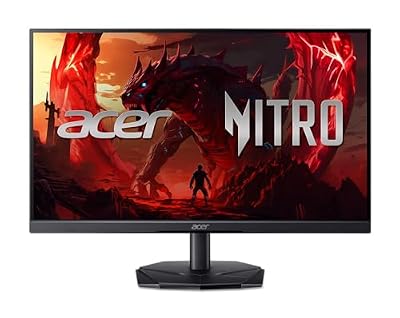
Acer Nitro 24.5in FHD 1920x1080 200Hz Gaming Monitor KG251Q X3biip | 0.5ms, AMD FreeSync Premium, sRGB 99%, 2xHDMI, DisplayPort, VESA Mountable, Bluelight Filter, Flickerless Technology
Included for 'Best Acer Monitor: Eight Office and Nitro Screens Sorted by Size, Speed and Pixel Density' as a representative home product in this roundup; selection reflects the product set returned for this topic.
View on Amazon
Acer Nitro 27in QHD 2560x1440 IPS 180Hz Gaming Monitor KG271U N3bmiipx | 0.5ms, AMD FreeSync, DCI-P3 95%, 2xHDMI, DisplayPort, Speaker, VESA Mountable, Bluelight Filter, Flickerless Technology
Included for 'Best Acer Monitor: Eight Office and Nitro Screens Sorted by Size, Speed and Pixel Density' as a representative home product in this roundup; selection reflects the product set returned for this topic.
View on Amazon
Acer SH322Q Hbih 31.5" Full HD (1920 x 1080) Ultra-Thin Gaming Office Monitor | Adaptive-Sync Support (FreeSync Compatible) | Up to 100Hz Refresh | 1ms (VRB) | Adjustable Stand | HDMI & VGA Ports
Included for 'Best Acer Monitor: Eight Office and Nitro Screens Sorted by Size, Speed and Pixel Density' as a representative home product in this roundup; selection reflects the product set returned for this topic.
View on Amazon| Model | Key point from title | Price tier | Best for |
|---|---|---|---|
| Acer KB220Q H2bi | 21.5in FHD, 100Hz, 1ms, AdaptiveSync | Budget | Second screen for light tasks |
| Acer SB242Y H1bi | 23.8in FHD, 100Hz, 4ms, no adaptive sync listed | Budget | Basic office use only |
| Acer KB242Y G0bi | 23.8in FHD IPS, 120Hz, 1ms, AdaptiveSync | Budget | Everyday work and streaming |
| Acer Nitro KG251Q X3biip | 24.5in FHD, 200Hz, 0.5ms, FreeSync Premium, 2xHDMI plus DisplayPort | Budget | Fast shooters on a small budget |
| Acer KB272 G0bi | 27in FHD IPS, 120Hz, 1ms, AdaptiveSync | Mid-range | Large, simple office screen |
| Acer KB272 P6bi | 27in FHD IPS, 144Hz, 1ms, AMD FreeSync | Mid-range | Casual gaming and office mix |
| Acer SH322Q Hbih | 31.5in FHD, up to 100Hz, 1ms (VRB), HDMI and VGA | Mid-range | Far-away viewing, shared screens |
| Acer Nitro KG271U N3bmiipx | 27in QHD IPS, 180Hz, 0.5ms, DCI-P3 95%, speaker | Premium | Gaming and detailed work together |
Everyday office screens
See also: Best OLED Monitors: Eight 1440p and Ultrawide Listings Compared by Panel Type, Ports and Burn-In Features • Monitor Vertical Lines: Causes, Fixes and When to Replace
Acer KB220Q H2bi
The smallest panel here is a 21.5-inch FHD screen at 100Hz, with 1ms, AdaptiveSync (FreeSync compatible), sRGB 99%, HDMI, VGA, VESA mounting, a bluelight filter and flicker-free wording. The title does not name the panel type, so IPS should not be assumed. At 21.5 inches, 1080p gives the highest pixel density of the FHD sizes, about 102 PPI, which makes small text easier to read than on a bigger 1080p screen. A 100Hz ceiling is a visible step up from 60Hz for scrolling, though not a gaming spec.
Pros
- Densest pixels of any 1080p size in this set
- Adaptive sync and flicker-free wording at the entry tier
Cons
- Panel type not named in the title
- Small for dual-window work
Who it’s for: anyone adding a compact second screen for chat, mail or reference pages.
Acer SB242Y H1bi
This is the weakest spec sheet in the group. The title gives 23.8-inch FHD, 100Hz, 4ms, HDMI and VGA, a bluelight filter and flicker-free wording, and it does not mention IPS, sRGB coverage or adaptive sync. It sits slightly below the KB242Y in this set, which does name IPS, 120Hz and AdaptiveSync, so the saving buys fewer features rather than a different class of screen. A 4ms figure is also the slowest response claim listed. Fine for spreadsheets, but little else.
Pros
- Low entry price for a 23.8-inch screen
- HDMI plus VESA mounting
Cons
- No IPS, sRGB or adaptive-sync wording in the title
- Slowest response claim in the set
Who it’s for: strictly text-and-spreadsheet desks with no gaming at all.
Acer KB242Y G0bi
The 23.8-inch KB242Y is the sensible office pick here. The title lists IPS, 120Hz, 1ms, AdaptiveSync (FreeSync compatible), sRGB 99%, HDMI, VGA, VESA mounting, a bluelight filter and flicker-free wording. Same 1920×1080 resolution as the SB242Y, but with the IPS and adaptive-sync claims the SB242Y leaves out. At about 93 PPI it is sharper than a 27-inch 1080p screen. Its VGA input is an analog legacy port, useful only for old equipment such as projectors or older desktops.
Pros
- IPS and 120Hz named at a very low price tier
- Compact enough for shallow desks
Cons
- 1080p limits workspace compared with QHD
- HDMI version not stated
Who it’s for: students and home offices that want IPS without paying for gaming extras.
Acer KB272 G0bi
Move up to 27 inches and the title keeps the same recipe: FHD IPS, 120Hz, 1ms, AdaptiveSync, sRGB 99%, HDMI, VGA and VESA mounting. The catch is pixel density. At 1920×1080 on 27 inches you get roughly 82 PPI, so small fonts can look coarser than on the 23.8-inch KB242Y. It is a near-duplicate of the KB272 P6bi below, which costs a little more and lists 144Hz. If you want size on a budget, pair it with generous text scaling. For a sharper 27-inch, compare it with the Nitro KG271U or our 27-inch QHD monitor roundup.
Pros
- Large IPS screen at a modest price tier
- Adaptive sync named in the title
Cons
- About 82 PPI is soft at close range
- Close sibling offers 144Hz for a small step up
Who it’s for: people who want a big display for video and browsing and sit a bit back.
Faster 27-inch and Nitro gaming screens
Acer KB272 P6bi
The P6bi is the KB272 with a higher ceiling: 27-inch FHD IPS, 144Hz, 1ms, AMD FreeSync, sRGB 99%, HDMI, VGA, VESA mounting and flicker-free wording. The “Gaming Office” label in the title is a clue to its role as a hybrid, not a competitive panel. The title says FreeSync where the G0bi says AdaptiveSync, which in practice both rely on the same adaptive-sync idea. Same density limits as the G0bi at about 82 PPI. Whether HDMI on this unit carries 144Hz depends on the version, which the title does not state.
Pros
- 144Hz and IPS on a large screen
- Same simple HDMI-based setup as the G0bi
Cons
- Near-duplicate of the G0bi apart from refresh rate
- No DisplayPort in the title
Who it’s for: casual players who want smoother motion without moving to QHD pricing.
Acer Nitro KG251Q X3biip
The Nitro KG251Q is the speed pick: 24.5-inch FHD, 200Hz, 0.5ms, AMD FreeSync Premium, sRGB 99%, two HDMI ports and DisplayPort, VESA mounting and a bluelight filter. At 24.5 inches 1080p reaches about 90 PPI, a common size for fast shooters. The title does not name the panel type, so check the listing for IPS or VA before assuming. 200Hz at 1080p needs about 10.5 Gbps by our estimate, which exceeds HDMI 1.4 but fits HDMI 2.0 and DisplayPort.
Pros
- 200Hz plus DisplayPort at a budget-tier price
- Two HDMI inputs for console or second PC
Cons
- Panel type not named
- No speakers listed
Who it’s for: frame-rate-focused players on a limited budget.
Acer Nitro KG271U N3bmiipx
The top of this group lists a 27-inch QHD IPS panel at 180Hz, 0.5ms, AMD FreeSync, DCI-P3 95%, two HDMI ports, DisplayPort, a speaker and VESA mounting. Moving from 1080p to 1440p lifts density to about 109 PPI, so text and fine detail look markedly crisper. The DCI-P3 figure is a seller claim about colour range. As calculated below, 180Hz at QHD needs about 17 Gbps, so use DisplayPort rather than HDMI 2.0. The built-in speaker is a convenience only.
Pros
- QHD IPS with 180Hz and a stated wide gamut
- DisplayPort plus two HDMI inputs
Cons
- Highest price tier here
- Needs a GPU that can approach 180 fps at 1440p to use the ceiling
Who it’s for: buyers who want one screen for gaming and detailed work.
The oversized outlier
Acer SH322Q Hbih
The title describes a 31.5-inch Full HD “ultra-thin gaming office monitor” with adaptive-sync support, up to 100Hz, 1ms (VRB), an adjustable stand, HDMI and VGA. The size is the problem. Stretching 1920×1080 across 31.5 inches yields roughly 70 PPI, the coarsest in the set, and our estimate is that pixels blur only past about 49 inches. VRB refers to a motion-clarity mode, so the 1ms figure is not plain grey-to-grey. Spend a little more and a 32-inch QHD screen will look noticeably sharper.
Pros
- Very large picture for shared or far-away viewing
- Adjustable stand named
Cons
- About 70 PPI is soft for desk use
- Priced above sharper 27-inch options
Who it’s for: living-room desks or presentations where viewers sit well back.
How we picked these
We selected eight Acer listings and compared their titles on size, resolution, refresh rate, ports and mounting. Judgments rest on published specifications, manufacturer documentation and buyer reviews. Price tiers are relative to these eight listings only. Nobody on the team used or measured these units. Where Acer’s wording is vague, such as a missing panel type or an unspecified HDMI version, we flag it rather than guess. Pixel-density and bandwidth numbers below are our own estimates from the stated resolution and refresh rate, with assumptions shown.
Choosing an Acer by size, speed and port
Pixel density by size
Pixels per inch falls as screen size grows at the same resolution. Assuming 20/20 vision resolves about one arcminute, the distance beyond which pixels blur together is roughly 3,438 divided by PPI, in inches.
| Size and resolution | PPI | Blur distance (est.) |
|---|---|---|
| 21.5in FHD | 102 | 34 in |
| 23.8in FHD | 93 | 37 in |
| 24.5in FHD | 90 | 38 in |
| 27in FHD | 82 | 42 in |
| 27in QHD | 109 | 32 in |
| 31.5in FHD | 70 | 49 in |
Refresh rate and the cable that delivers it
Assume 8-bit colour and timings that add about 6% to the pixel count. FHD at 144Hz needs about 7.6 Gbps, 200Hz about 10.5 Gbps, and QHD at 180Hz about 17 Gbps. HDMI 2.0 carries roughly 14.4 Gbps and DisplayPort 1.4 about 25.9. The titles never give an HDMI version, so check the listing and use the supplied cable. The ceiling also only helps if the graphics card can supply the frames: 1080p at 144 to 200 fps is a realistic target for many mid-range cards, while 1440p at 180 fps is a much heavier load. If you mostly browse and write, the gap between 100Hz and 120Hz is hard to notice.
Response-time and sync wording
“1ms”, “0.5ms”, “1ms (VRB)” and “4ms” are not like-for-like. “AdaptiveSync”, “FreeSync” and “FreeSync Premium” describe variable-refresh support; “Premium” implies tighter requirements, but none of these promise flicker-free behaviour at all frame rates.
Panel type, colour claims and comfort features
Only some titles name IPS; the rest leave the panel type unstated. IPS generally holds colour and contrast better off-axis, which matters on a 27-inch screen you sit close to. sRGB 99% and DCI-P3 95% are seller claims about gamut coverage. Bluelight filters and flicker-free modes are comfort features, not medical claims; long sessions are better managed with sensible distance, brightness matched to the room and regular breaks.
VGA, VESA and stands
VGA is analog and unnecessary for modern computers. For arm mounting, confirm the VESA pattern and weight rating; our dual monitor arm picks by screen weight show how to match them.
Mistakes buyers make with Acer monitors
- Choosing 27-inch 1080p for close seating. At about 82 PPI it suits viewing past 40 inches better than 24, and text scaling only partly hides the softness.
- Treating “1ms” as one standard. Titles mix 1ms, 0.5ms and 1ms (VRB); they are seller claims and rarely comparable across models.
- Pairing a 200Hz screen with an old HDMI cable. The monitor may fall back to 60 or 100Hz without warning. Check the monitor’s on-screen display to confirm the active mode.
- Skipping the adaptive-sync check. The SB242Y title names none, and tearing is likelier when frame rate and refresh rate drift apart.
- Paying for gaming labels on office panels. “Gaming Office” in a title does not make a 100Hz FHD screen a fast-gaming monitor, so read the numbers instead.
Verdict: the Acer to shortlist
The Nitro KG271U is the strongest all-round listing if its price fits, since it combines QHD, IPS, 180Hz and DisplayPort. For budget gaming, shortlist the Nitro KG251Q. For office use, the KB242Y gives IPS and 120Hz at a very low tier. Skip the SB242Y unless price is everything, and think twice about the 31.5-inch SH322Q at close range. Whatever you pick, confirm HDMI or DisplayPort versions and the VESA pattern on the listing before you order, because the titles leave those details out.
Frequently asked questions
Which Acer monitor in this list is the best all-rounder?
On the titles alone, the Nitro KG271U is the broadest fit: 27-inch QHD at 180Hz, IPS, 2xHDMI plus DisplayPort, and a stated 95% DCI-P3 gamut. It is also the most expensive of the eight. If your work is documents and video calls, the 23.8-inch KB242Y offers IPS and 120Hz at far less outlay.
Is 1080p on a 27-inch Acer sharp enough?
It is usable, but not crisp. A 27-inch 1920×1080 panel works out to about 82 pixels per inch, versus about 109 for 27-inch QHD. Our estimate is that individual pixels blur together only beyond roughly 42 inches, so at a typical 24 to 30 inch desk distance, small text can look slightly coarse.
Do I need DisplayPort for the 180Hz and 200Hz Nitro monitors?
For the 180Hz QHD model, probably yes. Our estimate is about 17 Gbps for 2560×1440 at 180Hz in 8-bit colour, above the roughly 14.4 Gbps HDMI 2.0 can carry, while DisplayPort 1.4 manages about 25.9. The 200Hz FHD model needs roughly 10.5 Gbps, which fits HDMI 2.0 but not HDMI 1.4.
Does the 1ms figure on these Acer listings mean the same thing on every model?
Not necessarily. Some titles say 1ms, one says 0.5ms, and the SH322Q says 1ms (VRB), which refers to a motion-clarity mode rather than plain grey-to-grey response. Treat all of them as seller claims, compare them only loosely, and check the listing for the measurement basis. Motion clarity also depends on overdrive settings that the titles do not describe.
Can these Acer monitors go on a monitor arm?
Most titles say VESA mountable, but the SH322Q title does not mention it, and none of the titles give the pattern or weight limit. Confirm the VESA pattern and the arm’s rated weight in the specification before buying, and remember that an arm clamps to the desk, so check desk thickness too.
Related Reviews & Guides

Best Transfer Pivot Discs for Smooth Handling
Best Power Banks for Steam Deck