

Last Updated: September 27, 2026
BenQ created the monitor light bar category in 2017 with the original ScreenBar, and it remains the reference point that dozens of cheaper copies are compared against. The idea is simple: a slim LED bar that clips onto the top of your monitor and lights the desk in front of it, while asymmetric optics keep light off the screen and out of your eyes. This review focuses on the original ScreenBar, what it does well, where it falls short, and how it compares with the Plus, Halo and Pro models above it.
📄 In This Review
Specifications
| Spec | BenQ ScreenBar (original) |
|---|---|
| Dimensions | About 45 x 9 x 9.2 cm (17.7 in wide) |
| Weight | About 0.53 kg |
| Monitor compatibility | Top edge about 1-3 cm thick (per BenQ) |
| Power | USB, 5V/1A minimum, up to 5W |
| Colour temperature | 2,700K to 6,500K, stepped |
| Brightness at centre | About 930 lux at 45 cm below the bar |
| 500 lux coverage | About 60 x 30 cm |
| CRI | Ra 95 or higher |
| Controls | Touch buttons on top of the bar; auto-dimming sensor |
Figures are from BenQ’s published specifications; check the current spec page for your region.
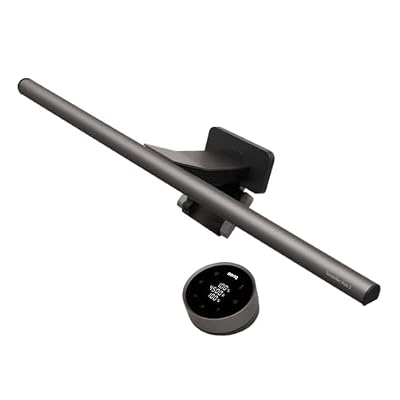
BenQ ScreenBar Halo 2 LED Monitor Light Bar - Wireless Controller, Backlight, Motion Sensor, Adjustable Brightness/Color Temperature, Eye-Care, No Screen Glare, Fits Curved Monitor, Monitor Accessory
Included for 'BenQ ScreenBar review' because the listing specifies Wireless Controller and Backlight, details this guide uses to compare options.
View on Amazon
BenQ ScreenBar Pro LED Monitor Light Bar (Black) - Ultrawide Lighting, Motion Sensor, Adjustable Brightness/Color Temperature, Eye-Care USB-C Monitor lamp, No Glare, Curved Monitors, Monitor accessory
Included for 'BenQ ScreenBar review' because the listing specifies Ultrawide Lighting and Motion Sensor, details this guide uses to compare options.
View on Amazon
BenQ ScreenBar Pro LED Monitor Light Bar (Silver)- Ultrawide Lighting, Motion Sensor, Adjustable Brightness/Color Temperature, Eye-Care USB-C Monitor Lamp, No Glare, Curved Monitors, Monitor accessory
Included for 'BenQ ScreenBar review' because the listing specifies Motion Sensor and Adjustable Brightness/Color Temperature, details this guide uses to compare options.
View on Amazon
BenQ ScreenBar LED Monitor Light Bar - Auto-dimming, Adjustable Brightness and Color Temperature, No Screen Glare, Space-Saving, Eye-Care USB Monitor Lamp, Black
Included for 'BenQ ScreenBar review' because the listing specifies Auto-dimming and Adjustable Brightness and Color Temperature, details this guide uses to compare options.
View on AmazonDesign and installation
See also: Best Reclining Chairs: Nine Recliner Listings Compared by Mechanism, Fabric and Space Needs • Best Roku Streaming Deals Reviewed
The ScreenBar uses a weighted, counterbalanced clip that rests on the monitor’s top edge rather than clamping it. Installation takes seconds and leaves no marks. It works on most flat monitors with a normal bezel thickness. It is not designed for strongly curved monitors, very thin-edged displays or monitors with a webcam in the middle of the top edge; clearance for a webcam can be an issue. Power comes from a USB port, ideally on the monitor itself, so the bar turns on and off with the display on some setups.
Light quality
The asymmetric optics are the product’s main strength. Light falls forward onto the desk and keyboard, not onto the screen, so there is no reflected glare. CRI of 95+ gives accurate colours on paper and objects. Light is even across the central work area, with falloff toward the edges; a 45 cm bar covers a keyboard, mouse and notebook comfortably, but not a very wide L-shaped desk.
Auto-dimming
An ambient light sensor adjusts brightness to reach around 500 lux on the desk. It works well as you move from daylight into evening. In auto mode, colour temperature sits at a neutral value, so switch to manual if you prefer warmer light in the evening.
Controls
The original uses touch buttons on top of the bar. They work, but reaching up to the monitor is less convenient than a desk controller, which is the main reason people choose the ScreenBar Plus: the same bar with a weighted desk dial. The Halo adds a wireless controller and a rear backlight, and the Pro adds features such as presence sensing; all cost more.
Strengths and weaknesses
- Strengths: no screen glare; high CRI; auto-dimming; no desk space used; easy installation; long track record.
- Weaknesses: touch controls on the bar are awkward to reach; limited coverage for very wide desks; not ideal for curved or thin-edge monitors; more expensive than generic light bars.
ScreenBar versus cheaper light bars
Budget light bars often copy the form factor but vary in optics, CRI and flicker performance. Some leak light onto the screen or into your eyes. The ScreenBar’s consistent optics and colour rendering justify its premium for daily use, though good mid-range alternatives exist. Our light bar roundups compare several options.
FAQ
Does the BenQ ScreenBar work with a webcam on top of the monitor?
It can be tricky, because both want the centre of the top edge. Options include mounting the webcam on a separate stand, placing it on one side of the bar, or using a model with a webcam-friendly design. Check clearance before buying.
Is the ScreenBar Plus worth the extra money?
If you adjust brightness or colour often, the desk dial is noticeably more convenient than reaching up to the bar. If you mostly leave it on auto, the original ScreenBar is enough.
Bottom line
The BenQ ScreenBar remains an excellent, glare-free way to light a desk in front of a flat monitor, with high colour accuracy and useful auto-dimming. Its weaknesses are the awkward on-bar controls and limited coverage for large desks. For most single-monitor setups it is still a benchmark; choose the Plus if you want a desk controller, or a Halo if you work with a curved screen.
Related Reviews & Guides
Best desk footrest for under a standing desk
Best monitor arm for a standing desk converter










