Last Updated: October 17, 2026
- Top Picks at a Glance
- Comparison Table
- The Numbers That Decide Whether a Stand Works
- 1. Lamicall Tablet Floor Stand: Best Overall
- 2. Lamicall Gooseneck Tablet Holder for Bed: Best Value Clamp Arm
- 3. MAGIPEA Gooseneck Tablet Holder: Best Sturdy Arm
- 4. VIVI MAO Gooseneck Tablet Holder: Best Budget
- 5. BluuSuuk Tablet Floor Stand With Double Weight Base: Best for Beds Without a Headboard
- 6. KDD Tablet Pillow Holder: Best Without an Arm
- Also Consider
- How We Chose
- Buying Guide
- Common Mistakes to Avoid
- Frequently Asked Questions
- Which One Should You Buy?
- Sources
The best tablet stand for reading in bed is the Lamicall Tablet Floor Stand, because its 10.6 lb base lets it sit beside the mattress and arc a gooseneck arm over your chest without clamping to anything. If your bed has a sturdy headboard or frame, the Lamicall Gooseneck Tablet Holder for Bed is the cheaper and tidier alternative, and for people who want no arm over their face at all, a soft pillow stand such as the KDD Tablet Pillow Holder rests on your lap or the duvet. The right choice depends on three measurements: the thickness of whatever you clamp to, the weight of your tablet in its case, and how far you need the screen to reach.
Bed stands look interchangeable in photos and behave very differently in use. An arm that sags after ten minutes is worse than no stand at all, and a floor stand that tips onto the mattress is a hazard. This guide ranks six real stands in three styles, explains the numbers that decide whether they hold your tablet steadily, and gives a quick way to check your own bed before you buy.
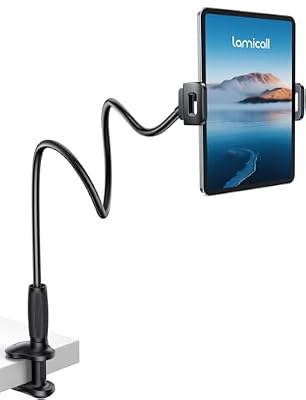
Lamicall Gooseneck Tablet Holder for Bed, Unique Tapered Flexible Arm | Fully Adjustable, iPad Kindle Holder Stand for Reading in Bed, Tablet Mount for 4.7-13" iPad Pro Mini Air, Kindle, Switch
Included for '6 Best Tablet Stands for Reading in Bed: Arm, Floor and Pillow' because the listing specifies Unique Tapered Flexible Arm and Fully Adjustable, details this guide uses to compare options.
View on Amazon
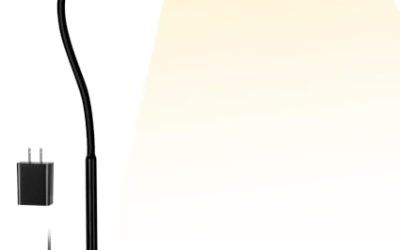
Lamicall Tablet Floor Stand Holder - Bed Gooseneck Mount for 4.7-13" iPad | 63" Adjustable Height, 10.6lb Ultra Stable Base,Flexible Arm for iPad Pro Air Mini, Galaxy Tab, Kindle, Phones
Included for '6 Best Tablet Stands for Reading in Bed: Arm, Floor and Pillow' because the listing specifies Bed Gooseneck Mount for 4.7-13" iPad and 63" Adjustable Height, details this guide uses to compare options.
View on Amazon
Lamicall Kindle Stand Tablet Holder 55" Height Adjust Extend Flexible Arm | Extendable Flexible Arm, 55" Height Adjustable, Heavy Base, Kindle Accessories Bed Tablet Mount for 4.7-13" iPad Pro Air Mini
Included for '6 Best Tablet Stands for Reading in Bed: Arm, Floor and Pillow' because the listing specifies Extendable Flexible Arm and 55" Height Adjustable, details this guide uses to compare options.
View on Amazon
Lamicall Tablet Pillow Stand iPad Bed Soft Holder for Lap 6 Viewing Angles | Soft, Relieve Neck Fatigue, 6 Viewing Angles, Sofa Tablet Dock for 4-13" iPad Pro Air Mini Kindle Galaxy Tab E-Reader Gifts
Included for '6 Best Tablet Stands for Reading in Bed: Arm, Floor and Pillow' because the listing specifies Soft and Relieve Neck Fatigue, details this guide uses to compare options.
View on Amazon📄 In This Review
- Top Picks at a Glance
- Comparison Table
- The Numbers That Decide Whether a Stand Works
- 1. Lamicall Tablet Floor Stand: Best Overall
- 2. Lamicall Gooseneck Tablet Holder for Bed: Best Value Clamp Arm
- 3. MAGIPEA Gooseneck Tablet Holder: Best Sturdy Arm
- 4. VIVI MAO Gooseneck Tablet Holder: Best Budget
- 5. BluuSuuk Tablet Floor Stand With Double Weight Base: Best for Beds Without a Headboard
- 6. KDD Tablet Pillow Holder: Best Without an Arm
- Also Consider
- How We Chose
- Buying Guide
- Common Mistakes to Avoid
- Frequently Asked Questions
- Which One Should You Buy?
- Sources
Top Picks at a Glance
- Best Overall: Lamicall Tablet Floor Stand, for the heavy base and 130 to 160 cm of height range.
- Best Value Clamp Arm: Lamicall Gooseneck Tablet Holder for Bed, with a tapered arm and a clamp that opens to about 3.15 inches.
- Best Sturdy Arm: MAGIPEA Gooseneck Tablet Holder, with a reinforced 34-inch arm that resists sag.
- Best Budget: VIVI MAO Gooseneck Tablet Holder, a 30-inch aluminum-magnesium arm at a low price tier.
- Best for Beds Without a Headboard: BluuSuuk Tablet Floor Stand with Double Weight Base, with a 6.6 lb base and 12 to 57 inch claw height.
- Best Without an Arm: KDD Tablet Pillow Holder, a foldable soft stand for lap or duvet reading.
Comparison Table
See also: Best Windows Tablet with Keyboard in 2026
| Product | Style | Key specs | Watch for | Price tier |
|---|---|---|---|---|
| Lamicall Tablet Floor Stand | Floor gooseneck | 130-160 cm height, 10.6 lb base, fits 4.7-13 inch devices | Reading and watching only, not typing | Mid-range |
| Lamicall Gooseneck Holder for Bed | Clamp arm | Fits 4.7-13 inch, clamp 0.2-3.15 in, arm holds up to 800 g | Needs a clampable edge; arm length varies by model | Budget |
| MAGIPEA Gooseneck Holder | Clamp arm | 34 in reinforced arm, 4.7-13 in, clamp 0.2-3 in, max tablet thickness 2 cm | Bulky cases may not fit | Budget |
| VIVI MAO Gooseneck Holder | Clamp arm | 30 in arm, 4.7-12.9 in, clamp up to 3.7 in | Shorter reach than the others | Budget |
| BluuSuuk Floor Stand (Double Weight Base) | Floor arm | 6.6 lb base, 12-57 in claw height, devices under 1.5 lb | Weight limit rules out large tablets in heavy cases | Mid-range |
| KDD Tablet Pillow Holder | Soft pillow stand | Fits 4-13 in, foldable, 0.93 lb, stylus mounts | Needs a lap or flat surface | Budget |
The Numbers That Decide Whether a Stand Works
Three figures matter more than any marketing claim. The first is the weight your tablet and case add up to. A bare 11-inch tablet is typically 450 to 500 g; a 13-inch tablet is about 580 g or more; a small tablet or e-reader is around 200 to 300 g. Add 150 to 300 g for a protective case. The Lamicall clamp arm is listed as supporting up to 800 g, the BluuSuuk floor stand is meant for devices under 1.5 lb (about 680 g), and these ceilings are easy to exceed with a rugged case. Staying within about 75 percent of the stated limit is a sensible margin.
The second is the thickness of the clamp surface. Bed frames, headboards and nightstands range from thin metal rails of 0.5 inch to chunky wooden headboards of 3 inches or more. The Lamicall and MAGIPEA clamps open to about 3.15 and 3 inches respectively, and the VIVI MAO opens to roughly 3.7 inches. If your headboard is thicker, a floor stand is the answer. The third is reach. A 30 to 34 inch arm is enough to bring a tablet from a headboard to chest height, but if your head sits 18 inches from the headboard and you lie flat, you want the longer arm and a clamp near the pillow edge.
1. Lamicall Tablet Floor Stand: Best Overall
- Height adjusts from about 130 cm (51 inches) to 160 cm (63 inches)
- 10.6 lb weighted base; item weight listed near 4.8 kg
- Gooseneck arm and extension tube in aluminum alloy; clamp fits devices from 4.7 to 12.9 inches
- Ball joint rotates more than 360 degrees
- Made for reading and watching, not for typing, per the listing
Best for: anyone who wants a stable stand beside the bed, a recliner or a sofa with no clamping. Skip if: floor space beside the bed is tight or you prefer to hide the stand when not in use.
A heavy base is what keeps a floor stand from tipping when the gooseneck extends, and the Lamicall design leans into that with a 10.6 lb foot, roughly twice the weight of cheaper rivals. It means the tablet can hang at chest height over a bed without the whole assembly leaning. The height range is generous: at the lower end, you can position the screen over a couch or low bed, and at the upper end it reaches over a tall mattress or a person sitting upright. The gooseneck section bends in any direction and holds its pose.
The trade-offs are footprint and handling. It is a large, heavy item to move and it sits on the floor, so it needs a clear space beside the bed, and in a small room it can crowd you. It is meant for reading and watching, not tapping or typing, because the arm gives a little when you touch the screen. For a household that wants one stand for bed and sofa, it is the easiest to recommend.
Pros:
- Very stable heavy base
- Wide height range, fits tablets up to 12.9 inches
- No clamp surface needed
Cons:
- Large floor footprint
- Heavy to move and store
- Not suited to typing
2. Lamicall Gooseneck Tablet Holder for Bed: Best Value Clamp Arm
- Fits 4.7 to 13 inch tablets and phones
- Enlarged base clamp fits surfaces from 0.2 to 3.15 inches thick
- Tapered aluminum arm supports up to 800 g
- Arm length: not listed for this model; older Lamicall bed clamps list roughly 30 to 36 inches
Best for: beds with a headboard, frame rail or nightstand edge you can clamp to. Skip if: your bed has nothing sturdy to grip, or you use a heavy rugged case.
The tapered arm is the improvement here: a thicker base section carries the load and a thinner tip is easier to bend, which reduces the droop that cheap goosenecks suffer after a few weeks. The clamp opens wide enough for most headboards and metal frames, and it stays out of the way when you are not using it. Because it does not use floor space, it works well in small bedrooms and dorm rooms.
The 800 g capacity is the number to watch. A 11-inch tablet plus a slim case lands around 650 to 750 g, which is within limits but close, so pick a light case. Lamicall also sells older bed clamps rated for 4.7 to 11 inch devices, with several arm lengths quoted across listings, so make sure you are viewing the 4.7 to 13 inch tapered version before comparing.
Pros:
- Wide clamp opening and tapered arm
- No floor footprint
- Low price tier
Cons:
- Needs a sturdy clamp surface
- 800 g limit is tight with a case
- Arm length varies between Lamicall models
3. MAGIPEA Gooseneck Tablet Holder: Best Sturdy Arm
- Fits 4.7 to 13 inch tablets and phones
- Reinforced, 34-inch aluminum arm that needs both hands to bend
- Clamp fits surfaces 0.2 to 3 inches thick, with EVA non-slip pads
- 360 degree rotation, TPE pads and a semi-enclosed safety clamp
- Maximum recommended tablet thickness of 0.78 inch (2 cm)
Best for: people who want the arm to stay put once positioned and are willing to bend it firmly. Skip if: you want to move the tablet with one hand or your tablet case is thicker than 2 cm.
The selling point of the MAGIPEA is stiffness. Many gooseneck arms look good in photos and sag within minutes, because the metal coil relaxes under load. The reinforced design trades convenience for stability, and it takes two hands to reshape. Once set, it holds. The safety clamp wraps the tablet edges to reduce the chance of a drop, and the TPE pads protect the tablet’s edges.
Watch the thickness limit. A 2 cm maximum rules out some rugged or battery-style cases, and the listing notes bulky cases may not fit in the clamp. The 34-inch arm gives a long reach, which suits tall beds and people who like the tablet near their face. It is a strong all-round arm for the price.
Pros:
- Stiff arm that resists sag
- Long 34-inch reach
- Secure, semi-enclosed tablet clamp
Cons:
- Needs two hands to adjust
- 2 cm tablet thickness limit
- Requires a clampable edge
4. VIVI MAO Gooseneck Tablet Holder: Best Budget
- Fits 4.7 to 12.9 inch devices
- 30-inch (76 cm) overall length
- Base clamp opens up to about 3.7 inches, with non-slip silicone pads
- Heavy-duty aluminum-magnesium alloy core; 360 degree rotation
Best for: occasional bedtime reading on a small tablet or e-reader. Skip if: you have a large tablet in a heavy case or a tall bed that needs a longer reach.
The VIVI MAO delivers the basics at the lowest price tier. The clamp opening is the widest of the three clamp arms, which suits thick headboards and bulky bed frames, and it mounts to a desk or table as well as a bed. The listing suggests looping the long arm into an S or Z shape for extra stability, a useful tip for any gooseneck holder that keeps the tablet closer to the clamp and reduces leverage on the arm.
At 30 inches it has less reach than the MAGIPEA, and the arm is not described as reinforced, so expect more sag with an 11-inch tablet in a case. It is a better match for a mini tablet, a small Android tablet or an e-reader, and a poor match for a 13-inch tablet.
Pros:
- Wide 3.7 inch clamp opening
- Lowest price tier
- Also mounts on desks and tables
Cons:
- Shorter 30-inch reach
- Likely to sag under heavy loads
- Better for small devices
5. BluuSuuk Tablet Floor Stand With Double Weight Base: Best for Beds Without a Headboard
- Base weight doubled from 3.3 lb to 6.6 lb in this version
- Claw height adjusts from about 12 to 57 inches
- Stretchable arm for use over beds, recliners and tabletops; 360 degree ball-head angle adjustment
- Meant for devices under 1.5 lb; supplied with base, two support rods, folding arm and chuck
Best for: platform beds, bunks and rentals where there is no headboard to clamp to. Skip if: you have a large tablet in a heavy case, since the 1.5 lb limit is easy to exceed.
This stand uses a folding arm rather than a gooseneck, which is easier to set and tends to hold position better. Its low end of 12 inches suits couches and low beds, and its 57 inch top reaches over taller mattresses. The 6.6 lb base is lighter than the Lamicall’s 10.6 lb, so it relies on you placing the base on the same side as the arm and pointing the arm toward it, which keeps the centre of mass over the foot.
BluuSuuk also sells an 11 lb base version that fits devices up to 12.9 inches and extends higher, which is worth considering if you have a 13-inch tablet. The stand in this review is the right size for most 8 to 11 inch tablets without a heavy case, and it folds more compactly than the Lamicall.
Pros:
- Works with any bed, no clamp needed
- Foldable arm and a wide height range
- Compact when stored
Cons:
- 1.5 lb device limit
- Lighter base needs careful placement
- Not intended for typing
6. KDD Tablet Pillow Holder: Best Without an Arm
- Fits devices of roughly 4 to 13 inches, plus books and e-readers
- Foldable soft stand with plush polyester surface that can be wiped clean
- Multi-angle models use Velcro fastening and have two stylus holders; folded about 9.84 x 10.23 x 1.96 inches and 0.93 lb
- Storage pouch on some versions; other versions add trays or cup holders
Best for: lap, duvet and sofa reading, side sleepers who dislike anything hovering over them, and travel. Skip if: you want the screen raised above your face while lying flat.
A pillow stand solves a different problem. Instead of lifting the tablet on an arm, it props the tablet at an angle on your lap, knees or the duvet, which removes the sag and tip risks completely. The KDD design folds flat for a bag, adds a pocket or stylus mounts depending on the version, and the plush cover is wipeable. There are no clamps or bases to fit, so it works in a hotel or a dorm.
The limitation is position. It needs a surface in front of you, which works sitting up or propped on pillows but not lying on your back with the screen overhead. KDD sells several versions with different angle counts, storage options and weights, so confirm the one you want. Lamicall’s Tablet Pillow Stand is a close alternative with six viewing angles and a washable cover.
Pros:
- No arm, clamp or base to worry about
- Foldable and travel friendly
- Safe around children and pets
Cons:
- Needs a lap or flat surface
- Cannot hold a tablet overhead
- Several versions with different features
Also Consider
Elekpopu Tablet Floor Stand With 5LB Base
A floor stand with a 27.5 to 55 inch height range and a base of about 5 lb, listed for 4.7 to 12.9 inch devices. It is light and cheap, but one review site notes it may tip at full extension, so add weight to the base. Price tier: Budget.
elitehood 24-inch Swing Arm Floor Stand
A horizontal 24-inch aluminum arm with a 14 lb base, designed for beds, sofas and recliners. The heavy base is the most stable on this list, but it is also the largest and costs more. Price tier: Premium.
Lamicall Tablet Pillow Stand
A triangular soft pillow with six viewing angles, a washable cover and a footprint of about 11.4 x 11 x 7.3 inches at 0.78 lb. It ships vacuum-compressed and needs time to expand. Price tier: Budget.
How We Chose
We built this guide from research rather than physical use. We compared manufacturer descriptions and retailer specification pages for each stand, then cross-checked clamp sizes, arm lengths, base weights and device limits across listings, noting where listings disagree. We did not set up or load any of these stands ourselves, so we make no claims about long-term sag, noise or how they hold up. Where a figure varies between versions, we said so and told you to check the listing. We chose stands that are currently sold, cover the three main bed-use styles (clamp arm, floor stand and pillow), and have clear limits on tablet size and weight. We kept to one or two products per brand where possible.
Buying Guide
Choose the style that matches your bed
If your bed has a headboard or frame at least 0.5 inch and no more than about 3 inches thick, a clamp arm is the neatest solution. If you have a platform bed, a thick upholstered headboard or you share a bed and do not want hardware on the frame, choose a floor stand. If you only read sitting up, a pillow stand is the safest and cheapest option.
Match the arm to your tablet weight
Weigh your tablet in its case on a kitchen scale. Under 500 g, almost any gooseneck works. Between 500 and 700 g, prefer a reinforced arm or a floor stand. Above 700 g, use a heavy floor stand and check the listed limit. The Lamicall clamp arm is rated to 800 g and the BluuSuuk to about 680 g, so a 13-inch tablet with a thick case calls for the heavier Lamicall floor stand or a larger base.
Think about reach and height
Lie in your usual reading position and ask someone to measure from the clamp point (or the floor base) to where you want the screen. A distance of 24 to 30 inches is typical for a clamp at the headboard. A floor stand beside the mattress needs the screen at roughly 20 to 28 inches from your eyes, which a 130 to 160 cm tube can reach on most beds.
Check clamp padding and tablet grip
Soft pads protect wood and painted frames. A semi-enclosed tablet clamp, like the MAGIPEA’s, holds the tablet more securely than a simple spring grip. Look for a clamp that opens wide enough for your tablet in its case, and check that the tablet’s volume buttons are not blocked.
Stability and safety
Never position a heavy tablet over your face, over a child or over a pet’s sleeping spot. Keep the arm as short as possible, form the gooseneck into an S shape for rigidity, and place floor stand bases so the arm points toward the base. If you share a bed, check that the arm will not swing into a partner’s side.
Common Mistakes to Avoid
- Choosing a stand for the tablet size alone and ignoring case thickness and weight.
- Clamping onto a decorative or hollow headboard that cannot take the load.
- Buying a lightweight floor stand and leaving the arm fully extended with no counterweight.
- Expecting a gooseneck to be a typing stand; they flex when tapped.
- Ignoring the manufacturer’s maximum tablet thickness.
Frequently Asked Questions
What is the best tablet stand for reading in bed?
The Lamicall Tablet Floor Stand is the best overall for most beds because it has a heavy base and needs no clamping. If you have a sturdy headboard, a clamp arm such as the Lamicall or MAGIPEA gooseneck holder saves floor space.
Do gooseneck tablet holders sag?
Some do, especially with heavier tablets. Reinforced arms such as the MAGIPEA resist sag better, and keeping the arm short or looping it into an S shape reduces the strain.
How heavy a tablet can a bed stand hold?
It depends on the model. The Lamicall tapered gooseneck is listed for up to 800 g, and the BluuSuuk floor stand is intended for devices under 1.5 lb. Always add the weight of your case when comparing.
Will a tablet stand clamp onto any headboard?
No. Most clamps open between about 0.2 and 3.7 inches, so very thick or irregular headboards will not fit. Measure your headboard first, or choose a floor stand.
Is a floor stand better than a clamp arm?
A floor stand is better if you have no clampable surface, want a large height range or need to share between a bed and a sofa. A clamp arm takes no floor space and is cheaper, but needs a sturdy edge.
Can I use a tablet stand for an e-reader or phone?
Yes. Most of these stands accept devices from about 4.7 inches, so they work for e-readers and phones as well as tablets.
Is it safe to hang a tablet over my face?
Treat it with caution. Use a stand within its weight rating, keep the arm firmly clamped and consider a pillow stand if you are worried about the tablet dropping. If you have ongoing neck or eye discomfort, ask a health professional.
Which One Should You Buy?
Choose the Lamicall Tablet Floor Stand if you want the steadiest, most flexible setup and have space beside the bed. Pick the Lamicall Gooseneck Holder or the sturdier MAGIPEA if you have a headboard and want to save floor space, and the VIVI MAO if you read on a small device and want the lowest cost. Go with the BluuSuuk for a bed with no headboard and a lighter tablet, and the KDD pillow stand if you would rather not have anything over your head. Before ordering, weigh your tablet in its case and measure the clamp surface.
Sources
- Lamicall manufacturer product pages for the floor stand, gooseneck holder and pillow stand
- MAGIPEA and VIVI MAO retailer specification pages
- BluuSuuk product page for the floor stand with double weight base
- KDD product page for the tablet pillow holder
- elitehood and Elekpopu retailer specification pages
Last updated: October 2026