Last Updated: October 4, 2026
The best USB-C laptop charger for most people is a GaN charger rated 100W with at least two USB-C ports, because it can run nearly any 13–16-inch laptop at full speed while also topping up a phone, and it is about half the size of a traditional laptop brick. If you only ever charge a thin ultrabook, a 65W GaN charger is enough; if you have a 16-inch performance laptop, look at 140W models that support USB PD 3.1.
📄 In This Review
Match the charger to your laptop first
A USB-C laptop charger negotiates power with the laptop through USB Power Delivery. A higher-wattage charger is always safe, because the laptop only takes what it asks for. A lower-wattage charger works but charges slowly and may not keep up under heavy use. The quickest way to size one is to read the wattage printed on your laptop’s original adapter.

Anker Laptop Charger, Compact Foldable 100W USB C Charger with 5FT Cable
Included for 'Best USB-C Laptop Charger in 2026: How to Match Wattage, Ports and GaN Size to Your Laptop' because the listing specifies Compact Foldable 100W USB C Charger with 5FT Cable, details this guide uses to compare options.
View on Amazon
Anker Laptop Charger, 100W Foldable Type C Charger Fast Charging
Included for 'Best USB-C Laptop Charger in 2026: How to Match Wattage, Ports and GaN Size to Your Laptop' because the listing specifies 100W Foldable Type C Charger Fast Charging, details this guide uses to compare options.
View on Amazon
Anker 140W Max 4-Port GaN Charging Blocks,Smart Display for MacBook Charger
Included for 'Best USB-C Laptop Charger in 2026: How to Match Wattage, Ports and GaN Size to Your Laptop' because the listing specifies Smart Display for MacBook Charger, details this guide uses to compare options.
View on Amazon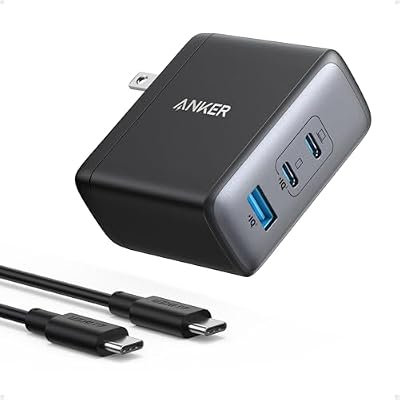
Anker Nano 100W MacBook Charger, 3-Port Fast Compact GaN USB Charger Block
Included for 'Best USB-C Laptop Charger in 2026: How to Match Wattage, Ports and GaN Size to Your Laptop' because the listing specifies 3-Port Fast Compact GaN USB Charger Block, details this guide uses to compare options.
View on Amazon| Laptop class | Typical original charger | Minimum USB-C charger | Comfortable choice | 0–50% charge time (approx.) |
|---|---|---|---|---|
| Chromebook / 11–13-inch ultrabook | 30–45W | 45W | 65W | 30–40 min |
| 13–14-inch business laptop | 65W | 65W | 100W multi-port | 30–45 min |
| 15–16-inch thin laptop | 65–100W | 100W | 100–140W | 35–50 min |
| 16-inch performance laptop | 140W | 100W (slower) | 140W PD 3.1 | 30–40 min at 140W |
| Gaming laptop with barrel jack | 180–330W | Not a replacement | 100W for light use only | Varies |
Gaming laptops are the main exception: many charge over USB-C at up to 100W for travel, but under gaming loads they still need their barrel-jack adapter.
Why GaN laptop chargers took over
See also: What Is VRR on a Gaming Monitor and How Does It Work • Is HDR Worth It for Gaming Monitors? What the Badges Mean and When It Pays Off
Gallium nitride transistors switch faster and waste less energy as heat than silicon, which lets manufacturers shrink the charger. A typical 100W GaN laptop charger weighs about 7–9 ounces and is roughly the size of a deck of cards, while an older silicon 90W brick often weighs 12–16 ounces and needs a separate power cord. For a desk setup that means a smaller lump behind the monitor; for travel, it means one charger instead of three.
The multi-port catch
The headline wattage on a multi-port charger is the total, not the per-port figure. A common 100W two-port charger might give 100W from one port alone, but split into 65W plus 30W when two devices are plugged in. If your laptop needs 65W, that is fine; if it needs 100W, it will slow down when you add a phone. Always check the split table in the specifications.
Charger types compared
| Type | Output | Ports | Weight | Usual price range | Best for |
|---|---|---|---|---|---|
| Single-port 65W GaN | 65W | 1 USB-C | 3–4 oz | usually $25–$45 | Ultrabooks, travel |
| Multi-port 100W charger | 100W total | 2–3 USB-C + 1 USB-A | 7–9 oz | usually $45–$85 | Laptop plus phone and tablet |
| 140W PD 3.1 charger | 140W | 1–3 USB-C | 9–12 oz | usually $70–$130 | 16-inch performance laptops |
| Desktop charging station | 150–300W total | 4–6 mixed | 12–20 oz | usually $80–$180 | Desk hub for several devices |
| Universal laptop charger with tips | 65–100W | 1 output + tips | 8–14 oz | usually $30–$70 | Older laptops without USB-C |
Picks by situation
One charger for desk and travel
A compact 100W GaN charger with two USB-C ports and one USB-A port is the most flexible choice. Anker’s Prime line, Ugreen’s Nexode line and Belkin’s BoostCharge Pro line all have 100W multi-port options. Pick one with folding prongs so it slips into a laptop sleeve.
A 16-inch laptop that draws real power
If your laptop shipped with a 140W adapter, buy a 140W USB PD 3.1 charger and pair it with a 240W-rated cable. A 100W charger will still work, but the battery may drain during long exports or compiles.
A permanent desk hub
A desktop charging station with 4–6 ports and 150W or more lets one wall outlet feed a laptop, tablet, phone, watch and earbuds. Put it where the cables can reach without crossing your mouse area; a 6-foot cable to the laptop is usually enough on a 60-inch desk.
An older laptop without USB-C
A universal laptop charger with interchangeable barrel tips covers many older models. Match both the voltage (often 19–20V) and the tip size exactly. If the laptop does have USB-C charging, a USB-C charger is the safer and simpler route.
Cables matter as much as the charger
- 60W cables are the default for most basic USB-C cables and cap your laptop at 60W.
- 100W (5A) cables contain an e-marker chip and are needed for anything above 60W.
- 240W cables are required for 140W PD 3.1 charging.
- Length: 3–6 feet covers most desks. Longer cables work but are more likely to snag behind furniture.
What wears out and how to make it last
The cable fails first, usually at the strain relief near the plug. Avoid tight wraps around the charger body and do not yank by the cord. GaN chargers run warm at full load (often 110–130°F on the casing), which is normal, but keep them out of bags and away from blankets while charging. Folding prongs loosen with heavy use; a charger that wobbles in the outlet should be replaced. Expect a quality charger to last 4–6 years of daily use.
FAQ
Can I use a phone charger on my laptop?
A 20–30W phone charger will slowly charge a laptop that is asleep or off, but it usually cannot keep up while you work. Use 45W or more for real laptop use.
Is a 100W USB-C charger safe for my phone?
Yes. USB Power Delivery negotiates a safe voltage and current with each device, so a phone draws only what it supports.
Do I need a GaN laptop charger?
Not strictly, but at the same wattage a GaN model is usually smaller, lighter and runs a little cooler, which matters on a crowded desk or in a bag.
Related Reviews & Guides




Best Cyber Monday Carpet Cleaner Deals 2026

Best 10×42 Binoculars for Clear, Steady Viewing