Last Updated: October 24, 2026
- Top Picks at a Glance
- Quick Comparison Table
- 1. Ergotron HX Desk Monitor Arm: Best Overall for Heavy Screens
- 2. Ergotron HX with HD Pivot: Best for Curved Ultrawides
- 3. Ergotron HX VHD: Best for the Largest Screens
- 4. Ergotron HX Dual Monitor Arm: Best for Two Screens
- 5. Ergotron HX Wall Monitor Arm: Best Wall Option
- 6. Ergotron LX Monitor Arm: Best Lighter Alternative
- 7. VIVO Heavy Duty Aluminum Ultrawide Tension Arm: Best Value Heavy-Duty Alternative
- Also Consider
- How We Chose
- Buying Guide
- Common Mistakes to Avoid
- Which Variant Matches Your Setup?
- Frequently Asked Questions
- Which One Should You Buy?
- Sources
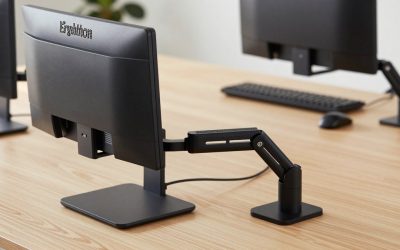
The Ergotron HX monitor arm is the one to buy when your screen is too heavy for a mainstream arm, and the standard HX single desk arm (20 to 42 lb, screens up to 49 in) is the best overall pick for most large flat or gently curved displays. The runner-up is the HX with HD Pivot, which is the version to choose if your ultrawide is strongly curved, deep or sits at the top of the weight range. The part that trips buyers up is not “HX or not”: it is that the HX name covers a family of at least five different mounting products, and picking the wrong member means a screen that tilts forward, sags or does not clear your desk.
This guide is built around that decision. Instead of ranking arms by a vague quality score, it maps each HX variant, plus the lighter LX family and one heavy-duty alternative, to the kind of monitor and desk it actually suits. Where the maker’s published numbers are available we use them; where we could only confirm a figure from a retailer listing we say so, and where nothing is listed we write “not listed”. This is a research-based guide: we did not personally use these products.

Ergotron – HX Premium Heavy Duty Monitor Arm, Single Monitor VESA Desk Mount – for Flat or Slight Curved Ultrawide Monitors Up to 49 inches, 20 to 42 lbs – Standard Pivot, Matte Black
Included for 'Ergotron HX Monitor Arm: Which Version Fits Your Heavy Screen?' because the listing specifies HX Premium Heavy Duty Monitor Arm and Single Monitor VESA Desk Mount, details this guide uses to compare options.
View on Amazon
Ergotron – HX HD Premium Heavy Duty Gaming Monitor Arm, Single Monitor Desk Mount – for 1000R Curved Ultrawide Monitors Up to 49 Inches, 28 to 42 lbs, VESA 75x75mm or 100x100mm – HD Pivot, White
Included for 'Ergotron HX Monitor Arm: Which Version Fits Your Heavy Screen?' because the listing specifies HX HD Premium Heavy Duty Gaming Monitor Arm and Single Monitor Desk Mount, details this guide uses to compare options.
View on Amazon
Ergotron – HX Premium Heavy Duty Monitor Arm, Single Monitor VESA Desk Mount – for Flat or Slight Curved Ultrawide Monitors Up to 49 inches, 20 to 42 lbs – Standard Pivot, Polished Aluminum
Included for 'Ergotron HX Monitor Arm: Which Version Fits Your Heavy Screen?' because the listing specifies HX Premium Heavy Duty Monitor Arm and Single Monitor VESA Desk Mount, details this guide uses to compare options.
View on Amazon
Ergotron – HX HD Premium Heavy Duty Gaming Monitor Arm, Single Monitor Desk Mount – for 1000R Curved Ultrawide Monitors Up to 49 Inches, 28 to 42 lbs, VESA 75x75mm or 100x100mm – HD Pivot, Matte Black
Included for 'Ergotron HX Monitor Arm: Which Version Fits Your Heavy Screen?' because the listing specifies HX HD Premium Heavy Duty Gaming Monitor Arm and Single Monitor Desk Mount, details this guide uses to compare options.
View on Amazon📄 In This Review
- Top Picks at a Glance
- Quick Comparison Table
- 1. Ergotron HX Desk Monitor Arm: Best Overall for Heavy Screens
- 2. Ergotron HX with HD Pivot: Best for Curved Ultrawides
- 3. Ergotron HX VHD: Best for the Largest Screens
- 4. Ergotron HX Dual Monitor Arm: Best for Two Screens
- 5. Ergotron HX Wall Monitor Arm: Best Wall Option
- 6. Ergotron LX Monitor Arm: Best Lighter Alternative
- 7. VIVO Heavy Duty Aluminum Ultrawide Tension Arm: Best Value Heavy-Duty Alternative
- Also Consider
- How We Chose
- Buying Guide
- Common Mistakes to Avoid
- Which Variant Matches Your Setup?
- Frequently Asked Questions
- Which One Should You Buy?
- Sources
Top Picks at a Glance
- Best Overall: Ergotron HX Desk Monitor Arm (standard pivot), the safe heavy-duty default for screens up to 49 in.
- Best for Curved Ultrawides: Ergotron HX with HD Pivot, built for 1000R curves and deep 28 to 42 lb panels.
- Best for the Largest Screens: Ergotron HX VHD, listed for monitors up to 57 in and 9 to 14 in of depth.
- Best for Two Screens: Ergotron HX Dual Monitor Arm, for two displays up to 32 in and 17.5 lb each.
- Best Wall Option: Ergotron HX Wall Monitor Arm, for heavy screens when the desk surface must stay clear.
- Best Lighter Alternative: Ergotron LX Monitor Arm, for ordinary 34 in and smaller screens up to 25 lb.
- Best Value Heavy-Duty Alternative: VIVO Heavy Duty Aluminum Ultrawide Tension Arm, listed at 44 lb and 49 in for a fraction of the HX cost tier.
Quick Comparison Table
See also: 6 Best Sliding Keyboard Trays for Desks (October 2026) Honest Reviews
| Product | Best for | Key specs | Watch for | Price tier |
|---|---|---|---|---|
| Ergotron HX Desk Monitor Arm | Heavy flat or slightly curved screens | 20-42 lb, up to 49 in, about 11.5 in of lift, 10-year warranty | Best for monitors under about 6 in deep; stronger curves need the HD Pivot | Premium |
| Ergotron HX with HD Pivot | 1000R curved ultrawides | 28-42 lb, up to 49 in, VESA 75×75 or 100×100, suits 6-12 in depth | Minimum 28 lb: lighter screens can drift | Premium |
| Ergotron HX VHD | 57 in super-ultrawides | Listed up to 57 in, 9-14 in depth, VESA 75×75 or 100×100; weight range not listed | Confirm weight on the maker page before ordering | Premium |
| Ergotron HX Dual Monitor Arm | Two mid-size screens | Up to 32 in, 5-17.5 lb each, about 23.6 in reach | Screens deeper than 3 in can reduce capacity | Premium |
| Ergotron HX Wall Monitor Arm | Clear desks, shared stations | 20-42 lb, up to 49 in, under 8 in depth | Needs solid wall mounting | Premium |
| Ergotron LX Monitor Arm | Everyday 27-34 in screens | 7-25 lb, up to 34 in, VESA 75×75 or 100×100 | Too light for large ultrawides | Mid-range |
| VIVO Heavy Duty Ultrawide Tension Arm | Budget heavy screens | Listed 44 lb, up to 49 in, aluminum | Lower warranty and finish expectations than Ergotron | Budget |
1. Ergotron HX Desk Monitor Arm: Best Overall for Heavy Screens
- Monitor weight: 20 to 42 lb per the maker and major retailers
- Screen size: up to 49 in, flat or slight curve
- Motion: about 11.5 in of vertical lift, reach up to about 23.6 in, 75 degrees of tilt, 360 degree rotation
- VESA: 75×75 to 200×200 mm per the maker spec sheet; some listings show only 75×75 and 100×100
- Mounting: edge clamp and grommet mount in the box; 10-year limited warranty
Best for: anyone with a large 34 to 49 in monitor, or a heavy 32 in display, who wants an arm that is overbuilt for the job. Skip if: your monitor weighs under about 20 lb, because the spring is tuned for heavy loads and a light screen will not balance well.
The HX is the arm people reach for when a lighter arm has already failed them. The 20 lb floor matters as much as the 42 lb ceiling: a constant-force arm is calibrated to hold a window of weights, and below the minimum the head tends to float upward. If your display sits near the bottom of that window, you will want to check whether a smaller arm from the same brand is a better match.
In practice the generous 11.5 in of lift range means you can run the screen low for sitting and raise it for standing at a sit-stand desk without re-adjusting the clamp. The reach of roughly 23.6 in is useful on deep desks and corner setups, but on a shallow 24 in desk you will rarely use all of it. Independent reviewers describe the arm as stable even with the heaviest displays, with the main complaint being the cost.
Pros: very high weight range; stable with big screens; clamp and grommet options; 10-year warranty; straightforward adjustment. Cons: expensive compared with generic heavy-duty arms; heavy itself at around 15 lb; overkill for a typical 24 to 27 in office monitor.
2. Ergotron HX with HD Pivot: Best for Curved Ultrawides
- Monitor weight: 28 to 42 lb per the store listing
- Screen size: up to 49 in, designed for 1000R curved ultrawides
- Display depth: suits roughly 6 to 12 in without the stand, per maker guidance relayed by retailers
- VESA: 75×75 mm or 100×100 mm
- Extras: reinforced tilt pivot; 10-year warranty on the HX family
Best for: large curved gaming or productivity ultrawides such as 49 in super-ultrawide panels, where the weight sits far forward of the VESA plate. Skip if: your monitor is flat and under about 6 in deep; the standard HX is the cheaper choice there.
The difference between this and the standard HX is the pivot at the head. On a very deep, strongly curved monitor the center of mass is well in front of the mounting plate, so the screen wants to nod forward. The HD Pivot is the part that resists that torque. Ergotron has recommended this version for displays such as the Samsung Odyssey G9; the standard HX typically needs a separate tilt-pivot add-on to hold those panels.
Note the higher minimum weight. Because the listing states 28 to 42 lb, a 49 in monitor around 25 lb falls below the stated window. Always read your exact monitor’s weight without the stand on the maker’s spec sheet before buying; if it falls in the gap between 20 and 28 lb, consider the standard HX with the separately sold heavy duty tilt pivot instead.
Pros: designed around the awkward balance of curved ultrawides; same 10-year coverage; solid reputation in independent reviews of large ultrawide use. Cons: narrower weight window; premium price; large and visually bulky.
3. Ergotron HX VHD: Best for the Largest Screens
- Screen size: listed up to 57 in, 1000R curved
- Display depth: listed 9 to 14 in
- VESA: 75×75 or 100×100
- Weight range: not listed in the store title; check the maker’s spec sheet
- Motion range and warranty: not confirmed for this specific variant
Best for: 57 in dual-QHD or similar super-ultrawides, the category that exceeds the 49 in rating of the other HX arms. Skip if: your monitor is 49 in or smaller; the HD Pivot version already covers you at lower cost.
This is the newest and least documented item here. The store lists it as a “VHD” variant for panels up to 57 in and 9 to 14 in deep, with white and matte black finishes. We could not verify a full spec sheet through the maker’s site for this guide, so treat every number in this entry as listing-sourced and confirm weight capacity, reach and warranty before paying. The reason to include it is simple: if your monitor is a 57 in model, none of the other Ergotron arms in this list are rated for it.
Pros: the only Ergotron option here sized for 57 in screens; same finish options as the rest of the HX line. Cons: several specs not listed; likely the most expensive single-arm tier; check desk depth since a screen this deep needs the desk space.
4. Ergotron HX Dual Monitor Arm: Best for Two Screens
- Screen size: up to 32 in each
- Weight: 5 to 17.5 lb per monitor (10 to 35 lb total)
- Motion: about 11.5 in of lift, up to about 23.6 in of reach, 75 degrees of tilt, 180 degree pivot, 360 degree rotation
- VESA: 75×75 or 100×100
- Clamp fits desk edges roughly 0.4 to 2.6 in thick; arm weighs about 22.7 lb; 10-year warranty
Best for: two 27 to 32 in monitors on a desk where you want both on one stable post. Skip if: either monitor is a heavy ultrawide; the dual arm tops out at 17.5 lb per side.
The per-screen limit is the whole story here. Many 32 in QHD and 4K displays fall inside 17.5 lb, but a few premium models do not, so measure before you buy. The maker also notes that displays deeper than about 3 in can reduce capacity because the weight sits farther from the arm. If you have two heavy displays, two single HX arms on separate clamps will outperform a single dual arm.
The hinge bow lets the two screens fold inward by about 40 degrees and outward by about 90, so you can run them nearly flat side by side or angled in toward you. Check clearance behind the desk: a clamp-mounted dual arm needs the screens to swing without hitting a wall.
Pros: one clamp for two screens; smooth range; 10-year warranty. Cons: heavy at roughly 23 lb; premium cost; capacity limit per side.
5. Ergotron HX Wall Monitor Arm: Best Wall Option
- Monitor weight: 20 to 42 lb
- Screen size: up to 49 in, display depth under 8 in per the listing
- VESA: 75×75 to 200×200 mm
- Motion: about 11.5 in of lift, tilt from about -5 to 70 degrees, wide pan
- Extras: folds back over the base; the maker notes it is preapproved for wall-track installation in some healthcare-regulated settings; 10-year warranty
Best for: shared workstations, reception areas, and rooms where the desk surface needs to stay clear or where the desk cannot take a clamp. Skip if: you do not have a stud or solid structure behind the mounting point, or you rent and cannot drill.
A wall arm moves the load from your desk to the wall, which changes what can go wrong. The desk edge is no longer a weak point, but the wall is. Mounting into studs or a rated wall track is the maker’s expectation for this class of arm, and a screen of up to 42 lb is a real load on drywall alone. If you are unsure, hire an installer rather than guess. The store also lists an HX Wall Mount Conversion Kit that adapts HX desk arms to wall use, which is worth looking at if you already own the desk version.
Pros: frees the entire desktop; strong weight range; folds flat; 10-year warranty. Cons: needs proper wall structure; reach and height are tied to the wall position; installation takes longer than a clamp.
6. Ergotron LX Monitor Arm: Best Lighter Alternative
- Screen size: up to 34 in, flat or curved
- Weight: 7 to 25 lb
- VESA: 75×75 or 100×100
- Variants: desk, tall pole and wall options in the store, plus dual versions
Best for: standard 24 to 34 in monitors that weigh well under 25 lb, where the HX would be more arm than you need. Skip if: your screen is a heavy 38 to 49 in ultrawide.
The LX family is the point of comparison most readers actually have in mind. The simple rule is weight: if the monitor weighs between 7 and 25 lb and is 34 in or smaller, the LX is enough; if it is heavier, the HX is the right size. The store also carries listings titled “Upgraded LX Pro” with a stated 4 to 22 lb range, but we could not confirm that name on the maker’s own pages, so this guide treats it as part of the LX family and gives no further claims about it. We already cover LX versus generic gas-spring arms in a separate article, so this entry stays short.
Pros: noticeably cheaper than the HX; many mounting variants; good fit for typical office screens. Cons: not for large ultrawides; lower weight ceiling leaves little spare margin.
7. VIVO Heavy Duty Aluminum Ultrawide Tension Arm: Best Value Heavy-Duty Alternative
- Screen size: up to 49 in
- Weight: listed at 44 lb
- Design: aluminum tension arm, listed as suited to the Samsung Odyssey G9 class of screens
- VESA, reach and warranty: not listed in the store title
Best for: people who want a 49 in rated arm without paying for an Ergotron. Skip if: you want the long warranty and refined motion of the maker with the strongest reputation in this category.
The VIVO’s listed 44 lb capacity is slightly above the HX’s 42 lb, but headline capacity is only part of the picture. The things that separate budget heavy-duty arms from premium ones are how evenly the spring holds across the full height range, how much the head droops over months of use, and how clean the cable routing and finish are. Those are exactly the aspects a listing cannot tell you, so treat this as the value pick rather than a like-for-like replacement.
Pros: low cost for the weight class; aluminum build; several finishes. Cons: fewer details published; no direct match to Ergotron’s long coverage; confirm VESA and mount types yourself.
Also Consider
HUANUO TitanLift Heavy Duty Monitor Arm
Listed for screens up to 49 in and 44 lb, with a dual C-clamp and a maximum VESA of 100×100. A good fit if you want a budget heavy-duty arm and your monitor uses the common 100×100 pattern.
WALI Heavy Duty Monitor Arm (GSM001XL)
Listed for 13 to 49 in curved screens up to 44 lb, with a C-clamp or grommet base and 75 or 100 mm VESA. Another low-cost way to hold a large ultrawide.
ULTRARM Heavy Duty Monitor Arm
Listed for ultrawide monitors up to 57 in and 44 lb, pneumatic height adjustment with modular extension arms. Worth a look if you need 57 in support and the Ergotron VHD is out of budget.
Ergotron HX Heavy Duty Tilt Pivot
An add-on for HX desk and wall arms, listed for 1000R ultrawide curved monitors with 6 to 12 in of screen depth. If you already own a standard HX and a heavier curved screen is on the way, this add-on is the upgrade path rather than buying a new arm.
How We Chose
This guide is research-based. We did not personally use these products. Specifications come from the manufacturer’s published spec sheets and data sheets where reachable, from the product detail pages of established retailers, and from independent write-ups such as Techaeris and Clever Creations, which describe the HX as stable with heavy monitors and note its price. We cross-checked weight windows, screen-size ratings and warranty terms across at least two sources wherever possible.
We selected products from the store’s real, currently listed items. The Ergotron picks cover each real mounting scenario (desk single, curved, very large, dual, wall) and the LX as the lighter reference point. The alternatives were chosen because they advertise a comparable 44 lb or 49 in rating. We limited the list to no more than two non-Ergotron brands in the main picks and kept price to tier words rather than numbers, because prices move too often to print reliably. Where a number could not be confirmed we have written “not listed” or flagged it as listing-sourced.
Buying Guide
Start with the real weight of your monitor
Find the monitor’s weight without its stand on the maker’s spec sheet; the figure with the stand is always higher and will mislead you. Then pick an arm whose stated range brackets that weight with margin on both sides. An HX covers 20 to 42 lb, so a 24 lb monitor is inside the range but near the bottom; a 38 lb monitor is inside but near the top. If you sit near an edge, choose the variant whose window is centered on your screen. Arms that are too strong for a light screen let the head rise on its own, and arms too weak let it sink.
Check depth and curvature, not just size
Screen diagonal tells you very little about balance. A strongly curved 49 in ultrawide can be 9 to 12 in deep at its edges, which pulls its center of mass well forward. That is exactly the reason Ergotron sells an HD Pivot. Rule of thumb from the maker’s guidance relayed by retailers: standard HX for monitors under about 6 in deep, HD Pivot for roughly 6 to 12 in, and the VHD listing for 9 to 14 in. If your monitor has a thick back housing or a built-in speaker bar, add that to its depth.
Confirm the VESA pattern and clearance
Most modern monitors use 75×75 or 100×100 mm mounting holes, and these are supported by every arm here. Some very large panels use 200×100 or 200×200 patterns, which only certain HX arms list. Also check that the arm head does not collide with a monitor’s rear ports or built-in stand mount; some curved panels have recessed VESA plates that need a spacer.
Measure your desk before you measure the arm
Clamp mounts need a desk edge that is solid and, for the HX dual, roughly 0.4 to 2.6 in thick. Glass tops, thin tops with hollow cores, and desks with a rear cable lip can all prevent a clamp from seating. If a clamp will not fit, the grommet mount or a wall arm is the answer. Remember also that a long reach is wasted on a shallow desk: if your desk is about 24 in deep, a 23.6 in reach arm will mostly stay folded.
Think about warranty and total cost
The HX family carries a 10-year limited warranty. Over a decade, an arm that costs more upfront but is never replaced can be cheaper than two budget arms, and it also means your expensive monitor is held by hardware built for the load. For lighter screens, that logic fades, which is why the LX is the sensible choice for most 27 in displays.
Common Mistakes to Avoid
- Buying by screen size alone. A 34 in ultrawide and a 34 in curved gaming panel can differ by 10 lb or more.
- Ignoring the minimum weight. Heavy-duty arms are not automatically better for light screens.
- Picking the standard HX for a deeply curved ultrawide. If the screen tilts forward, you wanted the HD Pivot.
- Using a dual arm for two heavy screens. Check the per-side limit.
- Wall mounting into drywall alone. Use studs or the proper rated track.
- Assuming “LX Pro” means a bigger LX. Verify the weight range on the listing before buying.
Which Variant Matches Your Setup?
| Your situation | Choose | Why |
|---|---|---|
| 34 in flat ultrawide, about 20-30 lb | HX standard | Inside the 20-42 lb window, shallow depth |
| 49 in 1000R curved, 28 lb or more | HX with HD Pivot | Pivot designed for deep curves |
| 57 in super-ultrawide | HX VHD (verify) or ULTRARM | Only options listed for 57 in |
| Two 27 in monitors under 17.5 lb each | HX Dual | One clamp, two screens |
| Shared desk, no clamp possible | HX Wall | Load moves to the wall |
| 27 in monitor under 20 lb | LX | HX would be more than needed |
| Heavy ultrawide on a tight budget | VIVO, HUANUO or WALI | Listed 44 lb capacity at lower cost |
Frequently Asked Questions
What is the difference between the Ergotron HX and LX monitor arms?
The HX is the heavy-duty line (20 to 42 lb, up to 49 in) and the LX is the lighter line (7 to 25 lb, up to 34 in). Pick by your monitor’s weight without its stand, not by price alone.
Does the Ergotron HX hold a 49 inch ultrawide?
Yes for most, within its 49 in and 42 lb rating. For strongly curved or deep panels such as the Samsung Odyssey G9, use the HX with HD Pivot or add the heavy duty tilt pivot, because the standard pivot may not hold those panels.
What does HD Pivot mean on an Ergotron arm?
It is a reinforced tilt pivot at the head of the arm. It is intended to stop deep, heavy, curved monitors from tipping forward. The listing for the HD version states a 28 to 42 lb window.
Can the HX hold two monitors?
Not the single arm. The HX Dual Monitor Arm holds two screens up to 32 in at 5 to 17.5 lb each. For two heavier displays, use two single HX arms on separate clamps.
Can I mount an HX arm on the wall?
Yes, the HX Wall Monitor Arm is a separate product with the same 20 to 42 lb range, and the store lists an HX Wall Mount Conversion Kit for adapting desk arms. Mount into studs or a rated track, and consult a professional if unsure.
How long is the warranty on Ergotron HX arms?
The maker lists a 10-year limited warranty for the HX family, including the dual and wall versions. Confirm the terms for your specific part number at purchase.
Is the HX worth the extra cost over a generic heavy-duty arm?
It depends on the screen. For a 40 lb curved ultrawide you will keep for years, the longer warranty and stability reports justify it. For a lighter or short-lived setup, a listed 44 lb alternative from VIVO, HUANUO or WALI may be enough.
Does the Ergotron “LX Pro” exist?
The store carries listings titled “Upgraded LX Pro”, but we could not confirm that name on the maker’s own pages, so treat it as part of the LX family and check the weight range on the listing.
Which One Should You Buy?
If your monitor is a heavy flat or gently curved screen up to 49 in, buy the standard Ergotron HX. If it is deep and strongly curved, buy the HX with HD Pivot. If it is a 57 in panel, check the VHD or ULTRARM against your screen’s exact weight and depth. For two mid-size screens, the HX Dual is the tidy answer, and for a desk that cannot take a clamp, use the HX Wall. If your monitor is a normal 27 to 34 in model under 25 lb, save money with the LX. And if budget is the constraint while the screen is heavy, the VIVO, HUANUO and WALI arms are the realistic alternatives, as long as you accept less published detail and a shorter track record.
Sources
- Ergotron HX Desk Monitor Arm spec sheet (ergotron.com media library)
- Ergotron HX Wall Monitor Arm spec sheet (ergotron.com media library)
- B&H Photo product detail pages for Ergotron 45-475, 45-476 and 45-478 series
- Techaeris: Ergotron HX with HD Pivot review
- Clever Creations: Ergotron HX review
- Retailer listings from ErgoDirect and Provantage for part numbers and finishes
Last updated: October 2026