Last Updated: October 13, 2026
- Top 3 Picks
- Quick Comparison
- How We Chose
- 1. TP-Link Deco 7 Dual-Band BE5000 – Best for a mainstream Wi-Fi 7 upgrade
- 2. TP-Link Deco 7 Pro Tri-Band BE10000 – Best for larger homes needing a 6 GHz band
- 3. NETGEAR Orbi 370 3-pack – Best for medium homes and a simple wired option
- 4. TP-Link Deco 7 Pro BE63 – Best for multi-gig homes with Ethernet backhaul
- 5. TP-Link Deco 7 BE25 – Best for fast 5 GHz at a modest tier
- 6. eero 7 (3-pack) – Best for whole-home coverage with easy setup
- 7. NETGEAR Orbi 770 3-pack – Best for large homes and heavy device counts
- 8. eero 7 (1-pack) – Best for apartments and single-router upgrades
- 9. eero 7 (2-pack) – Best for mid-size homes
- 10. TP-Link Deco BE23 (3-pack) – Best for budget-minded Wi-Fi 7
- How to Choose a Wi-Fi 7 Mesh Router
- Frequently Asked Questions
- Our Recommendation by Situation
The best Wi-Fi 7 mesh router for most homes in this group is the NETGEAR Orbi 770 Series 3-pack if you want a premium tri-band system with a dedicated 6 GHz band, and the eero 7 if you want the simplest setup with the flexibility of 1-, 2- and 3-pack sizes. Both deliver real Wi-Fi 7 features, including multi-link operation, and both support internet plans in the multi-gigabit range through 2.5 gigabit ports. Buyers who care most about value will find the TP-Link Deco BE25 and BE23 dual-band kits attractive, while larger homes with wired backhaul should look at the tri-band Deco BE63 or the Orbi 770. This guide ranks all ten listings in a fixed order, explains the difference between dual-band and tri-band Wi-Fi 7, includes a coverage calculation you can adapt to your own house, and ends with a decision table.
📄 In This Review
- Top 3 Picks
- Quick Comparison
- How We Chose
- 1. TP-Link Deco 7 Dual-Band BE5000 – Best for a mainstream Wi-Fi 7 upgrade
- 2. TP-Link Deco 7 Pro Tri-Band BE10000 – Best for larger homes needing a 6 GHz band
- 3. NETGEAR Orbi 370 3-pack – Best for medium homes and a simple wired option
- 4. TP-Link Deco 7 Pro BE63 – Best for multi-gig homes with Ethernet backhaul
- 5. TP-Link Deco 7 BE25 – Best for fast 5 GHz at a modest tier
- 6. eero 7 (3-pack) – Best for whole-home coverage with easy setup
- 7. NETGEAR Orbi 770 3-pack – Best for large homes and heavy device counts
- 8. eero 7 (1-pack) – Best for apartments and single-router upgrades
- 9. eero 7 (2-pack) – Best for mid-size homes
- 10. TP-Link Deco BE23 (3-pack) – Best for budget-minded Wi-Fi 7
- How to Choose a Wi-Fi 7 Mesh Router
- Frequently Asked Questions
- Our Recommendation by Situation
Quick answer: For most people in 2026, the best wi is the TP-Link Deco 7 Dual-Band BE5000 — our #1 rated choice. See the full ranked comparison, alternatives and buying advice below.
Top 3 Picks
Best overall: NETGEAR Orbi 770 Series 3-pack. The listing promises coverage of up to 8,000 square feet, and NETGEAR describes a tri-band design with 2.5 gigabit ports on the router and satellites. The extra 6 GHz band gives the system room to carry traffic between nodes without stealing capacity from your devices, which is the main reason tri-band mesh behaves better in large or dense homes.

Deco 7 Dual-Band BE5000 WiFi 7 Mesh Wi-Fi System 4-Stream 5 Gbps, 240 Mhz
Included for 'Best Wi-Fi 7 Mesh Router in 2026' because the listing specifies 240 Mhz, details this guide uses to compare options.
View on Amazon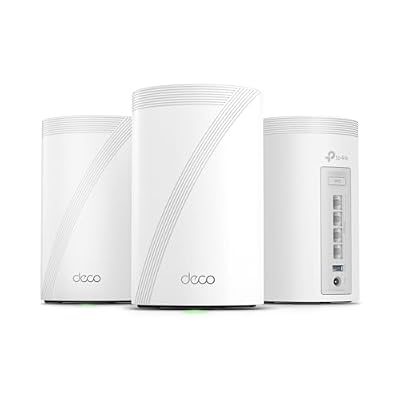
Deco 7 Pro Tri-Band WiFi 7 BE10000 Whole Home Mesh System 6-Stream 10 Gbps
Included for 'Best Wi-Fi 7 Mesh Router in 2026' as a relevant option in this category; details come from the product listing.
View on Amazon
NETGEAR Orbi 370 Series WiFi 7 Mesh System, Up to 6,000 sq ft., 3 Pack | Up to 5 Gbps, 70 Devices, Easy Set Up, Dual-Band, Security Features, 2.5 Gig Port, Router + 2 Satellite Extenders, RBE373
Included for 'Best Wi-Fi 7 Mesh Router in 2026' because the listing specifies Up to 6 and 000 sq ft., details this guide uses to compare options.
View on Amazon
TP-Link Deco 7 Pro BE63 Tri-Band WiFi 7 BE10000 Whole Home Mesh System
Included for 'Best Wi-Fi 7 Mesh Router in 2026' as a relevant option in this category; details come from the product listing.
View on Amazon
Deco 7 BE25 Dual-Band BE5000 WiFi 7 Mesh Wi-Fi System 5 Gbps, 240 Mhz
Included for 'Best Wi-Fi 7 Mesh Router in 2026' because the listing specifies 240 Mhz, details this guide uses to compare options.
View on Amazon
Amazon eero 7 dual-band mesh Wi-Fi 7 router (newest model) - Supports internet plans up to 2.5 Gbps, Coverage up to 6,000 sq. ft., 3-pack
Included for 'Best Wi-Fi 7 Mesh Router in 2026' because the listing specifies Supports internet plans up to 2.5 Gbps and Coverage up to 6, details this guide uses to compare options.
View on Amazon
NETGEAR Orbi 770 Series WiFi 7 Mesh System, Up to 8,000 sq ft., 3 Pack
Included for 'Best Wi-Fi 7 Mesh Router in 2026' because the listing specifies Up to 8 and 000 sq ft., details this guide uses to compare options.
View on Amazon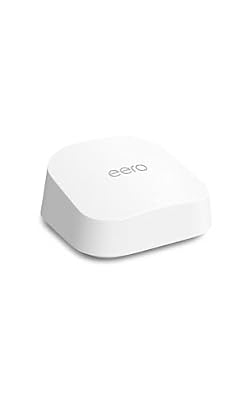
Amazon eero 7 dual-band mesh Wi-Fi 7 router (newest model) - Supports internet plans up to 2.5 Gbps, Coverage up to 2,000 sq. ft., 1-pack
Included for 'Best Wi-Fi 7 Mesh Router in 2026' because the listing specifies Supports internet plans up to 2.5 Gbps and Coverage up to 2, details this guide uses to compare options.
View on Amazon
Amazon eero 7 dual-band mesh Wi-Fi 7 router (newest model) - Supports internet plans up to 2.5 Gbps, Coverage up to 4,000 sq. ft., 2-pack
Included for 'Best Wi-Fi 7 Mesh Router in 2026' because the listing specifies Supports internet plans up to 2.5 Gbps and Coverage up to 4, details this guide uses to compare options.
View on Amazon
TP-Link Deco 7 BE23 Dual-Band BE3600 WiFi 7 Mesh Wi-Fi System, 3-Pack | 4-Stream 3.6 Gbps, 160 Mhz | Covers up to 6,500 Sq.Ft | 2× 2.5G Ports Wired Backhaul | VPN,MLO,AI-Roaming, HomeShield
Included for 'Best Wi-Fi 7 Mesh Router in 2026' because the listing specifies 3-Pack and 4-Stream 3.6 Gbps, details this guide uses to compare options.
View on AmazonBest for simple setups and smart homes: eero 7. The listing describes dual-band Wi-Fi 7 with support for internet plans up to 2.5 gigabits, sold in 1-, 2- and 3-pack sizes covering up to 2,000, 4,000 and 6,000 square feet. Eero is widely known for its app-driven setup, and the device doubles as a smart home hub for Thread and Zigbee gear, according to the maker.
Best for value: TP-Link Deco BE23 or BE25. These dual-band Wi-Fi 7 kits skip the 6 GHz band to keep the product simple. The BE25 adds a faster 5 GHz connection, while the BE23 is the lower-speed option for typical homes. Both are the sensible starting point for people upgrading from Wi-Fi 5 or Wi-Fi 6 and who do not need extreme speeds.
Quick Comparison
| Product | Best for | Key specs |
|---|---|---|
| TP-Link Deco 7 Dual-Band BE5000 | Mainstream Wi-Fi 7 upgrade | Dual-band, BE5000, 4-stream, 240 MHz channel support |
| TP-Link Deco 7 Pro Tri-Band BE10000 | Larger homes needing a 6 GHz band | Tri-band, BE10000, 6-stream, whole-home mesh |
| NETGEAR Orbi 370 3-pack | Medium homes, simple wired option | Dual-band Wi-Fi 7, up to 6,000 sq ft |
| TP-Link Deco 7 Pro BE63 | Multi-gig homes with Ethernet backhaul | Tri-band BE10000, whole-home mesh |
| TP-Link Deco 7 BE25 | Fast 5 GHz at a modest tier | Dual-band BE5000, 240 MHz channels |
| eero 7 (3-pack) | Whole-home coverage with easy setup | Dual-band, up to 2.5 Gbps plans, up to 6,000 sq ft |
| NETGEAR Orbi 770 3-pack | Large homes and heavy device counts | Tri-band, up to 8,000 sq ft, 2.5 gigabit ports |
| eero 7 (1-pack) | Apartments and single-router upgrades | Dual-band, up to 2,000 sq ft |
| eero 7 (2-pack) | Mid-size homes | Dual-band, up to 4,000 sq ft |
| TP-Link Deco 7 BE23 (3-pack) | Budget-minded Wi-Fi 7 | Dual-band BE3600, 3 units |
How We Chose
This ranking is based on manufacturer specification pages, product listing text, networking standards documentation and published technical analysis of Wi-Fi 7 hardware. We did not run our own speed or range measurements, and no figure here is a measured result. We compared each system on six factors: whether it is dual-band or tri-band, the maker’s stated coverage and pack size, the type and number of Ethernet ports, support for wired backhaul, smart home extras and the practical limits that come with each platform’s app and subscription features. Where specifications conflict between sources or product versions, particularly for port counts on TP-Link models, we say so and recommend confirming on the product page. Square-footage claims are always best-case, so we treat them as ceilings and show how to estimate real coverage below.
1. TP-Link Deco 7 Dual-Band BE5000 – Best for a mainstream Wi-Fi 7 upgrade
As an Amazon Associate we earn from qualifying purchases at no extra cost to you.

The TP-Link Deco 7 Dual-Band BE5000 mesh system is the entry point to Wi-Fi 7 for people who want a mainstream upgrade without paying for multi-gigabit extras they will not use. The listing name emphasizes 4-stream operation, a combined 5 Gbps class figure and a 240 MHz channel width. Dual-band means it uses the 2.4 GHz and 5 GHz bands only; it has no 6 GHz radio. That keeps the design simpler and the device cost lower, at the expense of the extra spectrum a tri-band system provides.
Key specs
- Standard: Wi-Fi 7 (802.11be), dual-band BE5000
- Streams: 4 streams, with 240 MHz channels supported on 5 GHz
- Ports: multi-gig Ethernet on most TP-Link versions of this class; confirm the exact count on the product page
- Backhaul: wireless, wired or mixed on Deco systems
- Pack size: not stated in the listing name, so check how many units come in the box
Why it stands out
The 5 Gbps figure is a combined theoretical rate across both bands, not a speed any single device will see. What matters is the 5 GHz band’s 240 MHz channel and multi-link operation, which lets a compatible phone or laptop use two bands at the same time for lower latency. On Wi-Fi 7 hardware, that is the main real-world benefit over Wi-Fi 6, and it needs Wi-Fi 7 client devices to see the full advantage. Older devices still connect and benefit from better handling of crowded airwaves.
The Deco app handles setup, guest networks, parental controls and, on supported models, security features under the HomeShield name. Some advanced features are free while others sit behind a subscription, so read the current plan details before you count on them.
Setup tips
Install the app, create the network name and password, and place the first unit by the modem before adding the others. If the box contains more than one unit, plug them in one at a time near the router, let them join, and only then move them to their final spots. Name the main network once rather than splitting 2.4 GHz and 5 GHz into separate names, since the mesh steers each device to the better band on its own. Turn on automatic firmware updates and schedule them for the middle of the night. If an older smart plug or printer refuses to join, temporarily connect it from a phone that is on the 2.4 GHz band, then let the mesh handle it afterward.
Pros
- Genuine Wi-Fi 7 features including multi-link operation
- Flexible backhaul options, including Ethernet
- Strong app control with common home features included
Cons
- No 6 GHz band, so the wireless link between nodes shares capacity with clients
- Listing does not clearly state pack size or port count
- Some security features may require a subscription
How it compares
It is closely related to the BE25 entry later in the list, and the two may be the same hardware family sold as different listings. Compared with the tri-band Deco 7 Pro, it gives up the 6 GHz band and some capacity. Compared with the eero 7, it offers more detailed controls but a less simple setup. It suits apartments and mid-size homes up to a few thousand square feet.
2. TP-Link Deco 7 Pro Tri-Band BE10000 – Best for larger homes needing a 6 GHz band

The Deco 7 Pro Tri-Band BE10000 is a step up in capacity. The listing name highlights 6-stream operation, a combined 10 Gbps class figure and whole-home mesh coverage. Tri-band means it adds a 6 GHz radio to the 2.4 GHz and 5 GHz bands, giving the system an uncongested lane for client devices and for the wireless link between nodes. In a house with thick walls or many connected devices, that third band is what helps keep speeds steady as you move from room to room.
Key specs
- Standard: Wi-Fi 7, tri-band BE10000
- Bands: 2.4 GHz, 5 GHz and 6 GHz; 6 GHz supports 320 MHz channels on Wi-Fi 7
- Streams: 6 streams
- Wi-Fi 7 features: multi-link operation, 4K-QAM and preamble puncturing, as listed by the maker for this family
- Pack size: the listing name does not state it, so confirm before you buy
What to know before buying
The 6 GHz band has shorter range than 5 GHz and gets weaker through walls, so it works best when nodes are placed with line of sight or a single wall between them. For many homes the system will move clients between bands automatically. If you wire the nodes with Ethernet, the wireless link no longer matters, and the main benefit becomes high-capacity access points in every room.
Because the BE63 is listed separately later, check the model number on each listing to see whether they are the same hardware sold in different pack sizes. Port counts and layout are worth confirming too, since TP-Link listings have conflicting statements about how many multi-gig ports each unit offers and whether any are 10 gigabit.
Placement and backhaul
In a tri-band mesh the best arrangement is a wired one: connect the nodes by Ethernet and keep the 6 GHz radio for devices. If you cannot wire them, keep nodes close enough that the connection between them is strong, usually one open room or a single wall apart. Avoid placing a node inside a cabinet, behind a television or next to a microwave oven. In a two-story home, place one node near the stairs on each floor so signals travel through a short vertical path instead of crossing a long floor slab. After placement, walk through the house with a phone running a speed check to find any remaining weak rooms.
Pros
- 6 GHz band with 320 MHz channels for high-capacity clients
- Six streams and tri-band design suit busy homes
- Works with wired and wireless backhaul
Cons
- 6 GHz range is shorter, so node placement matters
- Pack size and ports need confirmation on the listing
- Tri-band hardware is more than a small apartment needs
How it compares
It sits above the dual-band Decos and beside the BE63, which appears to be the same family. Against the Orbi 770, it is a similar class of tri-band mesh, with Deco offering finer app controls and Orbi offering larger rated coverage.
3. NETGEAR Orbi 370 3-pack – Best for medium homes and a simple wired option

The NETGEAR Orbi 370 Series is NETGEAR’s more accessible Wi-Fi 7 mesh. The listing describes a three-pack covering up to 6,000 square feet, and NETGEAR’s own specifications describe a dual-band BE5000 system with 4 streams, a router with 2.5 gigabit LAN and WAN ports and satellites with a 2.5 gigabit LAN port. The kit includes one router and two satellites, and extra satellites can be added to extend coverage by up to 2,000 square feet each.
Key specs
- Standard: Wi-Fi 7, dual-band BE5000
- Coverage: up to 6,000 square feet for the 3-pack
- Router ports: 2.5 gigabit WAN and 2.5 gigabit LAN
- Satellite ports: one 2.5 gigabit LAN each
- Backhaul: wireless with multi-link operation, or optional Ethernet
- Device guidance: NETGEAR cites support for dozens of devices per system
Why it stands out
Orbi satellites are physically larger than most mesh nodes, and the extra size helps with antenna performance. The one-port satellite design, however, limits how many wired devices you can connect at each node, so people with a gaming console, a streaming box and a desktop in the same room will want a small switch. The 2.5 gigabit WAN port on the router means it can handle internet plans beyond one gigabit, a feature worth checking on other budget meshes.
The Orbi app handles setup, and NETGEAR includes a trial of its security subscription. Some features, such as advanced parental controls and malware protection, are tied to paid plans after the trial ends.
Living with the hardware
The Orbi satellites are bulky enough to be noticed on a shelf, but their size gives the antennas room to work. Plug the router into the modem, let it finish its start-up, and then plug in the satellites in the rooms where you want the coverage, using the app to confirm each link. With a single Ethernet port per satellite, a small unmanaged switch is the usual answer for a room with several wired devices. NETGEAR’s trial of its security service is optional, so decide before it ends whether you want to keep it. For the best wired performance, connect the satellites to the router through a switch with 2.5 gigabit ports, not an older gigabit one.
Pros
- Wi-Fi 7 with 2.5 gigabit ports on every unit
- Simple three-unit kit that covers a medium home
- Expandable with extra satellites
Cons
- Dual-band, so no dedicated 6 GHz lane
- Single Ethernet port on each satellite
- Subscription features after the included trial
How it compares
It competes with the eero 7 3-pack and the Deco BE25 kits. Orbi offers sturdier hardware and a simple wired mode, while eero is more app-centric and Deco is more configurable. Compared with the Orbi 770, it gives up the third band and a lot of rated coverage, so choose it for a medium home that does not push big workloads.
4. TP-Link Deco 7 Pro BE63 – Best for multi-gig homes with Ethernet backhaul

The TP-Link Deco 7 Pro BE63 is the model-numbered version of the tri-band BE10000 whole-home mesh system. TP-Link’s materials describe the BE63 as a tri-band Wi-Fi 7 mesh with 2.4 GHz, 5 GHz and 6 GHz radios, a combined figure near 10 Gbps, support for 320 MHz channels in 6 GHz, multi-link operation and 4K-QAM. A three-pack is commonly quoted at up to roughly 7,600 square feet, though the listing here does not state a pack size, so confirm what is in the box.
Key specs
- Standard: Wi-Fi 7, tri-band BE10000
- Radio split: 6 GHz and 5 GHz bands carry most of the speed, 2.4 GHz is for range and legacy devices
- Ports: most listings describe several 2.5 gigabit multi-gig ports per unit and a USB port; at least one retailer disagrees, so check the specification sheet for your region
- Backhaul: Ethernet, wireless or mixed
- Extras: VPN client features, AI roaming and HomeShield security tools, with some tiers subscription-based
Why it stands out
The BE63 targets people who want a high-capacity system but plan to run Ethernet to the nodes. When the nodes are wired, the tri-band radio is all available for clients, and the 2.5 gigabit ports let you pass fast connections to a desktop, a network storage box or a work-from-home setup. Having several multi-gig ports on each node also reduces the need for an extra switch.
The same caution about 6 GHz applies here as for other tri-band systems. The band is fast but short-ranged, so place nodes within a room or two of the devices that need the speed. In a multi-story house, vertical placement, one node per floor and roughly aligned, usually works better than stacking all three nodes on one level.
Choosing between this and its twin listing
Because this listing and the earlier Deco 7 Pro BE10000 listing describe closely related tri-band hardware, compare the pack size, the model number printed in the description and the regional version. A two-pack suits a home up to roughly 5,000 square feet in open conditions, while a three-pack is quoted much higher. Buy the pack that matches your realistic coverage calculation, not the largest rated number. If you plan to wire the nodes, a two-pack placed on opposite ends of the home and connected by Ethernet can outperform a wireless three-pack in a house with thick walls.
Pros
- Tri-band Wi-Fi 7 with 320 MHz channels on 6 GHz
- Multi-gig Ethernet ports on each unit for wired devices
- Works well as a wired-backhaul mesh
- Rich app features and optional security tiers
Cons
- Port details vary between sources and must be confirmed
- Pack size is not stated in the listing name
- 6 GHz coverage is limited by walls
How it compares
It is nearly the same hardware family as the Deco 7 Pro earlier in the list, so decide by pack size and availability. Compared with the Orbi 770, the Deco offers more Ethernet ports per satellite in most descriptions but lower rated coverage. For tidy, wired setups, it is one of the stronger choices here.
5. TP-Link Deco 7 BE25 – Best for fast 5 GHz at a modest tier

The Deco 7 BE25 is the dual-band BE5000 system, sold under both BE25 and BE5000 names. The listing mentions 5 Gbps of combined speed and 240 MHz channel support. The 5 GHz band runs at a theoretical 4,324 Mbps, according to TP-Link, while the 2.4 GHz band provides 688 Mbps. Specifications reported for the family include four internal antennas, multi-link operation and wired or wireless backhaul, and multi-gig Ethernet ports on each unit.
Key specs
- Standard: Wi-Fi 7, dual-band BE5000
- 5 GHz: up to 4,324 Mbps theoretical, 240 MHz channels
- 2.4 GHz: up to 688 Mbps theoretical
- Ports: two 2.5 gigabit ports on each unit per most sources
- Size: compact, with no USB port on this model
- Pack size: confirm in the listing details
Where it fits
Many people buy a Wi-Fi 7 system without a Wi-Fi 7 device, and the BE25 makes sense in that case because it is not paying for a tri-band radio that older devices cannot use. Wi-Fi 6 and Wi-Fi 6E clients still benefit from improved scheduling and MLO-aware infrastructure, and your future Wi-Fi 7 phones and laptops will be ready to use the 240 MHz channel. A 5 GHz channel that wide can carry fast links in the same room as a node but drops off quickly with distance and walls.
The BE25 also reveals a practical lesson about Wi-Fi 7 naming. TP-Link has sold similar-looking models with different speeds, and regional versions of the same name sometimes differ. If a listing says BE25, verify that it is the 5 GHz 4,324 Mbps version, not a slower revision, before you accept it as the BE5000 product described here.
Tuning the BE25
The Deco app lets you set up a guest network, schedule parental controls and prioritize devices such as a work laptop or a video-call machine. Keep the default automatic channel selection unless you live in a very crowded building, and consider naming the network with a single SSID. If you have an old device that cannot connect, use the app’s IoT network option, which isolates simple gadgets on 2.4 GHz. For a household with several Wi-Fi 7 laptops, enable multi-link operation if it is not already on, and check the client list to confirm those devices connect at the wide 5 GHz channel.
Pros
- Fast 5 GHz band with wide channels for close-range devices
- Compact nodes that blend into a living space
- Supports Ethernet backhaul
Cons
- No 6 GHz band
- No USB port for storage or printer sharing
- Regional version differences require care
How it compares
It lines up with the first Deco on the list and the eero 7, and its main rival is the Orbi 370. The BE25 has the higher 5 GHz peak, the eero is easier to set up, and the Orbi is built larger. Compared with the BE23 at the end of the list, it offers a wider 5 GHz channel and higher peak speed.
6. eero 7 (3-pack) – Best for whole-home coverage with easy setup

The eero 7 3-pack is the family version sold as a dual-band Wi-Fi 7 mesh with support for internet plans up to 2.5 gigabits and coverage of up to 6,000 square feet. The maker’s technical documents describe a BE5000 class radio with two streams per band, a 240 MHz channel on 5 GHz, multi-link operation, two 2.5 gigabit Ethernet ports on every unit and a USB-C port used for power. Each unit is also described as a smart home hub for Thread, Zigbee controllers and Matter, so your smart-home gear can pair without a separate hub.
Key specs
- Standard: Wi-Fi 7, dual-band, BE5000 class
- Ethernet: two auto-sensing 2.5 gigabit ports per unit
- Maker wired and wireless limits: roughly 2.3 Gbps wired and 1.8 Gbps wireless
- Capacity: more than 120 devices per unit, as stated by the maker
- Coverage: up to 6,000 square feet in the 3-pack
- Smart home: Thread, Zigbee controller and Matter controller features
Why it stands out
The appeal of eero is not raw radio power but ease. Setup runs through a phone app, nodes find each other and updates install automatically. Every unit has two Ethernet ports, which is more flexible than the single-port satellites of some competitors. The smart home features are a genuine plus if you have Thread or Matter devices.
The tradeoffs are about control and subscriptions. The app offers fewer low-level settings than a TP-Link, and features such as advanced filtering and security are part of a paid plan. If you want to fine-tune channels and bands, eero is not the best fit; if you want a router that you set up once and forget, it is.
Smart home angle
The smart home features are worth understanding. A Thread border router lets low-power devices such as sensors and some locks join a resilient local network, and a Matter controller lets devices from different brands work together. Having these functions built into each eero node means they are spread through the house and don’t depend on a separate hub in one room. Zigbee support is listed as a controller feature, so check that the devices you own are compatible. Those who do not use smart home gear can ignore this, but for others it replaces a plug-in hub and simplifies the network.
Pros
- Fast, app-led setup that is friendly to non-technical users
- Two 2.5 gigabit ports on every unit
- Smart home hub features included
- Three-pack covers large homes at the stated square footage
Cons
- Dual-band, with no 6 GHz band
- Limited advanced tuning options
- Some security and filtering features need a subscription
How it compares
It is the same product as the other eero 7 listings in this guide, differing only in pack size. Against the Orbi 370 3-pack, eero has more Ethernet ports per node and a smarter hub, while Orbi has bigger hardware and a router-centered design. Against the Deco BE25, eero gives up configurability for simplicity.
7. NETGEAR Orbi 770 3-pack – Best for large homes and heavy device counts

The Orbi 770 Series is NETGEAR’s tri-band Wi-Fi 7 mesh, rated BE11000 and described in the listing as covering up to 8,000 square feet in a three-pack. NETGEAR lists the per-band theoretical speeds as 5,760 Mbps on 6 GHz, 4,320 Mbps on 5 GHz and 688 Mbps on 2.4 GHz. The router has one 2.5 gigabit WAN port and three 2.5 gigabit LAN ports, while each satellite has two 2.5 gigabit LAN ports. It also supports multi-link operation and a large number of connected devices.
Key specs
- Standard: Wi-Fi 7, tri-band BE11000
- Coverage: up to 8,000 square feet for the three-pack, with each satellite covering a share
- Router ports: 1 x 2.5G WAN, 3 x 2.5G LAN
- Satellite ports: 2 x 2.5G LAN each
- No 10 gigabit ports on this series; those are on NETGEAR’s higher-tier Orbi 970 family
- Management: Orbi app, automatic firmware updates, WPA3 security
Why it stands out
This is the biggest system in the guide. With three radios and large hardware, it has the headroom to handle a large family’s phones, TVs, consoles and smart devices, and the 2.5 gigabit ports on both the router and satellites allow wired backhaul at 2.5 gigabits. For someone with a 2 gigabit internet plan, the WAN port can keep up, but the single link means one wired device will not exceed 2.5 gigabits.
NETGEAR’s marketing uses the term Enhanced Backhaul rather than a dedicated backhaul band by default, so the wireless link between nodes is shared with client traffic. With Ethernet backhaul it avoids this entirely. The system has no USB port, so it cannot share a drive or printer directly.
Planning for a large home
The Orbi 770 makes the most sense in a house that is hard to cover: long floor plans, multiple stories, thick masonry walls or a detached office. Put the router near the center of the home and the satellites on different floors or ends. If your house has Ethernet runs, use them, because the 2.5 gigabit ports on the satellites allow a fast wired backhaul. Each satellite has two LAN ports, so you can attach a desktop and a streaming box without a switch. Keep the nodes in the open and give them space, since the larger antennas perform best when not boxed in.
Pros
- Tri-band Wi-Fi 7 with high rated capacity
- 2.5 gigabit ports on every unit, with two on each satellite
- Strong device capacity for large households
- Large rated coverage area
Cons
- Physically large nodes that are harder to hide
- No 10 gigabit port and no USB
- Subscription features after the included trial
How it compares
It is the highest-capacity option on this list and the best match for homes over 4,000 square feet. The TP-Link BE63 is its direct rival with more app tuning, and the eero 7 is the simpler alternative for smaller homes.
8. eero 7 (1-pack) – Best for apartments and single-router upgrades

The eero 7 1-pack is the smallest way into this platform: a single Wi-Fi 7 unit rated for up to 2,000 square feet, with support for internet plans up to 2.5 gigabits. It can act as the main router, replacing the box your internet provider gave you, or as an extra node joined to an existing eero network. For an apartment, a condo or a small single-story home, it is often all the coverage you need, and it saves you from paying for nodes that would sit idle.
Key specs
- Standard: Wi-Fi 7, dual-band, BE5000 class
- Coverage: up to 2,000 square feet per unit, with a radius of roughly 25 feet in open space
- Ports: two 2.5 gigabit Ethernet ports, one of which serves as the internet connection when it is the main router
- Smart home: Thread, Zigbee controller and Matter controller support
- Power: USB-C
A practical wrinkle
With only two Ethernet ports on the single unit, a one-pack eero used as the router has one port left for a wired device. Anyone with a desktop, a console and a media player needs a small switch, and an unmanaged 2.5 gigabit switch is worth considering if you want to avoid bottlenecks. Because the product is dual-band and rated BE5000, it behaves like a very good single router rather than a mesh when used alone. Add a second unit later and the system becomes a mesh.
Placement matters more than the specification. Put the unit in an open spot near the center of the living space, off the floor and away from metal appliances. A modem closet is a poor location because it buries the radio behind walls and wiring, so use a short Ethernet cable to bring the router out where the signal can spread.
Adding to the system later
One advantage of buying a single eero 7 is that the investment is not wasted if your needs grow. Additional units can be added in the app, and they join the existing network without reconfiguration. If you move to a larger home, the first unit can become a node in a new system. Keep the original box and check that new units are the same generation to avoid compatibility surprises. Many people find that a one-pack handles a 1,200 square foot apartment very well and only run into limits when a thick wall or a second floor enters the picture.
Pros
- Lowest-complexity way to get Wi-Fi 7 and 2.5 gigabit ports
- Expandable to a mesh at any time
- Small and unobtrusive
Cons
- Only one unit, so a larger home will have dead spots
- Only one spare Ethernet port when used as the router
- Subscription needed for advanced filtering and security
How it compares
It matches the 2-pack and 3-pack in technology and differs only in the number of nodes. Compared with the Deco BE23 or BE25 packs, it is simpler but lets you start small. If your home is over 2,000 square feet or has multiple floors, move up to the next eero size.
9. eero 7 (2-pack) – Best for mid-size homes

The eero 7 2-pack gives two units and a stated coverage of up to 4,000 square feet. It is the natural fit for a mid-size home, a two-story townhouse or a home with an office at the far end of the floor plan. The technology is the same as the other eero 7 listings: dual-band Wi-Fi 7, two 2.5 gigabit ports on each node and support for plans up to 2.5 gigabits.
Key specs
- Standard: Wi-Fi 7, dual-band, BE5000 class
- Coverage: up to 4,000 square feet for two units
- Ports: two 2.5 gigabit ports per unit, four in total
- Backhaul: wireless or Ethernet; wired backhaul frees the radio for client traffic
- Capacity: well over 100 devices per unit according to the maker
When two nodes are enough
Two nodes work when the home is roughly a rectangle and the main router can sit near the center. Place one unit near the internet connection and the second halfway to the far end of the house, not at the edge of coverage where its own wireless link would be weak. A good test is to stand at the planned second location and check the signal from the first unit on a phone; a node needs a decent connection to its parent to pass it along.
Two units are also the best way to use a wired backhaul if your house has an Ethernet jack in a back room. Plug the second node into that jack and the wireless link between nodes disappears, raising speeds in both directions. In houses with MoCA or powerline adapters, those can serve as a bridge but are usually less consistent than a dedicated cable.
Getting the most from two nodes
Try the app’s placement suggestions after each move, and consider labeling the nodes by room so you can read the diagnostics. If one device keeps connecting to the far node when it is near the first, restart that device’s Wi-Fi so it can re-evaluate. Avoid placing the second node in a room that is already at the edge of the first node’s coverage, because it would pass along a weak signal. If you find a dead zone after setup, move the node by a few feet before concluding you need a third unit. An outlet on an interior wall often beats an outlet in a far corner.
Pros
- Good balance of coverage and simplicity
- Four 2.5 gigabit Ethernet ports across the pair
- Easy to expand by adding a third unit
Cons
- Dual-band design shares airtime between nodes and clients unless wired
- Large or multi-story homes may still need a third unit
- Some features require a subscription
How it compares
Between the 1-pack and 3-pack, it is the best fit for homes of 2,000 to 3,500 square feet. Against the Orbi 370 3-pack, it uses fewer units but has the same Wi-Fi class, so the difference comes from the hardware size and software preferences.
10. TP-Link Deco BE23 (3-pack) – Best for budget-minded Wi-Fi 7

The Deco 7 BE23 is TP-Link’s dual-band BE3600 Wi-Fi 7 mesh, sold here as a 3-pack. TP-Link describes 5 GHz speeds of about 2,882 Mbps and 2.4 GHz speeds of about 688 Mbps, 160 MHz channels rather than the wider 240 MHz of the BE25, multi-link operation and the same Deco app. Source information on its Ethernet ports conflicts, with some listing multi-gig ports and others listing gigabit ports, so check the specification for your region before buying if you have an internet plan above one gigabit.
Key specs
- Standard: Wi-Fi 7, dual-band BE3600
- 5 GHz: about 2,882 Mbps theoretical, 160 MHz channels
- 2.4 GHz: about 688 Mbps theoretical
- Pack: three units, per the listing name
- Devices: designed for well over 100 connected devices, as stated by the maker
Why it stands out
The BE23 is for people who want Wi-Fi 7 features, mostly multi-link operation and better efficiency, without paying for the highest speeds. A typical home internet plan under a gigabit cannot saturate a BE3600 link in most rooms, and plenty of devices today are Wi-Fi 6 or earlier. Three nodes provide good coverage in a mid-size home, and TP-Link’s app is comprehensive, with parental controls and device prioritization.
The key compromise is that this is a lower-tier product. It lacks the wide 5 GHz channel of the BE25 and the 6 GHz band of tri-band models, so top single-device speeds are lower. For streaming, browsing, video calls and typical smart home devices, that tends not to matter.
What to expect from BE3600
The BE3600 label describes total theoretical link rates, not speeds you will see on a single device. A Wi-Fi 6 or Wi-Fi 7 laptop near a node can reach several hundred megabits per second on a decent connection, and farther away speeds fall. For most households with plans of a gigabit or less, this is plenty, and the real advantage is better handling of many devices at once. If you later upgrade to a multi-gig internet plan, check whether the Ethernet ports on your version can support it; if not, consider the BE25 or an eero.
Remember to verify the pack size in the listing details, since this one is described as a 3-pack. Name the network once, apply updates, place the units with a wall or two between them and run a phone check in the farthest rooms before you finalize their positions.
Pros
- Wi-Fi 7 features in the most modest tier
- Three units for broad coverage
- Full-featured Deco app
Cons
- Lower peak speeds than BE25 and tri-band systems
- Ethernet port specifications vary between sources
- No 6 GHz band
How it compares
It is the cheaper sibling of the BE25. If you have a gigabit plan or less, the BE23 is plenty; if you have a multi-gig plan, choose the BE25, eero 7 or Orbi.
How to Choose a Wi-Fi 7 Mesh Router
Start with the decision matrix
| Your situation | Recommended pick | Reason |
|---|---|---|
| Apartment under 2,000 sq ft | eero 7 1-pack | One unit covers it, simple setup |
| Two-story home, 2,000 to 3,500 sq ft | eero 7 2-pack or Deco BE25 | Two to three nodes with Wi-Fi 7 |
| Large home over 4,000 sq ft | Orbi 770 or Deco BE63 | Tri-band capacity and 2.5G wired backhaul |
| Medium home on a tight budget | Deco BE23 or Orbi 370 | Wi-Fi 7 features without premium bands |
| Many Thread or Matter devices | eero 7 | Smart home hub included |
| Ethernet already in walls | Deco BE63 or Orbi 770 | Multi-gig wired backhaul |
| Wants maximum settings control | Deco family | Most detailed app options |
Estimate your coverage
Maker coverage figures assume open space. A workable estimate is to multiply the rated square footage by 0.5 to 0.7 for a house with drywall walls and by 0.3 to 0.5 for brick, plaster or concrete. Take a 3,200 square foot two-story home with drywall. A three-pack rated at 6,000 square feet gives 6,000 times 0.6, or about 3,600 square feet of realistic coverage, enough with a margin. A two-pack rated at 4,000 gives about 2,400, which is not enough. For a 4,500 square foot house with plaster walls, a pack rated at 8,000 square feet gives 8,000 times 0.4, or about 3,200, so you would want that pack plus careful node placement or wired backhaul.
Dual-band or tri-band?
A dual-band mesh uses 2.4 GHz and 5 GHz. A tri-band mesh adds 6 GHz, which can carry client traffic or, on some systems, a dedicated backhaul link. With wireless backhaul in a larger home, the extra band matters a great deal, because nodes in a dual-band system use the same airtime to talk to each other and to your devices. If you can run Ethernet between nodes, dual-band is nearly as capable and usually the better value.
Why each wireless hop costs speed
When a node shares one radio for both its client devices and its link back to the router, it must take turns, so usable throughput is roughly halved at every hop. If a good link between two nodes carries about 1,200 Mbps in practice, a device on the far node may see closer to 500 to 600 Mbps, and a third node chained behind it less again. A dedicated 6 GHz backhaul or an Ethernet cable avoids that penalty, which is the strongest argument for wiring even one node.
Ports and internet plan
If your internet plan is above one gigabit, the router needs a 2.5 gigabit WAN port. The eero 7, Orbi 370, Orbi 770, and Deco BE25 and BE63 are described with multi-gig ports, while the BE23 is less clear. Also count the devices you want wired at each node. A node with one LAN port serves one device; with two or more, you can wire a console and a TV in the same room.
Software and subscriptions
Every platform here has an app. TP-Link offers the deepest settings, eero is the simplest and NETGEAR sits between. Security, filtering and advanced parental controls are tied to paid plans on most systems. Decide whether you want those before you buy.
Wi-Fi 7 terms in plain language
Multi-link operation (MLO) lets a device use two bands at once. 4K-QAM packs more data into each radio signal, which helps at short range. A 320 MHz channel, available on 6 GHz, is twice as wide as the 160 MHz channels of Wi-Fi 6, so it can carry more, but it needs clear spectrum. Preamble puncturing lets a router skip a noisy slice of a wide channel instead of falling back to a narrower one. None of these features helps a device that does not support Wi-Fi 7, but they improve how the network handles a busy home as you replace older gear.
Common mistakes
Buying on peak speed numbers is the biggest one: BE10000 or BE11000 are sums across bands, not what one phone sees. Another is hiding the first unit in a utility closet, then blaming the mesh for weak coverage. A third is forgetting that the satellites need power outlets in the right places. Finally, plenty of buyers skip firmware updates, which fix real bugs and security issues.
Placement
Put the first unit in the center of the house, not in a corner or cabinet. Space nodes so each can see the previous one with one or two walls between, and test with a phone before fixing positions. Keep nodes off the floor, away from microwaves and large metal objects.
Frequently Asked Questions
Do I need Wi-Fi 7 devices to benefit from a Wi-Fi 7 mesh?
You do for the full feature set, but older devices still gain. Wi-Fi 7 routers manage airtime better and handle many devices more gracefully, though a phone or laptop must support Wi-Fi 7 to use features such as multi-link operation and 320 MHz channels.
Is tri-band worth it?
For larger homes with wireless backhaul and many devices, usually yes, since the 6 GHz band adds capacity. For smaller homes or those with Ethernet between nodes, a dual-band system often performs similarly.
How many mesh nodes do I need?
Use the estimate above: multiply the rated coverage by 0.5 to 0.7 for typical drywall homes. A node every 1,000 to 1,500 square feet of real living space with a wall or two between nodes is a good rule of thumb, with fewer if you can wire them.
What does multi-link operation do?
It lets a Wi-Fi 7 device use more than one band at the same time, such as 5 GHz and 6 GHz, or switch quickly between them. The practical result is lower latency and steadier connections, especially in busy networks.
Will a mesh router speed up my internet plan?
No. The mesh cannot exceed the speed of your internet service. It can improve the speed and reliability of Wi-Fi inside the house, especially if the old router was weak or poorly placed.
Can I mix mesh units from different brands?
Generally no. Mesh nodes are designed to work with units from the same family, though some brands allow limited mixing within a product line. Buy all nodes in the same ecosystem.
Should I use wired backhaul?
Yes, if you can. Ethernet between nodes removes the wireless link as a bottleneck and frees the radios for clients. Use a quality cable and set the nodes to use the wired connection in the app.
Are mesh routers secure?
They get regular updates, and you should enable automatic updates, use WPA3 where available and set a strong admin password. Some advanced security tools sit behind a subscription.
Our Recommendation by Situation
For a large house, choose the Orbi 770 or Deco BE63 and wire the nodes if you can. For a medium home that wants simplicity, the eero 7 2-pack or 3-pack is easy to live with. For an apartment, the eero 7 1-pack covers it. For the best balance of value and Wi-Fi 7 features, pick the Deco BE25 or BE23, and for a straightforward medium-sized kit with large satellites, the Orbi 370.
Ready to decide? Our #1 pick for 2026 is the TP-Link Deco 7 Dual-Band BE5000.
Live price & availability on Amazon.