Last Updated: October 8, 2026
📄 In This Review
Best NAS hard drives for home media servers: the short answer
For most home media servers, the best NAS hard drives are CMR drives rated for continuous NAS operation, chosen by capacity and workload needs rather than by the highest rotational speed. A 4- to 8-bay home NAS is usually well served by 8–16 TB, 7,200 RPM drives if you need strong transfer performance; for a quieter 1- or 2-bay setup, a 5,400-RPM-class NAS drive can be a better fit. Match the drive’s workload rating to your actual transfers, check its vibration guidance for your enclosure, and confirm that the exact model is supported by your NAS manufacturer.
Among established product families, Seagate IronWolf, WD Red Plus, and Toshiba N300 are common choices for home NAS systems. Their specifications vary by capacity and model generation, so treat the model’s current datasheet—not just the family name—as the final authority. For a media library that is mostly read and streamed, modest drive speed is rarely the bottleneck: network speed, simultaneous users, and transcoding capability often matter more.
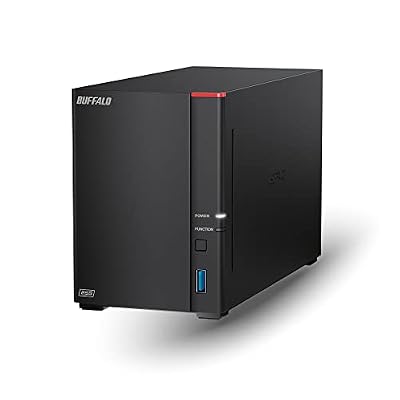
BUFFALO LinkStation 720 8TB 2-Bay Home Office Private Cloud Data Storage with Hard Drives Included/Computer Network Attached Storage/NAS Storage/Network Storage/Media Server/File Server
Included for 'Best NAS Hard Drives for Home Media Servers' as a relevant option in this category; details come from the product listing.
View on Amazon
2 Bay DIY NAS Kit, x86 Home Server, Intel Quad-Core, 16GB RAM,
Included for 'Best NAS Hard Drives for Home Media Servers' because the listing specifies x86 Home Server and Intel Quad-Core, details this guide uses to compare options.
View on AmazonChoose by situation
See also: What Is VRR on a Gaming Monitor and How Does It Work • Is HDR Worth It for Gaming Monitors? What the Badges Mean and When It Pays Off
| Home setup | Practical starting point | What to prioritize |
|---|---|---|
| 1–2 bays, one or two streams | 8–12 TB per drive, NAS-rated CMR | Low noise, warranty, and enough capacity for growth |
| 4 bays, family library or several streams | 12–16 TB per drive, NAS-rated CMR | Workload rating, vibration suitability, and RAID planning |
| Frequent library updates or backups | 8–16 TB, NAS-rated CMR with a higher workload rating | Annual workload allowance and sustained write performance |
| Quiet NAS near a living or sleeping area | 5,400-RPM-class NAS drive, if its capacity and workload fit | Seek noise and vibration; place the NAS on a stable surface |
| Large array or rack-style enclosure | Drive explicitly approved for the NAS and bay count | Rotational-vibration compensation and compatibility list |
Capacity planning should account for RAID overhead and free space. In a four-drive RAID 5 array, for example, usable capacity is roughly three drives’ worth before filesystem overhead; four 12 TB drives therefore provide about 36 TB decimal, not 48 TB. Keep room for library growth and avoid filling a volume to its limit, since expansion and rebuilding can be more awkward when the system is nearly full.
What the specifications mean in a home media server
Capacity and workload rating
NAS drives are designed for multi-drive enclosures and continuous operation, but their workload ratings differ. Workload is commonly expressed as terabytes transferred per year and can include both reads and writes. Streaming a film is not a large workload by itself; repeated backups, downloads, library scans, and multiple users’ transfers add up. Check the rating for the specific capacity and model, especially when several people will use the NAS or it also serves as a backup target.
CMR (conventional magnetic recording) is the safer default for RAID arrays. Some desktop drives use SMR (shingled magnetic recording), which can have much slower sustained writes and prolonged recovery behavior after heavy writes. Do not assume that every drive in a broad product family uses the same recording method: verify the exact model number and its documentation.
Rotational speed, noise, and vibration
Many NAS drives operate at 5,400-RPM-class or 7,200 RPM. Faster drives can improve transfer rates and access time, but usually produce more heat and audible seek noise. For a media server, sequential streaming is not very demanding, so a quieter drive can be the sensible choice in a small apartment or an office beside the TV. If the NAS serves backups or many simultaneous clients, 7,200 RPM may offer useful headroom.
Vibration matters more as the number of bays grows. Drives spinning side by side can transmit vibration through the chassis, affecting noise and potentially drive behavior. Choose a model rated for the enclosure’s bay count and rotational-vibration conditions; a NAS label alone does not guarantee suitability for every large array. A rigid shelf, adequate ventilation, and rubber-isolated feet can reduce transmitted noise, but should not replace the manufacturer’s bay-count guidance.
Warranty and RAID are not backups
NAS-drive warranties are often around three to five years, depending on the model, region, and current terms. Check the exact product’s warranty and whether it includes data-recovery services or only hardware replacement. A longer warranty can be useful, but it does not mean a drive cannot fail during that period.
RAID can keep a system running after certain drive failures, depending on the RAID level; it does not protect against accidental deletion, malware, theft, fire, or a second failure during a rebuild. Keep a separate backup of irreplaceable files. Before buying, check the NAS maker’s compatibility list for the exact drive model and capacity, and follow its guidance for mixing sizes or replacing a drive. Drives in an array should be monitored with SMART alerts, and replacements should be made promptly when the NAS reports problems.
How common NAS drive families compare
| Drive family | Typical role | What to verify before buying |
|---|---|---|
| Seagate IronWolf | Home and small-business multi-bay NAS | Exact capacity’s workload rating, RPM, warranty, and any included service terms |
| WD Red Plus | Home NAS where CMR recording is a priority | Exact model’s recording method, workload rating, speed, and NAS compatibility |
| Toshiba N300 | NAS use where capacity and multi-drive suitability are priorities | Capacity-specific noise, RPM, workload rating, warranty, and enclosure support |
These families are not interchangeable on every specification. A higher-capacity model may have a different rotational speed, noise level, or workload allowance than a smaller one in the same range. Compare datasheets at the exact capacity you intend to purchase, and avoid relying on a retailer’s abbreviated title.
A practical purchase checklist
- Estimate usable space: Add the library’s current size, likely growth over the next few years, and RAID overhead.
- Choose CMR: Confirm the exact model uses CMR, particularly for RAID and frequent writes.
- Match workload: Include backups, downloads, and transfers—not only video playback.
- Balance speed and noise: Favor quieter 5,400-RPM-class options for nearby, light-duty systems; consider 7,200 RPM for heavier use.
- Check the enclosure: Confirm the NAS supports the exact model and capacity, especially in a four-bay-or-larger array.
- Compare warranty terms: Verify coverage in your region and keep purchase documentation.
- Plan a separate backup: RAID improves availability but is not a substitute for another copy of important data.
For a typical home media server, a matched set of CMR NAS drives in the 8–16 TB range is a sound starting point. Choose quieter models when the NAS sits in a living space, and prioritize workload rating and vibration suitability as the number of bays and amount of writing increase. The best drive is the one whose exact specifications fit your NAS, noise tolerance, and usable-capacity target—not simply the one with the largest number on its label.
Related Reviews & Guides

Best USB-C Laptop Charger in 2026: How to Match Wattage, Ports and GaN Size to Your Laptop

Best Wireless Gaming Headsets for Clear, Low-Lag Audio