Last Updated: October 18, 2026
- Top Picks at a Glance
- Comparison Table
- What “Back Support” Actually Means in a Chair
- 1. MOLENTS Ergonomic Mesh Chair: Best for Lumbar-First Buyers
- 2. Marsail High-Back Mesh Chair: Best Value With a Headrest
- 3. CAPOT Ergonomic Mesh Chair: Best for Long Desk Work
- 4. GABRYLLY High-Back Chair: Best for Bigger Frames
- 5. TRALT Mesh Chair: Best Simple Lumbar Chair
- 6. Staples Dexley Ergonomic Mesh Task Chair: Best Office-Supply Brand
- 7. Nexthro Mesh Chair: Best 400 lb Alternative
- Also Consider
- How We Chose
- Buying Guide
- Common Mistakes to Avoid
- Frequently Asked Questions
- Which One Should You Buy?
- Sources
The best desk chair for back support in this guide is the MOLENTS ergonomic mesh chair, because its listing is the only one that names BIFMA X5.1 certification alongside adjustable lumbar support, 3D arms, tilt-back and a wide seat, and the runner-up is the Marsail high-back mesh chair if you also want a headrest and 3D armrests for the money. If you are heavier or taller than average, the GABRYLLY and CAPOT chairs list big-and-tall or 400 lb builds. This guide compares seven office chairs with lumbar support by the features that actually matter for your lower back: lumbar adjustment, seat depth, recline, armrests and fit.
We did not personally use these products. This guide is research-based, built from manufacturer spec pages, product listing details and ergonomics guidance named at the end. Where a detail could not be confirmed, we write “not listed”. A chair cannot treat or cure back pain, and persistent pain deserves a visit to a doctor or physical therapist. What a good chair can do is support a neutral sitting posture and make it easier to change position through the day.

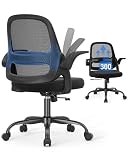
Marsail Ergonomic Office Chair: Office Desk Chair with High Back Mesh and Adjustable Lumbar Support Rolling Work Swivel Task Chairs with Wheel 3D Armrests and Headrest
Included for 'Best Desk Chairs for Back Support: 7 Picks by Lumbar and Fit' as a relevant option in this category; details come from the product listing.
View on Amazon
GTPOFFICE Executive Office Chair with Comfortable Lumbar Support, Ergonomic Gaming Chair with Flip-up Armrests & Zoned Pressure-Relief Cushion, Comfy PU Leather Desk Chair, Black
Included for 'Best Desk Chairs for Back Support: 7 Picks by Lumbar and Fit' because the listing specifies Comfy PU Leather Desk Chair and Black, details this guide uses to compare options.
View on Amazon
Lumbar Support Pillow for Office Chair, Office Home Essentials,Gifts for Mom,Dad, Back Support Pillow for Car, Chair Cushions,Back Pain Relief Improve Posture,Mesh Cover Double Adjustable Straps
Included for 'Best Desk Chairs for Back Support: 7 Picks by Lumbar and Fit' because the listing specifies Office Home Essentials and Gifts for Mom, details this guide uses to compare options.
View on Amazon
DUMOS Ergonomic Office Chair, Desk Computer Chair, Lumbar Support | High Back Mesh, Headrest Flip-up Arms, Swivel Wheels, Gaming Desk Chair, Home Bedroom, Black
Included for 'Best Desk Chairs for Back Support: 7 Picks by Lumbar and Fit' because the listing specifies Desk Computer Chair and Lumbar Support, details this guide uses to compare options.
View on Amazon📄 In This Review
- Top Picks at a Glance
- Comparison Table
- What "Back Support" Actually Means in a Chair
- 1. MOLENTS Ergonomic Mesh Chair: Best for Lumbar-First Buyers
- 2. Marsail High-Back Mesh Chair: Best Value With a Headrest
- 3. CAPOT Ergonomic Mesh Chair: Best for Long Desk Work
- 4. GABRYLLY High-Back Chair: Best for Bigger Frames
- 5. TRALT Mesh Chair: Best Simple Lumbar Chair
- 6. Staples Dexley Ergonomic Mesh Task Chair: Best Office-Supply Brand
- 7. Nexthro Mesh Chair: Best 400 lb Alternative
- Also Consider
- How We Chose
- Buying Guide
- Common Mistakes to Avoid
- Frequently Asked Questions
- Which One Should You Buy?
- Sources
Top Picks at a Glance
- Best Overall: MOLENTS ergonomic mesh chair, BIFMA X5.1 certified on the listing, adjustable lumbar, 3D arms, wide seat.
- Best Value: Marsail high-back mesh chair, adjustable lumbar, 3D armrests and headrest.
- Best for Long Desk Work: CAPOT mesh chair, 400 lb listing, 4D flip-up arms, 3-level tilt, 3D headrest.
- Best for Bigger Frames: GABRYLLY high-back chair, wide cushion, headrest, flip-up arms, 90 to 120 degree tilt lock.
- Best Mid-Range Mesh: TRALT mesh chair with adjustable lumbar support.
- Best Office-Supply Brand: Staples Dexley ergonomic mesh task chair.
- Best 400 lb Alternative: Nexthro mesh chair, 400 lb listing, flip-up arms, headrest.
Comparison Table
See also: Best Ergonomic Office Chair under 300 in 2026
| Product | Best for | Key specs | Watch for | Price tier |
|---|---|---|---|---|
| MOLENTS Ergonomic Mesh | Lumbar-first buyers | BIFMA X5.1 listed, adjustable lumbar, 3D arm, tilt back, wide seat | Seat height range not listed in title | Mid-range |
| Marsail High-Back Mesh | Value with a headrest | High-back mesh, adjustable lumbar, 3D armrests, headrest | Weight limit not listed in title | Mid-range |
| CAPOT Mesh | Long sessions | 400 lb, 4D flip-up arms, 3-level tilt, 3D headrest, PU wheels | Assembly is multi-part | Mid-range |
| GABRYLLY High-Back | Big and tall users | Headrest, flip-up arms, 90-120 degree tilt lock, wide cushion | Larger footprint | Premium |
| TRALT Mesh | Simple lumbar chair | Adjustable lumbar, mesh back | Few other features listed | Budget |
| Staples Dexley | Brick-and-mortar brand | Mesh back, lumbar support, swivel | Details beyond title not listed | Mid-range |
| Nexthro Mesh | Heavier users on a budget | 400 lb, flip-up arms, headrest, lumbar | Newer brand, fewer specs in title | Mid-range |
What “Back Support” Actually Means in a Chair
A chair gives back support in three ways. First, it has lumbar support, a curve or adjustable pad that fills the natural inward curve of your lower back. Second, it has a backrest tall enough to reach the shoulder blades, plus a recline mechanism that lets the back angle change instead of locking you upright. Third, the seat depth and height let your feet rest flat with your knees about level with your hips, so your pelvis does not roll backward.
Marketing labels such as “ergonomic” are not regulated. A more useful signal is a certification. BIFMA X5.1 is a US standard for the safety and durability of general-purpose office chairs, and a listing that names it is telling you the chair was built to that standard, not that it will fit you. Fit remains personal.
1. MOLENTS Ergonomic Mesh Chair: Best for Lumbar-First Buyers
- Mesh back with adjustable lumbar support
- BIFMA X5.1 certified according to the listing
- 3D arms, tilt back and a wide seat
- Swivel work-task chair for company and home use
Best for: anyone shopping for lumbar support who wants a recognizable durability standard. Skip if: you want a headrest, because the title does not mention one.
The title lists adjustable lumbar support, which is the feature most people mean by back support. An adjustable lumbar lets you move the support up or down to meet the curve of your lower back, rather than hoping a fixed bump lands in the right place. Sit all the way back in the seat, then adjust until you feel the support in the small of the back, not under the ribs.
The BIFMA X5.1 mention is the second reason this chair leads. It is a claim on the listing, so check the product page and manual if the certification matters to you, particularly if it will be used in a small business.
The title also mentions 3D arms and a wide seat. Arms that move in several directions let you match desk height and keep your shoulders relaxed. A wide seat is comfortable for larger frames but can be a tight fit under a narrow desk, so measure the clearance.
Pros
- Adjustable lumbar support
- Certification named on the listing
- Wide seat and multi-way arms
- Mesh back for airflow
Cons
- No headrest listed
- Dimensions not in the title
2. Marsail High-Back Mesh Chair: Best Value With a Headrest
- High-back mesh design
- Adjustable lumbar support
- 3D armrests and headrest
- Rolling swivel task chair with wheels
Best for: people who lean back to read or take calls. Skip if: you need a published weight capacity on the title.
A high back that includes a headrest suits anyone who spends time reclined, because it supports the neck and upper back instead of leaving your head unsupported. The adjustable lumbar handles the lower back. Together these cover the three zones of the spine, which is a good checklist for any chair.
Marsail also lists a newer chair with a dual-zone mesh backrest, 2D headrest and 330 lb capacity for people from about 5 ft 4 in to 6 ft 2 in. That is useful for judging the family: it suggests the maker designs around height ranges, which is a good sign. For the chair here, check the product page for the capacity and recommended height range.
Set the headrest so that it supports the back of your head when you recline, not so that it pushes your head forward when you sit upright. If it pushes your head forward, lower it or remove the habit of leaning into it.
Pros
- Full-spine support features
- Breathable mesh
- Good feature count for the money
Cons
- Weight capacity not in the title
- Headrest needs careful setup
3. CAPOT Ergonomic Mesh Chair: Best for Long Desk Work
- High-back mesh with adjustable lumbar
- 400 lb rating on the listing
- 4D flip-up arms and 3-level tilt backrest
- 3D headrest and PU wheels
Best for: long sessions at a desk, including people who want a reclining option. Skip if: you have a desk with fixed side panels that arms cannot slide beneath.
The listing positions this chair for long desk work, and the features back that up: a tilt backrest with three levels, a headrest and 4D arms that flip up. Flip-up arms are underrated. They let you slide the chair under the desk edge, which keeps your forearms supported at the keyboard and lets you push in close to reduce reaching.
A three-level tilt is simpler than an unlimited recline. You choose a position and lock it. That is fine for many people but if you like to rock continuously, check whether the tilt is free-floating or locked.
PU wheels are typically quieter and gentler on hard floors than hard plastic. They are a small detail that matters on laminate or wood.
Pros
- 400 lb listing
- Flip-up 4D arms
- Headrest and tilt lock
- Floor-friendly wheels
Cons
- Many adjustments to learn
- Assembly takes time
4. GABRYLLY High-Back Chair: Best for Bigger Frames
- High-back chair with headrest
- Flip-up arms, wide cushion
- 90 to 120 degree tilt lock
- Described as big and tall mesh chair
Best for: larger or taller users who find standard chairs cramped. Skip if: you have a small room.
The 90 to 120 degree tilt range is the most informative number here. It means the backrest can lock anywhere from upright to a mild recline. For the lower back, the ability to change the angle through the day is more valuable than any single fixed posture.
The wide cushion makes the chair comfortable for larger users, but also bulkier. Measure your desk opening and allow room to swivel. If the chair will not fit under the desk, the arms may block you from sitting close.
The listing does not give a weight limit in the title, so confirm it before buying if that matters.
Pros
- Headrest, flip-up arms, wide cushion
- Tilt lock with a useful range
- Fits bigger users
Cons
- Large footprint
- Capacity not in the title
5. TRALT Mesh Chair: Best Simple Lumbar Chair
- Mesh computer chair
- Adjustable lumbar support
- Described for executive and home-office use
- Black finish
Best for: a spare room or a lighter-use home office. Skip if: you want a long list of adjustments.
TRALT also sells a version with headrest and flip-up armrests and a 330 lb capacity. The chair here is the plainer option. If you do not need a headrest or recline, fewer parts can mean fewer things to loosen. The core value is the adjustable lumbar and the breathable mesh.
Before you buy, check seat height range and seat depth on the product page, since those decide whether your feet reach the floor and whether the seat edge presses behind your knees.
Pros
- Straightforward design
- Adjustable lumbar
- Breathable mesh
Cons
- Few features listed
- Details not in title
6. Staples Dexley Ergonomic Mesh Task Chair: Best Office-Supply Brand
- Ergonomic mesh task chair
- Lumbar support, swivel
- Listed as ideal for home offices and workstations
- Black finish
Best for: shoppers who prefer a large office-supply retailer’s brand. Skip if: you want a headrest.
A task chair is designed for the working day, usually with simpler controls than an executive chair. The Dexley is that type. The title lists lumbar support and swivel but not an exact adjustment range, so read the product page for details.
Staples also sells the Kroy chair, a related mesh task chair. We list it under Also Consider rather than as a main pick because the title gives even fewer details.
Pros
- Simple, familiar brand
- Mesh back
- Suitable for daily desk use
Cons
- Few specifications in the title
- No headrest
7. Nexthro Mesh Chair: Best 400 lb Alternative
- Mesh chair with lumbar support
- High back with flip-up arms
- 400 lb listing
- Headrest included
Best for: heavier users who want a headrest and flip-up arms. Skip if: you prefer a long-established brand.
Nexthro’s listing packs in the features people look for: lumbar, a high back, flip-up arms and a 400 lb rating. Newer brands may have fewer long-term reports to read, so read the warranty terms and the return policy.
Pros
- 400 lb listing
- Headrest and flip-up arms
- Mesh back
Cons
- Newer brand
- Seat dimensions not in title
Also Consider
- BestOffice Ergonomic Mid-Back Chair: a mid-back swivel chair with lumbar support, adjustable height and a breathable backrest, listed with a sponge seat and wheels. A budget choice for lighter use.
- Everlasting Comfort Lumbar Support Pillow: if your existing chair is fine except for lower-back support, a memory foam lumbar pillow for an office chair can help. It does not replace a good chair.
- Staples Kroy Ergonomic Mesh Task Chair: another mesh task chair from the same retailer, with lumbar support.
How We Chose
We shortlisted chairs whose listings name lumbar support and at least one other fit feature, such as adjustable arms, recline or a headrest. We compared the claims in the listings, checked manufacturer notes where available, and read ergonomics guidance from workplace safety organizations. We did not personally use any of these chairs, so we do not claim comfort scores, durability results or long-term wear findings of our own. Every capacity or certification mentioned here is what the listing states.
We kept brands varied and avoided picking two nearly identical chairs. Features not stated in a title are marked “not listed”.
Buying Guide
Lumbar support: adjustable beats fixed
A fixed lumbar bump works only if it happens to match your spine. Adjustable lumbar, either a slide-up pad or a flex-back, lets you place support where you need it. Look for a range of at least a few inches of vertical movement.
Seat height and depth
Seat height commonly spans around 17 to 21 inches on typical chairs, but check the specific range. Your feet should rest flat with knees at roughly a right angle. Seat depth should leave about two to three fingers of space between the seat edge and the back of your knee. If the seat is too deep, you slouch to avoid the edge.
Recline and tilt
A back that can lean 100 to 120 degrees gives you more variety than sitting bolt upright for hours. Look for a tilt lock so you can choose a position, and tension control so the chair responds to your weight.
Armrests
Armrests should let your elbows rest at about a right angle with shoulders relaxed. Adjustable height and flip-up arms help you slide under the desk. Fixed, high arms often hit the desk and push you forward.
Weight capacity and size
Typical chairs list capacities from 250 to 330 lb. Bigger builds list 400 lb or more. Choose a chair whose capacity is well above your weight, and check the seat width.
Move often
No chair is a cure for stiffness. Stand, stretch and walk regularly, and ask a doctor if pain continues.
Common Mistakes to Avoid
- Buying on looks without checking seat depth
- Setting the headrest so it pushes your head forward
- Leaving the lumbar pad too high
- Ignoring desk height when choosing arms
- Expecting a chair to fix ongoing pain
Frequently Asked Questions
What is the best desk chair for back support?
The MOLENTS mesh chair is our top pick because it lists adjustable lumbar support and BIFMA X5.1 certification. The Marsail chair is the value alternative.
Does a lumbar pillow work as well as a chair with built-in lumbar?
It can improve an existing chair, but it does not fix a poor seat depth, height or armrest setup. A good chair addresses the whole posture.
Is mesh better than cushioned for back support?
Mesh breathes and holds its shape, while thick cushions may feel softer at first and compress over time. Neither is automatically better, so choose by fit.
How do I set up an ergonomic chair?
Raise or lower the seat until your feet are flat, set the lumbar into the curve of your lower back, then adjust the arms to elbow height. Finally set the tilt and headrest.
How long should I sit before moving?
Many ergonomics guides suggest changing position every 30 to 60 minutes. Short breaks help more than any chair.
Can a chair help with back pain?
It may help comfort by supporting posture, but it is not a treatment. See a doctor or physical therapist for ongoing pain.
What weight capacity do I need?
Pick a chair whose rating is comfortably above your weight. Many standard chairs list around 250 to 330 lb, and heavy-duty models list 400 lb or more.
Which One Should You Buy?
- Choose the MOLENTS for lumbar and certification.
- Choose the Marsail for a headrest at a fair price.
- Choose the CAPOT for long sessions and flip-up arms.
- Choose the GABRYLLY for a bigger frame.
- Choose the TRALT for a simple lumbar chair.
- Choose the Staples Dexley for a familiar office brand.
- Choose the Nexthro for a 400 lb listing with a headrest.
Sources
- BIFMA X5.1 standard summary (Business and Institutional Furniture Manufacturers Association)
- US OSHA computer workstation ergonomics guidance
- Canadian Centre for Occupational Health and Safety office chair guidance
- Manufacturer product pages for the chairs named above
- Mayo Clinic back pain and sitting posture information
Last updated: October 2026